
'%3e%3cg%20clip-path='url(%23b)'%3e%3cpath%20fill='%23fff'%20d='M.5%200h24v18H.5z'/%3e%3cpath%20fill='%23F7FCFF'%20fill-rule='evenodd'%20d='M.5%200h24v18H.5z'%20clip-rule='evenodd'/%3e%3cpath%20fill='%23E31D1C'%20fill-rule='evenodd'%20d='M.5%2011v1.5h24V11zM.5%2013.75v1.5h24v-1.5zM.5%205.5V7h24V5.5zM.5%2016.5V18h24v-1.5zM.5%208.25v1.5h24v-1.5zM.5%200v1.5h24V0zM.5%202.75v1.5h24v-1.5z'%20clip-rule='evenodd'/%3e%3cpath%20fill='%232E42A5'%20d='M.5%200h15v9.75H.5z'/%3e%3cpath%20fill='%23F7FCFF'%20fill-rule='evenodd'%20d='m4.791%202.204-.544.382.184-.68-.484-.43h.632L4.79.922l.248.554h.538l-.423.43.164.68zm-3%200-.544.382.184-.68-.484-.43h.632L1.79.922l.248.554h.538l-.423.43.164.68zm5.456.382.544-.382.527.382-.164-.68.423-.43H8.04L7.791.922l-.212.554h-.632l.484.43zm3.544-.382-.544.382.184-.68-.484-.43h.632l.212-.554.248.554h.539l-.424.43.164.68zM1.247%205.586l.544-.382.527.382-.164-.68.423-.43H2.04l-.248-.554-.212.554H.947l.484.43zm3.544-.382-.544.382.184-.68-.484-.43h.632l.212-.554.248.554h.538l-.423.43.164.68zm2.456.382.544-.382.527.382-.164-.68.423-.43H8.04l-.248-.554-.212.554h-.632l.484.43zm3.544-.382-.544.382.184-.68-.484-.43h.632l.212-.554.248.554h.539l-.424.43.164.68zM1.247%208.586l.544-.382.527.382-.164-.68.423-.43H2.04l-.248-.554-.212.554H.947l.484.43zm3.544-.382-.544.382.184-.68-.484-.43h.632l.212-.554.248.554h.538l-.423.43.164.68zm2.456.382.544-.382.527.382-.164-.68.423-.43H8.04l-.248-.554-.212.554h-.632l.484.43zm3.544-.382-.544.382.184-.68-.484-.43h.632l.212-.554.248.554h.539l-.424.43.164.68zm2.456-5.618.544-.382.527.382-.164-.68.424-.43h-.539l-.248-.554-.212.554h-.632l.484.43zm.544%202.618-.544.382.184-.68-.484-.43h.632l.212-.554.248.554h.539l-.424.43.164.68zm-.544%203.382.544-.382.527.382-.164-.68.424-.43h-.539l-.248-.554-.212.554h-.632l.484.43zM3.291%203.704l-.544.382.184-.68-.484-.43h.632l.212-.554.248.554h.538l-.423.43.164.68zm2.456.382.544-.382.527.382-.164-.68.423-.43H6.54l-.248-.554-.212.554h-.632l.484.43zm3.544-.382-.544.382.184-.68-.484-.43h.632l.212-.554.248.554h.539l-.424.43.164.68zM2.747%207.086l.544-.382.527.382-.164-.68.423-.43H3.54l-.248-.554-.212.554h-.632l.484.43zm3.544-.382-.544.382.184-.68-.484-.43h.632l.212-.554.248.554h.538l-.423.43.164.68zm2.456.382.544-.382.527.382-.164-.68.424-.43h-.539l-.248-.554-.212.554h-.632l.484.43zm3.544-3.382-.544.382.184-.68-.484-.43h.632l.212-.554.248.554h.539l-.424.43.164.68zm-.544%203.382.544-.382.527.382-.164-.68.424-.43h-.539l-.248-.554-.212.554h-.632l.484.43z'%20clip-rule='evenodd'/%3e%3c/g%3e%3c/g%3e%3cdefs%3e%3cclipPath%20id='a'%3e%3crect%20width='24'%20height='18'%20x='.5'%20fill='%23fff'%20rx='3'/%3e%3c/clipPath%3e%3cclipPath%20id='b'%3e%3cpath%20fill='%23fff'%20d='M.5%200h24v18H.5z'/%3e%3c/clipPath%3e%3c/defs%3e%3c/svg%3e)


**Mod Config Menu Pure**
Creator: umKrampus
Updated:27/01/2023 17:33:35
182KB

Trusted by 200,000,000+ Users
About this Mod
Mod Config Menu is a library that enables other mods to feature a settings menu. This particular version removes all the hacky API overrides used by the original author—a terrible programming practice that can
Disclaimer: I am not the author of this mod. I am only posting it here. If you want me to remove this mod page, just message me. Krampus | Gravatar
Disclaimer 2: If you are downloading from here, you are not using the Steam version. That said, it does work — in fact, you can download my Vortex support extension. Here.
Before posting a comment, please read the FAQ below. Comments that ask questions already covered will be deleted.
Introduction
Mod Config Menu is a library that allows other mods to add a settings menu. Only subscribe to this mod if you have other mods that require it.
This specific version of Mod Config Menu removes all the hacky API overrides used by the original author—an awful programming practice that can cause issues with other elements in the Isaac ecosystem. That's why I call it the "Pure" version.
This mod is open-source. You can help with development by Contributing on GitHub[github.com]
Credit goes to piber20 for originally creating this library and Chifilly for updating it for Repentance.
Using Mod Config Menu
To use Mod Config Menu Pure, do not use the "require," "dofile," or "pcall" functions. Instead, just check if the global variable "ModConfigMenu" exists, something like this:
local MOD_NAME = "My Mod" local VERSION = "1.0" local function setupMyModConfigMenuSettings() if ModConfigMenu == nil then return end ModConfigMenu.AddSpace(MOD_NAME, "Info") ModConfigMenu.AddText(MOD_NAME, "Info", function() return MOD_NAME end) ModConfigMenu.AddSpace(MOD_NAME, "Info") ModConfigMenu.AddText(MOD_NAME, "Info", function() return "Version " .. VERSION end) end
Troubleshooting
Note that the "Pure" version of Mod Config Menu will not work properly if:
– You have subscribed to the "Pure" version and another version at the same time. This may cause a conflict.
– You are subscribed to a mod that uses a standalone version of Mod Config Menu, which will cause a conflict.
– You are subscribed to a mod that uses the "require", "dofile", or "pcall" functions to initialize or invoke the Mod Config Menu.
Navigation
Keyboard:
– Use arrow keys or WASD to move.
– Esc, Backspace, or Q can be used to go back.
– E, space, or enter can be used to select an item.
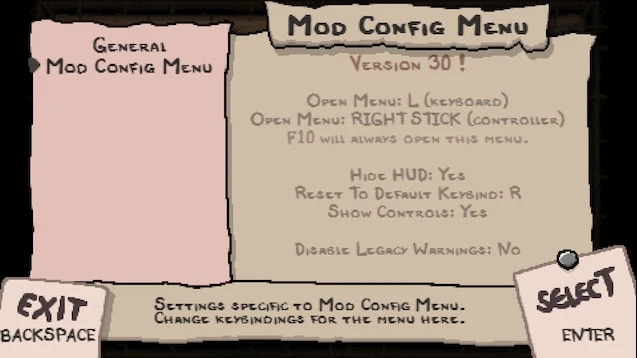
– Press L to open the menu by default.
– F10 will always open the menu; this cannot be changed.
Controller:
– Both control sticks can be used to move.
– Press B to go back.
– Press A to select an item.
– Press the right stick to open the menu.
FAQ
**A:** Yes, it's compatible with Repentance.
A: Yes.
Q: Does it work with Afterbirth+?
A: No, because it uses features exclusive to Repentance to adjust the HUD offset.
A: Try checking for mod updates or compatibility patches first. If the issue persists, report it to the mod author with details about your setup and the specific mod.
A: This is likely because the mod uses the "require", "dofile", or "pcall" functions to initialize or call Mod Config Menu. Please contact the specific mod author to fix this issue—do not leave a comment here.
A: Mod Config Menu Continued is a mod configuration menu framework.
A: The original Mod Config Menu was created by piber20. Mod Config Menu Continued is an updated version by Chifilly, aimed at compatibility with the Repentance DLC and fixing certain bugs. Mod Config Menu Pure is a further update of Mod Config Menu Continued, focused on resolving additional bugs. Therefore, Mod Config Menu Continued is not the same as Mod Config Menu Pure.
Q: What are the differences between the original Mod Config Menu, Mod Config Menu Continued, and Mod Config Menu Pure?
A: There are some minor technical differences. But for the average player, you’d never notice them—other than the fact that certain versions work with some mods and others don’t. So, use whichever version gives you the fewest bugs for the specific mod combination you want to play. (Or reach out to the authors of the other mods you're using to make them compatible with Mod Config Menu Pure, if they aren’t already.)
A: As a player, do I need to subscribe to both this mod and other versions of the Mod Config Menu at the same time?
A: No. You should only subscribe to one specific version of Mod Config Menu at a time.
Q: What do I do if my mod settings don’t save between game sessions?
A: Mod Config Menu only handles saving data for the "General" and "Mod Config Menu" pages. If a specific mod fails to save its data correctly, please contact that mod's author.
Q: Does this have the same API functionality as other versions of Mod Config Menu?
A: Yes, but it may not work as a direct drop-in replacement for mods that use "require," "dofile," or "pcall" functions to initialize or call Mod Config Menu. Another common issue is using outdated properties like "ModConfigMenuOptionType.BOOLEAN" instead of "ModConfigMenu.OptionType.BOOLEAN." If you're a mod author looking to switch to the pure version, make sure to test everything thoroughly.
Q: What does it mean to "remove API overrides"?
A: The original version overwrote some Lua and Isaac API functions, like `pcall` and `RequireMod`. This version does not overwrite any API functions.
A: Go to the main menu and check the bottom-left corner for the version number.
A: There are three ways. First, you can check the version in the console. Second, you can find it in the game's "log.txt" file. Third, you can see it at the top of the file "C:\Program Files (x86)\Steam\steamapps\common\The Binding of Isaac Rebirth\mods\!mod config menu_2681875787\scripts\modconfig.lua".
Q: Where is the game’s "log.txt" file located?
A: By default, it is located here: C:\Users\james\Documents\My Games\Binding of Isaac Repentance\log.txt
Q: Where is the save data for Mod Config Menu located?
A: By default, it's located here: C:\Program Files (x86)\Steam\steamapps\common\The Binding of Isaac Rebirth\data\!!mod config menu\save#.dat
Q: Why doesn’t Mod Config Menu work for me?
A: It works for everyone else, so it has to be something wrong with you. Start by uninstalling the game, completely removing all leftover game files, reinstalling the game, and then only subscribing to this mod on the workshop and nothing else. For more information on where the various game files are located, see My Directories & Save Files Explained[github.com]
Q: What changed in the last update?
A: Like any other open source piece of software, you can find the changes. on GitHub[github.com]
Disclaimer 2: If you are downloading from here, you are not using the Steam version. That said, it does work — in fact, you can download my Vortex support extension. Here.
Before posting a comment, please read the FAQ below. Comments that ask questions already covered will be deleted.
Introduction
Mod Config Menu is a library that allows other mods to add a settings menu. Only subscribe to this mod if you have other mods that require it.
This specific version of Mod Config Menu removes all the hacky API overrides used by the original author—an awful programming practice that can cause issues with other elements in the Isaac ecosystem. That's why I call it the "Pure" version.
This mod is open-source. You can help with development by Contributing on GitHub[github.com]
Credit goes to piber20 for originally creating this library and Chifilly for updating it for Repentance.
Using Mod Config Menu
To use Mod Config Menu Pure, do not use the "require," "dofile," or "pcall" functions. Instead, just check if the global variable "ModConfigMenu" exists, something like this:
local MOD_NAME = "My Mod" local VERSION = "1.0" local function setupMyModConfigMenuSettings() if ModConfigMenu == nil then return end ModConfigMenu.AddSpace(MOD_NAME, "Info") ModConfigMenu.AddText(MOD_NAME, "Info", function() return MOD_NAME end) ModConfigMenu.AddSpace(MOD_NAME, "Info") ModConfigMenu.AddText(MOD_NAME, "Info", function() return "Version " .. VERSION end) end
Troubleshooting
Note that the "Pure" version of Mod Config Menu will not work properly if:
– You have subscribed to the "Pure" version and another version at the same time. This may cause a conflict.
– You are subscribed to a mod that uses a standalone version of Mod Config Menu, which will cause a conflict.
– You are subscribed to a mod that uses the "require", "dofile", or "pcall" functions to initialize or invoke the Mod Config Menu.
Navigation
Keyboard:
– Use arrow keys or WASD to move.
– Esc, Backspace, or Q can be used to go back.
– E, space, or enter can be used to select an item.
– Press L to open the menu by default.
– F10 will always open the menu; this cannot be changed.
Controller:
– Both control sticks can be used to move.
– Press B to go back.
– Press A to select an item.
– Press the right stick to open the menu.
FAQ
**A:** Yes, it's compatible with Repentance.
A: Yes.
Q: Does it work with Afterbirth+?
A: No, because it uses features exclusive to Repentance to adjust the HUD offset.
A: Try checking for mod updates or compatibility patches first. If the issue persists, report it to the mod author with details about your setup and the specific mod.
A: This is likely because the mod uses the "require", "dofile", or "pcall" functions to initialize or call Mod Config Menu. Please contact the specific mod author to fix this issue—do not leave a comment here.
A: Mod Config Menu Continued is a mod configuration menu framework.
A: The original Mod Config Menu was created by piber20. Mod Config Menu Continued is an updated version by Chifilly, aimed at compatibility with the Repentance DLC and fixing certain bugs. Mod Config Menu Pure is a further update of Mod Config Menu Continued, focused on resolving additional bugs. Therefore, Mod Config Menu Continued is not the same as Mod Config Menu Pure.
Q: What are the differences between the original Mod Config Menu, Mod Config Menu Continued, and Mod Config Menu Pure?
A: There are some minor technical differences. But for the average player, you’d never notice them—other than the fact that certain versions work with some mods and others don’t. So, use whichever version gives you the fewest bugs for the specific mod combination you want to play. (Or reach out to the authors of the other mods you're using to make them compatible with Mod Config Menu Pure, if they aren’t already.)
A: As a player, do I need to subscribe to both this mod and other versions of the Mod Config Menu at the same time?
A: No. You should only subscribe to one specific version of Mod Config Menu at a time.
Q: What do I do if my mod settings don’t save between game sessions?
A: Mod Config Menu only handles saving data for the "General" and "Mod Config Menu" pages. If a specific mod fails to save its data correctly, please contact that mod's author.
Q: Does this have the same API functionality as other versions of Mod Config Menu?
A: Yes, but it may not work as a direct drop-in replacement for mods that use "require," "dofile," or "pcall" functions to initialize or call Mod Config Menu. Another common issue is using outdated properties like "ModConfigMenuOptionType.BOOLEAN" instead of "ModConfigMenu.OptionType.BOOLEAN." If you're a mod author looking to switch to the pure version, make sure to test everything thoroughly.
Q: What does it mean to "remove API overrides"?
A: The original version overwrote some Lua and Isaac API functions, like `pcall` and `RequireMod`. This version does not overwrite any API functions.
A: Go to the main menu and check the bottom-left corner for the version number.
A: There are three ways. First, you can check the version in the console. Second, you can find it in the game's "log.txt" file. Third, you can see it at the top of the file "C:\Program Files (x86)\Steam\steamapps\common\The Binding of Isaac Rebirth\mods\!mod config menu_2681875787\scripts\modconfig.lua".
Q: Where is the game’s "log.txt" file located?
A: By default, it is located here: C:\Users\james\Documents\My Games\Binding of Isaac Repentance\log.txt
Q: Where is the save data for Mod Config Menu located?
A: By default, it's located here: C:\Program Files (x86)\Steam\steamapps\common\The Binding of Isaac Rebirth\data\!!mod config menu\save#.dat
Q: Why doesn’t Mod Config Menu work for me?
A: It works for everyone else, so it has to be something wrong with you. Start by uninstalling the game, completely removing all leftover game files, reinstalling the game, and then only subscribing to this mod on the workshop and nothing else. For more information on where the various game files are located, see My Directories & Save Files Explained[github.com]
Q: What changed in the last update?
A: Like any other open source piece of software, you can find the changes. on GitHub[github.com]
Top Mods for The Binding of Isaac: Repentance+
Explore the best mods for The Binding of Isaac: Repentance+ that bring new features, upgraded visuals, and exciting ways to transform your gameplay experience.
Planetarium Chance
umKrampus17/01/2025 02:17:42
Shows the probability of a planetarium appearing (on the current floor) in the HUD. Accounts for all items, collectibles, and modifiers.
Rep - Enhanced Boss Bars
umKrampus31/01/2023 22:30:22
A mod that reimagines boss health bars to be more unique, customizable, and responsive.
**Mod Config Menu Pure**
umKrampus27/01/2023 17:33:35
Mod Config Menu is a library that enables other mods to feature a settings menu. This particular version removes all the hacky API overrides used by the original author—a terrible programming practice that can
**Encyclopedia – In-Game Wiki**
umKrampus03/08/2024 17:26:22
This mod brings the Wiki’s content directly into the game through an easy-to-use menu, so players no longer need to keep a separate window open for Platinum God or The Binding of Isaac’s gamepedia page.
New Binding of Isaac Starting Items
Skibber12323/01/2017 23:36:46
A few characters will start with items they normally wouldn't have.
Andromeda
umKrampus18/05/2023 20:02:11
Andromeda, a unique character focused on Planetariums with a corrupted variant.
Full unlocks for both characters, including new items, trinkets, runes, and more.
Hundreds of custom costumes.
Mod support for EID (ENG and RUS), Encyclopedia, and
Playable Character: Maid in the Myst
umKrampus31/01/2023 23:36:44
Finally, my next character mod. The moment I saw concept art of this unused boss from the game files, I knew I had to bring her to life as a mod. You can actually thank her for finally motivating me to get my other three mods working for Repentance.
恶魔门
ChickenGod0011/02/2017 06:53:31
Changes the graphic of the devil doors. Nuff said.
Unlock the full potential of The Binding of Isaac: Repentance+ with XMODhub—explore these top mods today!
Trusted by 200,000,000+ Users
Need help with download or installation? Join our Discord community for support.

'%3e%3crect%20x='0.5'%20width='24'%20height='18'%20rx='3'%20fill='white'/%3e%3cg%20id='flag'%3e%3cg%20id='contents'%3e%3cpath%20id='bottom'%20fill-rule='evenodd'%20clip-rule='evenodd'%20d='M0.5%2012H24.5V18H0.5V12Z'%20fill='%23FFD018'/%3e%3cpath%20id='middle'%20fill-rule='evenodd'%20clip-rule='evenodd'%20d='M0.5%206H24.5V12H0.5V6Z'%20fill='%23E31D1C'/%3e%3cpath%20id='middle_2'%20fill-rule='evenodd'%20clip-rule='evenodd'%20d='M0.5%200H24.5V6H0.5V0Z'%20fill='%23272727'/%3e%3c/g%3e%3c/g%3e%3c/g%3e%3c/g%3e%3cdefs%3e%3cclipPath%20id='clip0_992_70053'%3e%3crect%20x='0.5'%20width='24'%20height='18'%20rx='3'%20fill='white'/%3e%3c/clipPath%3e%3c/defs%3e%3c/svg%3e)
'%3e%3cg%20clip-path='url(%23b)'%3e%3cpath%20fill='%23fff'%20d='M.5%200h24v18H.5z'/%3e%3cpath%20fill='%23F7FCFF'%20fill-rule='evenodd'%20d='M.5%200v18h24V0z'%20clip-rule='evenodd'/%3e%3cmask%20id='c'%20width='25'%20height='18'%20x='0'%20y='0'%20maskUnits='userSpaceOnUse'%20style='mask-type:luminance'%3e%3cpath%20fill='%23fff'%20fill-rule='evenodd'%20d='M.5%200v18h24V0z'%20clip-rule='evenodd'/%3e%3c/mask%3e%3cg%20mask='url(%23c)'%3e%3cpath%20fill='%233D58DB'%20fill-rule='evenodd'%20d='M12.5%2013.666c2.402%200%204.349-2.068%204.349-4.62%200-2.55-1.947-4.618-4.35-4.618-2.401%200-4.349%202.068-4.349%204.619s1.948%204.618%204.35%204.618'%20clip-rule='evenodd'/%3e%3cmask%20id='d'%20width='9'%20height='10'%20x='8'%20y='4'%20maskUnits='userSpaceOnUse'%20style='mask-type:luminance'%3e%3cpath%20fill='%23fff'%20fill-rule='evenodd'%20d='M12.5%2013.666c2.402%200%204.349-2.068%204.349-4.62%200-2.55-1.947-4.618-4.35-4.618-2.401%200-4.349%202.068-4.349%204.619s1.948%204.618%204.35%204.618'%20clip-rule='evenodd'/%3e%3c/mask%3e%3cg%20mask='url(%23d)'%3e%3cpath%20fill='%23E31D1C'%20fill-rule='evenodd'%20d='M17.001%209.4s-.244-2.178-2.052-2.296-2.295%201.597-2.4%202.052c-.104.454-.368%201.666-2.271%201.666S8.202%207.74%208.202%207.74V4.104h8.8z'%20clip-rule='evenodd'/%3e%3c/g%3e%3cpath%20fill='%23272727'%20fill-rule='evenodd'%20d='m5.974%201.54.686.62-3.18%203.715-.686-.621zm1.132%201.005.686.62-3.066%203.66-.687-.62zm1.812%201.637-.686-.62-3.074%203.687.686.62zM19.522%201.28l-.686.618%201.19%201.397.687-.619zm2.117%202.57-.687.618%201.19%201.397.687-.619zm-5.068.06.686-.618%201.19%201.397-.686.618zm2.802%201.952-.686.618%201.19%201.397.687-.618zm-1.627-2.988.687-.618%203.314%204.035-.687.619zM20.04%2010.683l-.692-.62-1.2%201.402.692.62zm-2.018%202.469-.692-.621-1.201%201.402.692.621zm3.512-1.127.692.621-1.2%201.403-.693-.621zm-1.228%203.147-.692-.62-1.2%201.402.692.62zm-1.832-1.688.692.621-1.253%201.498-.692-.62zm2.748-1.874-.692-.621-1.253%201.498.692.62zM5.305%2011.168l.686-.62%203.064%203.511-.687.62zm.714%203.07.687-.619L8%2015.041l-.687.619zm-2.287-1.72-.686.62%203.079%203.557.686-.619zm.488-.404.687-.619%201.122%201.316-.687.619z'%20clip-rule='evenodd'/%3e%3c/g%3e%3c/g%3e%3c/g%3e%3cdefs%3e%3cclipPath%20id='a'%3e%3crect%20width='24'%20height='18'%20x='.5'%20fill='%23fff'%20rx='3'/%3e%3c/clipPath%3e%3cclipPath%20id='b'%3e%3cpath%20fill='%23fff'%20d='M.5%200h24v18H.5z'/%3e%3c/clipPath%3e%3c/defs%3e%3c/svg%3e)

'%3e%3cmask%20id='b'%20width='25'%20height='18'%20x='0'%20y='0'%20maskUnits='userSpaceOnUse'%20style='mask-type:luminance'%3e%3cpath%20fill='%23fff'%20d='M.5%200h24v18H.5z'/%3e%3c/mask%3e%3cg%20mask='url(%23b)'%3e%3cpath%20fill='%23fff'%20fill-rule='evenodd'%20d='M-1%200h27v18H-1z'%20clip-rule='evenodd'/%3e%3cpath%20fill='%23BC002D'%20d='M12.502%2014.596a5.595%205.595%200%201%200%200-11.19%205.595%205.595%200%200%200%200%2011.19'/%3e%3c/g%3e%3cg%20clip-path='url(%23c)'%3e%3cpath%20fill='%23fff'%20d='M.5-.5h24v18H.5z'/%3e%3cpath%20fill='%23F7FCFF'%20fill-rule='evenodd'%20d='M.5-1.1v18h24v-18z'%20clip-rule='evenodd'/%3e%3cmask%20id='d'%20width='25'%20height='19'%20x='0'%20y='-2'%20maskUnits='userSpaceOnUse'%20style='mask-type:luminance'%3e%3cpath%20fill='%23fff'%20fill-rule='evenodd'%20d='M.5-1.1v18h24v-18z'%20clip-rule='evenodd'/%3e%3c/mask%3e%3cg%20mask='url(%23d)'%3e%3cpath%20fill='%23E31D1C'%20fill-rule='evenodd'%20d='M.5-1.1v9h24v-9z'%20clip-rule='evenodd'/%3e%3c/g%3e%3c/g%3e%3c/g%3e%3cdefs%3e%3cclipPath%20id='a'%3e%3crect%20width='24'%20height='18'%20x='.5'%20fill='%23fff'%20rx='3'/%3e%3c/clipPath%3e%3cclipPath%20id='c'%3e%3cpath%20fill='%23fff'%20d='M.5-.5h24v18H.5z'/%3e%3c/clipPath%3e%3c/defs%3e%3c/svg%3e)
'%3e%3cmask%20id='b'%20width='25'%20height='18'%20x='0'%20y='0'%20maskUnits='userSpaceOnUse'%20style='mask-type:luminance'%3e%3cpath%20fill='%23fff'%20d='M.5%200h24v18H.5z'/%3e%3c/mask%3e%3cg%20mask='url(%23b)'%3e%3cpath%20fill='%23fff'%20fill-rule='evenodd'%20d='M-1%200h27v18H-1z'%20clip-rule='evenodd'/%3e%3cpath%20fill='%23BC002D'%20d='M12.502%2014.596a5.595%205.595%200%201%200%200-11.19%205.595%205.595%200%200%200%200%2011.19'/%3e%3c/g%3e%3cg%20clip-path='url(%23c)'%3e%3cpath%20fill='%23fff'%20d='M-.834-.5h26.667v20H-.834z'/%3e%3cpath%20fill='%23F7FCFF'%20fill-rule='evenodd'%20d='M-1.167-1.167H25.5v20H-1.167z'%20clip-rule='evenodd'/%3e%3cpath%20fill='%23E31D1C'%20fill-rule='evenodd'%20d='M-1.167-1.167v20H25.5v-20z'%20clip-rule='evenodd'/%3e%3cmask%20id='d'%20width='28'%20height='21'%20x='-2'%20y='-2'%20maskUnits='userSpaceOnUse'%20style='mask-type:luminance'%3e%3cpath%20fill='%23fff'%20fill-rule='evenodd'%20d='M-1.167-1.167v20H25.5v-20z'%20clip-rule='evenodd'/%3e%3c/mask%3e%3cg%20mask='url(%23d)'%3e%3cpath%20fill='%23FFD221'%20fill-rule='evenodd'%20d='m12.217%2012.15-4.292%202.729%201.44-4.778L6.303%206.98l4.22-.092%201.868-4.717%201.702%204.779%204.211.074-3.164%203.178%201.477%204.545z'%20clip-rule='evenodd'/%3e%3c/g%3e%3c/g%3e%3c/g%3e%3cdefs%3e%3cclipPath%20id='a'%3e%3crect%20width='24'%20height='18'%20x='.5'%20fill='%23fff'%20rx='3'/%3e%3c/clipPath%3e%3cclipPath%20id='c'%3e%3cpath%20fill='%23fff'%20d='M-.834-.5h26.667v20H-.834z'/%3e%3c/clipPath%3e%3c/defs%3e%3c/svg%3e)

'%3e%3cmask%20id='b'%20width='25'%20height='18'%20x='0'%20y='0'%20maskUnits='userSpaceOnUse'%20style='mask-type:luminance'%3e%3cpath%20fill='%23fff'%20d='M.5%200h24v18H.5z'/%3e%3c/mask%3e%3cg%20mask='url(%23b)'%3e%3cpath%20fill='%23fff'%20fill-rule='evenodd'%20d='M-1%200h27v18H-1z'%20clip-rule='evenodd'/%3e%3cpath%20fill='%23BC002D'%20d='M12.502%2014.596a5.595%205.595%200%201%200%200-11.19%205.595%205.595%200%200%200%200%2011.19'/%3e%3c/g%3e%3cg%20clip-path='url(%23c)'%3e%3cpath%20fill='%23fff'%20d='M-.834-.5h26.667v20H-.834z'/%3e%3cpath%20fill='%23093'%20fill-rule='evenodd'%20d='M-1.167-1.167v20H25.5v-20z'%20clip-rule='evenodd'/%3e%3cmask%20id='d'%20width='28'%20height='21'%20x='-2'%20y='-2'%20maskUnits='userSpaceOnUse'%20style='mask-type:luminance'%3e%3cpath%20fill='%23fff'%20fill-rule='evenodd'%20d='M-1.167-1.167v20H25.5v-20z'%20clip-rule='evenodd'/%3e%3c/mask%3e%3cg%20mask='url(%23d)'%3e%3cg%20fill-rule='evenodd'%20clip-rule='evenodd'%20filter='url(%23e)'%3e%3cpath%20fill='%23FFD221'%20d='m12.105%201.92%2010.168%207.086-10.306%206.636-9.96-6.773z'/%3e%3cpath%20fill='url(%23f)'%20d='m12.105%201.92%2010.168%207.086-10.306%206.636-9.96-6.773z'/%3e%3c/g%3e%3cpath%20fill='%232E42A5'%20fill-rule='evenodd'%20d='M12.167%2013.166a4.167%204.167%200%201%200%200-8.333%204.167%204.167%200%200%200%200%208.333'%20clip-rule='evenodd'/%3e%3cmask%20id='g'%20width='9'%20height='10'%20x='8'%20y='4'%20maskUnits='userSpaceOnUse'%20style='mask-type:luminance'%3e%3cpath%20fill='%23fff'%20fill-rule='evenodd'%20d='M12.167%2013.166a4.167%204.167%200%201%200%200-8.333%204.167%204.167%200%200%200%200%208.333'%20clip-rule='evenodd'/%3e%3c/mask%3e%3cg%20fill='%23F7FCFF'%20mask='url(%23g)'%3e%3cpath%20fill-rule='evenodd'%20d='m10.817%2010.975-.187.098.036-.207-.15-.147.208-.03.093-.189.093.189.208.03-.15.147.035.207zM12.483%2010.975l-.186.098.035-.207-.15-.147.208-.03.093-.189.093.189.208.03-.15.147.035.207zM12.483%2011.975l-.186.098.035-.207-.15-.147.208-.03.093-.189.093.189.208.03-.15.147.035.207zM11.65%208.475l-.187.098.036-.207-.15-.147.208-.03L11.65%208l.093.189.208.03-.15.147.035.207zM11.65%2010.141l-.187.098.036-.207-.15-.147.208-.03.093-.189.093.189.208.03-.15.147.035.207zM10.483%209.308l-.186.098.035-.207-.15-.147.208-.03.093-.189.093.189.208.03-.15.147.035.207zM9.317%209.975l-.186.098.035-.207-.15-.147.208-.03.093-.189.093.189.208.03-.15.147.035.207zM13.15%207.141l-.187.098.036-.207-.15-.147.208-.03.093-.189.093.189.208.03-.15.147.035.207z'%20clip-rule='evenodd'/%3e%3cpath%20d='m7.104%207.998.125-1.662c3.998.301%207.154%201.616%209.427%203.955l-1.195%201.161c-1.97-2.026-4.743-3.182-8.357-3.454'/%3e%3c/g%3e%3c/g%3e%3c/g%3e%3c/g%3e%3cdefs%3e%3cclipPath%20id='a'%3e%3crect%20width='24'%20height='18'%20x='.5'%20fill='%23fff'%20rx='3'/%3e%3c/clipPath%3e%3cclipPath%20id='c'%3e%3cpath%20fill='%23fff'%20d='M-.834-.5h26.667v20H-.834z'/%3e%3c/clipPath%3e%3clinearGradient%20id='f'%20x1='25.5'%20x2='25.5'%20y1='18.833'%20y2='-1.167'%20gradientUnits='userSpaceOnUse'%3e%3cstop%20stop-color='%23FFC600'/%3e%3cstop%20offset='1'%20stop-color='%23FFDE42'/%3e%3c/linearGradient%3e%3cfilter%20id='e'%20width='20.267'%20height='13.723'%20x='2.007'%20y='1.92'%20color-interpolation-filters='sRGB'%20filterUnits='userSpaceOnUse'%3e%3cfeFlood%20flood-opacity='0'%20result='BackgroundImageFix'/%3e%3cfeColorMatrix%20in='SourceAlpha'%20result='hardAlpha'%20values='0%200%200%200%200%200%200%200%200%200%200%200%200%200%200%200%200%200%20127%200'/%3e%3cfeOffset/%3e%3cfeColorMatrix%20values='0%200%200%200%200.0313726%200%200%200%200%200.368627%200%200%200%200%200%200%200%200%200.28%200'/%3e%3cfeBlend%20in2='BackgroundImageFix'%20result='effect1_dropShadow_414_2340'/%3e%3cfeBlend%20in='SourceGraphic'%20in2='effect1_dropShadow_414_2340'%20result='shape'/%3e%3c/filter%3e%3c/defs%3e%3c/svg%3e)
'%3e%3cmask%20id='b'%20width='25'%20height='18'%20x='0'%20y='0'%20maskUnits='userSpaceOnUse'%20style='mask-type:luminance'%3e%3cpath%20fill='%23fff'%20d='M.5%200h24v18H.5z'/%3e%3c/mask%3e%3cg%20mask='url(%23b)'%3e%3cpath%20fill='%23fff'%20fill-rule='evenodd'%20d='M-1%200h27v18H-1z'%20clip-rule='evenodd'/%3e%3cpath%20fill='%23BC002D'%20d='M12.502%2014.596a5.595%205.595%200%201%200%200-11.19%205.595%205.595%200%200%200%200%2011.19'/%3e%3c/g%3e%3c/g%3e%3cdefs%3e%3cclipPath%20id='a'%3e%3crect%20width='24'%20height='18'%20x='.5'%20fill='%23fff'%20rx='3'/%3e%3c/clipPath%3e%3c/defs%3e%3c/svg%3e)


'%3e%3cpath%20d='M0%200.0529785H8.00035V18.9467H0V0.0529785Z'%20fill='%23008D46'/%3e%3cpath%20d='M8.00049%200.0529785H16.0008V18.9467H8.00049V0.0529785Z'%20fill='white'/%3e%3cpath%20d='M16.0005%200.0529785H24.0019V18.9467H16.0005V0.0529785Z'%20fill='%23D2232C'/%3e%3c/g%3e%3cdefs%3e%3cclipPath%20id='clip0_1698_2581'%3e%3crect%20width='24'%20height='19'%20rx='3'%20fill='white'/%3e%3c/clipPath%3e%3c/defs%3e%3c/svg%3e)
'%3e%3c/g%3e%3cg%20clip-path='url(%23clip0_1709_32286)'%3e%3cpath%20d='M5.33301%209.0153H18.6663M5.33301%209.0153C5.33301%2012.6972%208.31778%2015.682%2011.9997%2015.682M5.33301%209.0153C5.33301%205.3334%208.31778%202.34863%2011.9997%202.34863M18.6663%209.0153C18.6663%2012.6972%2015.6816%2015.682%2011.9997%2015.682M18.6663%209.0153C18.6663%205.3334%2015.6816%202.34863%2011.9997%202.34863M11.9997%202.34863C13.6672%204.1742%2014.6148%206.54332%2014.6663%209.0153C14.6148%2011.4873%2013.6672%2013.8564%2011.9997%2015.682M11.9997%202.34863C10.3322%204.1742%209.38451%206.54332%209.33301%209.0153C9.38451%2011.4873%2010.3322%2013.8564%2011.9997%2015.682'%20stroke='black'%20stroke-width='1.33333'%20stroke-linecap='round'%20stroke-linejoin='round'/%3e%3c/g%3e%3cdefs%3e%3cclipPath%20id='clip0_1709_32286'%3e%3crect%20width='16'%20height='16'%20fill='white'%20transform='translate(4%201.01562)'/%3e%3c/clipPath%3e%3c/defs%3e%3c/svg%3e)
Gaming solutions
Resources
Partners
Follow us on

'/%3e%3cpath%20id='f'%20d='M21.2137%2020.2816L21.8356%2016.3301H17.9452V13.767C17.9452%2012.6857%2018.4877%2011.6311%2020.2302%2011.6311H22V8.26699C22%208.26699%2020.3945%208%2018.8603%208C15.6548%208%2013.5617%209.89294%2013.5617%2013.3184V16.3301H10V20.2816H13.5617V29.8345C14.2767%2029.944%2015.0082%2030%2015.7534%2030C16.4986%2030%2017.2302%2029.944%2017.9452%2029.8345V20.2816H21.2137Z'%20fill='white'/%3e%3c/g%3e%3cdefs%3e%3clinearGradient%20id='paint0_linear_1709_56585'%20x1='16'%20y1='2'%20x2='16'%20y2='29.917'%20gradientUnits='userSpaceOnUse'%3e%3cstop%20stop-color='%2318ACFE'/%3e%3cstop%20offset='1'%20stop-color='%230163E0'/%3e%3c/linearGradient%3e%3c/defs%3e%3c/svg%3e)


Contact Support:
support@xmodhub.com
Xmod_Lily
Business Inquiries:
dc@xmodhub.com or lynn@business.xmodhub.com
catherine_79237
Larvas Limited
Room 1201, 12/F Tai Sang Bank Building 130-132 Des Voeux Road Central HK
We use cookies to make interactions with our websites and services easy and meaningful. For more information about the cookies we use or to find out how you can disable cookies, click here