
 Catherine Hu
Quick Answer: How do you cheat in Esports Manager 2026?
To cheat in Esports Manager 2026, you can manually attach Cheat Engine to the game’s executable and scan for changing numeric values like your organization’s total transfer budget and individual player morale or stamina ratings. However, because game updates frequently break Cheat Engine tables (.CT files), the safest and easiest alternative is using an auto-updating mod manager like XMODhub, which provides 1-click cheats without requiring any complex memory scanning or hex editing.
Editor’s Note
Look, I get it. We all start Esports Manager 2026 thinking we’re going to play it completely legit. But after losing a crucial Major tournament final to Copenhagen Wolves for the 15th time, or spending hours grinding for elite scouting points and millions in transfer budget, the fun stops. I’ve been messing with Cheat Engine for years, and trying to isolate the exact memory values for this game’s current patch almost drove me insane. Today, I’m going to show you how to manually hack the values if you want the technical challenge—but I’ll also share the 1-click shortcut I actually use to save my sanity.
You may also like: The Ultimate Esports Manager 2026 Console Commands and Cheats Guide
1. How to Use Cheat Engine for Esports Manager 2026 (The Manual Way)
If you want to go the old-school route and find the memory addresses yourself, here is the basic “First Scan/Next Scan” method tailored for this game.
Finding the exact memory addresses in a complex simulation like Esports Manager 2026 requires patience, especially because the game tracks hundreds of backend variables simultaneously during live match simulations. The most common thing players want to modify is their organization’s Transfer Budget, which allows you to buy out contracts from rival teams like M80 or GamerLegion without bankrupting your org. Here is the highly specific, step-by-step technical process to isolate and manipulate your financial resources.
| In-Game Stat/Resource | Cheat Engine Value Type | Search Strategy | Common Usage in Esports Manager 2026 | Difficulty to Isolate |
|---|---|---|---|---|
| Transfer Budget | 4 Bytes / 8 Bytes | Exact Value | Buying out elite players from rival teams. | Very Easy |
| Player ADR (Damage) | Float | Unknown Initial Value / Increased | Boosting live match simulation performance. | Hard |
| Scouting Points | 4 Bytes | Exact Value | Instantly revealing hidden talent stats. | Easy |
| Player HS% (Headshot) | Float | Exact Value (e.g., 0.45 for 45%) | Creating an aim-god for your main roster. | Medium |
| Staff Morale | Float / 2 Bytes | Unknown Initial Value | Preventing staff from resigning during slumps. | Hard |
2. Common CE Errors: Pointers Breaking & Not Attaching
If you are pulling your hair out because CE isn’t working for Esports Manager 2026, you aren’t alone. Here is what’s probably happening:
Error: “Cannot attach to process” / Game Crashes: Esports Manager 2026 might be using specific engine protections. While it is primarily a single-player management simulation, modern game engines (especially Unity and Unreal Engine) often feature built-in memory obfuscation or anti-tamper mechanisms that trigger when a debugger attempts to hook into the executable. If Esports Manager 2026 crashes the moment you click “First Scan,” the game’s garbage collector or memory watchdog has detected an unauthorized memory read. To bypass this, you need to configure Cheat Engine to use the VEH Debugger (Vectored Exception Handling). Go to Cheat Engine’s Settings, navigate to the “Debugger Options” tab, and change the debugger method from “Windows Debugger” to “Use VEH Debugger.” This method intercepts memory exceptions at a lower level, often bypassing basic anti-cheat triggers. Additionally, ensure you are running the game in Borderless Windowed mode, as exclusive Fullscreen mode can cause severe rendering crashes when Cheat Engine attempts to overlay or pause the process during active memory dumping.
The Pointer Problem: You finally found the exact memory address for your star player’s ADR (Average Damage per Round), you changed it to 99.9, and they dominated the live match simulation. But the moment you advance to the next week or load a saved game, your cheat stops working, and the memory address now points to a random string of useless data. This is the infamous “Pointer Problem.” Esports Manager 2026 utilizes dynamic memory allocation. Every time the game loads a new scene, simulates a match, or refreshes the global team database, the operating system assigns entirely new memory blocks to the game’s variables. The address you found was just a temporary location. To create a permanent cheat, you must perform a “Pointer Scan” to find the static base address (the pointer) that tells the game where to store the ADR value every time it loads. In complex management games with massive arrays of player data, this often requires digging through multi-level pointers (pointers that point to other pointers), requiring extensive knowledge of Assembly language (ASM) and AOB (Array of Byte) injection to write custom scripts. It is an incredibly frustrating and time-consuming process for anyone without a background in reverse engineering.
3. The Better Alternative: 1-Click Cheats with XMODhub
Here is the dirty little secret of the modding community: Nobody actually wants to spend two hours updating Cheat Engine tables every time a patch drops. The moment Esports Manager 2026 updates on Steam, your hard-earned memory addresses shift, and your game crashes to the desktop.
| Feature Metric | Manual Cheat Engine | XMODhub Auto-Trainer |
|---|---|---|
| Setup Time | 30 – 60+ Minutes per session | Under 10 Seconds |
| Update Reliability | Breaks instantly on every minor game patch | Auto-updates via Cloud within hours of a patch |
| Crash Risk | High (Manual memory freezing causes instability) | Near Zero (Engineered safe-hooks) |
| Ease of Use | Requires technical knowledge of Hex/Pointers | Simple 1-Click UI Toggles & Hotkeys |
| Feature Access | Limited to what you can manually find | Instant access to complex scripts & multipliers |
Why XMODhub beats manual CE for Esports Manager 2026:
How to Use XMODhub for Esports Manager 2026?

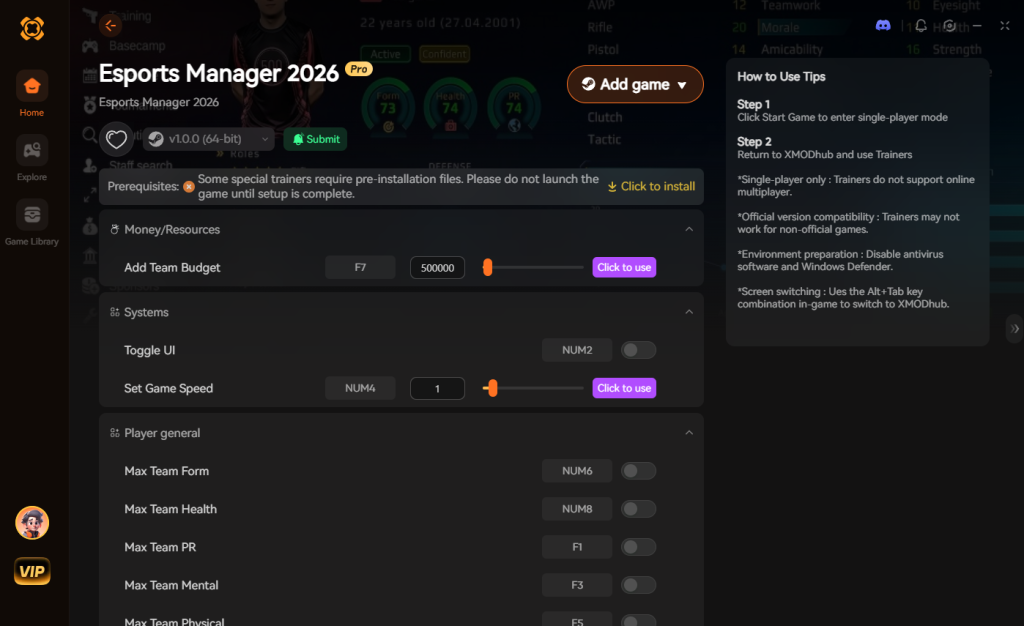
【Download Esports Manager 2026 Trainer Now】
4. Where to Find Safe Esports Manager 2026 Cheat Tables (.CT)?
If you absolutely insist on using CE, you’ll want a pre-made Cheat Table (.CT file).
However, you must exercise extreme caution. The internet is flooded with unverified forums, shady Discord servers, and obscure file-hosting sites claiming to offer the ultimate Esports Manager 2026 cheat table. What many gamers do not realize is that Cheat Engine .CT files are not just simple text documents containing memory addresses; they can contain complex, executable Lua scripts. When you download a random cheat table and allow it to execute its auto-assemble scripts, you are giving that script deep, system-level access to your PC.
Cybersecurity researchers have frequently documented malicious .CT files designed to deploy trojans, install hidden crypto-miners, or execute ransomware payloads the moment you click “enable script.” A malicious actor can easily use the os.execute() command hidden within a Lua script to silently download and run malware in the background while you are distracted by managing your esports roster. Furthermore, because Cheat Engine requires administrative privileges to function, any malware deployed through it automatically inherits those same high-level permissions, bypassing standard Windows Defender protocols.
If you are going to download .CT files, only use highly reputable, heavily moderated communities like FearLess Revolution, and always inspect the Lua scripts manually before executing them. This severe security risk is exactly why a verified, digitally signed application like XMODhub is the vastly superior and safer choice. XMODhub’s development team professionally engineers and rigorously tests every trainer in a secure environment, ensuring you never have to gamble your PC’s security just to get some extra transfer funds in Esports Manager 2026.
5. Essential Cheat Table Features & Updating Broken .CTs
When sourcing a legitimate .CT file for Esports Manager 2026, you need to ensure the creator has actually utilized advanced scripting rather than just providing static pointers. A high-quality cheat engine table will rely on AOB (Array of Bytes) injection. This method searches for the specific machine code pattern that the game uses to calculate values, rather than relying on a hardcoded memory address that changes every time you boot the game.
If you are evaluating a community-made table, here are the core features and underlying variable types you should look for to ensure it provides a comprehensive management experience:
| Cheat Table Feature | Backend Variable Type | Optimal Use Case | Instability Risk |
|---|---|---|---|
| Force 100% Team Synergy | Float (Locked at 1.0) | Bypassing the multi-week team bonding grind after roster changes. | Low |
| Zero Player Toxicity | 2 Bytes (Locked at 0) | Preventing star players from causing PR disasters or benching themselves. | Low |
| Edit Hidden Potential (PA) | 4 Bytes | Turning a cheap rookie into a generational, franchise-defining talent. | Medium |
| Instant Facility Construction | AOB Script (Timer Skip) | Upgrading your gaming house and psychological facilities without waiting months. | High |
| Freeze Match Sim Timer | Double / Float | Giving your coach infinite tactical pause time during live matches. | High |
How to Update a Broken .CT File After a Game Patch
Even the best AOB-based Cheat Engine tables will inevitably break when the developers release a major content update or hotfix for Esports Manager 2026. When the game engine recompiles, the array of bytes shifts, and your favorite scripts will return a dreaded <<Error in line X: Not all instructions could be injected>> message.
To manually fix a broken script, you need to open the script editor in Cheat Engine, find the original AOB string (usually a sequence of hex codes like 89 45 FC 8B 45 08), and perform a completely new memory search in the updated game to find the new string. You then have to calculate the new offsets and rewrite the assembly instructions. It requires a fundamental understanding of x86/x64 assembly language and debugging. For 99% of players, spending three hours reverse-engineering a game patch just to get your infinite scouting points back is not worth the headache. This relentless cycle of patching and breaking is exactly why modern gamers have abandoned manual tables in favor of cloud-synced platforms like XMODhub.
6. Frequently Asked Questions (FAQ)
| Platform / Environment | Cheat Compatibility | Ban Risk Level | Notes |
|---|---|---|---|
| Steam (Singleplayer) | 100% Compatible | Zero Risk | Ideal environment for XMODhub or CE. |
| Epic Games Store | 100% Compatible | Zero Risk | Memory addresses may differ slightly from Steam. |
| Xbox Game Pass (PC) | Requires XMODhub | Low Risk | Strict UWP file encryption blocks manual CE hooks. |
| Multiplayer / Leaderboards | NOT SUPPORTED | Extremely High | Never use memory editors in online environments. |
A: Usually, no. Game Pass uses strict UWP file encryption that actively blocks Cheat Engine. However, XMODhub is specifically engineered to bypass these restrictions seamlessly.
A: Modifying data on your own PC for a single-player experience like Esports Manager 2026 is completely legal. Just never bring memory editors into a multiplayer server.
A: Yes, it absolutely can, depending on how you use it. When you initiate a “First Scan” in Cheat Engine, the software forces your CPU to rapidly dump and analyze gigabytes of active RAM allocated to Esports Manager 2026. This massive data read can cause severe stuttering or temporary freezes. Furthermore, if you actively “Freeze” multiple memory addresses (like locking your transfer budget and player stats simultaneously), Cheat Engine must constantly write to the game’s memory dozens of times per second to prevent the game from changing the values. This continuous memory injection consumes CPU cycles and can lead to noticeable frame rate drops and micro-stutters during live match simulations. Using an optimized trainer like XMODhub minimizes this overhead by using highly efficient, compiled code injections rather than brute-force memory freezing.
Conclusion: Work Smarter, Not Harder
Learning how memory manipulation works in Cheat Engine is a cool flex. But let’s be real—when you come home from a long day at work, you just want to experience the thrill of signing an S-tier prodigy with a 99 ADR rating and wreck some rival teams without taking a computer science class.
Why spend 45 minutes digging through hex codes and assembly scripts when you can click one button and instantly get unlimited resources? And the best part? XMODhub supports over 5,000+ PC games. Once you install the app, you can ditch the complicated, easily broken cheat tables for good.


I am a passionate gamer and writer at XMODhub, dedicated to bringing you the latest gaming news, tips, and insights.
Connect with me:
LinkedIn Profile ↗


 Nancy Miller

