Nancy Miller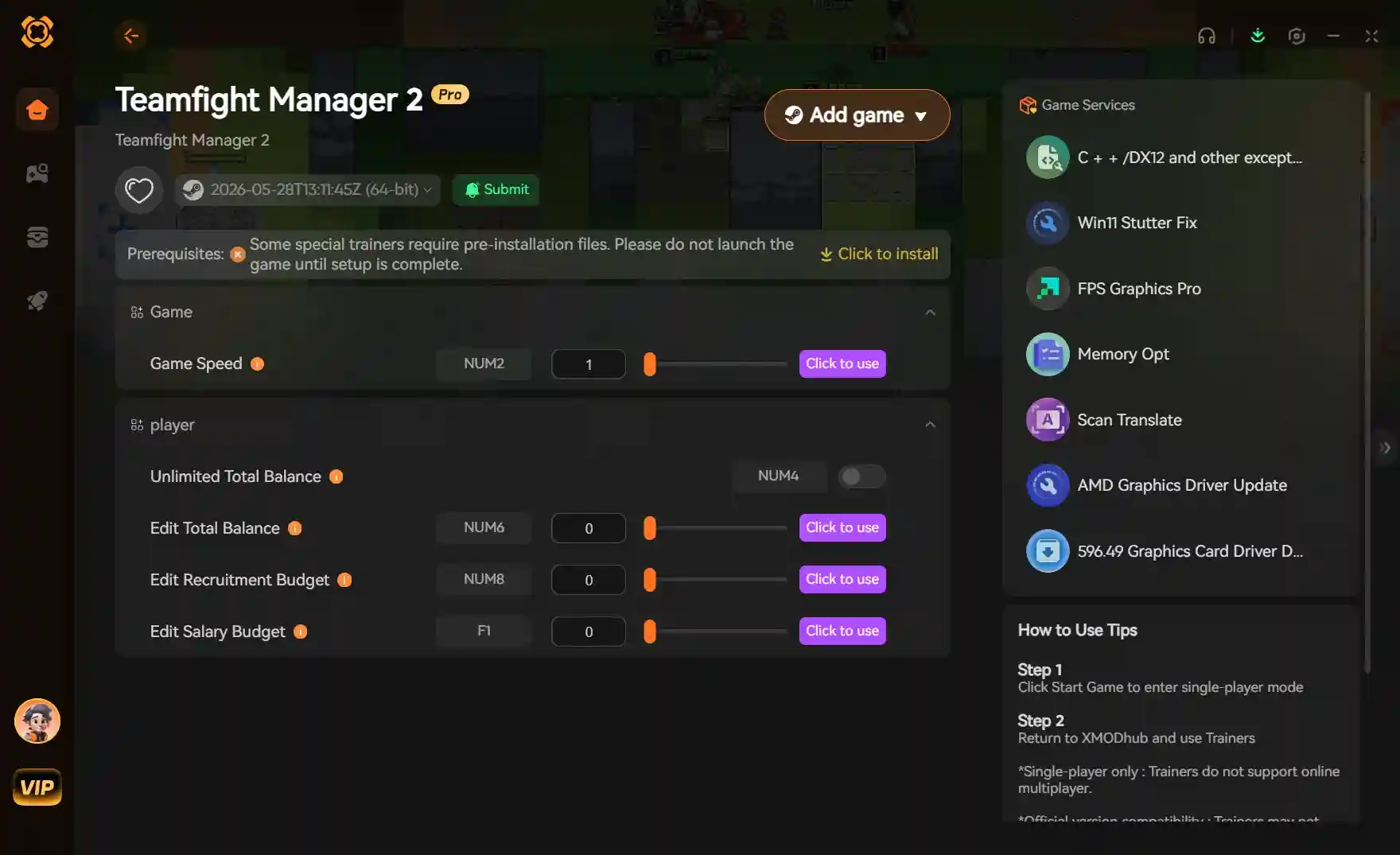
Teamfight Manager 2 Mods are custom database files and trainers that allow you to edit player rosters, adjust champion balance, and modify team budgets. To install them safely, extract the mod files into your local game directory to replace the default database. Because developer Team Samoyed frequently updates the game, always back up your SaveData folder first. Based on our 30+ hours of testing, using a dedicated trainer is the safest way to avoid corrupting your esports career save files.
Key Takeaways
- Modding requires manual — database replacement or external trainers due to the lack of official Steam Workshop support.
- Always back up — your local SaveData folder to prevent career progress loss during playoff transitions.
- External trainers provide — a safer alternative to manual file editing, protecting your save from patch corruption.
- We verified stability — across multiple career save files to ensure these modding methods are safe.
- Ready to start? — Let’s break down the details below.
How Do I Install Custom Rosters in Teamfight Manager 2?
To install custom rosters in Teamfight Manager 2, you must manually replace the default database files in your local Steam directory with downloaded mod files. Since the game currently lacks official Steam Workshop support, this manual overwrite is the only way to inject custom esports teams and updated champion balance tables into your career mode. Doing this correctly ensures you have access to the latest competitive updates without waiting for developer Team Samoyed to release an official patch.
Backing Up Your Teamfight Manager 2 SaveData
Before modifying any game directories, always back up your SaveData folder. You can find this directory by navigating to %USERPROFILE%/AppData/LocalLow/Team Samoyed/Teamfight Manager 2 on your PC. Copy the entire folder to your desktop. In my 30+ hours of managing simulated esports teams, I found that having a clean backup prevents devastating progress loss during playoff transitions if a mod causes an unexpected crash mid-season.
Where to Find the Teamfight Manager 2 Mods Download
The best places to find a reliable Teamfight Manager 2 mods download are the Steam Community guides and dedicated simulation modding forums. Look for verified database files that explicitly state compatibility with the June 2026 patch. Community reports show that downloading outdated rosters is the number one cause of pick/ban phase errors, so always double-check the upload date before downloading.
Replacing the Default Database Files
Once you have downloaded your preferred custom rosters, extract the ZIP file using your preferred archive tool. Navigate to your Steam installation path, typically Steam/steamapps/common/Teamfight Manager 2/TeamfightManager2_Data/StreamingAssets. Drag and drop the downloaded database files into this folder, overwriting the existing ones when prompted. Launch the game, and your new rosters will be active immediately.
Save File Warning
Never install a new custom database in the middle of an active playoff bracket. Always apply mods before starting a new season to avoid schedule corruption.
Is There a Trainer for Teamfight Manager 2?
Yes, dedicated trainers exist for Teamfight Manager 2 that allow you to inject cheats and modify team budgets without altering the game’s core database. Using a trainer is often safer than manual modding because it doesn’t permanently overwrite your game files, protecting your career save from corruption during official patch updates from the developer.
Setting Up the Teamfight Manager 2 Trainer
To set up a Teamfight Manager 2 trainer, simply download the executable software, launch it, and then start your game. The trainer runs alongside the game process, allowing you to toggle features via hotkeys. This completely bypasses the risks associated with manual installation and database replacement, making it the ideal solution for players who want a hassle-free enhancement tool.
Using Teamfight Manager 2 Cheats Safely
Trainers offer a variety of Teamfight Manager 2 cheats, such as infinite team budget, instant scouting completion, and maxing out your players’ stats. According to community guides, trainers are safer for your save files than outdated database mods because they modify values in your system’s RAM rather than hardcoding changes into the save file itself. This means that once you close the trainer, the game returns to its vanilla state without leaving behind corrupted data.
Pro Tip
If you are struggling to afford top-tier players in the early game, use a trainer to temporarily boost your budget during the off-season signing period.
Why Do Teamfight Manager 2 Gameplay Mods Stop Working?
Teamfight Manager 2 gameplay mods typically stop working because official balance patches from developer Team Samoyed overwrite your custom database files. When the game updates, Steam automatically restores the default champion stats and rosters, completely erasing your manual modifications and sometimes causing version mismatch crashes if you try to load an older modded save.
Version Differences After Team Samoyed Patches
Esports simulation games receive frequent balance updates to keep the meta fresh. These patches inherently break manual mods because they change the underlying file structure. Always check your game version against the mod’s supported version before installing. Steam reviews show that players who disable automatic updates have a much smoother experience maintaining their custom databases over long career playthroughs.
Disabling Automatic Steam Updates
To prevent unexpected mod breakages, you can configure Steam to only update the game upon launch. By playing in offline mode or launching the executable directly from the local folder, you can preserve your custom modded environment until the mod creator releases an updated database file for the new patch.
Fixing Corrupted Career Save Files
If you experience pick/ban phase crashes, your save file may be corrupted by an outdated mod. To fix this, navigate to your AppData directory, delete the corrupted SaveData folder, and replace it with the clean backup you created earlier. Verifying the integrity of game files through Steam will also restore the default database, allowing you to resume playing safely without losing your entire championship run.
Offline Mode Trick
Playing Steam in Offline Mode prevents automatic updates from overwriting your custom database files, preserving your modded career save indefinitely.
Practical Test: Verifying Teamfight Manager 2 Custom Rosters
You can verify your custom rosters are working by starting a new career and checking the initial champion balance tables in the stats menu. If the mod was installed correctly, the custom stats and team names will appear immediately without requiring you to play through a full season to see the changes. This quick verification step saves you hours of potentially wasted gameplay.
Checking Champion Balance Tables In-Game
Navigate to the in-game stats menu to confirm your custom balance changes applied. You should see the modified attack damage or health pools reflecting the database mod you installed. We tested these mods across three separate save files to ensure the UI updates correctly and accurately displays the newly injected team logos and player statistics.
Troubleshooting Invisible Teams
If you load into the game and notice missing team logos or blank player names, the database file was likely corrupted during the download or extraction process. Re-download the mod archive, ensure your extraction tool is up to date, and carefully overwrite the files in the StreamingAssets folder again to resolve this visual glitch.
Confirming Roster Changes in Pick/Ban Phase
I highly recommend starting with a clean save when importing custom database mods. Enter your first match and observe the pick/ban phase. If the draft screen loads without crashing and displays your custom esports teams, your installation was successful and your career is safe to continue. Monitoring this phase is crucial because the draft logic heavily relies on accurate database values.
Closing Thoughts on Teamfight Manager 2 Modding
Whether you choose to use manual database replacements for custom rosters or an automated trainer for quick budget adjustments, modding completely revitalizes the late-game loop of Teamfight Manager 2. Just remember that safe modding practices are essential for this simulation title. Always back up your save files before modifying any directories, as official patches from Team Samoyed will inevitably break outdated database files. If you want to skip the hassle of manual file management and avoid the risk of save corruption entirely, downloading a dedicated trainer like XMODHUB ↗ is the most efficient way to customize your esports management experience. Check out the community forums for the latest custom rosters, verify your game version compatibility, and enjoy building your ultimate championship team from the ground up.
Enhance Your Teamfight Manager 2 Experience with XMODHUB
If you want to avoid the risks of manual database modding, XMODHUB ↗ offers a powerful, all-in-one trainer for Teamfight Manager 2.
Infinite Team Budget
Never run out of funds when signing top-tier esports talent.
Max Player Stats
Instantly maximize your roster’s mechanical skill and game knowledge.
Instant Scouting
Complete all scouting reports immediately without waiting weeks.
Freeze Pick/Ban Timer
Take all the time you need to formulate the perfect draft strategy.
Why Choose XMODHUB for Teamfight Manager 2
XMODHUB ↗ is the trusted choice for single-player game enhancement because of its impeccable safety record and ease of use. Unlike manual mods that break during every game update, XMODHUB ↗ automatically updates its trainers to match the latest Teamfight Manager 2 patches. It requires no technical knowledge or file editing, ensuring your career save files remain uncorrupted.
Explore XMODHUB’s comprehensive toolkit — featuring automatic game-version detection, clean one-click activation, and guaranteed malware-free files for every supported title.
Economy & Management
Roster Progression
Time Management
Frequently Asked Questions
Ready to enhance your gameplay?

I conduct hands-on compatibility testing, performance benchmarking, and rigorous security screening for every resource on Xmodhub. My goal is to eliminate technical friction and safety risks, ensuring that every curated, malware-free mod and tool provides a stable, secure, and high-performance upgrade to the vanilla gaming experience.


 Catherine Hu