
 Catherine Hu
Quick Answer: Does Stardew Valley Have Console Commands?
No, Stardew Valley does not have a built-in developer console or native text-based cheat codes. Because the game was developed independently by a single creator, it does not feature a traditional command-line interface (like those found in Source or Creation Engine titles) for players to input debug codes.
Editor’s Note
This guide was last verified against the newest Stardew Valley patch. Whether you are using native engine tools or a dedicated trainer, please back up your save files before modifying game memory to prevent unexpected bugs.
We have all been there. You have just spent hours dying to the same boss in Stardew Valley, or maybe you simply do not have the time to grind for Prismatic Shards and Iridium Ore after a long day of work. While the farming and social simulation aspects are incredibly relaxing, the combat and resource gathering can sometimes feel like a second job. Single-player games are meant to be enjoyed on your own terms, at your own pace. Let us get your character powered up so you can focus on building the farm of your dreams.
You may also like: The Ultimate Stardew Valley Cheat Engine Guide (And A Much Easier Alternative)
1. How to Enable Cheats in Stardew Valley
Many players boot up Stardew Valley and immediately press the Tilde (~) key, expecting a gray developer console to drop down from the top of the screen. Unfortunately, as mentioned above, Stardew Valley does not feature a native text-based developer console.
In the past, players who wanted to input text commands had to rely on heavy, complex modding frameworks like SMAPI (Stardew Modding API). Installing SMAPI requires downloading external files, modifying your game’s launch options in Steam, managing a constantly updating folder of dependencies, and hoping that a new Stardew Valley patch does not break your entire mod list. For a player who simply wants to add a few thousand Gold to their inventory or stop their energy bar from depleting, this process is incredibly tedious and prone to errors.
Because there is no developer console to enable, players cannot type in codes natively. Instead, the absolute best method to enable cheats in Stardew Valley is to use a direct memory injection tool. Here is the simple 3-step process to download and attach XMODhub to the game to enable cheats instantly:
2. The Complete List of Stardew Valley Cheats
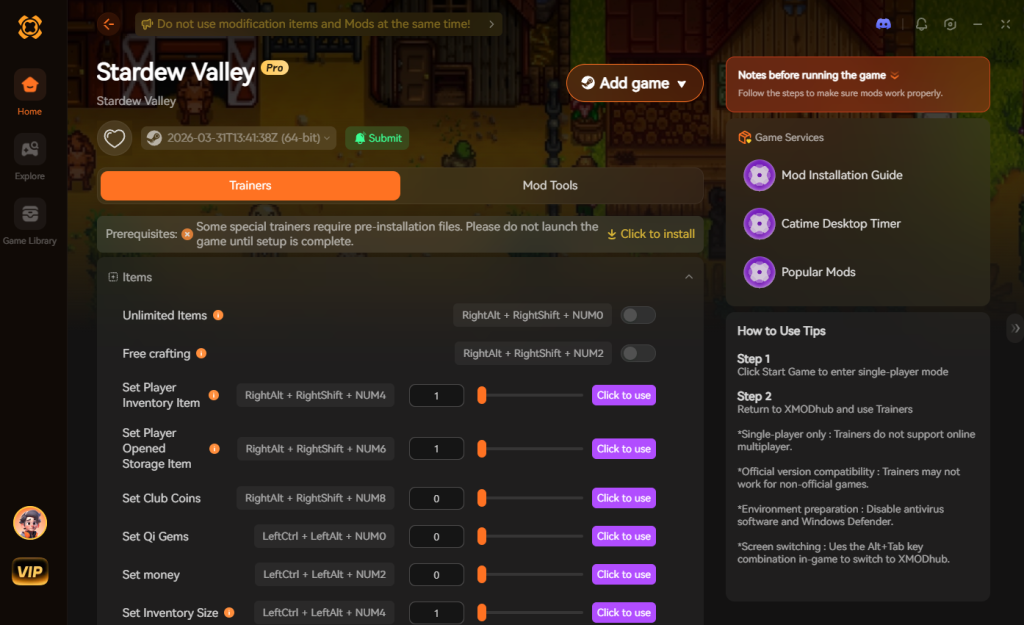
Because Stardew Valley does not feature a developer console, there are no text-based cheat codes to input. You cannot open a chat box and type /godmode or /addgold 10000. However, you can achieve the exact same effects—and often much more powerful ones—using the XMODhub app.
Below is a comprehensive breakdown of the trainer features available in XMODhub, designed to give you complete control over your Stardew Valley experience.
Deep Dive into Core Gameplay Modifications
The Time Freeze Advantage: Time management is the core mechanic of Stardew Valley. You only have from 6:00 AM to 2:00 AM to accomplish your daily tasks. By utilizing the Freeze Time feature, you remove the most stressful element of the game. You can casually water a massive farm, talk to every single NPC in Pelican Town, and descend to floor 100 of the Skull Cavern all in the exact same in-game day.
Mastering the Mines: Combat in Stardew Valley can be surprisingly punishing, especially when you reach the Volcano Dungeon on Ginger Island. Combining Infinite Health with One-Hit Kill transforms your character into an unstoppable force. You will no longer need to waste precious inventory slots on healing items like Cheese or Life Elixirs, allowing you to carry more valuable loot back to your shipping bin.
3. Item IDs and Spawning Guide
Because Stardew Valley lacks a native developer console, manually spawning items via text commands is impossible without installing heavy third-party engine tools.
Historically, veteran players utilized a highly specific exploit known as the “Item ID Naming Glitch.” By naming your character, a farm animal, or a child with bracketed numbers (for example, [74][163][166]), the game’s code would glitch and spawn the corresponding items (a Prismatic Shard, a Legend Fish, and a Treasure Chest) directly into your inventory every single time an NPC said your name in dialogue.
While this was a clever workaround for the lack of a console, it came with severe drawbacks. It completely ruined the immersion of the game, as villagers would constantly refer to you as a string of numbers. Furthermore, this exploit has been heavily patched on various console versions of Stardew Valley and is notoriously unreliable in newer PC updates.
We highly recommend skipping this convoluted process. XMODhub bypasses this archaic method entirely by allowing you to instantly maximize your inventory or add currency with a single click, eliminating the need to look up complex hex codes, ruin your character’s name, or rely on outdated glitches.
4. Do Cheats Disable Achievements?
A major concern for any PC gamer is whether modifying their game will lock them out of earning achievements on platforms like Steam or the Epic Games Store. Stardew Valley features several notoriously difficult achievements, such as “Fector’s Challenge” (beating the Journey of the Prairie King arcade game without dying once) and “Master Angler” (catching every single fish in the game).
If Stardew Valley had a native developer console, activating it would typically flag your save file and permanently disable achievement tracking—a standard practice in the gaming industry to preserve achievement rarity. Similarly, using outdated modding frameworks can sometimes interfere with the Steam API, causing achievements to fail to trigger when you complete the required milestones.
However, using a modern memory injection tool changes the landscape entirely. XMODhub operates by temporarily altering memory values in your system’s RAM rather than permanently modifying the game’s core executable files. Because of this stealthy approach, XMODhub safely bypasses the internal achievement locks. You can utilize Infinite Health, maximize your Gold, and freeze time to easily catch every legendary fish, and your Steam achievements will continue to unlock perfectly as if you were playing a pristine, unmodified version of Stardew Valley.
5. Why Native Cheats Can Break Your Save Files
Beyond the achievement lock, native developer tools and memory editors are notoriously unstable. These commands were originally built for developers to test bugs during production, not for everyday gameplay.
Forcing a quest to complete or bypassing intended story triggers can cause crucial NPCs to completely disappear from your map. In a heavily interconnected game like Stardew Valley, breaking a single event chain can ruin your entire playthrough. For example, if you force-spawn a late-game item before unlocking the Community Center, the game’s logic may fail to recognize your progress, permanently locking you out of repairing the greenhouse or unlocking the bus to the Calico Desert.
Memory leaks, corrupted assets, and sudden crashes to the desktop are incredibly common when you spawn too many items at once using unstable glitches. A corrupted SaveGameInfo file means losing hundreds of hours of farm progression, forcing you to start completely from scratch.
6. The Safer Alternative: 1-Click Cheats with XMODhub
If you want the benefits of cheats—like infinite health or skipping the heavy grind—without risking your save files or locking your achievements, you need a dedicated game modification tool.
Instead of typing risky code that might corrupt your game world, the XMODhub app hooks into Stardew Valley safely and cleanly. It is specifically engineered to interact with the game’s engine without leaving permanent, destructive traces in your local files.
How to Use XMODhub for Stardew Valley

Download Stardew Valley Trainer Now
7. Troubleshooting: Cheats Not Working
Even with the most streamlined software, PC gaming ecosystems can sometimes present minor technical hiccups. If you find that your hotkeys are not triggering the desired effects in Stardew Valley, check the following common issues:
8. Most Valuable Items to Spawn Early Game
If you are utilizing a trainer to bypass the tedious early-game progression, knowing exactly which items yield the highest return on investment is crucial. Because you no longer need to rely on the clunky Item ID naming glitch, you can directly inject wealth and resources into your playthrough.
Focusing your early cheat usage on these specific, high-tier items will drastically accelerate your farm’s infrastructure, allowing you to focus on decorating, socializing, and exploring Ginger Island much faster.
9. SMAPI Mods vs. Standalone Trainers
When researching Stardew Valley cheats and console commands, many players stumble across recommendations for CJB Cheats Menu, a popular mod that runs through SMAPI. While modding is a fantastic way to add custom textures or fan-made expansions (like Stardew Valley Expanded), it is often overkill for players who simply want basic cheats.
The SMAPI Modding Route: Installing SMAPI requires you to alter your core game files. You must download the API, configure your Steam launch parameters, and manually drop mod folders into your directory. The biggest drawback? Whenever Stardew Valley pushes a major update, SMAPI and your installed cheat mods will break. You are forced to wait for community modders to update their code, which can take weeks, leaving your save file temporarily unplayable.
The Standalone Trainer Route: A trainer like XMODhub operates externally. It does not touch your Stardew Valley directory, meaning there are no files to corrupt and no launch parameters to configure. Furthermore, professional trainers are updated automatically via cloud syncing. When a new Stardew Valley patch drops, the memory addresses are updated on the backend by a dedicated development team, ensuring your cheats are working again within hours, not weeks. For pure cheating utility—like God Mode or instant money—trainers offer a vastly superior, maintenance-free experience.
10. Frequently Asked Questions (FAQ)
A: No. Modifying game memory or accessing developer tools for Stardew Valley is strictly limited to the PC version. Consoles feature closed operating systems that prevent third-party software injection, making trainers incompatible with PlayStation, Xbox, or Nintendo Switch hardware.
A: There is no account ban, VAC ban, or official penalty for cheating in a single-player environment. The developer, ConcernedApe, has never penalized players for modifying their own local files. The only downsides are the potential for corrupted save files and disabled achievements when using unstable methods, which can be easily avoided by using a secure trainer like XMODhub.
A: While trainers are primarily designed for offline single-player use, attempting to use them in a multiplayer session can cause severe desynchronization between the host and the client players. If you freeze time or alter your movement speed while other players are connected, it can crash the server or corrupt the shared farm save. It is highly recommended to only use cheats when playing solo.
Conclusion
Whether Stardew Valley provides a built-in console or not, taking control of your single-player experience is easier than ever. While tweaking raw engine code or exploiting naming glitches can be a fun technical experiment, it comes with significant risks to your save files and achievements. For a flawless, risk-free experience, using a dedicated modification tool is always the smarter choice.
With secure support for over 5,000+ single-player PC games, you can easily customize your gameplay, skip the tedious grind, and play exactly the way you want. Build your ultimate farm, conquer the deepest levels of the mines, and romance your favorite villagers without the stress of stamina limits or ticking clocks.


I am a passionate gamer and writer at XMODhub, dedicated to bringing you the latest gaming news, tips, and insights.
Connect with me:
LinkedIn Profile ↗






