Catherine Hu
Loading up your 300-hour Early Access save only to find your meticulously crafted main base clipped inside a newly spawned mountain biome is a nightmare no survival gamer wants to face. With the massive drop of Palworld 1.0, returning players are staring at the main menu, paralyzed by a critical decision: Do you risk your legacy world breaking under the weight of new mechanics, or do you bite the bullet and start completely from scratch? The transition from the beta phases to the full release introduces sweeping changes to terrain, level caps, and the entire Pal economy.
Editor’s Note
When I first booted up the press build of Palworld 1.0, I stubbornly loaded my legacy level 50 save. Within ten minutes, I realized my automated mining bases were entirely broken due to pathing updates, and I was completely overwhelmed by the sudden influx of Dog Tokens, Meteorite events, and the new level 60 tech tree. Starting a fresh save file wasn’t just a suggestion; it felt like the only way to properly digest the massive overhaul without spending hours dismantling glitched structures.
Quick Answer: TL;DR: The Short Answer
If you are wondering whether to start a new save file in Palworld 1.0, starting a fresh save is highly recommended for 90% of players. Here is exactly why:
What Actually Changed in Palworld 1.0?
Before making your decision, you need to understand the sheer scale of the Palworld 1.0 update. This is not a simple patch that adds a few new guns and a couple of Pals. The 1.0 release fundamentally alters the DNA of the game.
The update introduces the highly anticipated Giant Tree area, the Feybreak region, and brand-new Sky Island biomes. Alongside these map expansions, the level cap has been increased from 50 to 60. This brings an entirely new tier of late-game technology, including the Quad Rocket Launcher, Laser Gatling Gun, and Hexolite Armor. Furthermore, the creature management system has been deepened. The sanity mechanic and base labor assignments have been refined, meaning the way you build and manage your Pal factories must adapt to the new Pal Research Laboratory and Selyne integrations.
The Case FOR Starting a New Save File in Palworld 1.0
For the vast majority of players, hitting that “Create New World” button is the optimal way to experience Palworld 1.0. Here is a deep dive into the underlying mechanics that make a fresh start so appealing.
Terrain Shifts and the Risk of Base Corruption
The biggest threat to your Early Access save file is map geometry changes. In survival games with base building, when developers add new biomes or alter existing topography, legacy structures often suffer.
In Palworld 1.0, the addition of the meteorite crash sites and the new pathways leading to the Feybreak region means that areas previously considered “safe” flatlands might now be clipping through newly generated cliffsides or enemy syndicate camps. If your primary breeding base or coal mining facility was located in an area that received a terrain overhaul, you might log in to find your Pals stuck in an infinite falling loop, their sanity plummeting to zero, and your structures inaccessible. Starting fresh guarantees that you are building your sanctuaries and productive workspaces on the finalized 1.0 map geometry.
The Rebalanced Tech Tree and Level 60 Cap
Palworld 1.0 stretches the progression timeline. During Early Access, hitting level 50 felt like a sudden cliff where the game simply stopped. Now, the journey from level 1 to 60 is a smoothed-out curve.
If you load an old level 50 save, you will be instantly bombarded with a massive backlog of new unlockable technologies. You’ll suddenly have access to the Plasma Advanced Gun, new saddles for Pals like Jetragon and Frostallion, and advanced automated assembly lines. Trying to retrofit a legacy base to accommodate the new Pal Research Laboratory and the new Plasteel/Chromite resource requirements is often more tedious than building a new base from scratch. A fresh save allows you to unlock these technologies naturally, giving you time to understand the logistical supply chains required for the new end-game gear.
Organic Integration of New Mechanics
Palworld 1.0 introduces dynamic world events like Meteorite supply drops and Ultra Raids featuring bosses like Blazamut Ryu and Xenolord. In a legacy save, these events will start spawning immediately, potentially overwhelming your existing bases if you aren’t prepared with the new Heat/Cold resistant Pal armor.
Additionally, the introduction of Dog Tokens (a new currency used at specific merchants) completely shifts the early-game economy. Starting fresh allows you to accumulate these tokens naturally as you explore, rather than forcing you to blindly grind lower-level areas on a max-level character just to farm the new currency.
The Case FOR Keeping Your Early Access Save
Despite the heavy recommendations to start over, there are a few highly specific, hardcore scenarios where keeping your old save file in Palworld 1.0 makes sense.
Preserving Perfect Breeding Mutations
If you spent 200 hours in Early Access meticulously cross-breeding Pals to pass down the perfect combination of passive skills (Legend, Musclehead, Ferocious, Lucky) and grinding for max IVs (Individual Values), abandoning that save will hurt.
Palworld 1.0 introduces new IV fruits and mutation mechanics, but rebuilding a perfect worker Pal setup (with Artisan, Work Slave, Serious, and Diet Lover) or a one-shot boss-killer team takes an astronomical amount of time. If your primary goal in Palworld 1.0 is to immediately challenge the new Xenogard raid boss or conquer the new Tower Bosses without spending weeks re-breeding your army, keep your old save.
Skipping the Plasteel and Chromite Grind
The jump from level 50 to 60 requires an insane amount of raw materials. Crafting the new Legendary Rocket Launcher or the Katana requires massive stockpiles of Palmetal, Coal, and the newly introduced Chromite and Plasteel. If your Early Access save already has chests overflowing with thousands of raw ores, you can bypass the tedious early-game mining phase and immediately start crafting the new Palworld 1.0 endgame equipment.
If you do decide to keep your old save and rush the new content, you’ll definitely want to know what you are up against. Be sure to (All New Pals Added in Palworld 1.0 World Tree Update (Location & Skills) so you know exactly which legacy Pals to swap out of your party.
How to Prepare Your Legacy Save for Palworld 1.0
If you are absolutely determined to carry your Early Access world into Palworld 1.0, you must take preventative measures to avoid game-breaking bugs. Follow these strict preparation steps before you download the update:
The Ultimate Shortcut: Skip the Grind with XMODhub
Let’s be brutally honest: deciding between losing 100 hours of breeding progress or dealing with broken legacy bases is a terrible choice. What if you want the pristine, bug-free map of a fresh Palworld 1.0 save, but you absolutely refuse to spend another 50 hours punching trees and waiting for eggs to hatch in the incubator?
You don’t have to choose. You can bypass the tedious grind entirely with XMODhub.
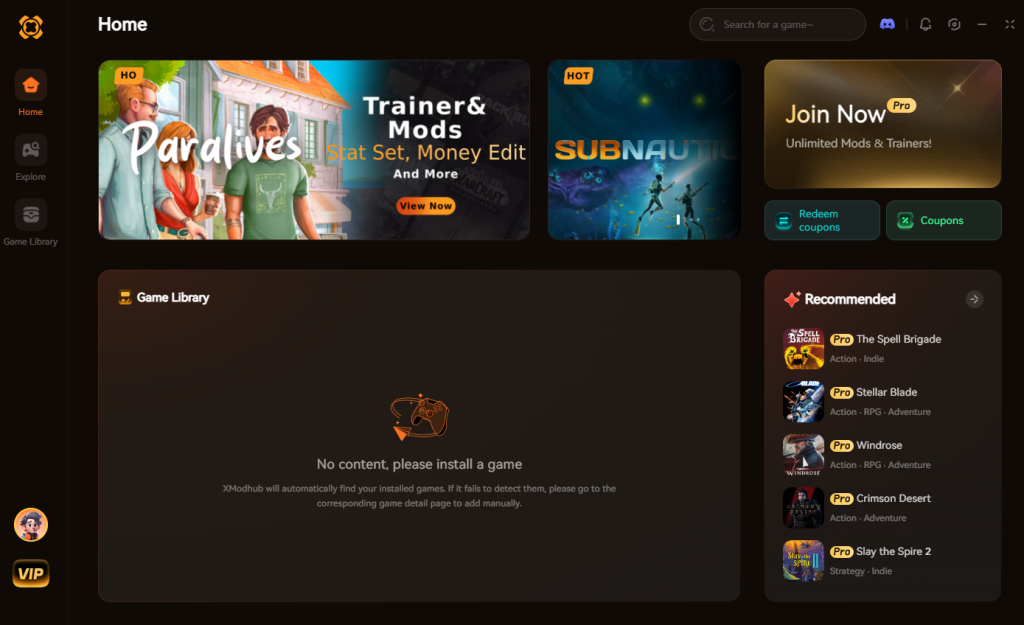
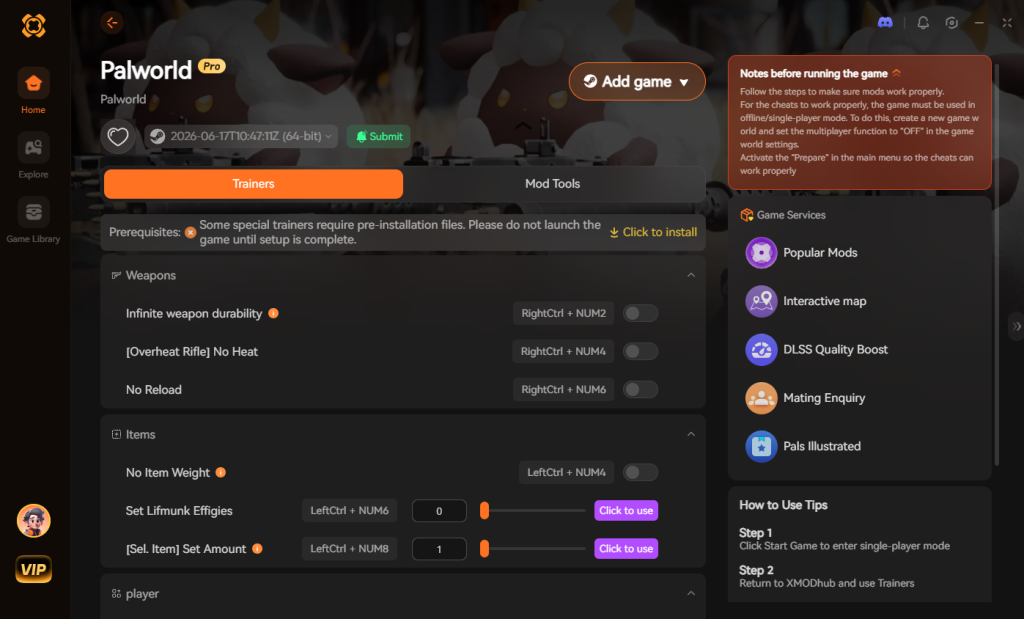
XMODhub is a premium, undetectable modding engine designed for hardcore PC single-player gamers who value their time. Instead of agonizing over lost progress, you can start a fresh Palworld 1.0 save and instantly fast-track your progression back to where you were—and beyond. Need to rebuild your base? Turn on Infinite Carry Weight and Free Crafting. Want your perfect IV Shadowbeak back? Force-spawn it with maximum stats.
Here is how you reclaim your time in Palworld 1.0:
【Download Palworld 1.0 Trainer Now】
Save Data Migration Checklist: What Survives in 1.0?
For players who choose to migrate their Early Access world into the 1.0 release, understanding exactly what carries over and what is at risk of corruption is crucial. The transition is not entirely seamless, and certain aspects of your progression are more vulnerable than others.
Below is a definitive breakdown of how your legacy data interacts with the new 1.0 server architecture:
| Game Element | Legacy Save Status | Risk Level | Recommended Action |
|---|---|---|---|
| Base Structures | High risk of clipping, floating, or instant destruction in updated biomes. | High | Dismantle perimeter bases before updating. |
| Palbox Inventory | Retains all captured Pals, breeding IVs, and passive skills. | Low | Recall all active base workers to the Palbox. |
| Player Level & Tech | Retained. Level 50 cap unlocks immediately to 60. | Medium | Farm Dog Tokens to catch up on new tech nodes. |
| World Map Exploration | Fog of war resets in newly altered terrain zones. | Medium | Re-explore the Feybreak and Sky Island borders. |
| Economy & Gold | Fully retained; highly valuable for the new wandering merchants. | Low | Stockpile gold and Pal Souls prior to patching. |
Frequently Asked Questions
A: No. The developers have confirmed that Early Access save files will carry over to Palworld 1.0. However, you will receive an in-game warning about potential terrain clipping and base location issues when loading an old save for the first time.
A: Officially, there is no built-in cross-save or character transfer feature between different local worlds in the vanilla game. If you start a new save, you start with an empty Palbox. (Unless you use external tools or server migration scripts, which can be highly unstable).
A: Yes. The map dynamically updates. You can fly to the new biomes using a flying mount like Jetragon or the new Wingpack accessory, even on a day-one Early Access save file.
A: Mostly, yes. Palworld 1.0 features a completely rewritten terrain collision mesh. Starting a new save ensures your world generates with the new mesh from day one, drastically reducing the chances of your Pals falling through the floor compared to loading a legacy map file.
Final Verdict
The leap from Early Access to Palworld 1.0 is monumental. The sheer volume of new mechanics—from the expanded level 60 tech tree to the introduction of Meteorite events, Dog Tokens, and the massive terrain overhauls—makes starting a new save file the absolute best way to experience the game. Trying to force a legacy save to adapt to the new pathing AI and economy often results in more frustration than it’s worth.
If you are dreading the loss of your hard-earned progress, remember that you don’t have to suffer through the early-game grind a second time. Tools like XMODhub exist exactly for this scenario, allowing you to start fresh on a clean, bug-free map while instantly restoring your resources and perfect Pals. With support for over 5000+ single-player PC titles—including other massive base-building survival hits like Enshrouded and ARK: Survival Ascended—XMODhub ensures that you dictate how you play. Embrace the new world, build smarter, and conquer the Giant Tree on your own terms.

I am a passionate gamer and writer at XMODhub, dedicated to bringing you the latest gaming news, tips, and insights.
Connect with me:
LinkedIn Profile ↗


 Nancy Miller