Catherine Hu
Quick Answer: How do you cheat in Fortune Mill?
To cheat in Fortune Mill, you can manually attach Cheat Engine to the game’s executable and scan for changing numeric values like your accumulated wealth coins and premium Gacha pull tickets. However, because game updates frequently break Cheat Engine tables (.CT files), the safest and easiest alternative is using an auto-updating mod manager like XMODhub, which provides 1-click cheats without requiring any memory scanning.
Editor’s Note
Look, I get it. We all start Fortune Mill thinking we’re going to play it completely legit. But after suffering through the god-awful pet-pulling gacha machine for the 15th time, or spending hours grinding for ultra-rare Gacha Ball pets and winning scratch-off tickets, the fun stops. I’ve been messing with Cheat Engine for years, and trying to isolate the exact memory values for this game’s current patch almost drove me insane. Today, I’m going to show you how to manually hack the values if you want the technical challenge—but I’ll also share the 1-click shortcut I actually use to save my sanity.
You may also like: Check out our comprehensive modding guide here
1. How to Use Cheat Engine for Fortune Mill (The Manual Way)
If you want to go the old-school route and find the memory addresses yourself, here is the basic “First Scan/Next Scan” method tailored for this game.
Because Fortune Mill is a hybrid of incremental idle mechanics and gacha pulls, the most valuable thing you can modify is your primary accumulated wealth. This wealth dictates your progression through the five distinct rooms and allows you to bypass the massive grind required to pull from all the machines. Here is the highly specific, step-by-step process to isolate and freeze your wealth values using Cheat Engine.
Here is a breakdown of the most common data types you will encounter when scanning for specific variables in Fortune Mill:
| Memory Value Type | Corresponding In-Game Stat | Technical Explanation & Scanning Difficulty |
|---|---|---|
| Double (8 Bytes) | Accumulated Wealth / Idle Currency | Incremental games require massive number storage. Very easy to find using exact value scans, provided you account for hidden decimals. |
| 4 Bytes | Gacha Pull Tickets / Scratch-off Uses | Standard integer storage used for finite items. Extremely easy to isolate by spending one ticket and scanning for the new integer. |
| Float | Dart Throw Timing Speed | Controls the physics and cursor speed in the Dart Throw minigame. Hard to find; requires “Unknown Initial Value” and “Increased/Decreased” scans. |
| Byte | Match-2 Sushi Board State | Simple boolean flags (0 or 1) that determine if a sushi tile is flipped. Tedious to isolate due to the sheer number of boolean flags in memory. |
| Array of Bytes (AoB) | Pachinko Dice Roll RNG Seed | Complex hexadecimal strings dictating the 1-in-6 dice roll logic. Requires advanced assembly knowledge to inject custom scripts and force a win. |
【Download Fortune Mill Trainer Now】
2. Common CE Errors: Pointers Breaking & Not Attaching
If you are pulling your hair out because CE isn’t working for Fortune Mill, you aren’t alone. Modifying modern indie games is rarely as simple as it was ten years ago. Here is what’s probably happening and how you can troubleshoot the most frustrating roadblocks.
Error: “Cannot attach to process” / Game Crashes: Fortune Mill might be using specific engine protections or anti-debugging techniques. Even indie games built on standard engines like Unity or Godot can inadvertently trigger crash handlers when an external debugger attempts to hook into their memory space. When standard Windows debuggers attach to Fortune Mill.exe, the game’s memory management system detects the intrusion, panics, and instantly closes the application to prevent data corruption. To bypass this frustrating issue, you need to change how Cheat Engine interacts with the game’s executable. Open Cheat Engine, navigate to Edit > Settings, and click on the Debugger Options tab. By default, Cheat Engine uses the standard Windows debugger. You need to switch this to the VEH Debugger (Vectored Exception Handling). The VEH Debugger operates at a different system level, catching exceptions before the game’s internal anti-crash protocols can detect them. Once you apply this setting, restart Cheat Engine, and you should be able to attach to Fortune Mill without triggering a silent desktop crash.
The Pointer Problem: You successfully found your wealth address, changed it to a million, bought all the Gacha Balls, and saved your game. But when you launch Fortune Mill the next day, your cheats are completely gone, and the address you saved in Cheat Engine now points to random gibberish. Welcome to the nightmare of dynamic memory allocation. Every time you transition between the five distinct rooms in Fortune Mill—moving from the Scratch-off room to the Pachinko Room, for instance—the game’s engine dumps old assets from your RAM and allocates entirely new memory blocks for the new environment. Your wealth value doesn’t stay in one physical location on your RAM stick; it floats around dynamically. The address you found yesterday was just a temporary residence. To fix this manually, you have to find the “Pointer”—a static base address that acts as a permanent map directing the game to wherever the wealth variable is currently hiding. Finding pointers requires generating a pointer map, restarting the game multiple times, performing deep pointer scans, and filtering through thousands of offsets. For advanced users, the alternative is writing a custom Assembly (ASM) script to perform an Array of Bytes (AOB) injection, which rewrites the game’s core code to permanently grant you wealth regardless of where the memory shifts. If writing hexadecimal assembly code sounds like a miserable way to spend your Friday night, you are going to want to read the next section.
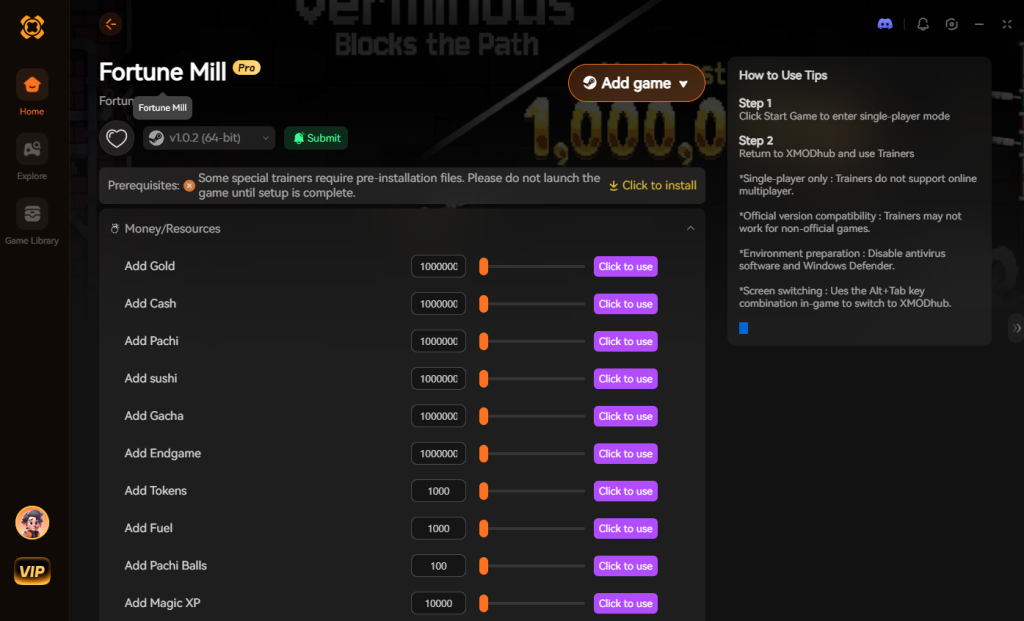
3. The Better Alternative: 1-Click Cheats with XMODhub
Here is the dirty little secret of the modding community: Nobody actually wants to spend two hours updating Cheat Engine tables every time a patch drops. The moment Fortune Mill updates on Steam, your hard-earned memory addresses shift, your carefully crafted pointers break, and your game crashes to the desktop.
| Feature / Metric | Manual Cheat Engine (.CT) | XMODhub Auto-Trainer |
|---|---|---|
| Setup Time | 30 to 60 minutes of scanning and filtering per session. | Instant. Click “Play” and toggle cheats on the fly. |
| Update Reliability | Breaks immediately on every minor Fortune Mill patch. | Cloud-based auto-updating tech adapts to new patches instantly. |
| Crash Risk | High. Freezing the wrong floating value will corrupt saves. | Zero. Professionally coded hooks ensure total game stability. |
| Ease of Use | Requires deep knowledge of Hex, AoB, and Pointers. | Clean, beautiful UI with simple on/off toggle switches. |
| Feature Access | Limited to whatever addresses you can manually uncover. | Access to God Mode, physics manipulation, and RNG bypasses. |
Why XMODhub beats manual CE for Fortune Mill:
Premium Features Instant Access:
How to Use XMODhub for Fortune Mill?

4. Where to Find Safe Fortune Mill Cheat Tables (.CT)?
If you absolutely insist on using CE, you’ll want a pre-made Cheat Table (.CT file). However, you need to exercise extreme caution. The internet is flooded with malicious actors looking to exploit gamers who are simply trying to bypass the gacha grind in Fortune Mill.
When you download a random .CT file from an unverified Discord server or a shady modding forum, you aren’t just downloading a text file with some memory addresses. Cheat Engine tables can contain embedded Lua scripts. While Lua is incredibly useful for creating complex cheat trainers, it is also a fully functional programming language capable of executing arbitrary code on your machine.
Cybersecurity researchers have repeatedly found severe threats hidden inside seemingly innocent cheat tables. Malicious Lua scripts can silently download Remote Access Trojans (RATs), giving a hacker complete control over your PC, allowing them to steal your saved passwords, banking info, and Discord tokens. More commonly, fake Fortune Mill cheat tables are bundled with silent crypto-miners. You might think your game is just lagging because of the Pachinko physics, but in reality, a hidden script is redlining your GPU to mine cryptocurrency for a stranger.
This is exactly why relying on a verified, sandboxed application like XMODhub is the only safe choice for modern gamers. If you must download a .CT file, only source them from heavily moderated, reputable communities like the FearLess Cheat Engine forums, and always inspect the Lua script in a text editor before attaching it to your game process. Never run a table that requests administrator privileges outside of Cheat Engine’s standard hooking process.
5. How to Build and Save Your Own Fortune Mill Cheat Table (.CT)
If you’ve managed to successfully track down the elusive memory pointers for your wealth and gacha tickets, your next logical step is saving your progress so you don’t have to repeat the entire scanning process tomorrow. This is done by creating your very own Fortune Mill cheat engine table.
To build a .CT file, you need to compile all your frozen addresses in the bottom pane of the Cheat Engine UI. Right-click any address you want to save and ensure you have properly labeled its “Description” (e.g., “Max Gacha Tickets”). Once your list is organized, click the floppy disk icon in the top left corner of the interface (File > Save As). Name your file something recognizable, like FortuneMill_V1.CT, and save it to your desktop.
The next time you launch the game, you simply double-click this .CT file. It will automatically open Cheat Engine and load your saved addresses. However, remember the pointer problem we discussed earlier: if you only saved raw, dynamic addresses instead of static pointers or injection scripts, those addresses will show up as ?? (invalid) upon reloading.
Essential Cheat Table Features You Should Include
If you are striving to build a comprehensive cheat table that rivals professional trainers, you’ll need to expand beyond just editing your money. Here is a breakdown of the most sought-after features you should try to script into your table, ranked by difficulty:
| Cheat Table Feature | Script / Address Type | In-Game Effect | Difficulty to Code |
|---|---|---|---|
| Infinite Wealth | Static Pointer / Double | Freezes your primary currency to its maximum limit. | Beginner |
| Unlimited Gacha Pulls | 4 Bytes (Integer) | Locks your premium ticket count at 99. | Beginner |
| Dart Throw Speed Hack | Speedhack Hook | Slows down minigame physics for guaranteed perfect timing. | Intermediate |
| Pachinko RNG Manipulation | Array of Bytes (AoB) | Injects logic to force a jackpot roll on every single attempt. | Advanced |
Creating advanced tables requires a solid grasp of Assembly language. If you find yourself spending more time debugging your Lua scripts than actually playing Fortune Mill, it might be time to transition to a pre-built solution.
6. Frequently Asked Questions (FAQ)
| Gaming Platform / Environment | Compatibility Status | Ban Risk Level | XMODhub Support Available? |
|---|---|---|---|
| Steam (Singleplayer) | 100% Compatible | None (Safe) | Yes, fully optimized. |
| Epic Games Store | 100% Compatible | None (Safe) | Yes, fully optimized. |
| Xbox Game Pass (PC) | Blocked by UWP Encryption | None (Safe) | Yes, bypasses UWP automatically. |
| Multiplayer / Co-op | Strictly Prohibited | Extremely High | No, disabled for fair play. |
A: Usually, no. Game Pass uses strict UWP (Universal Windows Platform) file encryption that actively blocks Cheat Engine from reading the game’s memory space. Attempting to attach CE to a UWP app often results in an instant “Access Denied” error. However, XMODhub is specifically engineered to bypass these UWP restrictions seamlessly, allowing you to cheat on the Game Pass version without dealing with encrypted file ownership permissions.
A: Modifying data on your own PC for a single-player experience like Fortune Mill is completely legal. You own the hardware and you are simply altering local RAM values. Just never bring memory editors into a multiplayer server, as that violates Terms of Service and will result in permanent account bans.
A: Yes, it absolutely can, depending on how you use it. When you perform a “First Scan” for an unknown initial value, Cheat Engine essentially dumps the entire allocated RAM space of Fortune Mill into your system’s pagefile. This causes massive disk I/O operations and severe CPU spikes, which will temporarily freeze your game. Furthermore, if you actively freeze dozens of variables simultaneously, Cheat Engine has to constantly write to your memory every few milliseconds to keep those values locked. This continuous memory rewriting can cause noticeable micro-stutters, which will completely ruin your timing in precision-based rooms like the Dart Throw minigame.
Conclusion: Work Smarter, Not Harder
Learning how memory manipulation works in Cheat Engine is a cool flex. Understanding hexadecimal offsets, pointers, and dynamic memory allocation gives you a fascinating peek behind the curtain of game development. But let’s be real—when you come home from a long day at work, you just want to bypass the artificial grind, spawn in the rarest tier-5 Gacha Ball pet, and actually enjoy the game without taking a computer science class.
Why spend 45 minutes digging through hex codes, risking game crashes and corrupted save files, when you can click one button and instantly get God Mode and infinite wealth? And the best part? XMODhub supports over 5,000+ PC games. Once you install the app, you can ditch the complicated cheat tables, the broken pointers, and the shady Discord downloads for good.


I am a passionate gamer and writer at XMODhub, dedicated to bringing you the latest gaming news, tips, and insights.
Connect with me:
LinkedIn Profile ↗


 Nancy Miller