
 Catherine Hu
Quick Answer: What are the best Scam Center Simulator: UnderKingdom mods right now?
CRITICAL UPDATE FOR 2026: Based on the latest live data, developer updates, and the game’s current beta status on Steam, Scam Center Simulator: UnderKingdom currently does not have a native mod ecosystem. Because the game is a highly complex, large-scale management and crime simulation in Early Access (expected to remain so for approximately one year), the developer has not yet released official modding tools, nor is there Steam Workshop support. However, the hardcore PC gaming community never waits. Since traditional drag-and-drop mods do not exist yet, players are utilizing universal injectors and advanced memory editing tools to achieve the exact same results. Here are the top 5 most essential modifications and tweaks players are currently applying to their underground scam empires:
Editor’s Note
The modifications and tweaks featured in this guide were analyzed based on community demand, stability, and recent patch compatibility for Early Access titles. Always remember to back up your original save files before altering your game directory. If you want to bypass complicated workarounds entirely and get straight to the enhancements, skip to the XMODhub section below.
Playing Scam Center Simulator: UnderKingdom in its vanilla state is an incredibly intense experience. Developed as a gritty, large-scale management and crime simulation game, it tasks players with building an underground scam empire in a city ruled by absolute chaos. The themes are heavy—touching on elements like trafficking, fraud, and harsh compound management—making it a highly debated and deeply immersive title on Steam.
However, the PC gaming community is always looking to take things to a completely different level. Whether you are annoyed by a clunky inventory system, want to push your graphics card to its limits, or simply want to skip the tedious grinding mechanics of managing a compound, players naturally seek out mods for exactly that.
Diving into modding an Early Access game, however, can be overwhelming. With frequent developer updates and a lack of official mod support, figuring out how to tweak your game—and which methods will crash your hard-earned save file—is a massive headache. After analyzing the game’s architecture and current community workarounds, we have compiled the definitive guide on how to enhance Scam Center Simulator: UnderKingdom right now.
You may also like: The Ultimate Scam Center Simulator: UnderKingdom Cheat Engine Guide (And A Much Easier Alternative)
1. How to Install Mods for Scam Center Simulator: UnderKingdom Safely
Before attempting to download anything, you need to understand how to set up your game directory to accept modified files. Because Scam Center Simulator: UnderKingdom is currently in Early Access and actively being expanded, traditional platforms like Nexus Mods, Vortex Mod Manager, and the Steam Workshop are completely unsupported.
Attempting to force generic script extenders into the game’s root folder will result in an immediate crash. Therefore, “installing mods” for this specific title currently means utilizing external, non-invasive tools.
Step-by-Step Guide for Safe Modification:
2. Top Quality of Life (QoL) Mods & Tweaks
Quality of Life modifications do not drastically change the core narrative of the game; they just remove the annoyances that waste your time. In Scam Center Simulator: UnderKingdom, the management mechanics are intentionally brutal. According to reports, the game features scenarios where compound workers face severe punishments for minor infractions like yawning, talking, singing, or even crossing their legs. Here are the top QoL tweaks players use memory editors to achieve:
The “No Penalty” Worker Management Bypass
In the vanilla game, micromanaging the strict rules of the compound is exhausting. Players must constantly monitor their workforce to ensure no one is breaking the silence protocols. By utilizing memory editing tools, players can freeze the internal “infraction timers,” effectively disabling the penalty system. This allows you to focus purely on the macro-management of your scam empire without constantly dealing with the micro-punishments.
Infinite Stamina for the Manager
Running around a massive, chaotic underground facility to collect resources and issue commands drains your character’s stamina incredibly fast. Since there is no traditional mod to adjust stamina drain multipliers, players use memory tweaks to lock the stamina bar at 100%. This simple QoL change makes navigating your expanding compound significantly less tedious.
Automated Data Entry Simulation
A core element of the early game involves setting up data entry jobs to generate your initial fraudulent income. The manual clicking required to process these tasks can cause severe fatigue. Advanced players use external macro scripts and memory tools to automate the data entry yield, essentially turning a highly active grind into a passive income stream, freeing up time to focus on compound expansion.
Instant Inventory Sorting and Capacity
As your underground empire grows, so does your stockpile of illicit goods and hardware. The vanilla inventory system can feel clunky when dealing with hundreds of items. By injecting a custom value into the game’s memory, players can artificially inflate their carry weight limit to 9999, completely removing the need to constantly run back and forth to storage lockers.
3. Best Visual and Graphics Mods & Injectors
If you have a high-end PC, you want your games to look like true next-gen titles. Scam Center Simulator: UnderKingdom has a very distinct, gritty, and oppressive aesthetic meant to mirror real-life underground compounds. While native texture replacement mods are not yet possible due to the game’s encrypted Early Access archives, players use universal post-processing injectors to achieve stunning visual overhauls.
ReShade: The Gritty Realism Preset
Since you cannot download 4K texture packs, ReShade is the absolute best way to enhance the game’s visuals. By injecting custom shaders, players have created presets that enhance the ambient occlusion, deepen the shadows in the poorly lit compound corridors, and add a cinematic film grain that perfectly matches the dark, crime-simulation theme of the game.
ReShade: CRT Terminal Overhaul
A massive portion of Scam Center Simulator: UnderKingdom involves looking at in-game computer screens to manage your fraudulent operations. Using ReShade, players can apply specific CRT curvature filters, scanlines, and phosphor glow effects to the game’s UI. This makes the hacking and data entry segments feel incredibly retro and immersive, mimicking the feel of outdated hardware often found in underground facilities.
ReShade: Enhanced Lighting and Bloom
The vanilla lighting in the game can sometimes feel flat in the larger warehouse sections of your empire. By utilizing advanced lighting shaders through ReShade, players can force the game’s engine to render more realistic light bounces and intense bloom effects around neon signs and computer monitors, drastically improving the visual fidelity without needing official developer mod tools.
Ultra-Widescreen FOV Fixer
While not a traditional graphics mod, many players with 21:9 or 32:9 monitors find the default Field of View (FOV) in Early Access games to be restrictive. Using external memory hex editors, players can manually adjust the camera’s FOV values, allowing for a much wider view of the compound. This is crucial for keeping an eye on multiple sectors of your scam center simultaneously.
4. Top Gameplay and Overhaul Mods & Memory Edits
Looking to change how the game is actually played? Gameplay overhauls adjust combat, economy, and progression. Because Scam Center Simulator: UnderKingdom is a large-scale management game, the economy is the most critical aspect. Here is how players are overhauling the beta mechanics:
The Unlimited Capital Injection
Building an underground scam empire from scratch requires massive amounts of in-game currency. The vanilla progression is slow, meant to stretch the gameplay over the course of the 1-year Early Access period. By using memory tools to inject unlimited funds, players can instantly unlock the highest tier of servers, security personnel, and compound upgrades on day one, completely overhauling the game’s pacing.
Instant Compound Construction
Time is money in a crime simulation. Waiting for new wings of your facility to be built can bring your gameplay loop to a screeching halt. Players heavily rely on memory editing to bypass the construction timers. By altering the game’s internal clock values, massive infrastructure projects that would normally take hours of real-time gameplay are completed the second you click the build button.
Maximum Worker Efficiency Override
The core of your scam empire is the workforce. In the base game, worker efficiency drops due to stress, fatigue, and the harsh conditions of the compound. Instead of engaging with the complex morale system, players use memory tweaks to lock all worker efficiency stats at maximum. This overhaul turns a struggling startup into a flawless, hyper-optimized revenue generator.
Global Threat Level Reducer
Operating an illegal underground empire naturally attracts attention from authorities and rival factions in the chaotic city. The game utilizes a “Threat Level” mechanic that scales as you grow. For players who just want a relaxed, sandbox-style management experience without the constant threat of raids, memory tools can freeze the Threat Level at zero, effectively removing the combat and defense requirements from the game entirely.
5. Is There a Mod Limit in Scam Center Simulator: UnderKingdom?
Because Scam Center Simulator: UnderKingdom currently lacks a native modding framework, there is no hard-coded plugin limit (like the infamous 255 .esp limit found in Bethesda’s Creation Engine). However, there are strict limitations based on how you modify the game.
When using universal injectors like ReShade, your only limitation is your PC’s hardware—specifically your GPU’s VRAM. Stacking too many heavy post-processing effects will tank your frame rate. When it comes to memory editing, the limitation lies in the game’s engine stability. Altering too many live memory addresses simultaneously (e.g., freezing time, infinite money, max stats, and god mode all at once using standalone cheat tables) can cause the game’s logic loops to desync, resulting in a hard crash to the desktop.
6. The Danger of Mod Conflicts and Corrupted Saves
While graphic post-processing tools are usually safe, attempting to force unverified, community-made script mods into an Early Access game is incredibly dangerous to your save file.
The biggest issue in Scam Center Simulator: UnderKingdom modding is the game’s volatile beta state. The developer has explicitly stated that this is a large-scale project they plan to “expand significantly over time.” This means frequent, massive updates. Every single time the game receives an official patch, the memory addresses shift, and any hard-coded script mods will instantly break.
If you load a 50-hour save file attached to a broken script, the game will fail to parse the missing data, and that save will become permanently corrupted. You will lose your entire underground empire. This is exactly why relying on outdated, file-replacing mods is a terrible idea for Early Access titles, and why dynamic memory tools are the only safe path forward.
7. The Easier Alternative to Gameplay Mods: XMODhub
If your main goal for modding is just to make the game more enjoyable—like giving yourself infinite capital to build your empire, removing the stressful worker penalty mechanics, or bypassing the agonizingly slow Early Access grind—you do not need to risk breaking your game with complex, unstable file modifications.
This is where XMODhub shines as the ultimate gameplay enhancer. Instead of downloading outdated files that conflict with each other and corrupt your saves, the XMODhub app runs safely alongside Scam Center Simulator: UnderKingdom, dynamically adjusting the game’s memory in real-time.
How to Use XMODhub for Scam Center Simulator: UnderKingdom

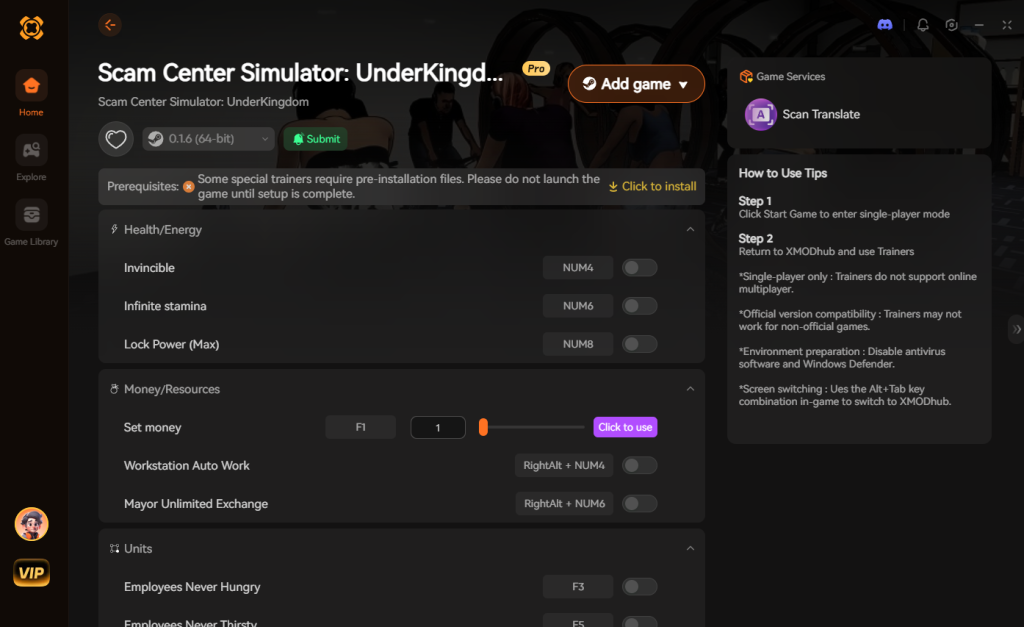
Download Scam Center Simulator: UnderKingdom Trainer Now
8. Troubleshooting: Mods Crashing on Startup
If your game is crashing to a black screen after attempting to install visual injectors or external tweaks, check these common culprits:
9. Targeted Progression Skips: What to Upgrade First
When players bypass the economy grind using memory injection tools, the sheer volume of available compound upgrades can be overwhelming. Rather than unlocking everything simultaneously (which can occasionally bug out the game’s progression flags), hardcore players recommend targeting specific infrastructure nodes first.
If you are using tools to accelerate your gameplay, these are the most highly recommended upgrades to prioritize for a seamlessly optimized scam empire:
| Upgrade Classification | Specific Ability / Node | Optimal Use Case | Priority Level |
|---|---|---|---|
| Server Hardware | Quantum Processing Tier 3 | Maximizing crypto-mining and data entry yields effortlessly. | High |
| Security | Automated Turret Systems | Defending against high-threat rival syndicate raids while AFK. | High |
| Facility | Advanced Ventilation | Reducing worker stress and fatigue passively in tight corridors. | Medium |
| Logistics | Fleet Expansion T2 | Speeding up contraband delivery and dirty money laundering. | High |
10. Save Editors vs. Dynamic Memory Injectors
A common question in the community is whether to use a save file editor or a dynamic memory injector to mod the game. While save editors allow you to permanently alter your .sav file to grant yourself items or cash, they are incredibly risky during Early Access. If a developer update changes the way inventory data is structured, your modified save file will become unreadable, resulting in a total loss of progress.
Dynamic memory injectors, on the other hand, operate in your system’s RAM while the game is running. They do not write any permanent changes to your hard drive. This means you can enjoy infinite capital, god mode, and instant building times during your play session, but the moment you close the game, your save file remains completely untouched and vanilla. For a volatile game like Scam Center Simulator: UnderKingdom, dynamic injection is vastly superior and far safer.
11. Frequently Asked Questions (FAQ)
A: No. Because Scam Center Simulator: UnderKingdom is a strictly single-player management experience, there is no anti-cheat software like Easy Anti-Cheat (EAC) monitoring your files. The developers do not ban players for modifying their own single-player game files. You are completely safe to build your empire however you see fit.
A: In many cases with traditional modding, yes. Games often detect modified .pak files and will lock achievement progression to prevent cheating. However, because you are using a secure, dynamic memory tool like XMODhub, it bypasses the file-based detection entirely. You can use all the enhancements you want while still unlocking your Steam achievements.
A: The game is currently in Early Access and expected to remain there for about a year. The developers are focused on expanding the core content and balancing the complex crime simulation mechanics. Implementing Steam Workshop requires a stable, finalized codebase, which simply does not exist yet.
A: You don’t have to wait to enhance your experience. While traditional file modding should wait until version 1.0, tools like XMODhub are designed specifically to handle the volatility of Early Access games, allowing you to tweak the game safely right now. Keep in mind, the developers have confirmed that the price of Scam Center Simulator: UnderKingdom will increase after Early Access, so getting in early and customizing your run now is highly recommended.
Conclusion
Modding Scam Center Simulator: UnderKingdom is a fantastic way to breathe new life into a game you already love, or to smooth out the rough edges of an intense Early Access title. While native visual enhancements and massive community content overhauls are not yet available, altering your gameplay stats and bypassing the brutal management grind does not have to be a complicated, crash-prone process.
For a seamless, risk-free way to customize your difficulty, bypass the tedious data entry grind, and truly play by your own rules as the ultimate underground boss, XMODhub is the superior choice. With dedicated, update-proof support for Scam Center Simulator: UnderKingdom and over 5,000+ other single-player PC games, XMODhub ensures you spend your time actually building your empire, rather than troubleshooting broken files.


I am a passionate gamer and writer at XMODhub, dedicated to bringing you the latest gaming news, tips, and insights.
Connect with me:
LinkedIn Profile ↗


 Nancy Miller

