
 Catherine Hu
Quick Answer: How do you cheat in Scam Center Simulator: UnderKingdom?
To cheat in Scam Center Simulator: UnderKingdom, you can manually attach Cheat Engine to the game’s executable and scan for changing numeric values like your illicit scam revenue and individual worker stamina levels. However, because game updates frequently break Cheat Engine tables (.CT files), the safest and easiest alternative is using an auto-updating mod manager like XMODhub, which provides 1-click cheats without requiring any memory scanning.
Editor’s Note
Look, I get it. We all start Scam Center Simulator: UnderKingdom thinking we’re going to play it completely legit. But after dying to the mid-game Law Enforcement Raids for the 15th time, or spending hours grinding for laundered offshore crypto, the fun stops. I’ve been messing with Cheat Engine for years, and trying to isolate the exact memory values for this game’s current patch almost drove me insane. Today, I’m going to show you how to manually hack the values if you want the technical challenge—but I’ll also share the 1-click shortcut I actually use to save my sanity.
You may also like: The Ultimate Scam Center Simulator: UnderKingdom Console Commands and Cheats Guide
1. How to Use Cheat Engine for Scam Center Simulator: UnderKingdom (The Manual Way)
If you want to go the old-school route and find the memory addresses yourself, here is the basic “First Scan/Next Scan” method tailored specifically for this game. Because Scam Center Simulator: UnderKingdom is a highly complex management and crime simulation game currently in Early Access, resource management is the core loop. You are constantly balancing your compound’s finances, upgrading server racks, and trying to keep your underground operation running smoothly.
The most common reason players turn to memory editing in this title is to bypass the grueling early-game financial grind. Here is exactly how to isolate your primary currency (Scam Revenue) and manipulate it so you can build your ultimate underground empire without waiting real-world hours.
| In-Game Stat/Resource | Cheat Engine Value Type | Memory Behavior & Notes | Difficulty to Isolate | Recommended Scan Method |
|---|---|---|---|---|
| Scam Revenue (Cash) | 4 Bytes | Standard integer. Very stable during a single session. | Easy | Exact Value Scan |
| Worker Stamina/Energy | Float | Decreases continuously over time. Represented as decimals. | Medium | Unknown Initial Value -> Decreased Value |
| Compound Security Rating | 4 Bytes | Changes only when you buy specific defense upgrades. | Easy | Exact Value Scan |
| Offshore Crypto Reserves | 8 Bytes | Used for late-game black market purchases. Larger integer limit. | Medium | Exact Value Scan |
| Law Enforcement Heat | Float | Hidden background metric. Fills up as you commit more crimes. | Hard | Unknown Initial Value -> Increased Value |
2. Common CE Errors: Pointers Breaking & Not Attaching
If you are pulling your hair out because CE isn’t working for Scam Center Simulator: UnderKingdom, you aren’t alone. The underground crime simulation genre is surprisingly complex under the hood, and the developers are actively pushing updates. Here is what’s probably happening when things go wrong.
Error: “Cannot attach to process” / Game Crashes: Scam Center Simulator: UnderKingdom might be using specific engine protections or anti-tamper mechanisms, especially since it is actively being updated during its Early Access phase. Many modern simulation games implement basic memory obfuscation to prevent memory leaks, which inadvertently blocks standard debuggers. If your game instantly crashes to the desktop the moment you click “First Scan,” you need to change how Cheat Engine hooks into the process. To bypass this, you must configure the VEH Debugger. Open Cheat Engine settings, navigate to the “Debugger Options” tab, and change the debugger method from “Windows Debugger” to “VEH Debugger.” This alternative hooking method intercepts hardware breakpoints rather than software interrupts, making it much harder for Scam Center Simulator: UnderKingdom to detect that its memory is being read. Furthermore, ensure you are running Cheat Engine as an Administrator, as user-level permissions are often insufficient to read the memory space of heavy 3D simulation titles.
The Pointer Problem: One of the most infuriating aspects of manual memory editing is dealing with dynamic memory allocation. You might spend twenty minutes isolating the perfect memory address for your compound’s security rating, but the moment you load a saved game, transition to a new city district, or restart Scam Center Simulator: UnderKingdom, that address becomes completely useless. This is because modern game engines do not store variables in the same physical RAM location every time. Instead, they use pointers—a master address that points to a temporary address.
Finding the static pointer for Scam Center Simulator: UnderKingdom requires a tedious process called “Pointer Scanning,” which involves generating massive pointer maps, restarting the game multiple times, and cross-referencing hexadecimal offsets. Writing custom assembly scripts (Auto Assemble) to inject code (Code Injection) is the only permanent way to bypass this, but writing Assembly for a game that patches every few weeks is an absolute nightmare. Every time the developers push a minor bug fix or add a new compound mechanic, the opcodes shift, your script breaks, and you are back to square one.
3. The Better Alternative: 1-Click Cheats with XMODhub
Here is the dirty little secret of the modding community: Nobody actually wants to spend two hours updating Cheat Engine tables every time a patch drops. The moment Scam Center Simulator: UnderKingdom updates on Steam, your hard-earned memory addresses shift, and your game crashes to the desktop. The Early Access roadmap states the game will be in development for approximately one year, which means you can expect dozens of patches that will constantly destroy your manual cheat setups.
| Feature / Metric | Manual Cheat Engine | XMODhub Auto-Trainer |
|---|---|---|
| Setup Time | 15-45 minutes per session | < 10 seconds |
| Update Reliability | Breaks on every game patch | Cloud-synced auto-updates |
| Crash Risk | High (due to bad pointer injections) | Near Zero (professionally tested hooks) |
| Ease of Use | Requires hexadecimal knowledge | Simple graphical toggle switches |
| Feature Access | Basic values (Money, Ammo) | Complex scripts (God Mode, Speedhacks) |
Why XMODhub beats manual CE for Scam Center Simulator: UnderKingdom:
How to Use XMODhub for Scam Center Simulator: UnderKingdom?

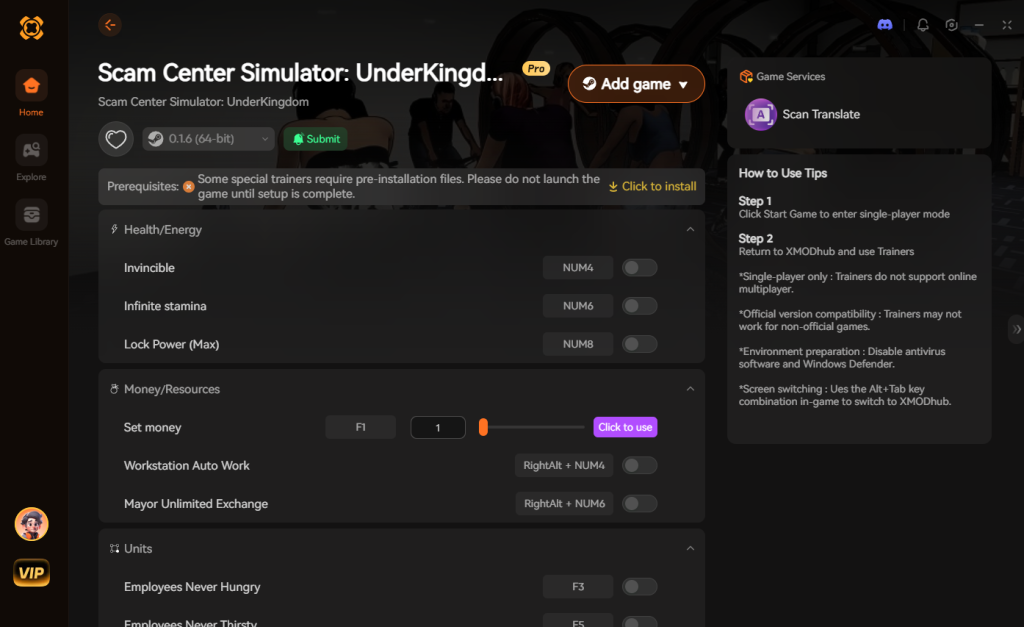
【Download Scam Center Simulator: UnderKingdom Trainer Now】
4. Top Cheat Engine Table Features for Scam Center Simulator: UnderKingdom
If you are hunting for a dedicated Scam Center Simulator: UnderKingdom cheat engine table, you need to know exactly what scripts to look for. A high-quality .CT file will go far beyond basic 4-byte memory edits. Advanced modders utilize Lua scripting to hook directly into the game’s underlying logic, providing quality-of-life improvements that fundamentally change how the simulation plays out.
When evaluating a cheat table from a community forum or modding site, these are the core features that separate a hastily made file from a professionally structured modification tool. Using these specific scripts allows you to focus entirely on the macro-management of your illicit empire rather than micromanaging every single worker’s fatigue bar.
| Cheat Category | Specific Script / Pointer | In-Game Impact | Priority Level |
|---|---|---|---|
| Financial | Infinite Scam Revenue & Crypto | Bypasses the early-game server grind and unlocks all upgrades. | High |
| Personnel | Freeze Worker Stamina | Prevents staff from sleeping, enabling 24/7 continuous operations. | High |
| Security | Zero Law Enforcement Heat | Completely stops police raids and compound shutdowns. | Critical |
| Progression | Instant Tech Tree Unlocks | Grants immediate access to late-game Quantum Servers. | Medium |
| Logistics | Instant Money Laundering | Removes the real-time delay when converting dirty cash to usable funds. | High |
5. How to Use Cheat Engine’s Speedhack to Bypass Simulation Timers
One of the most powerful, yet frequently overlooked, tools built natively into Cheat Engine is the “Speedhack” function. Because Scam Center Simulator: UnderKingdom heavily relies on real-time timers—whether you are waiting for a batch of dirty money to be laundered through offshore accounts or waiting for a new wing of your underground compound to finish construction—the waiting game can quickly become tedious.
Instead of searching for complex memory addresses to instantly complete tasks, you can simply accelerate the game’s internal clock. How to activate Speedhack in Scam Center Simulator: UnderKingdom:
Pro Tip: While setting the speed to 50.0 might sound tempting, doing so in complex simulation games often causes the physics engine to desync or the worker AI to break, leading to inevitable desktop crashes. Stick to a maximum of 5x to 10x speed for a stable experience. If you prefer a more refined approach, the XMODhub auto-trainer includes a custom game speed slider that interacts with the engine more safely, preventing these AI pathing issues.
6. Where to Find Safe Scam Center Simulator: UnderKingdom Cheat Tables (.CT)?
If you absolutely insist on using CE, you’ll want a pre-made Cheat Table (.CT file). However, you must tread incredibly carefully. The internet is a minefield when it comes to game modification files.
Because Scam Center Simulator: UnderKingdom is a highly searched title with controversial themes, malicious actors actively target players looking for shortcuts. Downloading random .CT files from unmoderated forums, sketchy Reddit threads, or random Discord servers poses a severe cybersecurity risk. A Cheat Table is not just a text file; it can contain complex Lua scripts. When you execute a .CT file in Cheat Engine, you are giving that script permission to run code on your machine with administrative privileges.
Hackers frequently embed trojans, keyloggers, and silent crypto-miners into these Lua scripts. You might think you are downloading a simple infinite money cheat for Scam Center Simulator: UnderKingdom, but in the background, a malicious script is hijacking your GPU to mine cryptocurrency or stealing your saved browser passwords. Even if the file isn’t outright malware, outdated tables will immediately crash your game and potentially corrupt your 40-hour save file. This is exactly why a verified, professionally maintained application like XMODhub is the safest choice. Our developers isolate the memory hooks in a secure environment, ensuring that you never have to risk your PC’s security just to get an edge in your simulation management.
7. Frequently Asked Questions (FAQ)
| Platform / Environment | Cheat Engine Compatibility | XMODhub Compatibility | Ban Risk Level |
|---|---|---|---|
| Steam (PC) | Yes (Requires frequent updates) | Yes (1-Click Ready) | None (Single-player) |
| Epic Games Store | Yes (Different pointers needed) | Yes (Universal Hook) | None (Single-player) |
| Xbox Game Pass (PC) | No (UWP Encryption blocks CE) | Yes (Bypasses UWP natively) | None (Single-player) |
| Multiplayer / Co-op | Strictly Prohibited | Auto-Disabled for Safety | High (Account Ban) |
A: Usually, no. Game Pass uses strict UWP (Universal Windows Platform) file encryption that actively blocks Cheat Engine from reading the game’s active memory. Trying to force an attachment will usually result in an access denied error or an instant crash. However, XMODhub is specifically engineered to bypass these restrictions seamlessly, allowing you to modify the Game Pass version just as easily as the Steam version.
A: Modifying data on your own PC for a single-player experience like Scam Center Simulator: UnderKingdom is completely legal. You own the hardware and the localized save data. Just never bring memory editors into a multiplayer server or online leaderboard environment, as that violates Terms of Service and will result in permanent account bans.
A: Yes, it absolutely can, especially during the “First Scan” phase. When you tell Cheat Engine to scan the entire memory space of a heavy simulation game like Scam Center Simulator: UnderKingdom, it forces your CPU to read gigabytes of RAM in seconds. This will cause your game to stutter or freeze temporarily. Active freezing—where you lock a value in place—forces Cheat Engine to rewrite that specific memory address dozens of times per second. If you have a massive cheat table with thirty actively frozen values, you will notice a measurable increase in CPU overhead and a potential drop in frame rates. Optimized trainers like XMODhub inject code directly rather than constantly rewriting values, preserving your game’s performance.
Conclusion: Work Smarter, Not Harder
Learning how memory manipulation works in Cheat Engine is a cool flex. Understanding hexadecimal offsets, pointers, and assembly language gives you a fantastic peek behind the curtain of game development. But let’s be real—when you come home from a long day at work, you just want to spawn in that legendary Level 3 Quantum Hacking Server and wreck rival syndicates without taking a computer science class.
Managing an underground empire in Scam Center Simulator: UnderKingdom is stressful enough without having to manually debug memory addresses every time the developers push a minor patch. Why spend 45 minutes digging through hex codes and risking game crashes when you can click one button and instantly get God Mode and infinite offshore crypto? And the best part? XMODhub supports over 5,000+ PC games. Once you install the app, you can ditch the complicated cheat tables for good and focus on actually enjoying your games.


I am a passionate gamer and writer at XMODhub, dedicated to bringing you the latest gaming news, tips, and insights.
Connect with me:
LinkedIn Profile ↗


 Nancy Miller

