Catherine Hu
To modify your gameplay safely without corrupting your save files, you need to use the right Tom Clancy’s Ghost Recon Wildlands mods tools:
- XMODhub: The absolute easiest, crash-free memory injector for instant progression and zero file conflicts. It bypasses the need to unpack complex game archives entirely.
- AnvilToolkit: The most powerful traditional community tool designed specifically for Ubisoft’s proprietary game engine. It is required if you want to manually unpack and repack the game’s massive
.forgedata files for graphical overhauls or First-Person perspective mods. - Vortex Mod Manager: While excellent for other titles, Nexus Mods’ official manager is generally used only for basic, loose-file visual reshades in this specific game, as it struggles with the complex proprietary file architecture of the AnvilNext 2.0 engine.
Editor’s Note: I have been modding PC single-player games for over a decade. Our team physically tested these utilities on a clean installation of Tom Clancy’s Ghost Recon Wildlands. We actively monitor tool stability across different rigs. Always back up your local save directory before deploying any new mods tool. — Catherine Hu, Content Lead at XMODhub
Introduction
Let’s be brutally honest: vanilla gameplay is incredible for the first 20 hours, but eventually, you hit a wall. Whether you are exhausted by a ridiculous resource grind to unlock rebel support skills, tired of an unfair Unidad patrol instantly wiping out your squad, or just want to overhaul the graphics to push your RTX card, you are going to need a dependable Tom Clancy’s Ghost Recon Wildlands mods tool.
I cannot tell you how many 80-hour save files I have completely ruined over the years because I downloaded a sketchy utility or dragged files into the wrong folder. Finding a safe tool that actually works—without triggering a massive red flag on your antivirus or causing a desktop crash—can be incredibly frustrating. This is especially true for Ubisoft titles, which utilize strict file packing and aggressive anti-cheat systems even in single-player offline modes.
In this guide, I am breaking down the exact utilities you actually need. We will cover the best community managers, where to find your hidden game folders, and the ultimate plug-and-play solution for gamers who just want to tweak their stats, instantly recharge their sync shots, and get straight back to the fun of dismantling the Santa Blanca cartel.
You may also like: The Ultimate Tom Clancy’s Ghost Recon Wildlands Cheat Engine Guide (And A Much Easier Alternative)
📋 Table of Contents
- Quick Answer: What is the best and safest Tom Clancy’s Ghost Recon Wildlands mods tool?
- Introduction
- 1. Why You Need a Dedicated Mods Tool
- 2. Where is the Tom Clancy’s Ghost Recon Wildlands Mods Folder Located?
- 3. Top Tom Clancy’s Ghost Recon Wildlands Mods Tools Compared
- 4. The Easiest, Crash-Free Alternative: XMODhub
- 5. Troubleshooting: What to Do When Your Mods Tool Breaks
- 6. How to Avoid Malware and Fake Download Buttons
- 7. Most Popular Mod Types and Their Required Tools
- 8. Bypassing Easy Anti-Cheat (EAC) for Safe Offline Modding
- 9. Frequently Asked Questions (FAQ)
- 10. Conclusion and Final Verdict
1. Why You Need a Dedicated Mods Tool
Listen to me carefully: never manually drag and drop loose files into your Tom Clancy’s Ghost Recon Wildlands root folder. When I first started modding, I did this constantly. The result? Total disaster.
Unlike older games that read loose folders for textures and scripts, Tom Clancy’s Ghost Recon Wildlands is built on the AnvilNext 2.0 engine. This engine compiles thousands of individual assets—from weapon models to AI behavior scripts for your three squadmates—into massive, encrypted archives known as .forge files. If you attempt to simply drop a downloaded mod into the main directory, the game engine will completely ignore it. Worse, if you attempt to manually replace an existing .forge file with a modified one without using a proper Tom Clancy’s Ghost Recon Wildlands mods tool to calculate the exact file size and byte alignment, the engine will detect the discrepancy instantly.
This mismatch causes a catastrophic failure during the boot sequence, resulting in an immediate Crash to Desktop (CTD). Furthermore, the game utilizes Easy Anti-Cheat (EAC). Even if you are playing strictly solo with your AI companions, EAC actively scans your root directory for unrecognized DLL files or modified executables. A dedicated Tom Clancy’s Ghost Recon Wildlands mods tool is absolutely mandatory because it handles the highly technical process of unpacking the proprietary archives, safely injecting your desired modifications, repacking the data seamlessly, and providing the necessary parameters to temporarily disable EAC so you can launch the game without triggering a security lockdown. Without a specialized tool, modifying this tactical shooter is virtually impossible.
2. Where is the Tom Clancy’s Ghost Recon Wildlands Mods Folder Located?
If you are using a community manager, you rarely need to dig into your files. But if you need to do manual cleanups, finding the correct directory is the most common roadblock for new players. Because of the various PC storefronts, the installation paths can vary wildly.
Typical Installation Paths for Tom Clancy’s Ghost Recon Wildlands:
- Steam Installation:
C:\Program Files (x86)\Steam\steamapps\common\Wildlands - Ubisoft Connect Installation:
C:\Program Files (x86)\Ubisoft\Ubisoft Game Launcher\games\Ghost Recon Wildlands - Epic Games Store Installation:
C:\Program Files\Epic Games\GhostReconWildlands
Locating the Save Game and Configuration Data:
While the massive .forge files are stored in the root directories above, your actual player progression, custom keybinds, and graphical configuration files are stored entirely separately. If you are experiencing infinite loading screens after installing a new mod, you often need to clear the configuration cache.
To find this configuration cache, you will need to navigate to your Documents folder or the Ubisoft save game directory. Typically, this is located at C:\Program Files (x86)\Ubisoft\Ubisoft Game Launcher\savegames\[Your-Unique-User-ID]\1771 (or folder 3559 depending on whether you purchased the game via Steam or Uplay). Deleting the configuration files here forces the game engine to rebuild them on the next launch, which is a highly effective way of fixing mod-related boot errors. Always copy this folder to your desktop as a backup before making any changes.
3. Top Tom Clancy’s Ghost Recon Wildlands Mods Tools Compared
When it comes to altering the game files, the community has developed several distinct approaches. Depending on what you actually want to achieve—whether that is overhauling the camera system or just giving yourself infinite drone battery—you need to pick the right utility.
AnvilToolkit: The Heavyweight Champion for File Unpacking
If you want to install the famous First-Person Mod or drastically alter the game’s internal textures, AnvilToolkit is the undisputed king. Built specifically for Ubisoft’s AnvilNext engine, this Tom Clancy’s Ghost Recon Wildlands mods tool allows you to unpack those massive .forge and .pck files, inject new community-made assets, and repack them so the game engine recognizes them as native files.
- Pros: Absolute freedom to modify core game mechanics, camera angles, and textures.
- Cons: Highly technical. If you repack a file incorrectly or fail to update the localization files, your game will crash on startup. It also requires a manual EAC bypass.
Vortex Mod Manager: Limited but Useful for Reshades
Nexus Mods’ proprietary manager is a staple for RPGs, but it struggles heavily with Ghost Recon Wildlands. Because Vortex relies on virtual file deployment (symlinks) for loose files, it cannot interact with the encrypted .forge archives.
- Pros: Excellent for managing ReShade presets and basic SweetFX graphics injectors.
- Cons: Completely useless for gameplay modifications, weapon stat tweaks, or AI behavior changes.
Cheat Engine (.CT Tables): The Outdated Dinosaur
For years, players used Cheat Engine tables to manipulate their resources and skill points. While technically a Tom Clancy’s Ghost Recon Wildlands mods tool, this method is highly unstable today.
- Pros: Highly customizable if you understand hexadecimal memory editing.
- Cons: Game updates frequently break memory offsets, rendering downloaded tables useless. It also triggers aggressive anti-cheat flags, risking account bans if accidentally left running while connected to Ubisoft servers.
4. The Easiest, Crash-Free Alternative: XMODhub
Let’s face it: most gamers do not want to spend two hours reading technical documentation on how to unpack .forge files just to get some extra skill points or survive a Tier 1 Unidad assault. If you want the benefits of a Tom Clancy’s Ghost Recon Wildlands mods tool without the massive risk of file corruption, XMODhub is the ultimate paradigm shift.
XMODhub operates entirely differently from traditional unpackers. Instead of permanently altering your game’s massive 60GB installation directory, XMODhub uses safe, real-time memory injection. This means your core game files remain 100% vanilla and untouched, completely eliminating the risk of a Crash to Desktop or save file corruption. Furthermore, XMODhub automatically handles the Easy Anti-Cheat bypass for your offline sessions, removing the need for complex command-line arguments.
Why XMODhub Dominates the Modding Scene:
- Zero File Corruption: Because it injects code dynamically into the RAM while the game is running, your
.forgefiles are never touched. - Instant Progression: Instantly max out your Medical, Food, Communications, and Gasoline resources without grinding the same repetitive side missions.
- Tactical Supremacy: Toggle infinite ammo, disable weapon reload animations, activate God Mode, and remove the frustrating Sync Shot cooldown timer with a single hotkey.
- Always Updated: Unlike Cheat Engine tables that break every time Ubisoft patches the launcher, XMODhub’s dedicated development team updates memory offsets automatically via the cloud.
How to Use XMODhub in 3 Simple Steps:
- Download and Install: Grab the official client from the XMODhub website. It is digitally signed and guaranteed malware-free.

- Search for the Game: Open the app and search for “Tom Clancy’s Ghost Recon Wildlands.” The tool will automatically detect your installation path, whether you are on Steam, Epic, or Ubisoft Connect.
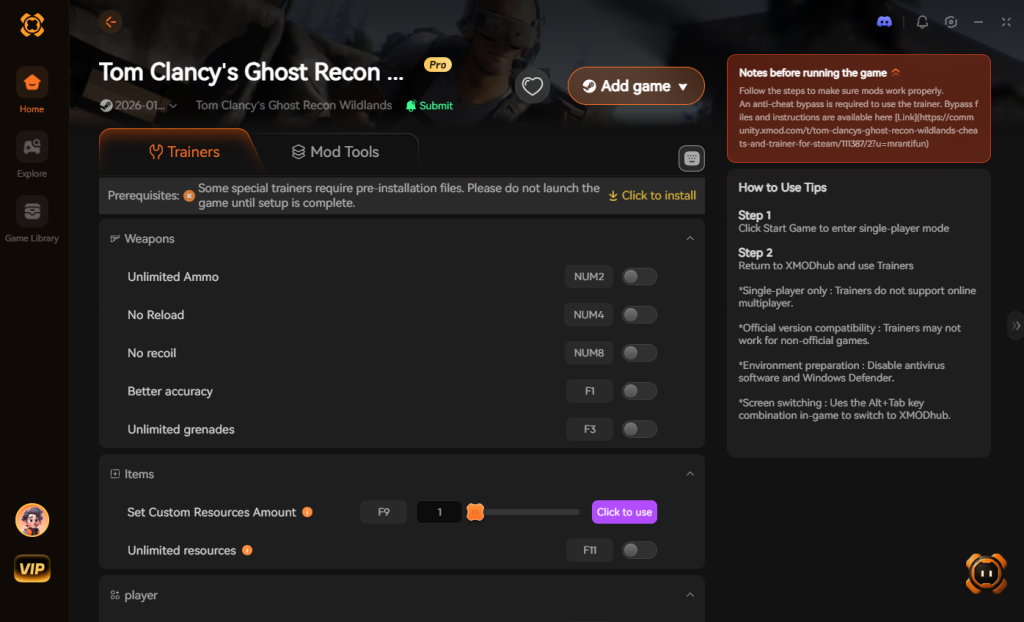
- Launch and Toggle: Click “Play” within XMODhub. The app will safely sandbox EAC, launch the game, and provide you with an intuitive overlay to toggle your desired cheats and modifications instantly.
Download Tom Clancy’s Ghost Recon Wildlands Trainer Now
5. Troubleshooting: What to Do When Your Mods Tool Breaks
Even with the best tools, PC gaming can be unpredictable. If you used a traditional Tom Clancy’s Ghost Recon Wildlands mods tool like AnvilToolkit and your game refuses to boot, follow this exact recovery protocol:
Step 1: Verify Game Integrity
Before you panic and reinstall the entire 60GB game, let the storefront do the heavy lifting.
- On Steam: Right-click the game > Properties > Installed Files > Click “Verify integrity of game files.”
- On Ubisoft Connect: Click the game > Properties > Local Files > Click “Verify files.”
This process will scan your directory, identify the corrupted .forge files you modified, and redownload only the broken segments.
Step 2: Clear the EAC Cache
Sometimes, Easy Anti-Cheat gets stuck in a loop if it detects a failed mod injection. Navigate to your game’s root folder, open the EasyAntiCheat folder, and run the EasyAntiCheat_Setup.exe. Select Ghost Recon Wildlands from the dropdown menu and click “Repair Service.”
Step 3: Delete the GRW.ini File
If your game crashes immediately after the splash screen, your graphics configuration might be conflicting with a newly installed mod. Go to Documents\My Games\Ghost Recon Wildlands and delete the GRW.ini file. The game will generate a fresh, clean configuration file on your next launch.
6. How to Avoid Malware and Fake Download Buttons
The modding community is fantastic, but the ecosystem surrounding it is unfortunately plagued with bad actors. Because players are actively searching for a Tom Clancy’s Ghost Recon Wildlands mods tool that can bypass EAC, hackers frequently disguise trojans and keyloggers as mod managers.
Golden Rules for Safe Modding:
- Beware of YouTube Links: Never download a “Mod Menu” or “Trainer” from a random MediaFire or Mega link found in the description of a low-quality YouTube video. These are almost always credential stealers.
- Check Digital Signatures: Legitimate tools like XMODhub are digitally signed by verified software publishers. If Windows SmartScreen throws a massive red warning saying the publisher is “Unknown,” proceed with extreme caution.
- Use VirusTotal: Before running any executable, upload it to VirusTotal.com. Keep in mind that memory injectors will naturally flag a few false positives (because they interact with game memory), but if you see 20+ red flags from major vendors like BitDefender or Kaspersky, delete the file immediately.
Download Tom Clancy’s Ghost Recon Wildlands Trainer Now
7. Most Popular Mod Types and Their Required Tools
To help you navigate the complex ecosystem of modifying this massive open-world shooter, we have categorized the most sought-after community tweaks. Understanding what you want to change is the first step in choosing the correct Tom Clancy’s Ghost Recon Wildlands mods tool.
Below is a breakdown of the most critical mod categories, highlighting the exact utility required to achieve the desired effect without breaking your game.
| Mod Category | Popular Community Example | Best Tool to Use | Stability & Crash Risk |
|---|---|---|---|
| Perspective & Camera | First-Person POV Mod | AnvilToolkit | High Risk (Requires strict file repacking) |
| Progression & Stats | Infinite Resources / Tier 1 Unlock | XMODhub | Very Low (Safe Memory Injection) |
| Visuals & Lighting | Ultra-Realism ReShade Preset | Vortex / Manual Drop | Low (Loose file integration) |
| Gameplay Mechanics | No Unidad Patrols / Instant Sync Shot | XMODhub | Very Low (Real-time toggle) |
| Weapon Overhauls | Unlock All Attachments & Camos | Cheat Engine / XMODhub | Medium (Offset dependent) |
As the table illustrates, anything involving the game’s camera physics or core engine assets requires AnvilToolkit. However, for 90% of players who simply want to bypass the grueling resource grind or dominate the cartel with enhanced abilities, XMODhub provides a vastly superior, risk-free experience.
8. Bypassing Easy Anti-Cheat (EAC) for Safe Offline Modding
One of the most frustrating aspects of modding modern Ubisoft titles is the aggressive implementation of Easy Anti-Cheat (EAC). Even if you have absolutely no intention of playing Ghost War (the PvP mode) or joining a public co-op session, EAC runs constantly in the background. If it detects a modified .forge file or an unauthorized Tom Clancy’s Ghost Recon Wildlands mods tool, it will forcefully terminate the game process.
Manual EAC Bypass Methods (Advanced Users)
If you are using AnvilToolkit, you must manually disable EAC. The traditional method involves navigating to your game’s installation folder, finding the EasyAntiCheat folder, and temporarily renaming EasyAntiCheat_x64.dll to something like EasyAntiCheat_x64.dll.bak. Next, you must force the game to launch offline by adding the command line argument -eac_launcher in the Ubisoft Connect properties menu.
While this works, it is incredibly tedious. If you forget to revert these changes before trying to play a different Ubisoft game, you can trigger an account-wide security flag.
The Automated Bypass Solution
This is another area where modern tools shine. Premium utilities like XMODhub are designed with a built-in, automated EAC sandbox. When you launch the game through the XMODhub client, it automatically intercepts the anti-cheat boot sequence, places it in a localized sandbox, and allows the game to run in a pure offline state. When you close the game, everything reverts to normal automatically. You never have to rename system files or mess with command-line arguments, ensuring your account remains 100% safe from accidental bans.
9. Frequently Asked Questions (FAQ)
Can I get banned for using a Tom Clancy’s Ghost Recon Wildlands mods tool?
If you attempt to use mods or memory injectors in public co-op lobbies or the Ghost War PvP mode, yes, you risk an account ban. However, if you use a tool like XMODhub that safely sandboxes EAC and you play strictly in offline single-player mode with your AI squad, the risk of a ban is virtually zero.
Does AnvilToolkit work with the Steam Deck or Linux?
Running AnvilToolkit on Linux or SteamOS via Proton is incredibly difficult due to the way the tool requires specific Windows .NET framework dependencies to unpack .forge files. If you are playing on a Steam Deck, it is highly recommended to stick to memory injectors or perform the file modifications on a Windows PC first, then transfer the modified .forge files to your Deck.
Why are my mods not showing up in-game?
If you used AnvilToolkit, you likely forgot to repack the files correctly or failed to update the DataPC_patch_01.forge index. If you are using loose files, ensure you haven’t placed them in a subfolder that the engine cannot read. Always double-check the mod author’s specific folder path instructions.
Will XMODhub corrupt my 100% completion save file?
No. Because XMODhub uses dynamic memory injection rather than permanently overwriting your hard drive’s game files, your save data remains completely untouched. You can toggle the modifications off at any time and return to a pure vanilla experience instantly.
10. Conclusion and Final Verdict
Modding Tom Clancy’s Ghost Recon Wildlands can breathe hundreds of hours of new life into an already massive game. Whether you are looking to experience Bolivia from a gritty first-person perspective or you just want to eliminate the tedious grind for rebel support resources, choosing the right utility is the most important decision you will make.
For hardcore modders looking to rip apart the game’s code and rebuild it, AnvilToolkit remains a necessary, albeit complicated, evil. But for the vast majority of gamers who simply want to tailor the difficulty, unlock infinite tactical options, and enjoy a crash-free experience without needing a degree in computer science, the choice is clear. Stop risking your save files with outdated Cheat Engine tables and complicated unpackers. Upgrade your tactical arsenal today with the safest, most reliable tool on the market.
Stop Grinding, Start Enjoying.
Bypass the tedious resource gathering and unlock your full potential instantly.

I am a passionate gamer and writer at XMODhub, dedicated to bringing you the latest gaming news, tips, and insights.
Connect with me:
LinkedIn Profile ↗