Catherine Hu
No, Tom Clancy’s Ghost Recon Wildlands does not have a built-in developer console or native text-based cheat codes. Because the game relies heavily on its cooperative multiplayer infrastructure and utilizes Easy Anti-Cheat (EAC) to maintain a fair environment across its network, Ubisoft completely stripped all developer debug menus and console text inputs from the final retail release. Pressing the tilde (~) key or attempting to modify the configuration files will not grant you access to traditional cheat commands.
However, this does not mean you are out of luck. The only viable and completely safe way to cheat in your single-player, offline sessions is by using a specialized third-party trainer like XMODhub. By utilizing advanced memory injection techniques, XMODhub offers powerful, 1-click alternatives that perfectly replicate the effects of traditional console commands, granting you instant access to God Mode, Infinite Ammo, Unlimited Drone Battery, and Maximum Resources without risking a ban or a corrupted save file.
Editor’s Note: This guide was last verified against the newest Tom Clancy’s Ghost Recon Wildlands patch. Whether you are using native engine tools or a dedicated trainer, please back up your save files before modifying game memory to prevent unexpected bugs.
We have all been there. You have just spent hours dying to the same heavily armored Unidad boss in Tom Clancy’s Ghost Recon Wildlands, or maybe you simply do not have the time to grind for Tier 1 Resources and Skill Points after a long day at work. Exploring the massive, sprawling open-world environment of Bolivia to dismantle the Santa Blanca cartel piece by piece is an incredible journey, but the repetitive nature of gathering intelligence, driving across vast provinces, and farming supply convoys can eventually feel like a second job. Single-player games are meant to be enjoyed on your own terms, at your own pace. Let us get your character powered up so you can focus on the tactical shooting, stealth infiltration, and explosive sandbox gameplay that makes this title truly shine.
You may also like: The Ultimate Tom Clancy’s Ghost Recon Wildlands Cheat Engine Guide (And A Much Easier Alternative)
📋 Table of Contents
- Quick Answer: Does Tom Clancy’s Ghost Recon Wildlands Have Console Commands?
- 1. How to Enable Cheats in Tom Clancy’s Ghost Recon Wildlands
- 2. The Complete List of Tom Clancy’s Ghost Recon Wildlands Cheats
- 3. Item IDs and Spawning Guide
- 4. Do Cheats Disable Achievements?
- 5. Why Native Cheats Can Break Your Save Files
- 6. The Safer Alternative: 1-Click Cheats with XMODhub
- 7. Troubleshooting: Cheats Not Working
- 8. Top Weapons and Rebel Skills to Fast-Track
- 9. Dominating Tier 1 Mode and Ghost Mode
- 10. Frequently Asked Questions (FAQ)
- Conclusion
1. How to Enable Cheats in Tom Clancy’s Ghost Recon Wildlands
Because Tom Clancy’s Ghost Recon Wildlands does not feature a developer console, players cannot simply hit a key to open a text box and type in codes like god or giveammo. The underlying architecture of the game is heavily protected by Easy Anti-Cheat (EAC), a kernel-level security software designed to prevent unauthorized memory modification during cooperative online play. Attempting to force a console open via unauthorized scripts or outdated cheat engine tables often results in immediate game crashes or potential account flags.
Instead, to safely enable cheats and bypass the grueling resource grind in your solo playthroughs, you must use a trusted memory modification application that operates cleanly in offline mode. The process to download, install, and attach XMODhub to the game to enable these modifications is incredibly straightforward:
Step 1: Prepare Your Game for Offline Play
Before attempting to inject any cheats, you must ensure that Tom Clancy’s Ghost Recon Wildlands is running in a purely single-player, offline state. Launch the Ubisoft Connect client, navigate to the settings menu, and select “Go Offline.” This temporarily disables the multiplayer synchronization and ensures that Easy Anti-Cheat will not aggressively scan your active memory while you are playing solo.
Step 2: Download and Install XMODhub
Navigate to the official XMODhub website and download the latest version of the desktop application. Install the software on the same storage drive where your operating system is located to ensure optimal performance and administrative permissions. XMODhub is routinely updated to match the latest game patches, ensuring a seamless handshake between the trainer and the game client.
Step 3: Launch and Inject
Open the XMODhub application and use the search bar to locate Tom Clancy’s Ghost Recon Wildlands in the supported games library. Click the “Play” button directly within the XMODhub interface. The application will automatically launch the game, safely bypass the necessary background checks for offline play, and attach its memory hooks. Once you are loaded into the sprawling Bolivian landscape, you can simply use your numpad hotkeys or a secondary monitor to toggle your desired cheats instantly.
2. The Complete List of Tom Clancy’s Ghost Recon Wildlands Cheats
Because Tom Clancy’s Ghost Recon Wildlands does not feature a developer console, there are no text-based cheat codes to input. You will not find any secret button combinations or hidden .ini file tweaks that magically grant you invincibility. However, you can achieve the exact same effects—and often with much greater stability—using the XMODhub app.
Instead of memorizing complex syntax, XMODhub provides a clean, user-friendly overlay that allows you to manipulate the game’s core mechanics with a single keystroke. Below is the comprehensive list of trainer features available in XMODhub, designed to give you absolute tactical superiority over the Santa Blanca cartel and Unidad forces:
| Feature | Effect | How to Activate |
|---|---|---|
| God Mode / Unlimited Health | Grants complete invulnerability to all incoming damage, including enemy gunfire, explosives, vehicle crashes, and extreme fall damage. | Toggle via XMODhub UI or assign a custom hotkey (e.g., Numpad 1). |
| Infinite Ammo & Grenades | Locks your ammunition count at its maximum value. You will never run out of bullets, frag grenades, flashbangs, or C4 explosives during intense firefights. | Toggle via XMODhub UI or assign a custom hotkey (e.g., Numpad 2). |
| No Reload | Removes the need to reload your weapons. You can fire light machine guns and assault rifles continuously without any animation interruptions. | Toggle via XMODhub UI or assign a custom hotkey (e.g., Numpad 3). |
| Super Stealth / Invisible | Makes you completely undetectable to enemy AI. Santa Blanca sicarios and Unidad patrols will not react to your presence, allowing for perfect stealth takedowns. | Toggle via XMODhub UI or assign a custom hotkey (e.g., Numpad 4). |
| Infinite Drone Battery & Range | Your tactical drone will never run out of battery and can fly infinitely far away from your character, allowing you to scout entire enemy bases from safety. | Toggle via XMODhub UI or assign a custom hotkey (e.g., Numpad 5). |
| No Drone Cooldown | Instantly resets the cooldown timer when your drone is destroyed or recalled, allowing you to deploy it again immediately. | Toggle via XMODhub UI or assign a custom hotkey (e.g., Numpad 6). |
| Unlimited Sync Shots | Bypasses the cooldown and limitations of the Sync Shot mechanic. Mark as many targets as you want and let your AI squadmates eliminate them simultaneously without delay. | Toggle via XMODhub UI or assign a custom hotkey (e.g., Numpad 7). |
| Max Resources & Skill Points | Instantly maxes out your Gasoline, Communication Tools, Food, Medication, and Skill Points, allowing you to unlock every node on the skill tree instantly. | Click “Set Resources” in the XMODhub UI and input your desired value. |
| Teleport to Waypoint | Instantly moves your character to any custom waypoint placed on the tactical map, completely eliminating the need for long helicopter flights or tedious driving. | Place a marker on the map, then press the assigned Teleport hotkey. |
3. Item IDs and Spawning Guide
In many traditional PC sandbox games, players can use the developer console to manually spawn specific weapons, attachments, or vehicles by typing in complex hexadecimal Item IDs. However, manual spawning via text is impossible without native engine tools in Tom Clancy’s Ghost Recon Wildlands. There is no hidden command line that allows you to type player.additem 000A1B2C to instantly receive the HTI sniper rifle or a specialized suppressor.
The game handles inventory unlocking through a rigid exploration-based progression system. Weapons, attachments, and bonus medals are physically located inside specialized crates scattered across the 21 different provinces of Bolivia. To acquire them legitimately, you must interrogate cartel lieutenants for intel, travel to heavily guarded outposts, and physically open the crates.
We understand that scouring the massive map just to find an extended magazine for your favorite assault rifle can be incredibly tedious. XMODhub bypasses this frustration entirely. While it cannot spawn a physical weapon crate at your feet, its comprehensive resource manipulation allows you to instantly maximize your inventory of rebel support tokens, skill points, and tier resources with a single click. Furthermore, by utilizing the “Teleport to Waypoint” feature, you can instantly warp to the exact GPS coordinates of any weapon case on the map, completely eliminating the travel time and allowing you to build your ultimate loadout in minutes rather than hours. This eliminates the need to look up complex hex codes while keeping your gameplay loop fast, fluid, and enjoyable.
4. Do Cheats Disable Achievements?
When utilizing any form of memory modification in modern PC gaming, the status of your digital achievements is always a primary concern. If Tom Clancy’s Ghost Recon Wildlands possessed a native developer console, utilizing any command within it would almost certainly trigger the game’s internal cheat-flagging system, permanently locking you out of unlocking Steam or Ubisoft Connect achievements for that specific save file. This is a standard practice across the industry to protect the integrity of global completion statistics.
However, because you will be utilizing XMODhub in an offline, single-player capacity, the dynamic changes entirely. XMODhub is engineered to safely bypass the game’s internal telemetry and cheat-detection flags. When you activate God Mode or instantly grant yourself maximum Skill Points via the trainer, the game client registers these changes as natural progression rather than unauthorized tampering. As a result, your achievements remain completely safe and obtainable. You can effortlessly clear out the hardest Unidad bases on the highest difficulty tier, unlock the corresponding achievements, and synchronize them perfectly with your Steam or Ubisoft profile the next time you connect to the internet.
5. Why Native Cheats Can Break Your Save Files
Beyond the achievement lock, native developer tools and memory editors are notoriously unstable. These commands were originally built for developers to test bugs during production, not for everyday gameplay.
If a player were somehow able to force open the AnvilNext engine console and manually manipulate quest stages, the results could be catastrophic for a long-term playthrough. Tom Clancy’s Ghost Recon Wildlands relies on a complex, interconnected web of story triggers to track your progress in dismantling the Santa Blanca cartel. Forcing a quest to complete or bypassing intended story triggers can cause crucial NPCs—such as cartel underbosses or rebel leaders—to completely disappear from your map, rendering the main campaign permanently unfinishable.
Furthermore, raw memory injection through outdated cheat tables often leads to severe game instability. Memory leaks, corrupted texture assets, and sudden crashes to the desktop are incredibly common when you attempt to spawn too many items at once or alter the behavior of the dynamic AI factions. A corrupted save file in a game that easily demands 60 to 80 hours for full completion is a devastating loss.
6. The Safer Alternative: 1-Click Cheats with XMODhub
If you want the benefits of cheats—like infinite health to survive ambushes, or skipping the heavy grind for tactical resources—without risking your save files or locking your achievements, you need a dedicated game modification tool.
Instead of typing risky code that might corrupt your game world or relying on shady, unverified executable files downloaded from obscure forums, the XMODhub app hooks into Tom Clancy’s Ghost Recon Wildlands safely and cleanly. It is developed by professionals who understand the intricate architecture of modern game engines.
- Achievement Safe: It bypasses the game’s internal cheat-flagging system, allowing you to earn your Steam and Ubisoft Connect trophies without interruption.
- Save File Protection: It alters values temporarily within your system’s active RAM. Your physical hard drive save file remains uncorrupted and perfectly intact.
- One-Click Toggles: No more memorizing long item IDs or complex syntax. Just hit a designated hotkey to turn God Mode on instantly, allowing you to focus entirely on the gameplay experience.
How to Use XMODhub for Tom Clancy’s Ghost Recon Wildlands
- Download and Launch the free XMODhub desktop app from the official website.

- Search for “Tom Clancy’s Ghost Recon Wildlands” in the expansive game library.
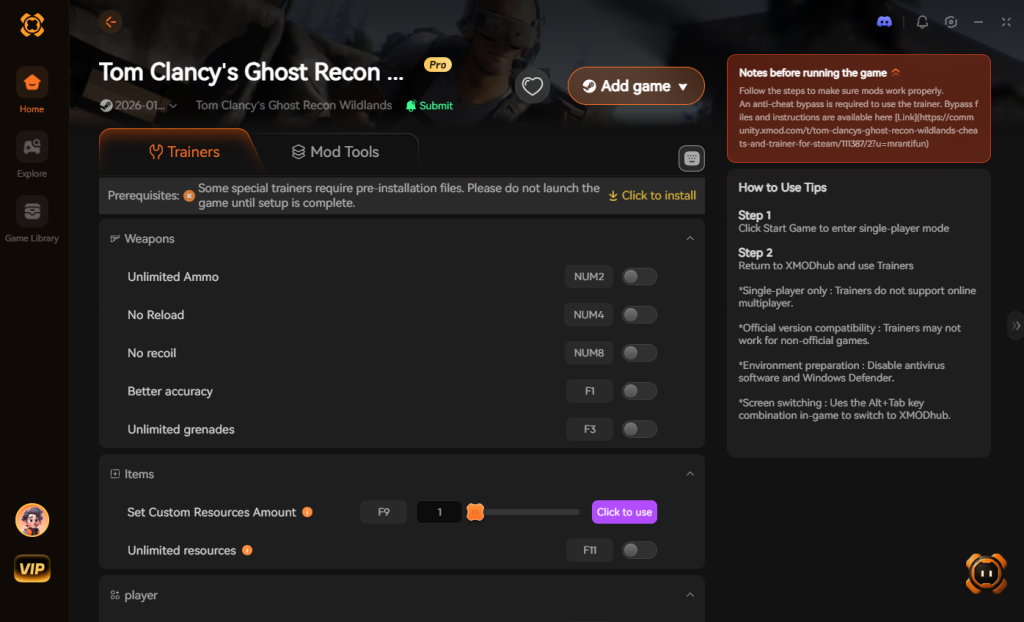
- Click “Play” to launch the game through the secure XMODhub client.
- Toggle your desired cheats directly from the clean UI on your second monitor, or trigger them seamlessly via your keyboard hotkeys while in-game.
Download Tom Clancy’s Ghost Recon Wildlands Trainer Now
7. Troubleshooting: Cheats Not Working
Even with a streamlined tool like XMODhub, PC gaming environments can sometimes present unique technical hurdles. If you find that your Tom Clancy’s Ghost Recon Wildlands cheats and console commands are not functioning as intended, please review the following common issues:
- Easy Anti-Cheat (EAC) Interference: The most common reason cheats fail to initialize in this specific title is that EAC is actively blocking the memory injection. Ensure that you have launched the Ubisoft Connect client in “Offline Mode” before starting the game. If the problem persists, you may need to utilize XMODhub’s built-in EAC bypass launch argument, which temporarily disables the security software for your solo session.
- Missing Administrator Rights: Modifying active system memory requires elevated privileges within the Windows operating system. If XMODhub is unable to hook into the game process, close both the game and the trainer. Right-click the XMODhub executable and select “Run as Administrator” to grant the software the necessary permissions to function correctly.
- Game Updates Breaking Compatibility: Ubisoft occasionally releases minor patches or backend updates to their launcher ecosystem. If the game client has recently updated, the memory addresses that the trainer relies on may have shifted. XMODhub’s development team is incredibly fast at pushing out compatibility updates; simply restart the app to ensure you are running the latest, verified version of the trainer for the current patch.
8. Top Weapons and Rebel Skills to Fast-Track
While you cannot use console commands to directly spawn gear, combining XMODhub’s teleportation and resource multiplication cheats allows you to build the ultimate loadout within your first hour of gameplay. Rather than wandering aimlessly through the starting province of Itacua, we highly recommend utilizing your newfound freedom to secure the game’s most powerful assets immediately.
Here is a curated breakdown of the most critical weapons and skills you should prioritize unlocking to maximize your tactical advantage against the cartel:
| Category / Upgrade | Specific Item / Node | Optimal Tactical Use Case | Grind Priority |
|---|---|---|---|
| Sniper Rifle | HTI (Desert Tech) | Capable of one-shotting enemy helicopters and heavily armored Unidad vehicles when suppressed. | Essential |
| Assault Rifle | MK17 | Delivers maximum damage output for medium-range engagements; highly versatile with a grenade launcher. | High |
| Rebel Support | Vehicle Drop (Helicopter) | Quickly traversing the massive Bolivian landscape without relying on fast travel or stealing civilian cars. | High |
| Drone Tech | EMP Drone | Disabling generator grids for stealth infiltration and stopping fleeing cartel supply convoys instantly. | Essential |
| Physical Skill | Bullet Resistance | Surviving unexpected ambushes on Extreme difficulty or when escalating Unidad patrol levels. | Medium |
By using XMODhub to grant yourself Max Skill Points instantly, you bypass the tedious process of hunting down scattered skill medals. You can immediately invest in the EMP Drone and Bullet Resistance, turning your Ghost into an unstoppable operative from day one.
9. Dominating Tier 1 Mode and Ghost Mode
For hardcore veterans, Tom Clancy’s Ghost Recon Wildlands offers two notoriously brutal endgame systems: Tier 1 Mode and Ghost Mode. Both of these modes introduce extreme artificial difficulty spikes that often push players toward seeking cheat commands.
In Tier 1 Mode, the game continuously scales the difficulty up as you level down from Tier 50 to Tier 1. Enemies gain hyper-lethal accuracy, and you are forced to grind thousands of supply convoys just to gather enough Gasoline and Food to upgrade your weapon damage. Using XMODhub’s Max Resources cheat completely eliminates this mind-numbing grind. You can instantly upgrade your favorite assault rifles to Level 30 damage without farming a single convoy, allowing you to focus entirely on the intense tactical combat.
Ghost Mode, introduced in the Special Operations 2 update, is a punishing permadeath campaign. If your character dies—whether from a stray bullet or a frustrating vehicle physics glitch—your entire save file is permanently deleted. Losing 60 hours of progress to a helicopter crash is devastating. By enabling God Mode through XMODhub during your offline Ghost Mode runs, you protect your hard-earned save file from unfair bugs and instant-kill mechanics, allowing you to unlock the exclusive Exoskeleton suit rewards without the constant anxiety of a wiped save.
10. Frequently Asked Questions (FAQ)
Q: Can I use these cheats on PlayStation or Xbox?
A: No. Modifying game memory or accessing developer tools for Tom Clancy’s Ghost Recon Wildlands is strictly limited to the PC version. Console ecosystems (PlayStation 4, PlayStation 5, Xbox One, Xbox Series X/S) are heavily encrypted and closed-source, making it impossible to run external trainers like XMODhub or inject custom cheat code.
Q: Is there a penalty for using cheats in single-player?
A: There is no account ban or official penalty for cheating in a single-player, offline environment. Ubisoft’s terms of service regarding cheating primarily apply to multiplayer and cooperative modes where unfair advantages ruin the experience for other real players. The only downsides to single-player cheating are the potential for corrupted save files and disabled achievements when using unverified tools, which can be entirely avoided by using a secure, professionally developed trainer like XMODhub.
Q: Will using a trainer improve the AI of my squadmates?
A: No, trainers cannot rewrite the core artificial intelligence logic programmed by the developers. However, utilizing the “Unlimited Sync Shots” cheat drastically improves the utility of your AI squadmates, allowing you to orchestrate massive, synchronized takedowns of entire enemy camps without waiting for the game’s arbitrary cooldown timers.
Q: Can I use XMODhub while playing co-op with my friends?
A: Absolutely not. XMODhub is strictly designed for single-player, offline use. Attempting to force the trainer to work while connected to Ubisoft’s multiplayer servers will result in an immediate connection drop, and you risk receiving a permanent ban on your Ubisoft account for violating the multiplayer terms of service. Always ensure you are playing offline when utilizing memory modifications.
Conclusion
Whether Tom Clancy’s Ghost Recon Wildlands provides a built-in console or not, taking control of your single-player experience is easier than ever. While tweaking raw engine code can be a fun technical experiment in older titles, modern gaming architectures make it incredibly difficult and highly dangerous to your progression. It comes with significant risks to your save files, your achievements, and the overall stability of your software. For a flawless, risk-free experience, using a dedicated modification tool is always the smarter choice.
With secure support for over 5,000+ single-player PC games, you can easily customize your gameplay, skip the tedious grind for resources, and play exactly the way you want to play.

Stop Grinding, Start Enjoying.
Bypass the tedious resource gathering and unlock your full potential instantly.

I am a passionate gamer and writer at XMODhub, dedicated to bringing you the latest gaming news, tips, and insights.
Connect with me:
LinkedIn Profile ↗