Catherine Hu
How do you cheat in Tom Clancy’s Ghost Recon Wildlands? To cheat in Tom Clancy’s Ghost Recon Wildlands, you can manually attach Cheat Engine to the game’s executable and scan for changing numeric values like your current available Skill Points or specific rebel support resources (such as Gasoline, Medical Supplies, Food, and Comms). However, because game updates frequently break Cheat Engine tables (.CT files) and the game utilizes Easy Anti-Cheat (EAC) which actively blocks memory scanners, the safest and easiest alternative is using an auto-updating mod manager like XMODhub. This provides 1-click cheats without requiring any memory scanning, hex code manipulation, or complex EAC bypasses.
[Editor’s Note] Look, I get it. We all start Tom Clancy’s Ghost Recon Wildlands thinking we’re going to play it completely legit. But after dying to an infinite wave of heavily armored Unidad patrols on Tier One mode for the 15th time, or spending hours grinding for those thousands of Medical Supplies just to upgrade your sync shot and drone battery, the fun stops. I’ve been messing with Cheat Engine for years, and trying to isolate the exact memory values for this game’s current patch almost drove me insane. Today, I’m going to show you how to manually hack the values if you want the technical challenge—but I’ll also share the 1-click shortcut I actually use to save my sanity.
You may also like: The Ultimate Tom Clancy’s Ghost Recon Wildlands Console Commands and Cheats Guide
📋 Table of Contents
- Quick Answer
- 1. How to Use Cheat Engine for Tom Clancy’s Ghost Recon Wildlands (The Manual Way)
- 2. Common CE Errors: Pointers Breaking & Not Attaching
- 3. The Better Alternative: 1-Click Cheats with XMODhub
- 4. Where to Find Safe Tom Clancy’s Ghost Recon Wildlands Cheat Tables (.CT)?
- 5. The Tier One Mode Problem: Why Players Abandon Vanilla Gameplay
- 6. Modifying Weapon Stats and Unlocking Attachments
- 7. Frequently Asked Questions (FAQ)
- Conclusion: Work Smarter, Not Harder
1. How to Use Cheat Engine for Tom Clancy’s Ghost Recon Wildlands (The Manual Way)
If you want to go the old-school route and find the memory addresses yourself, here is the basic “First Scan/Next Scan” method tailored specifically for this game.
Before you even launch Cheat Engine, you must bypass Easy Anti-Cheat (EAC), or the game will immediately crash. To do this, you need to go into your Ubisoft Connect or Steam launcher, open the game properties for Tom Clancy’s Ghost Recon Wildlands, and add -eac_launcher to the launch arguments. You must also play completely offline to prevent account bans. Once EAC is disabled and your system is offline, you can proceed with the memory scanning process.
Here is the exact, step-by-step method to isolate and modify your Skill Points and Rebel Resources (Gasoline, Comms, Food, Meds) in Tom Clancy’s Ghost Recon Wildlands using Cheat Engine:
Step 1: Attach the Process and Set Up the Initial Scan
Launch Tom Clancy’s Ghost Recon Wildlands and load into your campaign save file. Once your Ghost is standing in the Bolivian environment, pause the game and open your TacMap, then navigate to the Skills tab. Note your exact number of available Skill Points (for example, let’s say you have 15 points). Minimize the game and open Cheat Engine. Click the glowing PC icon in the top left corner to open the process list, select GRW.exe (the executable for Tom Clancy’s Ghost Recon Wildlands), and click “Open”. In the “Value Type” dropdown, ensure it is set to “4 Bytes”, as Ubisoft’s AnvilNext 2.0 engine stores standard integer currencies in this format. Type “15” into the Value box and click “First Scan”. You will likely see millions of addresses populate in the left pane.
Step 2: Alter the In-Game Value to Filter Results
Return to Tom Clancy’s Ghost Recon Wildlands. You need to change that exact numeric value to narrow down the memory addresses. Purchase a low-tier skill upgrade—for instance, upgrade your Parachute or your Drone Night Vision, which might cost 2 Skill Points. Your new total is now 13.
Step 3: Execute the Next Scan
Alt-tab back to Cheat Engine. In the “Value” box, delete “15” and type in your new value, “13”. Click the “Next Scan” button (do NOT click First Scan again, or you will reset your progress). The list of millions of addresses should drop drastically, perhaps down to a few dozen or even just two or three.
Step 4: Isolate and Modify the Exact Memory Address
If you still have more than three addresses, go back into the game, earn or spend another Skill Point, and repeat the “Next Scan” process with the new number. Once you have isolated 1 to 3 addresses that perfectly mirror your in-game Skill Points, double-click them to drop them into the bottom active address pool of Cheat Engine.
Step 5: Freeze and Inject the New Value
In the bottom pane, double-click the number under the “Value” column for your isolated addresses. Change the number to something massive, like 9999. Press OK. Finally, click the empty checkbox next to the address to place a red “X” in it. This “freezes” the value, meaning the engine will constantly force your Skill Points to stay at 9999, allowing you to instantly unlock every single node in the skill tree without grinding cartel lieutenants.
| In-Game Stat / Resource | Cheat Engine Value Type | Memory Behavior & Notes | Difficulty to Isolate | Recommended Scan Method |
|---|---|---|---|---|
| Skill Points | 4 Byte | Static during gameplay session, shifts on reload. Easy to manipulate. | Low | Exact Value (First Scan / Next Scan) |
| Rebel Resources (Gas, Meds) | 4 Byte | Values are often encrypted or multiplied in memory. | Medium | Exact Value (after tagging a resource convoy) |
| Player Health | Float | Highly dynamic. Regenerates out of combat, making precise scans difficult. | High | Unknown Initial Value / Decreased Value |
| Ammunition (Current Mag) | 4 Byte | Reallocates every time you swap weapons or reload from an ammo crate. | Medium | Exact Value (Shoot 1 bullet, Next Scan) |
| Drone Cooldown Timer | Float | Counts down from a specific float value to 0. | Very High | Unknown Initial Value / Changed Value |
2. Common CE Errors: Pointers Breaking & Not Attaching
If you are pulling your hair out because CE isn’t working for Tom Clancy’s Ghost Recon Wildlands, you aren’t alone. Here is what’s probably happening:
Error: “Cannot attach to process” / Game Crashes:
Tom Clancy’s Ghost Recon Wildlands might be using specific engine protections. As a major Ubisoft title, the game relies heavily on Easy Anti-Cheat (EAC) to maintain the integrity of its cooperative multiplayer and Ghost War PvP modes. When EAC detects a memory debugger like Cheat Engine attempting to hook into GRW.exe, it will forcefully terminate the process, resulting in an immediate crash to your desktop. Even if you manage to bypass EAC using offline launch arguments, the AnvilNext 2.0 engine has built-in anti-debugging measures. To get around this, you must dive into Cheat Engine’s settings, navigate to the “Debugger Options”, and switch your debugging method to “Use VEH Debugger” (Vectored Exception Handling). The standard Windows debugger will trigger tripwires in the game’s code. VEH Debugger operates at a different level of the Windows API, allowing you to peek into the memory of Tom Clancy’s Ghost Recon Wildlands without instantly triggering the game’s self-destruct sequence. However, even with VEH enabled, scanning massive memory blocks too quickly can cause memory leaks and freeze the game entirely.
The Pointer Problem:
You finally found the exact memory address for your HTI Sniper Rifle ammo. You freeze it, enjoy infinite ammo for about twenty minutes, and then you fast travel from the Itacua province to the snowy mountains of Inca Camina. Suddenly, your game crashes, or your infinite ammo stops working entirely. Welcome to the nightmare of Dynamic Memory Allocation (DMA).
In modern massive open-world games like Tom Clancy’s Ghost Recon Wildlands, the engine does not keep every single asset, bullet, and enemy loaded into the same physical RAM address permanently. To optimize performance, the AnvilNext 2.0 engine constantly destroys and rebuilds data structures. Every time you hit a loading screen, trigger a cinematic, or fast travel across Bolivia, the game reallocates memory. The address 0x1A4B9F2 that held your ammo count five minutes ago now holds the texture data for a Santa Blanca cartel truck. Because you left Cheat Engine actively “freezing” that address, you are now forcing the game to inject the number “999” into a texture file, which causes an immediate fatal crash. To fix this manually, you have to learn Assembly language (ASM), perform pointer scans, find the multi-level static base pointers (which can go 7 or 8 levels deep in this game), and write complex Lua scripts to inject code directly into the game’s instruction set. It is an incredibly frustrating, time-consuming process that turns a fun gaming session into a software engineering homework assignment.
3. The Better Alternative: 1-Click Cheats with XMODhub
Here is the dirty little secret of the modding community: Nobody actually wants to spend two hours updating Cheat Engine tables every time a patch drops. The moment Tom Clancy’s Ghost Recon Wildlands updates on Steam, your hard-earned memory addresses shift, and your game crashes to the desktop.
| Feature / Metric | Manual Cheat Engine | XMODhub Auto-Trainer |
|---|---|---|
| Setup Time | 30-60 minutes (finding pointers, bypassing EAC) | Under 60 seconds (1-click launch) |
| Update Reliability | Breaks on every minor game patch or hotfix | Cloud-based auto-updates match game versions instantly |
| Crash Risk | High (Freezing wrong dynamic addresses causes fatal errors) | Zero (Professionally coded injections prevent memory leaks) |
| Ease of Use | Requires deep knowledge of Hex, Float, and Pointers | Seamless UI with simple toggle switches and hotkeys |
| Feature Access | Basic values (Ammo, Skill Points) | Complex scripts (God Mode, Teleportation, Stealth Multipliers) |
Why XMODhub beats manual CE for Tom Clancy’s Ghost Recon Wildlands:
- Zero Hex Codes Needed: Just toggle a beautiful switch on our UI.
- Auto-Updating Cloud Tech: When the game patches, XMODhub updates its trainer automatically. No more broken scripts.
- Premium Features Instant Access:
- Undetected God Mode / Infinite Health
- Unlimited Medical Supplies and Infinite Drone Battery
- Super Speed & Custom Jump Height
- One-Hit Kills for annoying bosses.
How to Use XMODhub for Tom Clancy’s Ghost Recon Wildlands?
- Download and Launch the free XMODhub desktop app.

- Search for “Tom Clancy’s Ghost Recon Wildlands” in the library.
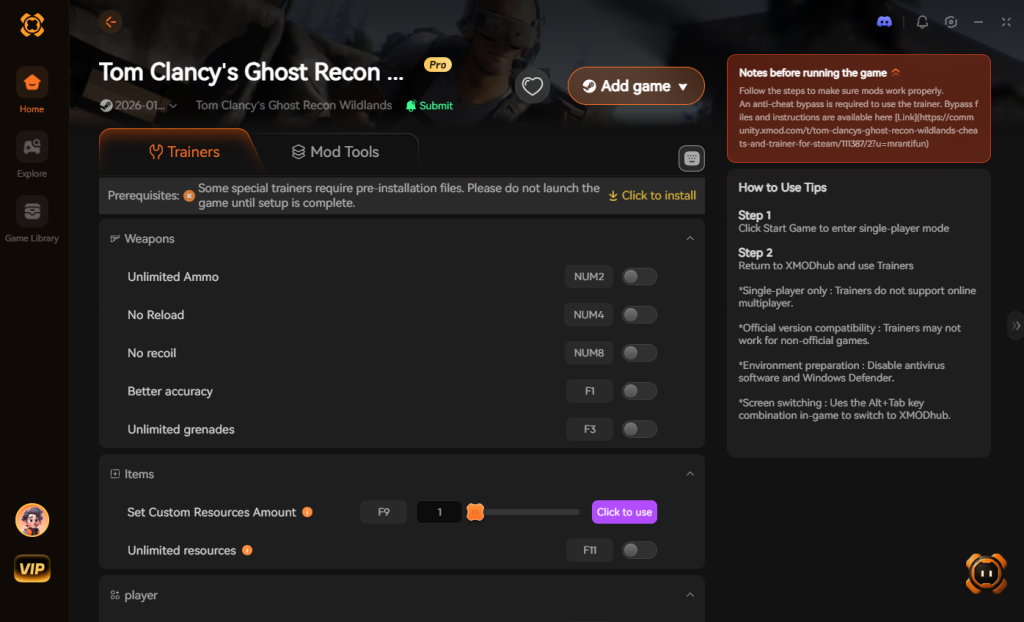
- Click “Play” to auto-hook the game safely.
- Toggle your desired cheats directly from the clean UI or via hotkeys.
Download Tom Clancy’s Ghost Recon Wildlands Trainer Now
4. Where to Find Safe Tom Clancy’s Ghost Recon Wildlands Cheat Tables (.CT)?
If you absolutely insist on using CE, you’ll want a pre-made Cheat Table (.CT file). However, you need to understand the extreme cybersecurity risks associated with downloading random .CT files from anonymous forum boards, obscure Discord servers, or unverified Reddit threads.
A .CT file is not just a harmless list of memory addresses. Modern Cheat Engine tables utilize embedded Lua scripting to handle complex tasks like bypassing anti-cheat protections, executing multi-level pointer scans, and injecting custom Assembly (ASM) code directly into your system’s RAM. Because Lua is a fully functional programming language, malicious actors can easily hide highly destructive payloads inside a seemingly innocent Tom Clancy’s Ghost Recon Wildlands cheat engine table. When you click the prompt that says “Execute Lua Script” upon opening the table, you might think you are activating an infinite ammo cheat. In reality, you could be silently executing a script that downloads and installs a rootkit, a background cryptocurrency miner that will permanently throttle your GPU, or even ransomware that encrypts your entire hard drive.
Furthermore, many “free cheat” websites bundle their .CT downloads with aggressive adware installers or trojans disguised as necessary game fixers. The modding scene is unfortunately filled with bad actors preying on gamers who just want to skip the grind. This is precisely why relying on a verified, digitally signed, and professionally maintained application like XMODhub is the only truly safe choice. XMODhub’s development team rigorously tests every single injection protocol in a secure environment, guaranteeing that you get the cheats you want without compromising your PC’s security or exposing your personal data to anonymous hackers.
5. The Tier One Mode Problem: Why Players Abandon Vanilla Gameplay
If there is one specific reason players hunt down a Tom Clancy’s Ghost Recon Wildlands cheat engine table, it is Tier One Mode. Introduced as a hardcore endgame progression system, Tier One allows players to level down from Tier 50 to Tier 1. However, the difficulty scaling is notoriously unbalanced.
Once you reach the lower tiers (around Tier 30 and below), the AI behavior shifts from tactical to borderline unfair. Santa Blanca sicarios and Unidad soldiers develop literal aimbot capabilities, dual-wielding submachine guns and instantly downing you from 200 meters away through dense foliage. To make matters worse, upgrading your weapons to remain viable in Tier One requires an astronomical amount of rebel resources. Grinding convoy missions stops being fun and starts feeling like a second job.
Here is a breakdown of why manual memory editing struggles with Tier One scaling, and why automated trainers are preferred:
| Tier One Challenge | Vanilla Grind Requirement | Cheat Engine Target Address | XMODhub 1-Click Solution |
|---|---|---|---|
| Weapon Upgrades (Lv 1-30) | Thousands of Gas, Meds, Food, and Comms per level. | 4-Byte (Highly volatile, multi-scan needed after every convoy). | Infinite Resources Toggle |
| Unidad Patrol Escalation | Hide and wait 10+ minutes for the alert level to clear. | N/A (Server-side/Complex script needed to wipe alert flags). | Undetected / Ghost Mode |
| Instant Death (Low TTK) | Play flawlessly; rely entirely on AI sync shots. | Float (Health value, extremely hard to freeze without crashing). | God Mode / Infinite Health |
| Tier Point Farming | Replay the exact same high-tier missions endlessly. | 4-Byte (XP values, high ban risk if synced to Ubisoft servers). | Custom XP Multiplier |
6. Modifying Weapon Stats and Unlocking Attachments
Another major hurdle in Tom Clancy’s Ghost Recon Wildlands is the weapon and attachment system. Exploring the massive map of Bolivia to find that one specific extended magazine or the Desert Tech HTI BDC sniper rifle is exciting at first, but for players on their second or third playthrough, it is pure tedium.
Can you use Cheat Engine to unlock all weapons and attachments? Technically, yes, but it requires highly advanced .CT scripts. Because inventory unlocks are tied to your Ubisoft account synchronization, simply changing a “0” (locked) to a “1” (unlocked) in memory will usually revert the moment the game communicates with the server, or worse, corrupt your save file.
Instead of risking save corruption by manipulating inventory flags with outdated cheat tables, players utilize trainers to bypass the need for attachments entirely. Why spend hours hunting down a compensator to reduce weapon recoil when you can simply toggle “No Recoil” and “No Weapon Spread”? Why hunt for an extended magazine when you have “Infinite Ammo / No Reload” activated? By altering the physics of the weapons rather than the inventory flags, modern trainers give you the firepower of a fully maxed-out arsenal right from the opening mission in Itacua.
7. Frequently Asked Questions (FAQ)
| Game Platform / Storefront | Cheat Engine Compatibility | XMODhub Compatibility | Ban Risk (Singleplayer) | Ban Risk (Multiplayer / Co-op) |
|---|---|---|---|---|
| Steam | Requires manual EAC bypass | 100% Seamless | None (if offline) | Extremely High |
| Ubisoft Connect | Requires manual EAC bypass | 100% Seamless | None (if offline) | Extremely High |
| Epic Games Store | Requires manual EAC bypass | 100% Seamless | None (if offline) | Extremely High |
| Xbox Game Pass (PC) | Blocked by UWP encryption | 100% Seamless | None (if offline) | Extremely High |
Q: Can I use Cheat Engine on the Xbox Game Pass version of Tom Clancy’s Ghost Recon Wildlands?
A: Usually, no. Game Pass uses strict UWP file encryption that actively blocks Cheat Engine from hooking into the executable. However, XMODhub is specifically engineered to bypass these Windows Store restrictions seamlessly.
Q: Is it illegal to use Cheat Engine?
A: Modifying data on your own PC for a single-player experience like Tom Clancy’s Ghost Recon Wildlands is completely legal. Just never bring memory editors into a multiplayer server, as this violates terms of service and ruins the experience for others.
Q: Will using Cheat Engine drop my FPS or slow down my PC?
A: Yes, it absolutely can, depending on how you are utilizing the software. During a “First Scan”, Cheat Engine essentially takes a snapshot of your entire system’s allocated RAM for that specific process. If Tom Clancy’s Ghost Recon Wildlands is utilizing 8GB of RAM, Cheat Engine has to read and index all of it simultaneously. This causes massive spikes in CPU usage and can lead to severe frame rate drops or temporary game freezes. Furthermore, if you actively “freeze” multiple addresses (forcing the engine to rewrite values every millisecond), you are consuming valuable CPU cycles that the game’s engine needs to render physics, AI squadmate behaviors, and weather systems. Poorly optimized Lua scripts running in the background of a .CT file can create a memory leak, slowly degrading your FPS over an hour of gameplay until the game eventually stutters to a halt.
Conclusion: Work Smarter, Not Harder
Learning how memory manipulation works in Cheat Engine is a cool flex. But let’s be real—when you come home from a long day at work, you just want to spawn in that legendary Desert Tech HTI BDC sniper rifle and wreck some Unidad enemies without taking a computer science class.
Why spend 45 minutes digging through hex codes and risking an Easy Anti-Cheat ban when you can click one button and instantly get God Mode? And the best part? XMODhub supports over 5,000+ PC games. Once you install the app, you can ditch the complicated cheat tables for good and get back to actually enjoying your game.

Stop Grinding, Start Enjoying.
Bypass the tedious resource gathering and unlock your full potential instantly.

I am a passionate gamer and writer at XMODhub, dedicated to bringing you the latest gaming news, tips, and insights.
Connect with me:
LinkedIn Profile ↗