
 Catherine Hu
Quick Answer: What are the best Esports Manager 2026 mods right now?
Based on the latest data from the Steam Sports Fest demo release and official developer updates from Neurona Games, Esports Manager 2026 currently does not have a native mod ecosystem for traditional file-based modifications (.pak files, script extenders, or visual overhauls). Because the game is a highly complex, data-driven strategy-simulation title, traditional modding is currently restricted entirely to community-driven database editing.
However, there are essential community tools and memory-level enhancements you absolutely must use to customize your managerial experience:
Editor’s Note
Editor’s Note on Testing Methodology: The tools and database tweaks featured in this guide were analyzed based on community downloads, stability, and recent Steam demo patch compatibility. Always remember to back up your original save files before altering your game directory or importing custom databases. If you want to bypass complicated database management entirely and just want unlimited budgets or instant scouting, skip to the XMODhub section below.
Playing Esports Manager 2026 in its vanilla state is an incredible experience. As a deep strategy-simulation game developed by Neurona Games and published by indie.io, it perfectly captures the high-stakes environment of leading an esports organization to victory. From scouting raw talent and negotiating complex contracts to managing staff and making critical live match decisions, the base game offers immense depth.
However, the PC gaming community always wants more control. Whether you are annoyed by a restrictive organizational budget, want to ensure your custom roster has the highest possible ADR and HS% ratings, or simply want to skip the tedious grinding mechanics of staff management, you might be looking for mods to fix exactly that.
Diving into modding for a specialized management sim can be overwhelming. With a heavy reliance on database structures rather than traditional 3D assets, figuring out how to actually modify Esports Manager 2026—and avoiding game-breaking crashes during live match simulations—is a massive headache. After analyzing the current state of the game’s ecosystem, we have compiled the definitive guide on how to customize, tweak, and enhance Esports Manager 2026 right now.
You may also like: The Ultimate Esports Manager 2026 Cheat Engine Guide (And A Much Easier Alternative)
1. How to Install Mods for Esports Manager 2026 Safely
Before downloading anything, you need to understand how this specific game engine handles modified files. Unlike traditional RPGs or shooters, Esports Manager 2026 does not utilize standard mod managers like Nexus Mods’ Vortex or Mod Organizer 2. There are no script extenders or .dll hooks officially supported by the developers at this time.
Instead, modifying Esports Manager 2026 revolves entirely around Database Management. Here is the step-by-step guide on how to safely install community rosters and database tweaks:
2. Top Quality of Life (QoL) Mods
These mods typically do not drastically change the core game; they just remove the annoyances that waste your time.
The Current Reality of QoL Mods in Esports Manager 2026
As previously stated, Esports Manager 2026 currently does not have a native mod ecosystem for traditional Quality of Life UI tweaks. Because the game’s interface—which handles complex data like real-time match overviews, live round tracking, and intricate contract negotiations—is deeply hardcoded into the current build, traditional UI overhaul mods simply do not exist yet. You cannot download a mod to change the menu layout or speed up the simulation animations natively.
How XMODhub Replaces Missing QoL Mods
Since you cannot download traditional QoL mods, the community relies heavily on memory editing to remove the game’s most tedious aspects. Instead of waiting for a modder to figure out how to unpack the game’s UI files, you can use XMODhub to instantly bypass the grind. Need to speed through a month of in-game time without worrying about staff morale dropping? XMODhub allows you to freeze morale stats. Tired of clicking through endless scouting reports to find a player with a high Headshot Percentage (HS%)? Memory tweaks can reveal hidden player potentials instantly, acting as the ultimate QoL enhancement.
3. Best Visual and Graphics Mods
If you have a high-end PC, you might be looking for mods that will make Esports Manager 2026 look like a true next-gen title.
The Lack of Traditional Graphics Mods
Esports Manager 2026 is a strategy-simulation game focused primarily on tactical depth, UI management, and live match simulation data. It is not a traditional 3D action game. Therefore, there are no visual or graphics mods available for Esports Manager 2026. You will not find 4K texture packs, ray-tracing ENB presets, or weather overhauls on Nexus Mods for this title. The visual fidelity of the game is entirely based on its sleek, modern UI design and the real-time match overview screens.
Enhancing Visual Data via EMDB.gg
While you cannot install a ReShade preset to make the game look photorealistic, you can enhance the visual experience by ensuring all your data is accurate. By utilizing the EMDB.gg community database, you can ensure that every player profile, team logo, and organization banner (such as EternalFire or Copenhagen Wolves) is perfectly represented in your game. Having a fully populated, accurate database is the management-sim equivalent of a high-resolution texture pack—it makes the immersive world feel complete and visually satisfying.
4. Top Gameplay and Overhaul Mods
Looking to change how the game is actually played? These mods adjust combat, economy, and progression.
EMDB.gg Real Roster Overhauls
The closest thing Esports Manager 2026 has to a massive gameplay overhaul is a complete database replacement. By downloading a comprehensive roster overhaul from EMDB.gg, you fundamentally change the game’s economy and progression. Free agents might have their ADR (Average Damage per Round) realistically adjusted, contract demands will shift based on real-world esports economies, and the overall difficulty of winning a Major championship will dynamically change based on the talent pool you have imported.
The Absence of Scripted Gameplay Mods
If you are looking for a mod that changes the fundamental logic of the live match simulation—for example, forcing your team’s tactical AI to always win pistol rounds—you will not find it. The game’s core simulation engine is currently locked behind developer encryption to ensure stability during the Steam Sports Fest demo period. Because there is no official modding toolkit, script-heavy gameplay overhauls cannot be created. To alter the actual gameplay mechanics, economy, and match outcomes, you must look outside traditional modding and utilize memory injection tools.
5. Is There a Mod Limit in Esports Manager 2026?
Unlike Bethesda titles that have a strict 255 .esp plugin limit, Esports Manager 2026 does not have a hardcoded limit on traditional mods because it does not use them. However, there is a very real limitation when it comes to database editing.
The primary limitation in Esports Manager 2026 is your PC’s hardware RAM and CPU processing power. When you import a massive community database from EMDB.gg that includes thousands of custom players, staff members, and intricate contract histories, the game’s engine has to process all of this data during every simulated in-game month. If you load a database that is too large, you will experience severe lag during daily transitions, slow live match simulation speeds, and potential out-of-memory crashes. It is highly recommended to only use optimized databases that your specific CPU can handle.
6. The Danger of Mod Conflicts and Corrupted Saves
While graphic mods in other games are usually safe, gameplay mods that alter health, inventory, or core stats can be incredibly dangerous to your save file. In the context of Esports Manager 2026, the biggest danger comes from Database Conflicts.
If you attempt to merge two different custom databases—for example, one database that overhauls the stats for GamerLegion and another that adds a custom talent acquisition pool—the game’s internal ID system will conflict. If Player ID #1045 is assigned to two different people, Esports Manager 2026 will crash to the desktop immediately upon loading a live match.
Furthermore, every time Neurona Games releases an official developer update on Steam, database structures often change. If you load an old, outdated EMDB.gg roster file into a newly patched version of the game, your career save file can become permanently corrupted. This is the inherent risk of modifying management simulation games.
7. The Easier Alternative to Gameplay Mods: XMODhub
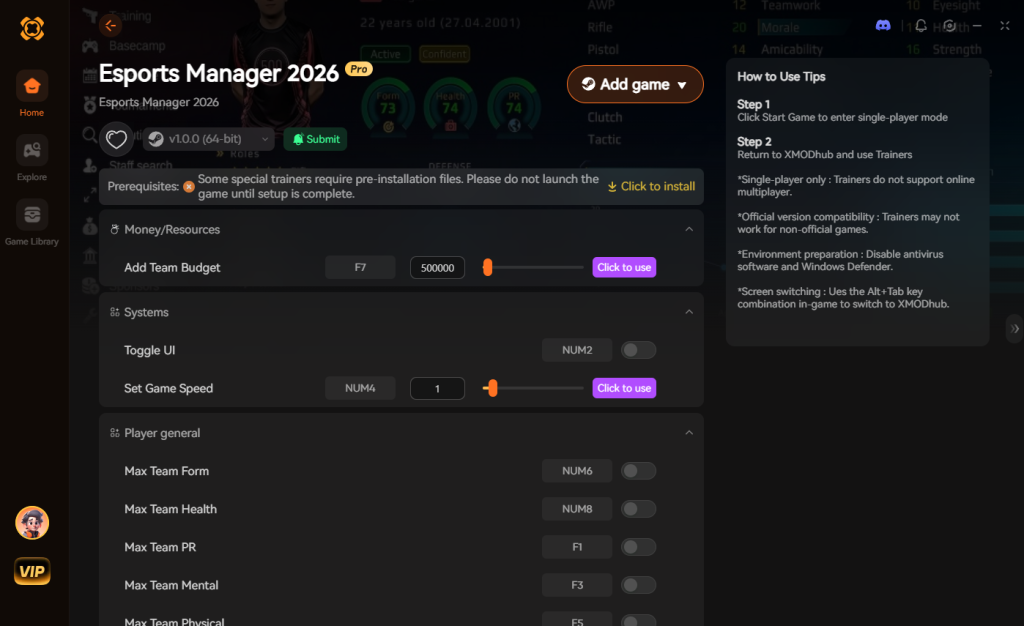
If your main goal for modding is just to make the game more enjoyable—like giving yourself an infinite organizational budget, unlimited scouting points, or guaranteeing that your roster maintains peak morale to win Majors—you do not need to risk breaking your game with complex database merges or corrupted save files.
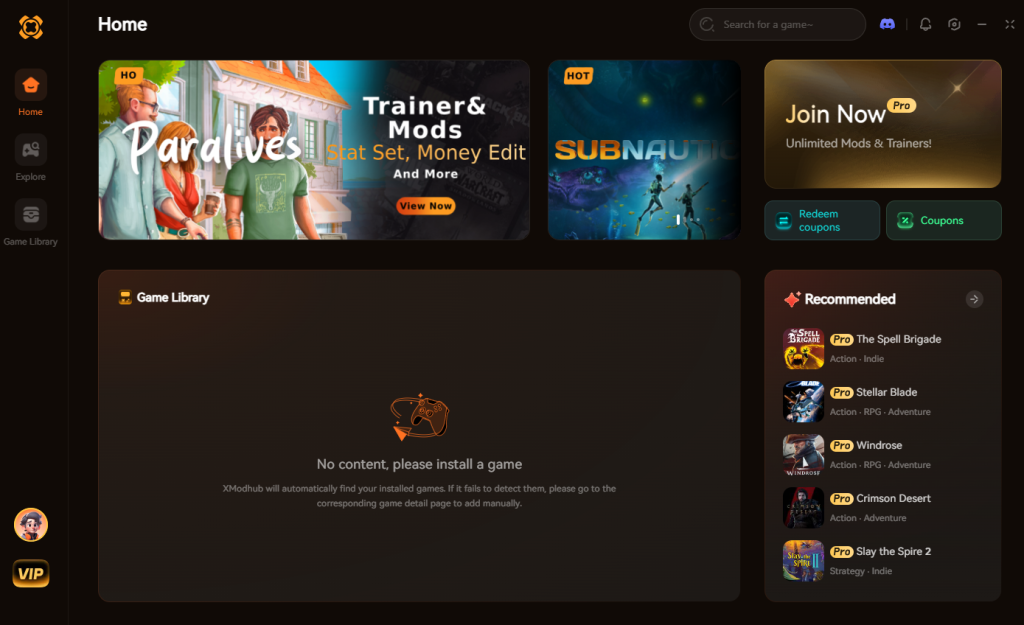
Because Esports Manager 2026 currently lacks a native mod ecosystem for these types of gameplay overhauls, XMODhub shines as the ultimate gameplay enhancer. Instead of downloading outdated databases that conflict with each other or wrestling with a complicated Esports Manager 2026 cheat engine table that requires technical knowledge of hexadecimal values, the XMODhub app runs safely alongside your game.
How to Use XMODhub for Esports Manager 2026
Download Esports Manager 2026 Trainer Now
8. Troubleshooting: Mods Crashing on Startup
If your game is crashing to a black screen after installing custom databases or attempting to modify Esports Manager 2026, check these common culprits:
9. Top Community Database “Mods” to Try First
While traditional .pak files are off the table, the EMDB.gg platform is overflowing with custom databases that function exactly like massive game overhauls. If you are just stepping into the modding scene for Esports Manager 2026, you might be overwhelmed by the sheer volume of user-generated content. To save you from endless scrolling and potential save corruption, we have categorized the most popular and stable database modifications currently dominating the community.
| Database Mod Type | Core Modification Focus | Ideal Player Profile | Stability Impact |
|---|---|---|---|
| Real-World Rosters 2026 | Updates all vanilla team names, logos, and current player contracts to match reality. | Immersion seekers wanting true-to-life esports management. | Low |
| Historical Legends Pack | Injects retired pros and legacy 2010s rosters into the modern free agent pool. | Nostalgic players wanting to build fantasy dream teams. | Medium |
| Hardcore Economy Overhaul | Slashes tournament prize pools and increases staff salary demands by 40%. | Veteran managers seeking a brutal financial challenge. | High |
| Youth Academy Expansion | Generates high-potential rookies with dynamic ADR and HS% growth rates. | Long-term career builders focused on talent development. | Medium |
When downloading these database overhauls, always ensure the version number matches your current Steam build. Loading a Hardcore Economy Overhaul meant for version 1.0.2 into a 1.0.5 client will almost certainly result in broken contract negotiations and immediate desktop crashes.
10. Optimizing Your Roster: The Best Stats to Tweak
If you decide to bypass downloading massive community databases and instead use memory injection tools like XMODhub to create your own “mods” on the fly, you need to know which underlying statistics actually matter in the simulation engine. Esports Manager 2026 is incredibly punishing if your team lacks synergy, even if you have an unlimited budget.
Here are the most critical hidden and visible attributes you should focus on tweaking for maximum win rates:
11. Frequently Asked Questions (FAQ)
A: No. Because Esports Manager 2026 is a single-player strategy-simulation experience, developers do not ban players for modifying their own game files or importing custom rosters from EMDB.gg. You are completely safe to build your team however you see fit.
A: In many cases, yes. Management games like Esports Manager 2026 often detect when a custom database has been loaded and will lock achievement progression to prevent players from easily winning Majors with heavily edited, overpowered rosters. You often have to rely on a secure memory tool like XMODhub, which bypasses the detection entirely, allowing you to customize your experience while still unlocking achievements.
A: Currently, true modding is limited. However, you can contribute to the community by using the EMDB.gg platform to edit teams, players, and rosters to match the real scene, effectively acting as a database modder for the community.
Conclusion
Modding Esports Manager 2026 is a fantastic way to breathe new life into a game you already love. While traditional visual enhancements and massive script-based content overhauls are not currently supported by the game’s architecture, the community-driven EMDB.gg database allows for incredible realism and roster accuracy.
However, altering your gameplay stats—like giving your organization the funds it needs to survive or ensuring your players perform perfectly during live match simulations—does not have to be a complicated, crash-prone process involving risky cheat engine tables or corrupted database files.
For a seamless, risk-free way to customize your difficulty, bypass the grind of talent acquisition, and truly play by your own rules, XMODhub is the superior choice. With dedicated support for Esports Manager 2026 and over 5,000+ other single-player PC games, XMODhub ensures you spend your time actually managing your esports empire and winning championships, rather than troubleshooting broken database load orders.


I am a passionate gamer and writer at XMODhub, dedicated to bringing you the latest gaming news, tips, and insights.
Connect with me:
LinkedIn Profile ↗


 Nancy Miller

