
 Catherine Hu
Quick Answer: What are the best Stardew Valley mods right now?
If you want to immediately elevate your farming simulation experience without reading through the entire guide, here are the absolute must-have modifications for Stardew Valley:
Editor’s Note on Testing Methodology
The mods featured in this guide were analyzed based on community downloads, stability, and recent patch compatibility (specifically the massive 1.6 version updates). Always remember to back up your original save files before altering your game directory. If you want to bypass complicated mod managers entirely, skip to the XMODhub section below.
Introduction
Playing Stardew Valley in its vanilla state is an incredible experience. Originally released in 2016 by solo developer Eric “ConcernedApe” Barone, this open-ended country-life RPG has cemented itself as a modern masterpiece. With its engaging gameplay mechanics, satisfying progression systems, and relaxing atmosphere, it is no wonder the game has received critical acclaim and numerous awards. But as amazing as the vanilla version 1.6 updates are, the modding community has taken Stardew Valley to a completely different level.
Whether you are annoyed by a clunky inventory system, want to push your graphics card to its limits with high-resolution texture overhauls, or simply want to skip the tedious grinding mechanics after hundreds of hours of playtime, there is a mod for exactly that.
However, diving into modding can be overwhelming. With thousands of files available on platforms like Nexus Mods, figuring out which ones actually work—and which ones will crash your game or corrupt your beloved farm—is a massive headache. After analyzing load orders, framework dependencies, and compatibility patches, we have compiled the definitive list of the best Stardew Valley mods you need to install right now.
You may also like: The Ultimate Stardew Valley Cheat Engine Guide (And A Much Easier Alternative)
1. How to Install Mods for Stardew Valley Safely
Before downloading anything, you need to set up your game directory to accept modified files. Unlike some modern titles that feature built-in mod managers, Stardew Valley relies heavily on a third-party script extender to function properly.
To begin your modding journey, you absolutely must install SMAPI (Stardew Modding API). SMAPI is the underlying engine that allows external code to interact with Stardew Valley safely. Without it, none of the mods on this list will work.
First, download the latest version of SMAPI from Nexus Mods or its official website. Extract the downloaded folder and run the installation script for your specific operating system (Windows, macOS, or Linux). The installer will automatically detect your Stardew Valley installation path.
Once installed, SMAPI will generate a new executable file called StardewModdingAPI.exe and create a dedicated Mods folder within your game directory. If you are playing on Steam, you must copy the custom launch path provided by the SMAPI installer (which looks something like "C:\Program Files (x86)\Steam\steamapps\common\Stardew Valley\StardewModdingAPI.exe" %command%) and paste it into the Launch Options under the game’s Properties menu in Steam. This ensures that launching the game through Steam automatically triggers the modded version while still tracking your playtime and enabling Steam achievements.
From this point forward, installing most mods is incredibly simple: download the mod archive from Nexus Mods, extract the contents, and drag the resulting folder directly into your newly created Mods directory.
2. Top Quality of Life (QoL) Mods
These mods do not drastically change the core game; they just remove the annoyances that waste your time. They streamline menus, provide better information, and eliminate repetitive clicking.
NPC Map Locations
Tracking down villagers to deliver gifts or complete quests can be a frustrating guessing game, especially since their schedules change based on the season, weather, and day of the week. NPC Map Locations is a brilliant script that overlays the real-time positions of every villager directly onto your in-game map. It even includes an optional mini-map for your HUD, allowing you to track moving characters without constantly pausing the game. It is a massive time-saver that respects the vanilla aesthetic.
Look Up Anything
Stardew Valley features incredible mechanical depth and complexity, but it often hides crucial data from the player. Look Up Anything allows you to press a simple hotkey (usually F1) while hovering your cursor over any item, crop, machine, or NPC. Instantly, a clean UI box appears detailing exactly how long a crop has left to grow, what gifts an NPC loves or hates, the exact sell price of an item, and how many minutes are left until your keg finishes fermenting wine.
Chests Anywhere
Inventory management is often cited as one of the few criticisms of farm simulation games. Chests Anywhere completely revolutionizes how you handle storage. This mod allows you to access all of your chests, shipping bins, and even your refrigerator from anywhere in the world. You can be deep inside the Skull Cavern, realize your inventory is full, and instantly transfer your precious iridium ore to a chest sitting back on your farm. It also allows you to categorize, name, and color-code your chests from a single unified drop-down menu.
Automate
If you want to scale up your farming operations to an industrial level, Automate is mandatory. By placing a standard chest adjacent to any processing machine, the mod automatically funnels raw materials into the machine and extracts the finished product back into the chest. You can connect dozens of crab pots, furnaces, crystalariums, and preserves jars into massive, self-sustaining production lines. It removes the tedious chore of manually loading and unloading hundreds of machines every single in-game morning.
Skull Cavern Elevator
The Skull Cavern in the Calico Desert is notorious for its punishing, rogue-like progression system where your elevator progress is wiped clean every time you leave. The Skull Cavern Elevator mod fixes this by adding a standard elevator system identical to the one found in the Pelican Town mines. It saves your progress every five floors, allowing you to resume your deep dives without having to spend hundreds of thousands of gold on staircases or rely on extreme luck to reach the bottom.
3. Best Visual and Graphics Mods
If you have a high-end PC, these mods will make Stardew Valley look like a true next-gen title. They enhance the visual fidelity, soften harsh color palettes, and add dynamic environmental details.
Vibrant Pastoral Recolor
The vanilla color palette of Stardew Valley is notoriously bright, featuring highly saturated neon greens and harsh yellows that can strain your eyes during long gaming sessions. Vibrant Pastoral Recolor is a comprehensive aesthetic overhaul that replaces the entire map’s tileset with softer, more natural, and muted tones. It gives the game a highly relaxing, cozy atmosphere that perfectly complements its comforting gameplay loop.
DaisyNiko’s Earthy Interface
To match the muted tones of environmental recolors, DaisyNiko’s Earthy Interface completely redesigns the game’s user interface. It replaces the bright, high-contrast orange menus, dialogue boxes, and inventory screens with gorgeous, high-resolution earthy tones. It features custom pixel art for menu tabs and seamlessly integrates with high-resolution monitors to provide a cleaner, more modern presentation without losing the retro charm.
Seasonal Cute Characters
In the base game, NPCs wear the exact same clothing regardless of whether it is a scorching summer day or a freezing winter blizzard. Seasonal Cute Characters fixes this immersion-breaking issue by providing every single NPC with a massive wardrobe of custom, high-quality pixel art outfits that change dynamically based on the current season and weather conditions. You will see characters wearing heavy coats and scarves in winter, and raincoats during spring showers.
Visible Fish
Fishing is a highly profitable and engaging mini-game in Stardew Valley, but casting your line into opaque water can feel disconnected. The Visible Fish mod renders the actual fish sprites swimming around in the water in real-time. The types of fish you see accurately reflect the current season, time of day, and specific body of water. It adds an incredible layer of visual depth to rivers, lakes, and the ocean, making the world feel significantly more alive.
Elle’s New Barn Animals
If you are tired of looking at the same standard cows, pigs, and sheep, Elle’s New Barn Animals offers a massive visual upgrade for your livestock. This mod introduces dozens of new, incredibly detailed sprites for your animals, including different breeds, color variations, and even entirely new species like deer or alpacas that replace standard farm animals. The textures are crisp, beautifully animated, and blend perfectly with the game’s original visual style.
4. Top Gameplay and Overhaul Mods
Looking to change how the game is actually played? These mods adjust combat, economy, and progression, adding hundreds of hours of new content.
Stardew Valley Expanded (SVE)
Stardew Valley Expanded is not just a mod; it is an unofficial expansion pack. It adds over 50 new locations, 27 new NPCs, fully voiced character events, custom crops, new fish, expanded dialogue, and a completely reimagined world map. It seamlessly integrates into the vanilla lore, offering a massive amount of open-ended options and discoveries. If you have already reached the end-game stopping points of the base game, SVE will make Stardew Valley feel brand new all over again.
Ridgeside Village
Often paired with SVE, Ridgeside Village introduces an entirely new town located on the cliffs above Pelican Town. It boasts over 50 new characters, 400+ new events, custom festivals, original music tracks, and a deep, engaging storyline involving ancient magic and hidden secrets. The sheer mechanical depth and complexity added by this mod rival the base game itself, providing an overwhelming amount of social simulation and friendship opportunities.
Tractor Mod
As your farm grows, manually watering, tilling, and harvesting thousands of crops becomes a massive time sink. The Tractor Mod introduces a late-game vehicle that you can purchase from Robin’s carpentry shop. Once built, you can drive the tractor around your farm to instantly clear rocks, chop down weeds, plant seeds, and harvest massive yields in a fraction of the time. It is a highly satisfying progression upgrade that respects the game’s economy by requiring significant resources to unlock.
Wear More Rings
Combat in the Stardew Valley mines relies heavily on the stat boosts provided by magical rings. However, the vanilla game restricts you to wearing only two rings at a time. The Wear More Rings mod expands your inventory slots, allowing you to equip up to six or more rings simultaneously. This opens up entirely new, complex character builds, letting you combine magnetism, light radius, critical strike chance, and immunity buffs to create the ultimate dungeon-crawling farmer.
Canon-Friendly Dialogue Expansion
After a few in-game years, you will inevitably start seeing the same dialogue lines repeated by the villagers, which can break the immersive social simulation aspect of the game. This mod injects thousands of meticulously written, lore-accurate lines of dialogue into the game. Characters will reference recent events, comment on the changing seasons, and acknowledge your growing friendship with significantly more variety. It drastically improves the dating and marriage candidate experience.
5. Is There a Mod Limit in Stardew Valley?
Unlike the proprietary engines used by Bethesda (such as the Creation Engine for Skyrim or Fallout), which historically enforce a strict 255 plugin limit, Stardew Valley’s engine does not have a hard-coded cap on the number of mods you can install. The SMAPI framework dynamically loads scripts and assets at runtime.
However, your true mod limit is dictated entirely by your PC’s hardware capabilities—specifically your RAM and CPU single-core performance. Every mod you install increases the game’s memory footprint and lengthens the initial loading screen. Massive framework mods like Content Patcher, combined with huge expansions like Stardew Valley Expanded and Ridgeside Village, can easily consume upwards of 8GB to 16GB of system RAM. If you install too many high-resolution texture packs or heavy script modifications, you will eventually experience severe frame rate stuttering, memory leaks, or outright out-of-memory crashes.
6. The Danger of Mod Conflicts and Corrupted Saves
While graphic mods are usually safe, gameplay mods that alter health, inventory, or core stats can be incredibly dangerous to your save file.
The biggest issue in Stardew Valley modding is “Load Order Conflicts.” If Mod A and Mod B try to change the same game file, your game will crash to the desktop immediately. Furthermore, every time the game receives an official developer update (such as the massive transition to version 1.6), script-heavy mods break. If you load a save file attached to a broken mod, that save can become permanently corrupted, instantly erasing hundreds of hours of farming, social progression, and carefully planned layouts. This is why relying on direct file manipulation is always a gamble.
7. The Easier Alternative to Gameplay Mods: XMODhub
If your main goal for modding is just to make the game more enjoyable—like giving yourself infinite carry weight, unlimited money, or invincible health to bypass a frustrating boss in the deeper mines—you do not need to risk breaking your game with complex mod managers or dealing with JSON file errors.
This is where XMODhub shines as the ultimate gameplay enhancer. Instead of downloading outdated mods that conflict with each other, the XMODhub app runs safely alongside Stardew Valley.
How to Use XMODhub for Stardew Valley

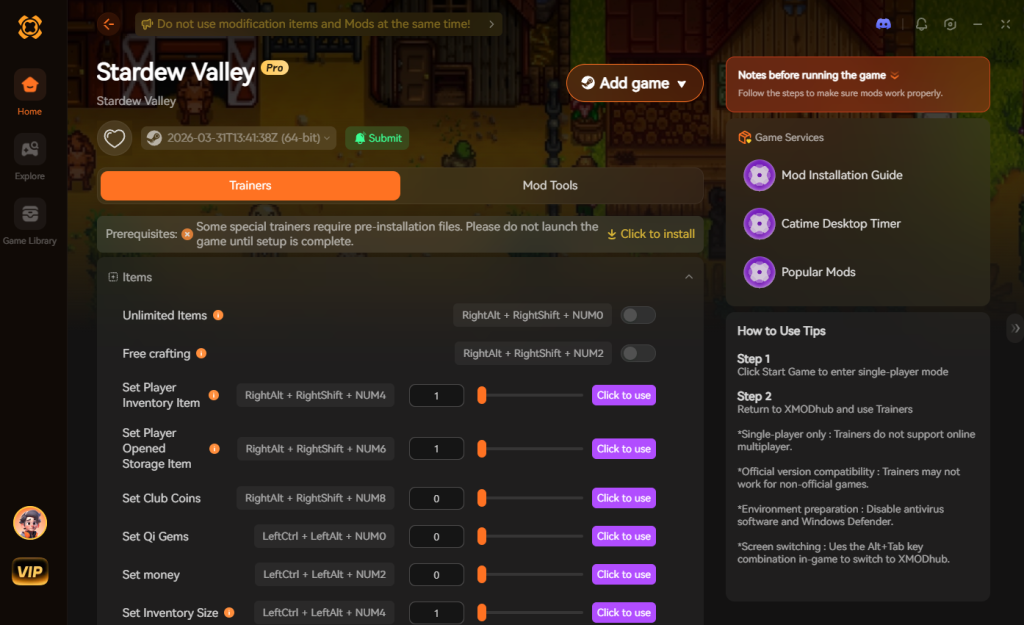
Download Stardew Valley Trainer Now
8. Troubleshooting: Mods Crashing on Startup
If your game is crashing to a black screen or the SMAPI console is flashing red text after installing mods, check these common culprits:
9. Essential Framework Dependencies (The Modding Backbone)
One of the most common mistakes new players make is downloading a highly-rated mod, only to find it does absolutely nothing in-game. This happens because many popular Stardew Valley mods are not standalone files; they are simply “content packs” that rely on underlying foundational frameworks to function.
Before you start downloading aesthetic overhauls or massive gameplay expansions, you should proactively install the following core framework mods. Having these pre-installed will prevent 90% of the red error text you might otherwise see in your SMAPI console.
10. Multiplayer Modding Compatibility Guide
Stardew Valley’s cooperative multiplayer is a massive draw, but introducing mods into a shared farm requires careful coordination. If you plan on playing with friends, you must understand the difference between client-side and server-side modifications to avoid severe desynchronization or game-breaking crashes.
11. Frequently Asked Questions (FAQ)
A: No. Because Stardew Valley is a single-player and private co-op experience, the developer does not ban players for modifying their own game files. However, you must ensure your mod list perfectly matches your friends’ lists if you are playing multiplayer, as mismatched files between hosts and clients will cause severe desynchronization and crashes.
A: In many cases, yes. Stardew Valley detects modified files and will lock achievement progression if you launch the executable directly without proper configuration. You often have to download a separate “Achievement Enabler” mod just to fix this, or use a secure memory tool like XMODhub which bypasses the detection entirely, allowing you to earn achievements while tweaking the game.
Conclusion
Modding Stardew Valley is a fantastic way to breathe new life into a game you already love. While visual enhancements and massive content overhauls require traditional mod managers, altering your gameplay stats does not have to be a complicated, crash-prone process.
For a seamless, risk-free way to customize your difficulty, bypass the grind, and truly play by your own rules, XMODhub is the superior choice. With dedicated support for Stardew Valley and over 5,000+ other single-player PC games, XMODhub ensures you spend your time actually playing, rather than troubleshooting broken load orders.


I am a passionate gamer and writer at XMODhub, dedicated to bringing you the latest gaming news, tips, and insights.
Connect with me:
LinkedIn Profile ↗






