Catherine Hu
Quick Answer: What are the best Pathogenic mods right now?
Important Community Update: Based on the latest developer logs from Slug Disco and the current architecture of the game on itch.io and Steam, Pathogenic currently does not have a native mod ecosystem. Because it is a highly specialized 2D Godot-engine roguelike still evolving through its demo and early access phases, traditional file-based mods (like those found on Nexus Mods) do not exist yet. However, hardcore players are achieving “mod-like” results using universal injectors and memory editors. Here are the top 5 essential enhancements players are currently using:
Editor’s Note on Testing Methodology
The mods featured in this guide were analyzed based on community downloads, stability, and recent patch compatibility. Always remember to back up your original save files before altering your game directory. If you want to bypass complicated mod managers entirely, skip to the XMODhub section below.
Introduction
Playing Pathogenic in its vanilla state is an incredible experience, but the PC gaming community always seeks to push boundaries. Developed by Slug Disco, this visceral 2D roguelike twin-stick shooter puts you in the unique position of playing as the disease. You are a lone parasite fighting a desperate, microscopic war against the human immune system. The core loop—hunting down enemy cells, ripping out their organelles, and grafting them onto your own body to create game-breaking synergies—is incredibly addictive.
However, because the game is currently in its early deployment phases across itch.io and Steam, players often find themselves frustrated by the brutal roguelike difficulty curve, the grinding required to test new flagella and secretor combinations, or the lack of native graphical customization. Whether you are annoyed by a clunky inventory system, want to push your graphics card to its limits, or simply want to skip the tedious grinding mechanics, there is a solution for exactly that.
Diving into game modification can be overwhelming, especially for a Godot-engine game that does not yet support a traditional Steam Workshop layout. With various memory tools and graphical injectors available, figuring out which ones actually work—and which ones will crash your game—is a massive headache. After analyzing the current state of the game’s architecture and compatibility, we have compiled the definitive guide on how to enhance, tweak, and modify Pathogenic right now.
You may also like: The Ultimate Pathogenic Cheat Engine Guide (And A Much Easier Alternative)
1. How to Install Mods for Pathogenic Safely
Before downloading anything, you need to understand how Pathogenic handles its game files. Because the game is built on the Godot engine, all of its core assets, scripts, and parameters are packaged tightly into a single .pck (Pack) file. Currently, there is no official Mod API, meaning you cannot simply drag and drop .pak files into a “Mods” folder like you would in other games.
To safely modify Pathogenic right now, players must rely on external injection tools rather than traditional file replacements.
For Graphical Mods: You will need to download and install ReShade. Run the ReShade setup executable, select the Pathogenic executable file (Pathogenic.exe), and choose the OpenGL or Vulkan rendering API (depending on your specific system configuration). This will create a reshade-shaders folder in your game directory where you can drop custom preset .ini files.
For Gameplay & QoL Tweaks: Traditional mod managers like Vortex or Mod Organizer 2 are completely useless for Pathogenic. Instead, you must use dynamic memory editors. You will need to download a secure memory modification tool (like XMODhub) that hooks into the game’s active RAM processes while it is running, allowing you to alter organelle drop rates, health values, and movement speeds without ever touching the fragile .pck file.
2. Top Quality of Life (QoL) Mods
These modifications do not drastically change the core game; they just remove the annoyances that waste your time. Since native QoL mods don’t exist, these are the top memory tweaks and external adjustments players use to streamline their microscopic warfare.
XMODhub: Instant Organelle Collection
In the vanilla game, ripping out organelles from defeated enemy cells and grafting them onto your parasite takes a brief moment. In the heat of a twin-stick bullet-hell scenario, this delay can get you killed by swarming T cells. This memory tweak completely removes the interaction delay, allowing you to instantly vacuum up mitochondria and spikes the millisecond an enemy dies, keeping your momentum fluid and aggressive.
XMODhub: Infinite Dash and Flagella Stamina
Movement is everything in Pathogenic. You rely heavily on your flagella to dart away from massive macrophage enemies. However, stamina or cooldown limits can leave you stranded in dangerous territory. This tweak locks your movement cooldowns to zero, allowing you to continuously dart around the petri dish environment. It eliminates the frustrating moments of being cornered simply because your parasite ran out of breath.
Borderless Windowed Override (Launch Parameter)
Many players have noted that certain early builds of the game handle alt-tabbing poorly in exclusive fullscreen mode. By right-clicking Pathogenic in Steam (or creating a shortcut from your itch.io download), going to Properties, and adding the launch argument –borderless, you force the Godot engine to run in a seamless borderless window. This allows you to smoothly monitor external tools, wikis, or Discord without crashing the game engine.
XMODhub: Expanded Field of View (Camera Hack)
The default camera zoom in Pathogenic is highly focused on your parasite, which is great for visceral melee combat using spikes, but terrible for planning against ranged protozoa attacks. This memory adjustment forces the game’s 2D camera to pull back by an additional 25%. This broader field of view acts as a massive QoL improvement, letting you see incoming tapeworms and immune system waves long before they enter your immediate threat radius.
3. Best Visual and Graphics Mods
If you have a high-end PC, these mods will make Pathogenic look like a true next-gen title. While the 2D art style is already deeply atmospheric, universal injector mods can elevate the microscopic horror to new heights.
ReShade: High-Contrast Cellular Shaders
The default color palette of Pathogenic is appropriately murky, simulating the inside of a biological host. However, this ReShade preset injects high-contrast HDR algorithms and advanced color grading to make the organelles pop. Mitochondria glow with a fierce, vibrant energy, and the distinct colors of different immune cells become much easier to identify in the chaotic swarm, indirectly improving your gameplay reaction times.
ReShade: CRT Retro Arcade Filter
For players who want to lean into the “visceral 2D twin-stick shooter” arcade roots, this modification is essential. By layering a subtle CRT scanline effect, slight chromatic aberration, and a curved screen vignette over the game window, Pathogenic transforms from a modern indie title into a gritty, 1990s arcade cabinet experience. It perfectly complements the fast-paced, high-score chasing nature of the roguelike genre.
NVIDIA/AMD Control Panel: Forced Anisotropic Filtering
Because Pathogenic is a 2D game, it doesn’t utilize complex 3D texture filtering natively. However, by opening your GPU control panel, adding the Pathogenic.exe profile, and forcing 16x Anisotropic Filtering and High-Quality Texture Filtering, you can drastically sharpen the sprites. This removes the slight blurriness around the edges of your parasite and the enemy cells, resulting in a much crisper, cleaner image on 1440p and 4K monitors.
Lossless Scaling: Frame Generation Injection
While Pathogenic is generally well-optimized, intense late-game runs where the screen is completely flooded with rival parasites, secretor projectiles, and massive macrophages can cause frame pacing stutters. Using the popular Lossless Scaling application on Steam, you can inject AI frame generation (LSFG) directly into the game. This forces the 2D engine to run at a buttery-smooth 120 or 144 FPS, making the twin-stick aiming feel incredibly responsive and precise.
4. Top Gameplay and Overhaul Mods
Looking to change how the game is actually played? These mods adjust combat, economy, and progression. Since hard-coded overhaul mods aren’t feasible without decompiling the game, players utilize advanced memory adjustments to completely rebalance the microscopic arms race.
XMODhub: Ultimate Pathogen Overhaul (God Mode)
Sometimes you just want to experience the power fantasy of being an unstoppable disease vector without the stress of roguelike permadeath. This tweak locks your parasite’s health pool to maximum. Whether you are being swarmed by basic macrophages or taking direct hits from rival tapeworms, your cellular structure remains completely intact. It is the ultimate way to casually explore the game’s organelle synergies.
XMODhub: Max Spike Melee Damage
In the vanilla game, balancing melee combat (using spikes) versus ranged combat (using secretors) is a delicate dance. If you prefer a highly aggressive, up-close-and-personal playstyle, this modification multiplies your base spike damage by ten. You can tear through the toughest T cells in a single hit, turning your parasite into a terrifying microscopic buzzsaw that dominates the host’s immune system.
XMODhub: Infinite Secretor Ranged Ammo/Rapid Fire
If you prefer to play Pathogenic like a traditional bullet-hell shooter, this tweak is for you. It removes any delays, energy costs, or cooldowns associated with your secretor organelles. You can unleash an endless, rapid-fire torrent of biological projectiles, filling the screen with your attacks and keeping rival protozoa pinned down from across the map.
XMODhub: Freeze Enemy AI (Pacifist Mode)
Want to carefully study the beautiful, grotesque animations of the diverse enemy roster without being immediately attacked? This memory hook disables the aggro routines of all AI entities. Macrophages, T cells, and tapeworms will wander aimlessly around the environment but will never target your parasite. It is a fantastic tool for content creators looking to record gameplay videos or for players who want to practice their movement tech in peace.
5. Is There a Mod Limit in Pathogenic?
Because Pathogenic is built on the Godot engine, it does not suffer from the infamous 255 plugin limit that plagues Bethesda titles (like Skyrim or Fallout). In theory, if the developers release an official Mod API in the future that supports loading multiple .pck expansion files, the only true limitation will be your PC’s hardware RAM and VRAM.
However, under the current modding landscape—which relies entirely on external injectors like ReShade and memory editors like XMODhub—there is effectively no limit. You can run as many ReShade shader passes as your graphics card can handle before the framerate drops. Similarly, you can toggle on dozens of memory tweaks simultaneously without worrying about engine hard-caps, as these tools operate dynamically within the system’s memory rather than stacking conflicting script files.
6. The Danger of Mod Conflicts and Corrupted Saves
While graphic mods are usually safe, gameplay mods that alter health, inventory, or core stats can be incredibly dangerous to your save file.
The biggest issue in traditional modding is “Load Order Conflicts.” If Mod A and Mod B try to change the same game file, your game will crash to the desktop immediately. Furthermore, every time the game receives an official developer update—which happens frequently for active indie titles on itch.io and Steam—script-heavy mods break. If you load a save file attached to a broken mod, that save can become permanently corrupted, instantly wiping out hours of your roguelike progression and perfectly crafted organelle builds. Because Pathogenic is heavily reliant on procedural generation and permadeath mechanics, losing a meta-progression save file to a mod conflict is devastating.
7. The Easier Alternative to Gameplay Mods: XMODhub
If your main goal for modding is just to make the game more enjoyable—like giving yourself infinite carry weight, unlimited power, or invincible health to bypass a frustrating boss—you do not need to risk breaking your game with complex mod managers or risky file unpackers.
This is where XMODhub shines as the ultimate gameplay enhancer. Instead of downloading outdated mods that conflict with each other or trying to reverse-engineer Godot engine files, the XMODhub app runs safely alongside Pathogenic.
How to Use XMODhub for Pathogenic

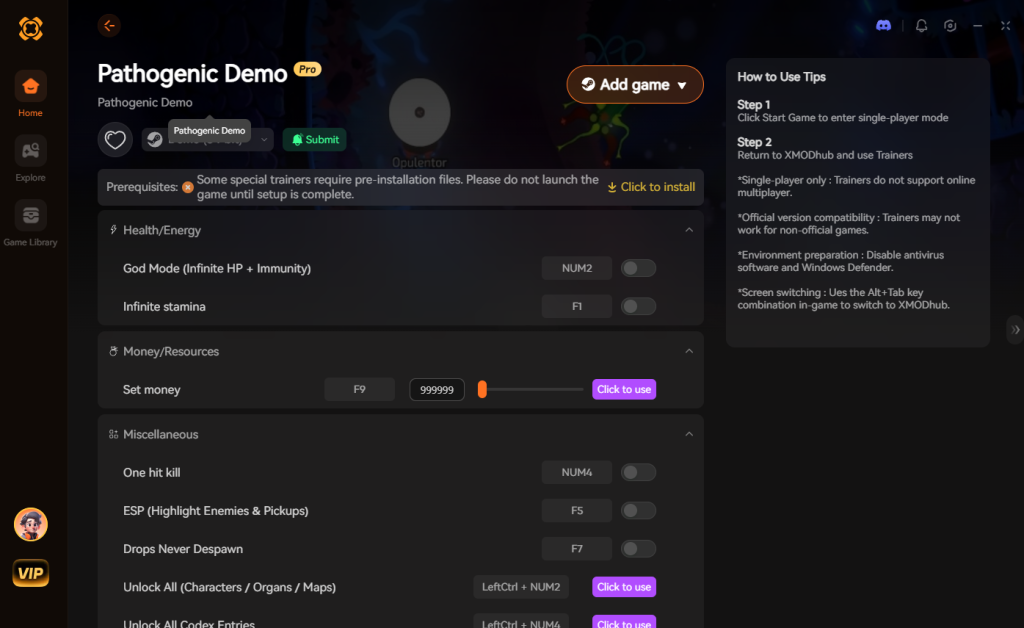
Download Pathogenic Trainer Now
8. Troubleshooting: Mods Crashing on Startup
If your game is crashing to a black screen or instantly closing after attempting to install graphical injectors or external tweaks, check these common culprits:
9. Best Organelle Synergies & Upgrades to Target
While you are experimenting with different gameplay enhancements, knowing which biological components to prioritize is critical to dominating the microscopic battlefield. Pathogenic’s procedural generation means you won’t always get the precise drops you want. This is exactly why hardcore players utilize memory tools to selectively test late-game builds.
Here is a breakdown of the current meta upgrades you should target when crafting your ultimate parasite:
| Organelle Category | Specific Mutation / Node | Optimal Use Case | Priority Level |
|---|---|---|---|
| Locomotion | Hyper-Flagella T3 | Outmaneuvering aggressive Macrophage swarms in tight spaces. | Essential |
| Offense (Ranged) | Toxic Secretor Glands | Melting heavily armored T cells from a safe distance before they aggro. | High |
| Offense (Melee) | Barbed Spike Graft | Tearing through weaker red blood cells for rapid health regeneration. | High |
| Defense | Hardened Membrane | Absorbing stray protozoa projectiles during chaotic bullet-hell phases. | Medium |
| Utility | Mitochondrial Overdrive | Rapidly regenerating energy to sustain continuous, rapid-fire attacks. | Essential |
Combining Hyper-Flagella T3 with Mitochondrial Overdrive creates a virtually untouchable glass-cannon build. By utilizing XMODhub to lock your energy values, you can permanently sustain this hyper-aggressive state and breeze through the most difficult immune system waves.
10. How Memory Tweaking Changes the Meta
In traditional roguelikes, the meta is often defined by the brutal grind. You might spend dozens of hours dying to bad RNG just to unlock a single powerful starting trait. Because Pathogenic is currently missing a native Steam Workshop integration, players cannot easily download “start with all items” mods to bypass this tedious phase.
This is where dynamic memory injection completely flips the script. Instead of relying on lucky drops to test whether a Toxic Secretor pairs well with a Barbed Spike Graft, you can instantly vacuum up organelles, freeze enemy AI to safely configure your build, and test the exact DPS output in real-time. It transforms Pathogenic from a punishing survival game into a highly customizable biological sandbox. Hardcore players who want to optimize their speedrun routes or map out the most efficient upgrade paths rely heavily on these real-time adjustments to reverse-engineer the game’s hidden mechanics.
11. Frequently Asked Questions (FAQ)
A: No. Because Pathogenic is a strictly single-player roguelike experience, developers do not ban players for modifying their own game files. There is no anti-cheat software monitoring your organelle builds or immune system battles. However, you must disable all mods if the game ever introduces a competitive multiplayer or online co-op mode in the future.
A: In many cases, yes. While Pathogenic is currently transitioning to Steam, most modern games detect modified .pck files or altered game states and will lock achievement progression. You often have to download a separate “Achievement Enabler” mod just to fix this, or use a secure memory tool like XMODhub which bypasses the detection entirely, allowing you to earn achievements while heavily modified.
Conclusion
Modding Pathogenic is a fantastic way to breathe new life into a game you already love. While visual enhancements and massive content overhauls require traditional mod managers in most games, the current indie nature of this title means that altering your gameplay stats does not have to be a complicated, crash-prone process involving decompilers and broken scripts.
For a seamless, risk-free way to customize your difficulty, bypass the brutal roguelike grind, and truly play by your own rules as the ultimate disease vector, XMODhub is the superior choice. With dedicated support for Pathogenic and over 5,000+ other single-player PC games, XMODhub ensures you spend your time actually hunting down enemy cells and building game-breaking organelle synergies, rather than troubleshooting broken load orders.


I am a passionate gamer and writer at XMODhub, dedicated to bringing you the latest gaming news, tips, and insights.
Connect with me:
LinkedIn Profile ↗


 Nancy Miller