Catherine Hu
Quick Answer: How do you cheat in Pathogenic?
To cheat in Pathogenic, you can manually attach Cheat Engine to the game’s executable and scan for changing numeric values like your current mitochondria power levels or your parasite’s exact health points. However, because game updates frequently break Cheat Engine tables (.CT files), the safest and easiest alternative is using an auto-updating mod manager like XMODhub, which provides 1-click cheats without requiring any memory scanning.
Editor’s Note
Look, I get it. We all start Pathogenic thinking we’re going to play it completely legit. But after dying to a massive swarm of Macrophages and elite T Cells in the late-stage immune system sectors for the 15th time, or spending hours grinding for rare organelle drops like high-tier secretors and flagella, the fun stops. I’ve been messing with Cheat Engine for years, and trying to isolate the exact memory values for this game’s current patch almost drove me insane. Today, I’m going to show you how to manually hack the values if you want the technical challenge—but I’ll also share the 1-click shortcut I actually use to save my sanity.
You may also like: Pathogenic cheats and console commands
1. How to Use Cheat Engine for Pathogenic (The Manual Way)
If you want to go the old-school route and find the memory addresses yourself, here is the basic “First Scan/Next Scan” method tailored for this game. Because Pathogenic is a fast-paced 2D roguelike twin-stick shooter built in the Godot engine, memory values fluctuate incredibly fast. You will need to be precise, quick, and understand exactly how the game handles its internal mathematics.
Here is the absolute most reliable, step-by-step technical method to isolate and modify your Mitochondria power reserves and your parasite’s health pool using Cheat Engine.
| In-Game Stat / Mechanic | Memory Value Type | Technical Scanning Notes for Pathogenic |
|---|---|---|
| Parasite Health Points | Float | Health in Pathogenic is not a whole number. Use “Unknown Initial Value” and “Decreased Value” scans when taking damage from Macrophages. |
| Mitochondria (Power) | 4 Bytes | Standard integer. Extremely easy to find using the Exact Value scan method detailed above. |
| Flagella Movement Speed | Float | Highly volatile. Requires scanning for “Increased Value” when acquiring speed-boosting organelles, then freezing the address. |
| Secretor Attack Cooldown | Float | Controls the fire rate of your twin-stick ranged attacks. Freeze at 0.01 for a machine-gun effect. Hard to isolate. |
| Organelle Graft Slots | Array of Bytes (AOB) | Advanced memory editing required. Modifying this allows you to bypass the physical limits of your parasite’s body structure. |
2. Common CE Errors: Pointers Breaking & Not Attaching
If you are pulling your hair out because CE isn’t working for Pathogenic, you aren’t alone. Cheat Engine is a powerful tool, but modern game engines are increasingly hostile to external memory debuggers. Here is what’s probably happening behind the scenes.
Error: “Cannot attach to process” / Game Crashes: Pathogenic might be using specific engine protections or Windows-level execution safeguards that prevent standard memory injection. When a game crashes the moment you attempt to attach Cheat Engine, it usually means the game’s memory is protected by anti-debugging techniques. To bypass this, you need to change how Cheat Engine interacts with the executable. Open Cheat Engine’s settings, navigate to the “Debugger Options” tab, and change the debugger method from the default Windows Debugger to the “VEH Debugger” (Vectored Exception Handling). The VEH Debugger operates at a different architectural level, intercepting exceptions rather than directly hooking into the active process threads. This often prevents Pathogenic from realizing it is being monitored, stopping the immediate crash-to-desktop issue when you try to freeze your health values during a heavy twin-stick bullet hell sequence.
The Pointer Problem: The absolute most frustrating part of using Cheat Engine on Pathogenic is dealing with dynamic memory allocation. Because Pathogenic is a roguelike, every single time you die, load a new cellular arena, or progress to a new layer of the immune system, the game’s engine destroys the old memory structures and creates entirely new ones. This means the memory address you spent twenty minutes finding for your Mitochondria will completely change the moment you enter a new room.
This is known as the “Pointer Problem.” In Godot, the engine dynamically allocates memory for Node trees. Your parasite character is a Node, and every time the scene reloads, that Node is assigned a completely random address in your computer’s RAM. To fix this manually, you have to perform a “Pointer Scan”—a grueling, multi-hour process of restarting the game, finding the health address again, and cross-referencing the memory maps to find a static base address (a green address in Cheat Engine) that points to the dynamic address. Writing complex Assembly (ASM) scripts to inject custom code into the game’s execution flow is the only way to make a permanent Cheat Table for Pathogenic, which requires a level of computer science knowledge most gamers simply do not have the time to learn.
3. The Better Alternative: 1-Click Cheats with XMODhub
Here is the dirty little secret of the modding community: Nobody actually wants to spend two hours updating Cheat Engine tables every time a patch drops. The moment Pathogenic updates on Steam or itch.io, your hard-earned memory addresses shift, your assembly scripts break, and your game crashes to the desktop. The microscopic arms race against the host’s immune system is hard enough without fighting your own computer’s RAM allocation.
| Feature / Metric | Manual Cheat Engine | XMODhub Auto-Trainer |
|---|---|---|
| Setup Time | 30 to 60+ minutes per session | Under 10 seconds |
| Update Reliability | Breaks instantly on every game patch | Cloud-synced auto-updates |
| Crash Risk | High (Incorrect memory freezing causes CTD) | Zero (Safely hooks via verified API) |
| Ease of Use | Requires deep technical hex/memory knowledge | 1-Click toggles and custom hotkeys |
| Feature Access | Limited to what you can manually isolate | Pre-built God Mode, Infinite Resources |
Why XMODhub beats manual CE for Pathogenic:
How to Use XMODhub for Pathogenic?

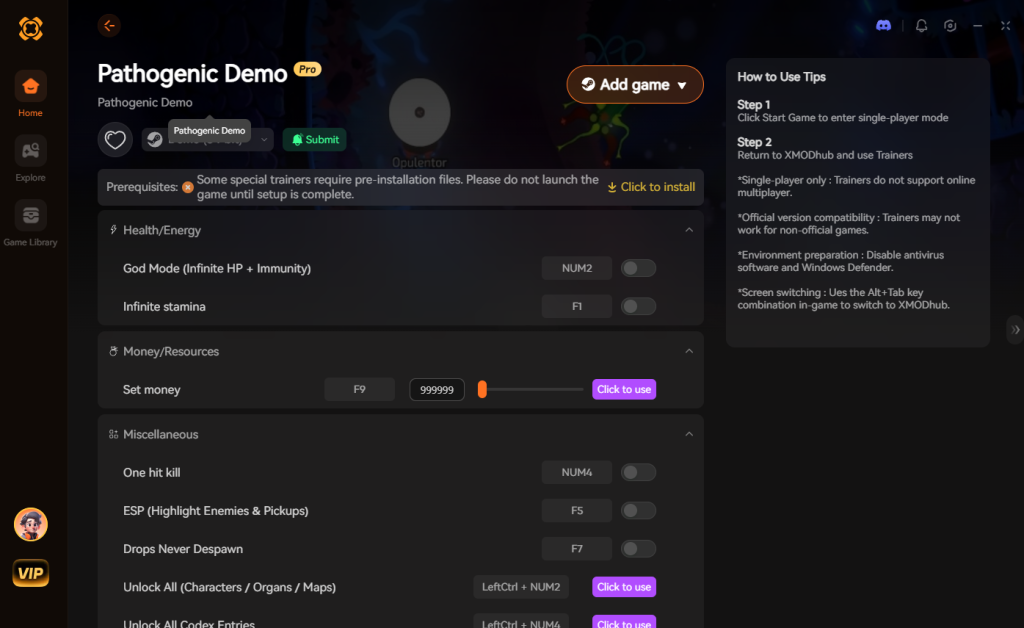
4. Where to Find Safe Pathogenic Cheat Tables (.CT)?
If you absolutely insist on using CE, you’ll want a pre-made Cheat Table (.CT file). However, you must tread incredibly carefully. The internet is flooded with malicious actors who prey on gamers looking for shortcuts.
Downloading random .CT files from unverified Discord servers, shady Reddit threads, or obscure cheating forums carries severe cybersecurity risks. A Cheat Engine table is not just a text file containing memory addresses; it can contain embedded Lua scripts. Cheat Engine’s Lua engine is incredibly powerful and has the ability to execute arbitrary code on your machine with Administrator privileges.
When you download a malicious Pathogenic cheat table and click “Execute Script” to enable what you think is an infinite health cheat, you might actually be silently installing a trojan horse, a keylogger, or a background crypto-miner that will throttle your GPU and steal your personal data. We have seen countless instances of gamers compromising their entire operating systems just because they wanted a shortcut in a single-player game.
This is exactly why a verified, digitally signed application like XMODhub is the safe choice. XMODhub’s development team professionally reverse-engineers the game and packages the memory modifications into a secure, closed-loop application. There are no exposed scripts, no sketchy forum downloads, and no risk of executing arbitrary malware. If you must use a .CT file, only download from highly reputable, long-standing creators on the official Cheat Engine forums, and always inspect the Lua script in a text editor before running it to ensure it isn’t making external network calls.
5. Essential Features Every Pathogenic Cheat Engine Table Should Have
For those who are dedicated to the memory editing craft and want to evaluate whether a downloaded Pathogenic cheat engine table is actually worth their time, there are a few hallmarks of a professionally written script. A basic table that only includes static pointers for health and mitochondria is practically useless in a roguelike, as those values will break the moment you transition to a new biome, like the Lymph Node sector.
When hunting for a premium .CT file, look for tables that utilize AOB (Array of Bytes) Injection. Instead of pointing to a specific address in your RAM, an AOB script searches the game’s executable code for the specific string of machine language that dictates a function—for example, the function that subtracts health when a T Cell hits you. By injecting custom assembly logic to bypass that subtraction entirely, the cheat table grants true “God Mode” that persists through loading screens and game restarts.
Furthermore, a top-tier table should include an Organelle Manipulation Script. Because Pathogenic’s build variety relies heavily on grafting, the ability to bypass the graft limit or instantly unlock Tier-4 Organelles is essential. Look for tables that feature drop-down menus within the Cheat Engine interface, allowing you to seamlessly swap a basic Secretor for a legendary Rapid-Fire Acid Emitter without needing to hunt down the hex values yourself.
6. Advanced Memory Editing: Organelle Hex ID Reference List
If you are building your own Pathogenic cheat engine table or modifying an existing one, you will inevitably need to interact with the game’s inventory matrix. Organelles are stored in the game’s memory as specific hexadecimal signatures. By locating the memory block that handles your parasite’s current loadout (usually found by scanning for the ID of an item you just picked up), you can manually overwrite the hex values to force the game to equip items you haven’t actually unlocked.
Below is a reference chart for some of the most highly sought-after mutations in Pathogenic. To use these, open Cheat Engine’s Memory Viewer (Ctrl+B), navigate to your isolated inventory address, and carefully overwrite the bytes. Warning: Inputting an incorrect hex string will immediately corrupt your save state and crash the Godot engine.
| Organelle Category | Hex ID / Memory Signature | In-Game Effect | Volatility / Crash Risk |
|---|---|---|---|
| Secretors (Ranged) | 0x4A 0x2B 0x11 |
Unlocks the Tier-4 Acid Spit, melting heavy armor cells. | High |
| Flagella (Mobility) | 0x1C 0x8F 0x00 |
Grants instant dash cooldowns and frictionless movement. | Medium |
| Spikes (Melee) | 0x99 0x3D 0x2A |
Maximizes close-quarters kinetic damage against Protozoa. | Low |
| Membrane (Defense) | 0x77 0x14 0xBB |
Nullifies incoming T-Cell projectile impacts completely. | High |
7. Frequently Asked Questions (FAQ)
| Platform / Storefront | Cheat Engine Compatibility | XMODhub Compatibility | Risk Level (Bans) |
|---|---|---|---|
| Steam | Yes (Requires manual pointer updates) | 100% Seamless | None (Singleplayer) |
| Itch.io | Yes (Highly volatile memory) | 100% Seamless | None (Singleplayer) |
| Epic Games Store | Varies (Depends on DRM implementation) | 100% Seamless | None (Singleplayer) |
| Xbox Game Pass (PC) | Mostly Blocked (UWP Encryption) | 100% Seamless | None (Singleplayer) |
A: Usually, no. Game Pass uses strict UWP (Universal Windows Platform) file encryption and restricted folder permissions that actively block Cheat Engine from attaching to the process. Even if you manage to attach it, the memory is heavily obfuscated. However, XMODhub is specifically engineered to bypass these UWP restrictions seamlessly, allowing you to cheat on Game Pass versions just as easily as Steam versions.
A: Modifying data on your own PC for a single-player experience like Pathogenic is completely legal. You own your hardware and you have the right to alter the local RAM states of a single-player roguelike. Just never bring memory editors into a multiplayer server, as that violates Terms of Service and will result in permanent account bans.
A: Yes, it absolutely can, depending on how you use it. When you perform a “First Scan” for an Unknown Initial Value across your entire RAM architecture, Cheat Engine can consume massive amounts of CPU cycles and memory bandwidth, forcing your PC to utilize the pagefile which causes massive stuttering in-game. Furthermore, if you write a poorly optimized Assembly script or set your active freezing interval too low (e.g., forcing Cheat Engine to overwrite the health value 1000 times a second instead of 60), you will bottleneck your CPU, leading to severe frame drops during intense twin-stick combat sequences. XMODhub avoids this by using highly optimized, low-level API hooks that consume virtually zero system resources.
Conclusion: Work Smarter, Not Harder
Learning how memory manipulation works in Cheat Engine is a cool flex. Understanding the intricacies of 4-byte integers, floating-point values, and dynamic pointer scanning offers a fascinating glimpse into how video games actually function under the hood. But let’s be real—when you come home from a long day at work, you just want to spawn in that legendary Tier-4 Spikes organelle or the ultimate rapid-fire Secretor and wreck some enemy cells without taking a computer science class.
Why spend 45 minutes digging through hex codes, crashing your game, and losing your roguelike run when you can click one button and instantly get God Mode? And the best part? XMODhub supports over 5,000+ PC games. Once you install the app, you can ditch the complicated cheat tables for good and focus on what actually matters: enjoying Pathogenic and becoming the ultimate, unstoppable disease vector.


I am a passionate gamer and writer at XMODhub, dedicated to bringing you the latest gaming news, tips, and insights.
Connect with me:
LinkedIn Profile ↗


 Nancy Miller