
 Catherine Hu
Quick Answer: Does Dust Front RTS Have Console Commands?
No, Dust Front RTS does not have a built-in developer console or native text-based cheat codes. Because the game is developed by a solo independent developer with a heavy focus on procedural grand strategy and tightly balanced macro-gameplay, the debugging console has been completely disabled in the public builds, including the Steam Next Fest demo and the full release.
If you are looking to bypass the resource grind or overcome the punishing maximum difficulty settings against the Mutant or Bandit factions, the only way to cheat is by using a third-party trainer like XMODhub. This dedicated software hooks directly into the game’s memory, offering 1-click alternatives like God Mode, Infinite Parts, and Instant Unit Production without requiring you to type out complex command lines.
Editor’s Note
This guide was last verified against the newest Dust Front RTS patch. Whether you are using native engine tools or a dedicated trainer, please back up your save files before modifying game memory to prevent unexpected bugs.
We have all been there. You have just spent hours dying to the same massive Mutant boss waves in Dust Front RTS, or maybe you simply do not have the time to grind for Parts and passive resource generation after a long day of work. Pushing through the Siege of an Industrial City mission on max difficulty requires intense micromanagement of your Mobile Construction Vehicle (MCV), Strike Groups, and population cap. Single-player games are meant to be enjoyed on your own terms. Let us get your Imperial armies powered up so you can crush the enemy bases with ease.
You may also like: The Ultimate Dust Front RTS Cheat Engine Guide
1. How to Enable Cheats in Dust Front RTS
Because Dust Front RTS lacks a native developer console, players cannot simply press the Tilde (~) key and type in commands to spawn Dreadnought super heavy artillery or bypass the technology doctrines. During the development of the game, the solo developer utilized internal debugging tools to test the procedural global map and the complex destruction physics. However, these tools were stripped from the compiled executable to prevent game-breaking sequence errors during the campaign.
Since you cannot enable a text-based console by editing .ini configuration files or adding launch parameters in Steam, you must rely on external memory injection. The safest and most efficient method to enable cheats in Dust Front RTS is through a dedicated modification platform.
Here is the straightforward, three-step process to download and attach XMODhub to the game to enable your cheats:
2. The Complete List of Dust Front RTS Cheats
Because Dust Front RTS does not feature a developer console, there are no text-based cheat codes to input. You will not find any traditional commands like add_resources 1000 or god_mode 1 hidden in the game files.
However, you can achieve the exact same effects—and often much more powerful ones—using the XMODhub app. The trainer isolates the specific memory addresses responsible for the game’s core mechanics, from your primary resource pools to your unit health values.
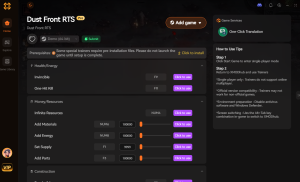
Below is the comprehensive list of trainer features available in XMODhub for Dust Front RTS, detailing exactly how each modification alters your real-time strategy experience.
3. Item IDs and Spawning Guide
In many traditional strategy games, players can open the console and type specific hexadecimal codes to spawn units or items directly at their cursor location. Because Dust Front RTS operates without a native console, manually spawning items or units via text is completely impossible without native engine tools. There are no exposed Item IDs or Entity Tags that a player can reference.
Trying to datamine the exact internal names for the Dreadnought or the Brem repair vehicle will yield no actionable results, as the game’s engine does not actively listen for external text string inputs. The solo developer designed the engine to read unit deployment strictly through the user interface and the predefined reinforcement logic.
However, XMODhub bypasses this limitation entirely by manipulating the game’s memory at the source. Instead of forcing you to look up complex hex codes or type out long strings of text, the trainer allows you to instantly maximize your inventory of Parts or add currency with a single click. When you need to rapidly expand your army, activating the “Instant Unit Recruitment” and “Infinite Parts” features simultaneously achieves the exact same result as a spawn command. You can queue up fifty tanks at your Machinery Plant and watch them instantly roll onto the battlefield, completely eliminating the need to memorize arbitrary Item IDs.
4. Do Cheats Disable Achievements?
When playing modern PC titles on platforms like Steam or the Epic Games Store, the implementation of developer consoles often triggers an internal flag that permanently disables achievement progression for that specific save file. If Dust Front RTS featured native console commands, utilizing them to clear the map or instantly win the Siege of an industrial city mission would undoubtedly lock you out of earning your hard-fought trophies.
Because you are utilizing XMODhub instead of a native console, your achievement progression remains completely secure. The trainer operates externally, intercepting and altering memory values on the fly without ever triggering the game’s internal cheat-detection flags.
Whether you are playing the Steam Next Fest demo or tackling the full strategic campaign on the maximum difficulty scale, you can freely use God Mode to protect your MCV or Infinite Resources to build massive defensive perimeters. The game will still register your mission completions, territory conquests, and boss defeats as legitimate gameplay, allowing you to unlock every single achievement without any restrictions.
5. Why Native Cheats Can Break Your Save Files
Beyond the achievement lock, native developer tools and memory editors are notoriously unstable. These commands were originally built for developers to test bugs during production, not for everyday gameplay.
Forcing a quest to complete or bypassing intended story triggers can cause crucial NPCs to completely disappear from your map. Memory leaks, corrupted assets, and sudden crashes to the desktop are incredibly common when you spawn too many items at once. In a game like Dust Front RTS, where the destruction physics, fire hazards, and procedural global map elements are deeply intertwined, forcing the engine to execute untested console commands could permanently corrupt your campaign progress. If the game attempts to load a procedural territory that you artificially bypassed, the entire save file may become unreadable, costing you dozens of hours of strategic planning.
6. The Safer Alternative: 1-Click Cheats with XMODhub
If you want the benefits of cheats—like infinite health or skipping the heavy grind—without risking your save files or locking your achievements, you need a dedicated game modification tool.
Instead of typing risky code that might corrupt your game world, the XMODhub app hooks into Dust Front RTS safely and cleanly. It understands the specific memory architecture of the real-time strategy engine, ensuring that your modifications only affect the intended variables.
How to Use XMODhub for Dust Front RTS

Download Dust Front RTS Trainer Now
7. Troubleshooting: Cheats Not Working
Even with a streamlined tool like XMODhub, PC gaming environments can sometimes present technical hurdles. If you find that your hotkeys are unresponsive or the cheats are not actively altering your gameplay in Dust Front RTS, review the following comprehensive troubleshooting steps:
8. Best Cheat Combinations for Maximum Tactical Advantage
Dust Front RTS is heavily focused on macro-gameplay, procedural grand strategy, and managing the attrition of your Imperial forces. Using individual cheats can be helpful, but layering them strategically allows you to completely bypass the most punishing aspects of the procedural campaign map without ruining the fun of real-time combat.
Instead of just turning on God Mode and afk-ing, hardcore players can utilize specific combinations of XMODhub features to curate their ideal gameplay experience. Whether you want to test out late-game units early or simulate massive cinematic battles, here are the most effective strategic pairings:
Overcoming the Procedural Grand Strategy Grind
The global map in Dust Front RTS requires you to manage resources across multiple territories. If you lose a major battle, rebuilding your army from scratch can take hours. By utilizing the Infinite Parts and Instant Unit Recruitment cheats right after a devastating loss, you can immediately replenish your Strike Groups. This allows you to focus purely on the tactical combat and strategic positioning, completely eliminating the tedious downtime associated with passive resource generation.
9. Frequently Asked Questions (FAQ)
A: No. Modifying game memory or accessing developer consoles for Dust Front RTS is strictly limited to the PC version. Console ecosystems are heavily locked down, preventing the execution of unsigned third-party software like memory trainers.
A: There is no account ban or official penalty for cheating in a single-player environment. Dust Front RTS is a strictly single-player experience focusing on a strategic campaign against AI factions like Bandits and Mutants. The only downsides to cheating are the potential for corrupted save files and disabled achievements if you use unstable methods, which can be entirely avoided by using a secure trainer like XMODhub.
A: Yes. XMODhub actively supports major demo releases, especially highly anticipated titles featured during Steam Next Fest events. The trainer profile will be explicitly calibrated to handle the Siege of an industrial city mission available in the demo build.
A: No. The trainer modifies existing memory values; it cannot generate assets that the developer physically removed from the compiled demo build. While you can easily defeat the Bandits and Mutants, you cannot force the game to let you play as the Alien faction if their specific unit models and code are not present in the demo’s files.
Conclusion
Whether Dust Front RTS provides a built-in console or not, taking control of your single-player experience is easier than ever. While tweaking raw engine code can be a fun technical experiment, it comes with significant risks to your save files and achievements. For a flawless, risk-free experience, using a dedicated modification tool is always the smarter choice.
With secure support for over 5,000+ single-player PC games, you can easily customize your gameplay, skip the tedious grind, and play exactly the way you want. Master the grand strategy layer, build an unstoppable Imperial army, and clear the devastated planet on your own terms.


I am a passionate gamer and writer at XMODhub, dedicated to bringing you the latest gaming news, tips, and insights.
Connect with me:
LinkedIn Profile ↗

 Nancy Miller





