
 Catherine Hu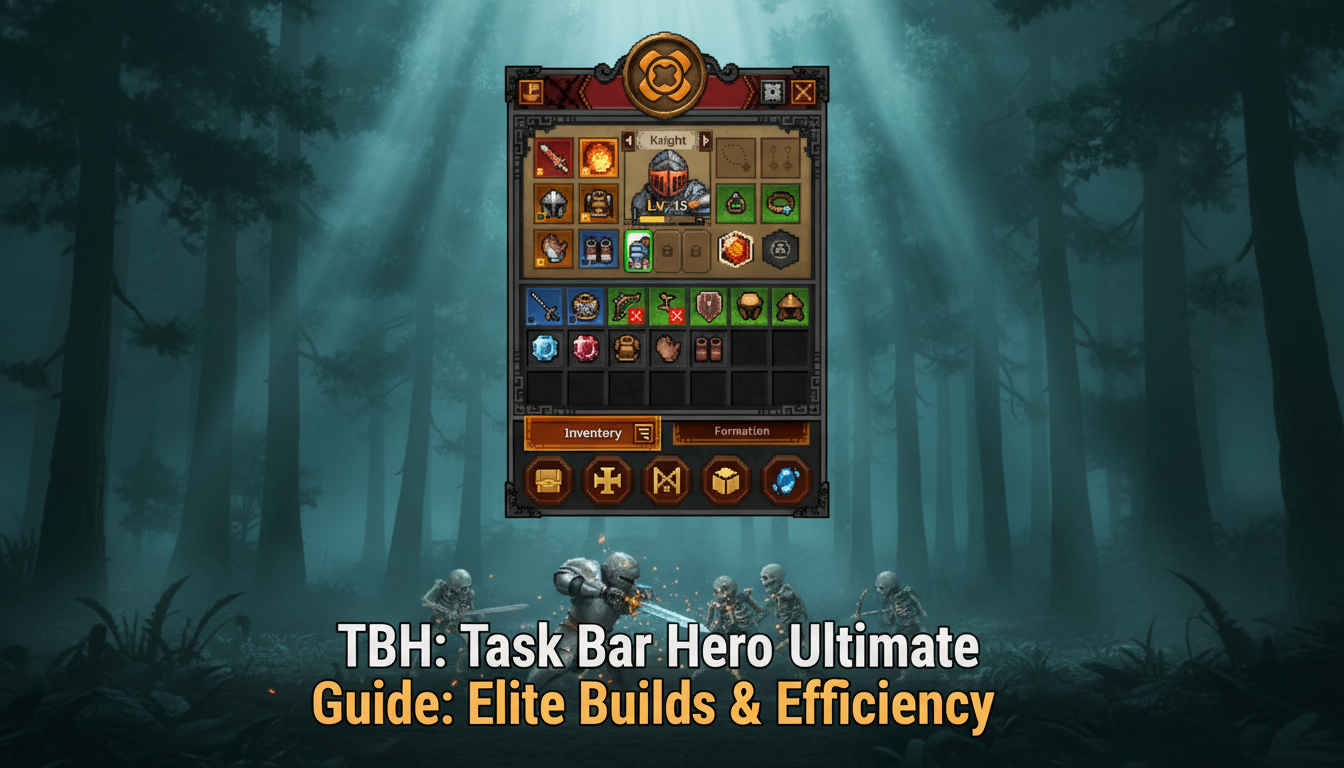
Picture this: You leave your PC running overnight, completely confident that your carefully crafted Slayer build will effortlessly farm Wave 150 while you sleep. You wake up, grab your coffee, eagerly glance down at the bottom of your monitor, and your heart sinks. Your tiny pixel hero is dead. Not only did they wipe on Wave 82 due to a brutal combination of elite monster affixes, but your inventory filled up with junk-tier grey items, causing you to permanently miss out on three guaranteed Legendary Chests that despawned. You wasted eight hours of potential progression because your “Taskbar Traversal Speed” wasn’t synchronized with your lifesteal metrics. This is the harsh reality of idle RPGs, where a single miscalculation in your build completely derails your long-term gear collection loop. If you want to conquer the most overlooked strip of your desktop, you need more than just passive patience; you need mathematical precision.
You may also like: The Ultimate TBH: Task Bar Hero Tracker Guide
Editor’s Note
As an idle-RPG veteran with over 1,000 hours logged since the May 2026 launch of TBH: Task Bar Hero, I’ve reverse-engineered the game’s drop-rate algorithms and pushed both the Hunter and Slayer classes to Wave 5,000+. This guide strips away the guesswork, providing you with the exact numerical thresholds and build synergies required to achieve absolute taskbar supremacy.
Quick Answer: TL;DR: The Short Answer
Here are the core takeaways for immediate success:
Understanding the Taskbar Ecosystem & Early Game Survival
The Desktop Battlefield Mechanics
TBH: Task Bar Hero is not your traditional idle game; it fundamentally alters how you perceive your Windows environment. By anchoring the gameplay to the taskbar, Nugem Studio has created a horizontal, 1D-plane combat system. This unique spatial limitation means that traditional RPG positioning is replaced by “Linear Engagement.” Monsters spawn on the far right (near your system tray) and march leftward toward your Start button. Your hero’s ability to intercept, burst down, and recover before the next wave arrives dictates your entire progression speed.
In the early game (Waves 1-100), your primary goal is to establish a stable “kill zone.” If your hero is forced to retreat too far to the left, you lose valuable seconds of engagement time, which drastically reduces your Gold Per Hour (GPH) and Chest Drop Rate (CDR). You must balance your offensive stats with enough sustain to hold the line at approximately the center of your monitor.
The Class Dilemma: Hunter vs. Slayer
When you first boot up TBH: Task Bar Hero, you are presented with a crucial choice between the base classes (assuming you have access to the DLC classes). The Hunter and the Slayer operate on entirely different mathematical paradigms. The Hunter thrives on high Attack Speed and Range, effectively minimizing Taskbar Traversal Speed (TTS) because they can hit enemies the moment they spawn from the system tray. The Slayer, however, requires a high investment in movement speed and lifesteal to close the gap and survive the melee engagement.
To truly understand which class to main in TBH: Task Bar Hero, we must look at their base scaling and early-game viability. The Slayer has a higher base damage modifier, but the Hunter’s innate range advantage gives them a massive lead in early idle efficiency.
| Class Attribute | Hunter (Ranged) | Slayer (Melee) |
|---|---|---|
| Early Game Priority Stat | Attack Speed | The Chrome Canyons |
| Base Damage | 12-18 | 25-35 |
| Attack Range | 800 Pixels | 50 Pixels |
| Critical Hit Chance | Recycle Bin Wastes | |
| Movement Spd | Base (1.0x) | Fast (1.3x) |
| Lifesteal / Regen | Edge Browser Badlands | |
| Idle Efficiency | S-Tier | B-Tier |
| Armor Penetration | System Tray Dungeons |
For beginners reading this TBH: Task Bar Hero ultimate guide, I strongly recommend starting with the Hunter. The ranged advantage ensures that you take significantly less chip damage during the early waves, allowing you to invest your early gold into offensive gear rather than defensive potions or sustain traits. The Slayer becomes a powerhouse later, but requires specific gear drops to function optimally while entirely unattended.
To dive deeper, read our guide on [Optimizing Early Game Gold Farming]
Advanced Build Mechanics and Gear Synergies
The Mathematics of the Gear Collection Loop
The long-term appeal of TBH: Task Bar Hero is entirely built around its intricate gear collection loop. However, the game obfuscates the underlying math, leading many players to make suboptimal build choices. Gear in this game rolls with one primary stat and up to four secondary affixes, depending on rarity (Common, Uncommon, Rare, Epic, Legendary).
The most critical formula you need to understand is the Effective DPS (eDPS) calculation, which factors in your hero’s downtime. In a standard RPG, DPS is just Damage x Attack Speed. In TBH: Task Bar Hero, the formula is: (Damage * Attack Speed * Crit Multiplier) * (Uptime %). Uptime is dictated by your movement speed and your ability to one-shot enemies. If an enemy takes two hits to kill, your hero experiences a “recoil animation” delay of 0.2 seconds. Over a 10-hour idle session, those 0.2-second delays compound into millions of lost damage points and thousands of missed chest drops.
Stat Priority and Diminishing Returns
To maximize your build in TBH: Task Bar Hero, you must navigate the game’s harsh diminishing returns (DR) on secondary stats.
For a mid-to-late game Hunter build, your stat priority on gear should strictly be: Weapon Damage > Attack Speed (up to 2.5 attacks/sec) > Crit Chance (to 75%) > Crit Damage > Armor Penetration. For the Slayer, the priority shifts heavily: Weapon Damage > Movement Speed (to close gaps instantly) > Lifesteal (minimum 5%) > Max HP > Crit Damage.
Furthermore, you must synergize your gear with your skill tree. Taking the “Piercing Shot” node on the Hunter is mathematically useless if you haven’t stacked enough raw damage to kill the secondary targets. Always ensure your passive skills amplify your highest rolled gear stats. If you find a Legendary weapon with a massive Attack Speed roll, immediately respec your skill tree to favor on-hit effects like “Poison Toxin” or “Stun Lock” to maximize the synergy.
Maximizing Loot Efficiency and Wave Pushing
Deciphering the Chest Drop Algorithm
Progression in TBH: Task Bar Hero is gated by your ability to acquire and open chests. Enemies drop basic loot, but the true account-defining items—like the Mythic-tier weapons or class-specific set pieces—are exclusively locked behind the chest system. Understanding how the game determines chest drops is what separates casual players from hardcore wave pushers.
The game operates on an internal “Pity Timer” combined with a pseudo-random distribution (PRD) system. Every time you kill a monster and it doesn’t drop a chest, your internal probability for a chest drop increases by a fraction of a percent. However, this probability resets if your hero dies or if you manually close the game without proper synchronization. This means that to maximize loot, you must guarantee 100% survival. Pushing a wave that is too difficult and dying repeatedly will constantly reset your PRD, effectively ruining your chest farming efficiency.
Optimal Farming Loops vs. Pushing
You must clearly separate your play sessions into two categories: “Farming Loops” and “Wave Pushing.”
Here is a breakdown of the chest rarities, their base drop rates during an optimal Farming Loop, and what you should expect per hour of optimized idle time:
| Chest Rarity | Base Drop Rate | Pity Timer Trigger | Expected per 10hr Idle Session | Primary Loot Pool |
|---|---|---|---|---|
| Wooden Chest | 15.0% | 50 Kills | 300+ | Crafting Materials, Gold |
| Iron Chest | 5.0% | 200 Kills | 100-120 | Uncommon Gear, Potions |
| Gold Chest | 1.0% | 1,000 Kills | 20-25 | Rare/Epic Gear, Skill Tomes |
| Crystal Chest | 0.1% | 10,000 Kills | 1-3 | Legendary Gear, Cosmetics |
| Taskbar Relic | 0.01% | None (Pure RNG) | < 1 | Mythic Weapons, Permanent Buffs |
To truly optimize TBH: Task Bar Hero, you must align your Farming Loops with your real-life schedule. Set the game to farm a safe zone while you sleep or work. Only attempt to push new waves when you are actively at your PC to manage cooldowns and prevent deaths that would nuke your PRD pity timer.
Fatal Mistakes That Will Ruin Your Idle Run
The Inventory Management Trap
The most devastating mistake players make in TBH: Task Bar Hero revolves around inventory management. As a free-to-play title, the game places strict limitations on your default stash space. If your inventory fills up while you are AFK, the game does not send items to a temporary mailbox; they are permanently deleted. I have seen players lose Crystal Chests because their inventory was clogged with dozens of worthless grey swords.
This is why the “Three Stash Pack” and the “Supporter Pack” mentioned in the Steam store page are essentially mandatory for hardcore players. If you refuse to upgrade your stash, you must obsessively utilize the game’s auto-sell filter. Failing to configure the auto-sell settings to immediately trash Common and Uncommon items before an overnight run is a guaranteed way to brick your progression.
Misallocating Premium Currency and Skill Points
TBH: Task Bar Hero occasionally rewards players with premium gems through achievements. A fatal error is spending these gems on instantly opening low-tier chests or buying temporary gold boosts. Premium currency must be hoarded exclusively for permanent account upgrades, such as unlocking the Slayer class (if you didn’t buy the DLC bundle) or purchasing permanent Global Damage Multipliers.
Similarly, the skill tree in TBH: Task Bar Hero is unforgiving. While you can respec, the gold cost scales exponentially with each reset. Many players fall into the trap of spreading their points too thin, trying to build a “hybrid” character that has both ranged and melee capabilities. The math does not support this. You must hyper-specialize. If you are a Hunter, put zero points into health regeneration and dump everything into raw damage and attack speed. A dead enemy deals no damage. If you fail to specialize, you will hit a mathematical wall around Wave 150 where monsters simply out-scale your hybrid DPS, leading to an endless loop of dying and respawning without any meaningful progression.
Elite Affix Tier List & Rerolling Strategies
As you push into the mid-to-late game (Wave 200+), base stats on gear are no longer sufficient to sustain your eDPS. You must begin utilizing the Blacksmith’s “Reroll” function to hunt for Elite Affixes. Because rerolling costs exponentially more Gold and Void Shards with each attempt, knowing exactly which affixes to lock in is critical to preventing resource bankruptcy.
Below is the definitive TBH: Task Bar Hero affix tier list, engineered to help you identify “god-roll” items at a glance before you accidentally auto-sell them.
| Affix Category | Specific Modifier / Stat | Optimal Use Case | Priority Level |
|---|---|---|---|
| Offensive Core | Critical Multiplier % | Scaling late-game Hunter eDPS past Wave 500. | S-Tier (Essential) |
| Mobility / Utility | Taskbar Traversal Speed (TTS) | Closing the gap for Slayer builds to eliminate downtime. | S-Tier (Essential) |
| Sustain / Defense | Armor Penetration % | Bypassing Elite monster mitigation in Crystal Zones. | A-Tier (High) |
| Farming | Magic Find (MF) | Dedicated farming loops 15 waves below max progression. | B-Tier (Situational) |
| Sustain / Defense | Flat HP Regeneration | Early game survival before unlocking Lifesteal nodes. | C-Tier (Low) |
Pro Tip for Rerolling: Never reroll a Legendary item more than 5 times. The algorithmic cost scaling makes it mathematically more efficient to simply farm a fresh Legendary drop rather than bankrupting your Void Shards trying to force a perfect Taskbar Traversal Speed roll on a bricked item.
Overcoming Milestone Bosses: The DPS Checks
In TBH: Task Bar Hero, every 100 waves introduces a “Milestone Boss”—a massive entity that takes up a significant portion of your taskbar and introduces mechanics that cannot simply be out-healed. These encounters act as hard DPS checks and will completely halt your idle progression if you are not prepared.
The Wave 100 “Start Menu Behemoth”
This is the first true wall for most players. The Behemoth spawns mini-adds that block projectiles. Hunter Strategy: You must manually activate your “Piercing Volley” skill right as the adds spawn to clear them and maintain DPS on the boss. Slayer Strategy: Equip your highest Armor Penetration weapon, as the Behemoth has a 40% physical damage reduction shield that activates at half health.
The Wave 500 “System Tray Sentinel”
The Sentinel introduces the “Taskbar Wipe” mechanic—a slow-moving laser that sweeps from right to left. If your TTS (Taskbar Traversal Speed) is below 1.5x, you will not be able to retreat fast enough to dodge it. This is the exact point in the game where movement speed transitions from a “Quality of Life” stat to a mandatory survival requirement. Hoard your Gold Chests until Wave 499, open them all at once, and pray for TTS-rolled boots.
The Ultimate QoL Solution: Bypassing the TBH: Task Bar Hero Grind
Let’s address the elephant in the room. The Steam reviews for TBH: Task Bar Hero sit at a “Mixed” 45% positive rating for a very specific reason: the late-game grind is absolutely brutal. Once you pass Wave 200, the scaling becomes exponential, but your gear drops remain strictly linear. You can leave your PC running for a week straight, burning electricity, only to receive a Legendary weapon with the worst possible stat rolls, effectively wasting 168 hours of your life. The RNG chest mechanics and the punishing inventory limits are designed to artificially inflate playtime and frustrate you into buying microtransactions.
If you love the aesthetic of tiny pixel heroes fighting on your taskbar but despise the predatory idle mechanics and the agonizing RNG, XMODhub is your ultimate escape hatch. XMODhub completely bypasses the artificial time-gating, allowing you to experience the full breadth of the game’s classes and builds without the suffering.
With XMODhub tailored for TBH: Task Bar Hero, you gain access to game-changing features that respect your time. You can instantly modify the game’s memory to guarantee Crystal Chest drops, completely remove the cooldown on your most powerful skills, or inject infinite gold to instantly max out your skill tree.
| Gameplay Aspect | Vanilla TBH: Task Bar Hero Experience | The XMODhub Experience |
|---|---|---|
| Legendary Loot | 0.1% drop rate; requires days of PC idling. | 100% Drop Rate Toggle; get perfect gear instantly. |
| Wave Progression | Blocked by massive DPS walls and RNG gear checks. | One-Hit Kill Toggle; instantly push to Wave 5,000+. |
| Inventory Space | Constantly full; forces you to buy the Stash Pack DLC. | Auto-Max Stash / Infinite Slots; never lose an item. |
| Skill Respecs | Costs exponentially scaling gold; punishes experimentation. | Infinite Gold; test every build combination freely. |
Follow these 3 simple steps to bypass the grind:

[Download TBH: Task Bar Hero Trainer Now]
Frequently Asked Questions
A: By default, the game is optimized to use minimal resources, but at higher waves with massive monster swarms and damage numbers, it can cause micro-stutters in demanding AAA games. It is highly recommended to cap the game’s framerate in the settings to 30 FPS when you are actively playing other intensive titles.
A: As detailed in this TBH: Task Bar Hero ultimate guide, the Hunter is the mathematically superior choice for beginners. The ranged attacks minimize travel time and keep your hero out of danger, allowing you to push further with lower-tier gear compared to the melee-dependent Slayer.
A: In the vanilla game, you must maximize your “Magic Find” stat on your gear and farm a wave tier where you can achieve a 100% one-shot kill rate to trigger the PRD pity timer as fast as possible. Alternatively, using XMODhub allows you to toggle a 100% Crystal Chest drop rate instantly.
A: No. Offline progress in TBH: Task Bar Hero uses a simplified algorithm that calculates your average DPS versus the wave’s HP pool, but it applies a strict penalty to the chest drop rates (usually a 50% reduction). To get the best loot, the game must be actively running on your taskbar.
Final Verdict
Mastering TBH: Task Bar Hero requires a deep understanding of its unique spatial constraints, rigorous stat prioritization, and flawless inventory management. By choosing the right class, optimizing your effective DPS, and understanding the pseudo-random chest algorithms, you can transform the bottom of your screen into an unstoppable loot-generating machine. However, the game’s inherent design heavily relies on extreme RNG and massive time sinks that can quickly turn a fun desktop distraction into a frustrating chore.
If you want to skip the tedious weeks of idle grinding and instantly experience the thrill of max-level builds and perfect legendary gear, XMODhub is the definitive answer. Joining a massive ecosystem that supports over 5,000+ single-player PC games, XMODhub puts the control back in your hands. Whether you are playing TBH: Task Bar Hero, or similar desktop-integrated idle titles like Cookie Clicker, XMODhub ensures your gaming time is spent enjoying the content, not waiting for it.

I am a passionate gamer and writer at XMODhub, dedicated to bringing you the latest gaming news, tips, and insights.
Connect with me:
LinkedIn Profile ↗

 Nancy Miller


