
'%3e%3cg%20clip-path='url(%23b)'%3e%3cpath%20fill='%23fff'%20d='M.5%200h24v18H.5z'/%3e%3cpath%20fill='%23F7FCFF'%20fill-rule='evenodd'%20d='M.5%200h24v18H.5z'%20clip-rule='evenodd'/%3e%3cpath%20fill='%23E31D1C'%20fill-rule='evenodd'%20d='M.5%2011v1.5h24V11zM.5%2013.75v1.5h24v-1.5zM.5%205.5V7h24V5.5zM.5%2016.5V18h24v-1.5zM.5%208.25v1.5h24v-1.5zM.5%200v1.5h24V0zM.5%202.75v1.5h24v-1.5z'%20clip-rule='evenodd'/%3e%3cpath%20fill='%232E42A5'%20d='M.5%200h15v9.75H.5z'/%3e%3cpath%20fill='%23F7FCFF'%20fill-rule='evenodd'%20d='m4.791%202.204-.544.382.184-.68-.484-.43h.632L4.79.922l.248.554h.538l-.423.43.164.68zm-3%200-.544.382.184-.68-.484-.43h.632L1.79.922l.248.554h.538l-.423.43.164.68zm5.456.382.544-.382.527.382-.164-.68.423-.43H8.04L7.791.922l-.212.554h-.632l.484.43zm3.544-.382-.544.382.184-.68-.484-.43h.632l.212-.554.248.554h.539l-.424.43.164.68zM1.247%205.586l.544-.382.527.382-.164-.68.423-.43H2.04l-.248-.554-.212.554H.947l.484.43zm3.544-.382-.544.382.184-.68-.484-.43h.632l.212-.554.248.554h.538l-.423.43.164.68zm2.456.382.544-.382.527.382-.164-.68.423-.43H8.04l-.248-.554-.212.554h-.632l.484.43zm3.544-.382-.544.382.184-.68-.484-.43h.632l.212-.554.248.554h.539l-.424.43.164.68zM1.247%208.586l.544-.382.527.382-.164-.68.423-.43H2.04l-.248-.554-.212.554H.947l.484.43zm3.544-.382-.544.382.184-.68-.484-.43h.632l.212-.554.248.554h.538l-.423.43.164.68zm2.456.382.544-.382.527.382-.164-.68.423-.43H8.04l-.248-.554-.212.554h-.632l.484.43zm3.544-.382-.544.382.184-.68-.484-.43h.632l.212-.554.248.554h.539l-.424.43.164.68zm2.456-5.618.544-.382.527.382-.164-.68.424-.43h-.539l-.248-.554-.212.554h-.632l.484.43zm.544%202.618-.544.382.184-.68-.484-.43h.632l.212-.554.248.554h.539l-.424.43.164.68zm-.544%203.382.544-.382.527.382-.164-.68.424-.43h-.539l-.248-.554-.212.554h-.632l.484.43zM3.291%203.704l-.544.382.184-.68-.484-.43h.632l.212-.554.248.554h.538l-.423.43.164.68zm2.456.382.544-.382.527.382-.164-.68.423-.43H6.54l-.248-.554-.212.554h-.632l.484.43zm3.544-.382-.544.382.184-.68-.484-.43h.632l.212-.554.248.554h.539l-.424.43.164.68zM2.747%207.086l.544-.382.527.382-.164-.68.423-.43H3.54l-.248-.554-.212.554h-.632l.484.43zm3.544-.382-.544.382.184-.68-.484-.43h.632l.212-.554.248.554h.538l-.423.43.164.68zm2.456.382.544-.382.527.382-.164-.68.424-.43h-.539l-.248-.554-.212.554h-.632l.484.43zm3.544-3.382-.544.382.184-.68-.484-.43h.632l.212-.554.248.554h.539l-.424.43.164.68zm-.544%203.382.544-.382.527.382-.164-.68.424-.43h-.539l-.248-.554-.212.554h-.632l.484.43z'%20clip-rule='evenodd'/%3e%3c/g%3e%3c/g%3e%3cdefs%3e%3cclipPath%20id='a'%3e%3crect%20width='24'%20height='18'%20x='.5'%20fill='%23fff'%20rx='3'/%3e%3c/clipPath%3e%3cclipPath%20id='b'%3e%3cpath%20fill='%23fff'%20d='M.5%200h24v18H.5z'/%3e%3c/clipPath%3e%3c/defs%3e%3c/svg%3e)


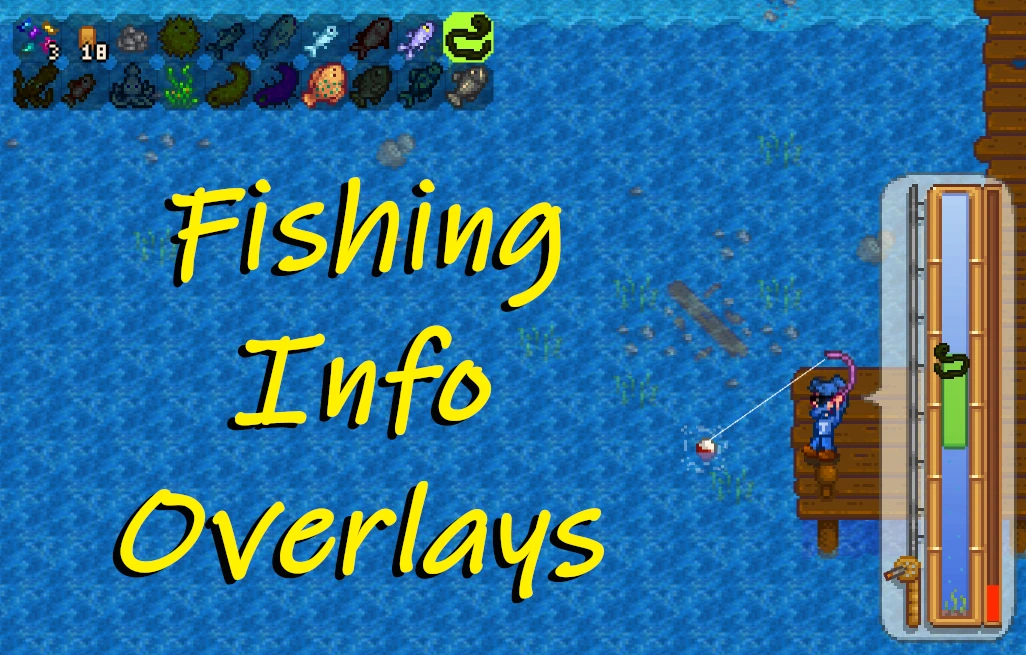
Fishing Info Overlays
Creator: barteke22
Updated:14/11/2025 16:39:56
65KB

Trusted by 200,000,000+ Users
Pre-required Mods
will be automatically installed when you use Fishing Info Overlays
About this Mod
Customizable overlays that show fish in the current area while holding a fishing rod (or crab pot), and provide a preview during the fishing minigame.
General info:
This mod shows information about fish (and fishable items) currently available in your area, along with a preview during the fishing minigame. It doesn't change any gameplay mechanics and is designed to be as compatible as possible with other fish-related mods. Highly customizable—check out the screenshots.
Uses Data\\Fish + Fishing Simulation combo for best mod compatibility. This method runs the fishing minigame at a configurable interval (per UI update) after retrieving the generic fish data. Higher intervals improve accuracy and reduce visual glitches, but increase performance cost. It should be nearly 100% accurate for anything (vanilla or modded) that uses the fishing minigame (getFish method).
**Project story:**
Installation:
Compatibility:
Issues:
Config (without GMCM)
My other mod(s):
Source and Translation:
Source code is available Here If I ever vanish from Nexus, I tried keeping it as simple as I could, so feel free to take over/reupload if it breaks and I'm gone for too long. Item names are already localized; you can find the GMCM translation base. here - Feel free to PM me your translations (or upload them yourself).
General info:
This mod shows information about fish (and fishable items) currently available in your area, along with a preview during the fishing minigame. It doesn't change any gameplay mechanics and is designed to be as compatible as possible with other fish-related mods. Highly customizable—check out the screenshots.
Uses Data\\Fish + Fishing Simulation combo for best mod compatibility. This method runs the fishing minigame at a configurable interval (per UI update) after retrieving the generic fish data. Higher intervals improve accuracy and reduce visual glitches, but increase performance cost. It should be nearly 100% accurate for anything (vanilla or modded) that uses the fishing minigame (getFish method).
**Project story:**
**Spoiler:**
This little project started as an attempt to update Teh's Overhaul, since even the unofficial 1.5 update seems to completely block access to certain 1.5 items and requires tons of workarounds for some modded fish. As the name suggests, Teh's Overhaul is a complete overhaul — meaning it implements its own fishing minigame logic. I was mainly interested in its overlay part, as there are plenty of decent alternatives when it comes to minigame difficulty. That mod is quite massive, though — with data spread across many files, classes, and APIs. I quickly gave up trying to make sense of it, decided to start from scratch, and properly understand how the vanilla game works.
So is this actually based on Teh's Overhaul? Well, yes, but actually... who knows? The visual concept/initial idea maybe, but the code is purely SMAPI/Vanilla Stardew based.
Show
This little project started as an attempt to update Teh's Overhaul, since even the unofficial 1.5 update seems to completely block access to certain 1.5 items and requires tons of workarounds for some modded fish. As the name suggests, Teh's Overhaul is a complete overhaul — meaning it implements its own fishing minigame logic. I was mainly interested in its overlay part, as there are plenty of decent alternatives when it comes to minigame difficulty. That mod is quite massive, though — with data spread across many files, classes, and APIs. I quickly gave up trying to make sense of it, decided to start from scratch, and properly understand how the vanilla game works.
So is this actually based on Teh's Overhaul? Well, yes, but actually... who knows? The visual concept/initial idea maybe, but the code is purely SMAPI/Vanilla Stardew based.
Installation:
- Download and Install the latest version of SMAPI. Designed for version 3.10 and above. Earlier versions may not be compatible.
- [Optional] Download and install Generic Mod Config Menu (GMCM). If you want an easy way to customize overlays on the fly with in-depth explanations.
- Download Mod by Files, and unzip the FishingInfoOverlays folder into your Mods folder.
Compatibility:
- Tested with Stardew Valley Expanded (SVE), Ridgeside Village, Stardew Aquarium, Fishing Made Easy Suite, Fishing Minigames. Any mod that adds fish through proper mechanics should work, and mods that adjust difficulty in simple ways, such as those using Content Patcher, should be fine.
- This mainly covers different features from the Fish Helper UI and should be fully compatible. You can disable various features of this mod if you prefer that UI.
- Location bar:By default, it checks the Fish Data (with less accurate percentages). It can be configured to simulate the location's getFish (the fishing minigame's success method) X times per UI update instead. This means any fish obtainable through the location's getFish should be found. Either method should work, unless a mod completely overhauls the vanilla fishing system.
- Mini-Game: Gets the active BobberBar's current fish and its position (plus some extra bits). Should work unless a mod completely overhauls vanilla fishing, though it might still work if said mod updates BobberBar's variables.
- Singleplayer, Multiplayer, and Split Screen (Local Co-op).
Issues:
- Some items and locations had to be hardcoded for preview functionality: Golden Walnuts, Spines, Skulls, CalderaPainting (furniture), Railroad, and IslandFarmCave (locations). No workaround is possible, as the game directly uses Game1.player there instead of the provided 'who'. As a side effect, the overlay is slightly predictive on Ginger Island—anticipating whether clicking a nearby water tile will yield certain items.
- Minor flicker/jumping when using magic bait in some locations. This is due to certain items having less than a 1% drop chance.
Config (without GMCM)
**Spoiler:**
From version 1.1.0, most variables are arrays of 4—one for each split-screen view. GMCM now supports this properly. Manual example:
"BarIconMode": [
2,- This is screen 1: Split-screen host, or any non-split-screen player.
0,- This is Screen 2: Split-screen (top) right. Non-split-screen players can disregard this and the next 2 values.
1,- Screen 3
0- Screen 4
]
Just like in GMCM, if you're holding a fishing rod near water in-game, you can preview any changes made to the config.json (after saving it) by pressing F5.
If you're using GMCM it has detailed in-game explanations of each position; otherwise, run the game once to generate the config.json for this mod.
Show
From version 1.1.0, most variables are arrays of 4—one for each split-screen view. GMCM now supports this properly. Manual example:
"BarIconMode": [
2,- This is screen 1: Split-screen host, or any non-split-screen player.
0,- This is Screen 2: Split-screen (top) right. Non-split-screen players can disregard this and the next 2 values.
1,- Screen 3
0- Screen 4
]
Just like in GMCM, if you're holding a fishing rod near water in-game, you can preview any changes made to the config.json (after saving it) by pressing F5.
If you're using GMCM it has detailed in-game explanations of each position; otherwise, run the game once to generate the config.json for this mod.
- BarSonarMode (0-3):Defines what doesn't function without Sonar Bobber: 0= Whole mod, 1= Minigame preview, 2= Shift Aim, 3= Nothing.
- BarIcon Mode (0-3): Direction in which icons move before swapping rows/columns. 0 = Horizontal Icons, 1 = Vertical Icons, 2 = Vertical Icons + Text, 3 = Disabled (no location bar for rods/pots, only minigame preview).
- BarTopLeftLocationX (0-X):Top left bar corner X coordinate.
- BarTopLeftLocationY (0-X): Y coordinate of top left bar corner.
- Bar Scale (0.1-10):The bar already scales along with the UI, this allows you to fine-tune it.
- BarMaxIcons (4-500): Maximum number of icons displayed simultaneously.
- BarMaxIconsPerRow (4-500):Maximum number of icons shown before switching rows/columns.
- BarBackgroundMode (0-2): Dark transparent background(s). 0 = Circles behind each icon, 1 = Single rectangle behind all icons, 2 = Off.
- Bar Background Color RGBA: Background color in integer RGBA format, with values ranging from 0–255 for each channel. Use a color picker tool; note that the alpha value is also 0–255 (not 0–1).
- BarTextColorRGBA: Colour of text in Integer RGBA, so 0-255 x4, like [255, 255, 255, 255].
- BarExtraIconsMaxSize: true= Show a Star icon if max size of fish hasn't been caught yet. false= Off.
- BarExtraIconsBundles: true= Show a Bundle icon if the fish is needed for a Community Center bundle (if unlocked). false= Off.
- BarExtraIconsAquarium: true= Show a Pufferfish icon if the fish is needed for Stardew Aquarium (if mod installed). false= off.
- BarExtraIconsAlwaysShow: Show Extra Icons even if the fish hasn't been caught before.
- BarUncaughtFishEffect (0-2): When uncaught: 0= Darken fish. 1= Show a Bronze Star extra icon (ignores BarExtraIconsAlwaysShow). 2= Same as caught.
- Bar Show Bait and Tackle Info: true= Displays bait and tackle icons + counts in the bar (if equipped). false= off.
- BarShowPercentMode (0-2):0/1= Shows the catch chance percentage under each fish icon. Accuracy depends on ExtraCheckFrequency. 2= off.
- Bar Sort Mode (0-2): 0= Icons are sorted by name. 1= Icons are sorted by catch chance percentage (heavily based on ExtraCheckFrequency, will likely jump), 2= Off (Trash, then IDs, then extras).
- Bar Extra Check Frequency (0-200): 0-22= Generic (when 0) OR Simulated, runs the fishing minigame value*10 times per UI Update (higher is more accurate, but can impact performance). Generic is less accurate percentage-wise, but performs better.
- Bar Scan Radius (1-50):Scans X tiles around the player for water and displays fish info only for the nearest tile found (if any).
- BarCrabPotEnabled:true= Enables the above preview for Crab Pots. false= Off.
- BarNonFishMode (0-2):Whether the bar shows non-fish objects, like furniture and trash. 0 = Same as fish. 1 = Always caught. 2 = Don't show.
- Minigame Preview Bar: true= When reeling a fish, it's highlighted on the Preview Bar. false= Off.
- Mini Game Preview Rodtrue= When reeling a fish, its sprite is shown instead of the generic minigame sprite. false= Off.
- Minigame Preview Water: true= When reeling a fish, it's visible in the water (nibbling bobber). Transparency depends on sonar setting & equipment. false= off.
- MinigamePreviewSonar: When reeling in a fish, the base game sonar display is shown.
- BarLegendary Mode (0-2) (pre 1.0.5): If BarExtraCheckFrequency is greater than 0, this is ignored. 0 = Vanilla Legendary Fish logic, 1 = Vanilla + Always Show (works with mods) Only makes them re-catchable), 2= Never Show (cool if you don't want to see them, or have a mod that alters them).
- Minigame Mode (0-3) (pre 1.2.5):0= Copies multiple layers to look better. 1= Only overlays the fish, looks worse. but may work better. 2= Included in both above: Highlights fish in the normal location bar (if enabled). 3= Disabled.
- BarShowPercent (pre 1.2.8): true= Displays percentage chance of catching a fish under its icon. Accuracy based on ExtraCheckFrequency, false= off.
- BarExtraIconsUncaught (pre 1.2.8): true= Show extra icons even if the fish hasn't been caught before. false= Show only when caught.
- OnlyFish (pre 1.3.1)true= Only show items from the official fish list (including trash), ignoring things like furniture or notes.
My other mod(s):
Source and Translation:
Source code is available Here If I ever vanish from Nexus, I tried keeping it as simple as I could, so feel free to take over/reupload if it breaks and I'm gone for too long. Item names are already localized; you can find the GMCM translation base. here - Feel free to PM me your translations (or upload them yourself).
Top Mods for Stardew Valley
Explore the best mods for Stardew Valley that bring new features, upgraded visuals, and exciting ways to transform your gameplay experience.
SMAPI - Stardew Modding API
Pathoschild15/07/2025 09:52:47
The mod loader for Stardew Valley.
Content Patcher
Pathoschild27/10/2025 01:17:30
Loads content packs that change the game's data, images, and maps without replacing XNB files.
Fishing Assistant 2 (1.6 Compatible)
I3lanketGhost26/04/2024 00:45:13
Your personal fishing assistant. that will handle the tough, boring, and tiring fishing for you, without you having to click even once.
Easy Fishing Suite (Content Patcher)
Ericlegacy2110/05/2026 01:42:50
Upgrade your fishing adventure! Adjust difficulty (easy/hard), fish availability (time, seasons, weather), spawn rates, and sell prices. Remove trash, re-catch legendary fish, fish for Prismatic Shards, boost Fish Pond rewards, and exclude specific fish.
Yet Another Fishing Mod
NeverToxic18/11/2024 00:43:23
Having trouble fishing and want to skip the minigame? Want to add bait to your bamboo rod? This mod lets you tweak various fishing-related settings.
Easy Fishing v2.0
mmanlapat06/06/2018 05:41:20
Made fishing easier.Compatible with Stardew Valley 1.2+.Compatible with Stardew Valley beta.
Eidee Easy Fishing
EideeHi02/06/2026 10:42:25
Customizable Mod for easy fishing.
Fishing Info Overlays
barteke2214/11/2025 16:39:56
Customizable overlays that show fish in the current area while holding a fishing rod (or crab pot), and provide a preview during the fishing minigame.
Unlock the full potential of Stardew Valley with XMODhub—explore these top mods today!
Trusted by 200,000,000+ Users
Need help with download or installation? Join our Discord community for support.

'%3e%3crect%20x='0.5'%20width='24'%20height='18'%20rx='3'%20fill='white'/%3e%3cg%20id='flag'%3e%3cg%20id='contents'%3e%3cpath%20id='bottom'%20fill-rule='evenodd'%20clip-rule='evenodd'%20d='M0.5%2012H24.5V18H0.5V12Z'%20fill='%23FFD018'/%3e%3cpath%20id='middle'%20fill-rule='evenodd'%20clip-rule='evenodd'%20d='M0.5%206H24.5V12H0.5V6Z'%20fill='%23E31D1C'/%3e%3cpath%20id='middle_2'%20fill-rule='evenodd'%20clip-rule='evenodd'%20d='M0.5%200H24.5V6H0.5V0Z'%20fill='%23272727'/%3e%3c/g%3e%3c/g%3e%3c/g%3e%3c/g%3e%3cdefs%3e%3cclipPath%20id='clip0_992_70053'%3e%3crect%20x='0.5'%20width='24'%20height='18'%20rx='3'%20fill='white'/%3e%3c/clipPath%3e%3c/defs%3e%3c/svg%3e)
'%3e%3cg%20clip-path='url(%23b)'%3e%3cpath%20fill='%23fff'%20d='M.5%200h24v18H.5z'/%3e%3cpath%20fill='%23F7FCFF'%20fill-rule='evenodd'%20d='M.5%200v18h24V0z'%20clip-rule='evenodd'/%3e%3cmask%20id='c'%20width='25'%20height='18'%20x='0'%20y='0'%20maskUnits='userSpaceOnUse'%20style='mask-type:luminance'%3e%3cpath%20fill='%23fff'%20fill-rule='evenodd'%20d='M.5%200v18h24V0z'%20clip-rule='evenodd'/%3e%3c/mask%3e%3cg%20mask='url(%23c)'%3e%3cpath%20fill='%233D58DB'%20fill-rule='evenodd'%20d='M12.5%2013.666c2.402%200%204.349-2.068%204.349-4.62%200-2.55-1.947-4.618-4.35-4.618-2.401%200-4.349%202.068-4.349%204.619s1.948%204.618%204.35%204.618'%20clip-rule='evenodd'/%3e%3cmask%20id='d'%20width='9'%20height='10'%20x='8'%20y='4'%20maskUnits='userSpaceOnUse'%20style='mask-type:luminance'%3e%3cpath%20fill='%23fff'%20fill-rule='evenodd'%20d='M12.5%2013.666c2.402%200%204.349-2.068%204.349-4.62%200-2.55-1.947-4.618-4.35-4.618-2.401%200-4.349%202.068-4.349%204.619s1.948%204.618%204.35%204.618'%20clip-rule='evenodd'/%3e%3c/mask%3e%3cg%20mask='url(%23d)'%3e%3cpath%20fill='%23E31D1C'%20fill-rule='evenodd'%20d='M17.001%209.4s-.244-2.178-2.052-2.296-2.295%201.597-2.4%202.052c-.104.454-.368%201.666-2.271%201.666S8.202%207.74%208.202%207.74V4.104h8.8z'%20clip-rule='evenodd'/%3e%3c/g%3e%3cpath%20fill='%23272727'%20fill-rule='evenodd'%20d='m5.974%201.54.686.62-3.18%203.715-.686-.621zm1.132%201.005.686.62-3.066%203.66-.687-.62zm1.812%201.637-.686-.62-3.074%203.687.686.62zM19.522%201.28l-.686.618%201.19%201.397.687-.619zm2.117%202.57-.687.618%201.19%201.397.687-.619zm-5.068.06.686-.618%201.19%201.397-.686.618zm2.802%201.952-.686.618%201.19%201.397.687-.618zm-1.627-2.988.687-.618%203.314%204.035-.687.619zM20.04%2010.683l-.692-.62-1.2%201.402.692.62zm-2.018%202.469-.692-.621-1.201%201.402.692.621zm3.512-1.127.692.621-1.2%201.403-.693-.621zm-1.228%203.147-.692-.62-1.2%201.402.692.62zm-1.832-1.688.692.621-1.253%201.498-.692-.62zm2.748-1.874-.692-.621-1.253%201.498.692.62zM5.305%2011.168l.686-.62%203.064%203.511-.687.62zm.714%203.07.687-.619L8%2015.041l-.687.619zm-2.287-1.72-.686.62%203.079%203.557.686-.619zm.488-.404.687-.619%201.122%201.316-.687.619z'%20clip-rule='evenodd'/%3e%3c/g%3e%3c/g%3e%3c/g%3e%3cdefs%3e%3cclipPath%20id='a'%3e%3crect%20width='24'%20height='18'%20x='.5'%20fill='%23fff'%20rx='3'/%3e%3c/clipPath%3e%3cclipPath%20id='b'%3e%3cpath%20fill='%23fff'%20d='M.5%200h24v18H.5z'/%3e%3c/clipPath%3e%3c/defs%3e%3c/svg%3e)

'%3e%3cmask%20id='b'%20width='25'%20height='18'%20x='0'%20y='0'%20maskUnits='userSpaceOnUse'%20style='mask-type:luminance'%3e%3cpath%20fill='%23fff'%20d='M.5%200h24v18H.5z'/%3e%3c/mask%3e%3cg%20mask='url(%23b)'%3e%3cpath%20fill='%23fff'%20fill-rule='evenodd'%20d='M-1%200h27v18H-1z'%20clip-rule='evenodd'/%3e%3cpath%20fill='%23BC002D'%20d='M12.502%2014.596a5.595%205.595%200%201%200%200-11.19%205.595%205.595%200%200%200%200%2011.19'/%3e%3c/g%3e%3cg%20clip-path='url(%23c)'%3e%3cpath%20fill='%23fff'%20d='M.5-.5h24v18H.5z'/%3e%3cpath%20fill='%23F7FCFF'%20fill-rule='evenodd'%20d='M.5-1.1v18h24v-18z'%20clip-rule='evenodd'/%3e%3cmask%20id='d'%20width='25'%20height='19'%20x='0'%20y='-2'%20maskUnits='userSpaceOnUse'%20style='mask-type:luminance'%3e%3cpath%20fill='%23fff'%20fill-rule='evenodd'%20d='M.5-1.1v18h24v-18z'%20clip-rule='evenodd'/%3e%3c/mask%3e%3cg%20mask='url(%23d)'%3e%3cpath%20fill='%23E31D1C'%20fill-rule='evenodd'%20d='M.5-1.1v9h24v-9z'%20clip-rule='evenodd'/%3e%3c/g%3e%3c/g%3e%3c/g%3e%3cdefs%3e%3cclipPath%20id='a'%3e%3crect%20width='24'%20height='18'%20x='.5'%20fill='%23fff'%20rx='3'/%3e%3c/clipPath%3e%3cclipPath%20id='c'%3e%3cpath%20fill='%23fff'%20d='M.5-.5h24v18H.5z'/%3e%3c/clipPath%3e%3c/defs%3e%3c/svg%3e)
'%3e%3cmask%20id='b'%20width='25'%20height='18'%20x='0'%20y='0'%20maskUnits='userSpaceOnUse'%20style='mask-type:luminance'%3e%3cpath%20fill='%23fff'%20d='M.5%200h24v18H.5z'/%3e%3c/mask%3e%3cg%20mask='url(%23b)'%3e%3cpath%20fill='%23fff'%20fill-rule='evenodd'%20d='M-1%200h27v18H-1z'%20clip-rule='evenodd'/%3e%3cpath%20fill='%23BC002D'%20d='M12.502%2014.596a5.595%205.595%200%201%200%200-11.19%205.595%205.595%200%200%200%200%2011.19'/%3e%3c/g%3e%3cg%20clip-path='url(%23c)'%3e%3cpath%20fill='%23fff'%20d='M-.834-.5h26.667v20H-.834z'/%3e%3cpath%20fill='%23F7FCFF'%20fill-rule='evenodd'%20d='M-1.167-1.167H25.5v20H-1.167z'%20clip-rule='evenodd'/%3e%3cpath%20fill='%23E31D1C'%20fill-rule='evenodd'%20d='M-1.167-1.167v20H25.5v-20z'%20clip-rule='evenodd'/%3e%3cmask%20id='d'%20width='28'%20height='21'%20x='-2'%20y='-2'%20maskUnits='userSpaceOnUse'%20style='mask-type:luminance'%3e%3cpath%20fill='%23fff'%20fill-rule='evenodd'%20d='M-1.167-1.167v20H25.5v-20z'%20clip-rule='evenodd'/%3e%3c/mask%3e%3cg%20mask='url(%23d)'%3e%3cpath%20fill='%23FFD221'%20fill-rule='evenodd'%20d='m12.217%2012.15-4.292%202.729%201.44-4.778L6.303%206.98l4.22-.092%201.868-4.717%201.702%204.779%204.211.074-3.164%203.178%201.477%204.545z'%20clip-rule='evenodd'/%3e%3c/g%3e%3c/g%3e%3c/g%3e%3cdefs%3e%3cclipPath%20id='a'%3e%3crect%20width='24'%20height='18'%20x='.5'%20fill='%23fff'%20rx='3'/%3e%3c/clipPath%3e%3cclipPath%20id='c'%3e%3cpath%20fill='%23fff'%20d='M-.834-.5h26.667v20H-.834z'/%3e%3c/clipPath%3e%3c/defs%3e%3c/svg%3e)

'%3e%3cmask%20id='b'%20width='25'%20height='18'%20x='0'%20y='0'%20maskUnits='userSpaceOnUse'%20style='mask-type:luminance'%3e%3cpath%20fill='%23fff'%20d='M.5%200h24v18H.5z'/%3e%3c/mask%3e%3cg%20mask='url(%23b)'%3e%3cpath%20fill='%23fff'%20fill-rule='evenodd'%20d='M-1%200h27v18H-1z'%20clip-rule='evenodd'/%3e%3cpath%20fill='%23BC002D'%20d='M12.502%2014.596a5.595%205.595%200%201%200%200-11.19%205.595%205.595%200%200%200%200%2011.19'/%3e%3c/g%3e%3cg%20clip-path='url(%23c)'%3e%3cpath%20fill='%23fff'%20d='M-.834-.5h26.667v20H-.834z'/%3e%3cpath%20fill='%23093'%20fill-rule='evenodd'%20d='M-1.167-1.167v20H25.5v-20z'%20clip-rule='evenodd'/%3e%3cmask%20id='d'%20width='28'%20height='21'%20x='-2'%20y='-2'%20maskUnits='userSpaceOnUse'%20style='mask-type:luminance'%3e%3cpath%20fill='%23fff'%20fill-rule='evenodd'%20d='M-1.167-1.167v20H25.5v-20z'%20clip-rule='evenodd'/%3e%3c/mask%3e%3cg%20mask='url(%23d)'%3e%3cg%20fill-rule='evenodd'%20clip-rule='evenodd'%20filter='url(%23e)'%3e%3cpath%20fill='%23FFD221'%20d='m12.105%201.92%2010.168%207.086-10.306%206.636-9.96-6.773z'/%3e%3cpath%20fill='url(%23f)'%20d='m12.105%201.92%2010.168%207.086-10.306%206.636-9.96-6.773z'/%3e%3c/g%3e%3cpath%20fill='%232E42A5'%20fill-rule='evenodd'%20d='M12.167%2013.166a4.167%204.167%200%201%200%200-8.333%204.167%204.167%200%200%200%200%208.333'%20clip-rule='evenodd'/%3e%3cmask%20id='g'%20width='9'%20height='10'%20x='8'%20y='4'%20maskUnits='userSpaceOnUse'%20style='mask-type:luminance'%3e%3cpath%20fill='%23fff'%20fill-rule='evenodd'%20d='M12.167%2013.166a4.167%204.167%200%201%200%200-8.333%204.167%204.167%200%200%200%200%208.333'%20clip-rule='evenodd'/%3e%3c/mask%3e%3cg%20fill='%23F7FCFF'%20mask='url(%23g)'%3e%3cpath%20fill-rule='evenodd'%20d='m10.817%2010.975-.187.098.036-.207-.15-.147.208-.03.093-.189.093.189.208.03-.15.147.035.207zM12.483%2010.975l-.186.098.035-.207-.15-.147.208-.03.093-.189.093.189.208.03-.15.147.035.207zM12.483%2011.975l-.186.098.035-.207-.15-.147.208-.03.093-.189.093.189.208.03-.15.147.035.207zM11.65%208.475l-.187.098.036-.207-.15-.147.208-.03L11.65%208l.093.189.208.03-.15.147.035.207zM11.65%2010.141l-.187.098.036-.207-.15-.147.208-.03.093-.189.093.189.208.03-.15.147.035.207zM10.483%209.308l-.186.098.035-.207-.15-.147.208-.03.093-.189.093.189.208.03-.15.147.035.207zM9.317%209.975l-.186.098.035-.207-.15-.147.208-.03.093-.189.093.189.208.03-.15.147.035.207zM13.15%207.141l-.187.098.036-.207-.15-.147.208-.03.093-.189.093.189.208.03-.15.147.035.207z'%20clip-rule='evenodd'/%3e%3cpath%20d='m7.104%207.998.125-1.662c3.998.301%207.154%201.616%209.427%203.955l-1.195%201.161c-1.97-2.026-4.743-3.182-8.357-3.454'/%3e%3c/g%3e%3c/g%3e%3c/g%3e%3c/g%3e%3cdefs%3e%3cclipPath%20id='a'%3e%3crect%20width='24'%20height='18'%20x='.5'%20fill='%23fff'%20rx='3'/%3e%3c/clipPath%3e%3cclipPath%20id='c'%3e%3cpath%20fill='%23fff'%20d='M-.834-.5h26.667v20H-.834z'/%3e%3c/clipPath%3e%3clinearGradient%20id='f'%20x1='25.5'%20x2='25.5'%20y1='18.833'%20y2='-1.167'%20gradientUnits='userSpaceOnUse'%3e%3cstop%20stop-color='%23FFC600'/%3e%3cstop%20offset='1'%20stop-color='%23FFDE42'/%3e%3c/linearGradient%3e%3cfilter%20id='e'%20width='20.267'%20height='13.723'%20x='2.007'%20y='1.92'%20color-interpolation-filters='sRGB'%20filterUnits='userSpaceOnUse'%3e%3cfeFlood%20flood-opacity='0'%20result='BackgroundImageFix'/%3e%3cfeColorMatrix%20in='SourceAlpha'%20result='hardAlpha'%20values='0%200%200%200%200%200%200%200%200%200%200%200%200%200%200%200%200%200%20127%200'/%3e%3cfeOffset/%3e%3cfeColorMatrix%20values='0%200%200%200%200.0313726%200%200%200%200%200.368627%200%200%200%200%200%200%200%200%200.28%200'/%3e%3cfeBlend%20in2='BackgroundImageFix'%20result='effect1_dropShadow_414_2340'/%3e%3cfeBlend%20in='SourceGraphic'%20in2='effect1_dropShadow_414_2340'%20result='shape'/%3e%3c/filter%3e%3c/defs%3e%3c/svg%3e)
'%3e%3cmask%20id='b'%20width='25'%20height='18'%20x='0'%20y='0'%20maskUnits='userSpaceOnUse'%20style='mask-type:luminance'%3e%3cpath%20fill='%23fff'%20d='M.5%200h24v18H.5z'/%3e%3c/mask%3e%3cg%20mask='url(%23b)'%3e%3cpath%20fill='%23fff'%20fill-rule='evenodd'%20d='M-1%200h27v18H-1z'%20clip-rule='evenodd'/%3e%3cpath%20fill='%23BC002D'%20d='M12.502%2014.596a5.595%205.595%200%201%200%200-11.19%205.595%205.595%200%200%200%200%2011.19'/%3e%3c/g%3e%3c/g%3e%3cdefs%3e%3cclipPath%20id='a'%3e%3crect%20width='24'%20height='18'%20x='.5'%20fill='%23fff'%20rx='3'/%3e%3c/clipPath%3e%3c/defs%3e%3c/svg%3e)


'%3e%3cpath%20d='M0%200.0529785H8.00035V18.9467H0V0.0529785Z'%20fill='%23008D46'/%3e%3cpath%20d='M8.00049%200.0529785H16.0008V18.9467H8.00049V0.0529785Z'%20fill='white'/%3e%3cpath%20d='M16.0005%200.0529785H24.0019V18.9467H16.0005V0.0529785Z'%20fill='%23D2232C'/%3e%3c/g%3e%3cdefs%3e%3cclipPath%20id='clip0_1698_2581'%3e%3crect%20width='24'%20height='19'%20rx='3'%20fill='white'/%3e%3c/clipPath%3e%3c/defs%3e%3c/svg%3e)
'%3e%3c/g%3e%3cg%20clip-path='url(%23clip0_1709_32286)'%3e%3cpath%20d='M5.33301%209.0153H18.6663M5.33301%209.0153C5.33301%2012.6972%208.31778%2015.682%2011.9997%2015.682M5.33301%209.0153C5.33301%205.3334%208.31778%202.34863%2011.9997%202.34863M18.6663%209.0153C18.6663%2012.6972%2015.6816%2015.682%2011.9997%2015.682M18.6663%209.0153C18.6663%205.3334%2015.6816%202.34863%2011.9997%202.34863M11.9997%202.34863C13.6672%204.1742%2014.6148%206.54332%2014.6663%209.0153C14.6148%2011.4873%2013.6672%2013.8564%2011.9997%2015.682M11.9997%202.34863C10.3322%204.1742%209.38451%206.54332%209.33301%209.0153C9.38451%2011.4873%2010.3322%2013.8564%2011.9997%2015.682'%20stroke='black'%20stroke-width='1.33333'%20stroke-linecap='round'%20stroke-linejoin='round'/%3e%3c/g%3e%3cdefs%3e%3cclipPath%20id='clip0_1709_32286'%3e%3crect%20width='16'%20height='16'%20fill='white'%20transform='translate(4%201.01562)'/%3e%3c/clipPath%3e%3c/defs%3e%3c/svg%3e)

'/%3e%3cpath%20id='f'%20d='M21.2137%2020.2816L21.8356%2016.3301H17.9452V13.767C17.9452%2012.6857%2018.4877%2011.6311%2020.2302%2011.6311H22V8.26699C22%208.26699%2020.3945%208%2018.8603%208C15.6548%208%2013.5617%209.89294%2013.5617%2013.3184V16.3301H10V20.2816H13.5617V29.8345C14.2767%2029.944%2015.0082%2030%2015.7534%2030C16.4986%2030%2017.2302%2029.944%2017.9452%2029.8345V20.2816H21.2137Z'%20fill='white'/%3e%3c/g%3e%3cdefs%3e%3clinearGradient%20id='paint0_linear_1709_56585'%20x1='16'%20y1='2'%20x2='16'%20y2='29.917'%20gradientUnits='userSpaceOnUse'%3e%3cstop%20stop-color='%2318ACFE'/%3e%3cstop%20offset='1'%20stop-color='%230163E0'/%3e%3c/linearGradient%3e%3c/defs%3e%3c/svg%3e)


