
'%3e%3cg%20clip-path='url(%23b)'%3e%3cpath%20fill='%23fff'%20d='M.5%200h24v18H.5z'/%3e%3cpath%20fill='%23F7FCFF'%20fill-rule='evenodd'%20d='M.5%200h24v18H.5z'%20clip-rule='evenodd'/%3e%3cpath%20fill='%23E31D1C'%20fill-rule='evenodd'%20d='M.5%2011v1.5h24V11zM.5%2013.75v1.5h24v-1.5zM.5%205.5V7h24V5.5zM.5%2016.5V18h24v-1.5zM.5%208.25v1.5h24v-1.5zM.5%200v1.5h24V0zM.5%202.75v1.5h24v-1.5z'%20clip-rule='evenodd'/%3e%3cpath%20fill='%232E42A5'%20d='M.5%200h15v9.75H.5z'/%3e%3cpath%20fill='%23F7FCFF'%20fill-rule='evenodd'%20d='m4.791%202.204-.544.382.184-.68-.484-.43h.632L4.79.922l.248.554h.538l-.423.43.164.68zm-3%200-.544.382.184-.68-.484-.43h.632L1.79.922l.248.554h.538l-.423.43.164.68zm5.456.382.544-.382.527.382-.164-.68.423-.43H8.04L7.791.922l-.212.554h-.632l.484.43zm3.544-.382-.544.382.184-.68-.484-.43h.632l.212-.554.248.554h.539l-.424.43.164.68zM1.247%205.586l.544-.382.527.382-.164-.68.423-.43H2.04l-.248-.554-.212.554H.947l.484.43zm3.544-.382-.544.382.184-.68-.484-.43h.632l.212-.554.248.554h.538l-.423.43.164.68zm2.456.382.544-.382.527.382-.164-.68.423-.43H8.04l-.248-.554-.212.554h-.632l.484.43zm3.544-.382-.544.382.184-.68-.484-.43h.632l.212-.554.248.554h.539l-.424.43.164.68zM1.247%208.586l.544-.382.527.382-.164-.68.423-.43H2.04l-.248-.554-.212.554H.947l.484.43zm3.544-.382-.544.382.184-.68-.484-.43h.632l.212-.554.248.554h.538l-.423.43.164.68zm2.456.382.544-.382.527.382-.164-.68.423-.43H8.04l-.248-.554-.212.554h-.632l.484.43zm3.544-.382-.544.382.184-.68-.484-.43h.632l.212-.554.248.554h.539l-.424.43.164.68zm2.456-5.618.544-.382.527.382-.164-.68.424-.43h-.539l-.248-.554-.212.554h-.632l.484.43zm.544%202.618-.544.382.184-.68-.484-.43h.632l.212-.554.248.554h.539l-.424.43.164.68zm-.544%203.382.544-.382.527.382-.164-.68.424-.43h-.539l-.248-.554-.212.554h-.632l.484.43zM3.291%203.704l-.544.382.184-.68-.484-.43h.632l.212-.554.248.554h.538l-.423.43.164.68zm2.456.382.544-.382.527.382-.164-.68.423-.43H6.54l-.248-.554-.212.554h-.632l.484.43zm3.544-.382-.544.382.184-.68-.484-.43h.632l.212-.554.248.554h.539l-.424.43.164.68zM2.747%207.086l.544-.382.527.382-.164-.68.423-.43H3.54l-.248-.554-.212.554h-.632l.484.43zm3.544-.382-.544.382.184-.68-.484-.43h.632l.212-.554.248.554h.538l-.423.43.164.68zm2.456.382.544-.382.527.382-.164-.68.424-.43h-.539l-.248-.554-.212.554h-.632l.484.43zm3.544-3.382-.544.382.184-.68-.484-.43h.632l.212-.554.248.554h.539l-.424.43.164.68zm-.544%203.382.544-.382.527.382-.164-.68.424-.43h-.539l-.248-.554-.212.554h-.632l.484.43z'%20clip-rule='evenodd'/%3e%3c/g%3e%3c/g%3e%3cdefs%3e%3cclipPath%20id='a'%3e%3crect%20width='24'%20height='18'%20x='.5'%20fill='%23fff'%20rx='3'/%3e%3c/clipPath%3e%3cclipPath%20id='b'%3e%3cpath%20fill='%23fff'%20d='M.5%200h24v18H.5z'/%3e%3c/clipPath%3e%3c/defs%3e%3c/svg%3e)


Nightreign Randomizer and Derandomizer
Creator: thefifthmatt
Updated:10/10/2025 06:05:04
26.3MB

Trusted by 200,000,000+ Users
About this Mod
Create new random combinations of map placements, run set seeds, and face interesting challenges
A randomizer for Nightreign which modifies the files loaded on game startup, including a derandomizer for more deterministic runs. It is compatible with Seamless Co-op.
At a base level, the only difference you might notice using the randomizer is that Night Bosses are more varied for a given Nightlord. Under the hood, it's creating map patterns nearly from scratch and has a tremendous amount of freedom in its placements. In the future this can be extended to randomizing enemies and bosses within maps and in-depth placement customization.
If you would like to provide feedback or report bugs or see detailed changelogs, you can join the discord server at https://discord.gg/QArcYud (also for Elden Ring Randomizer and other mods). This mod is under development, so please check this mod page and the server for updates.
If you'd like to support my work you can use my Ko-fi page.
Randomizer overview
Map randomizer
Refer to https://thefifthmatt.github.io/nightreign/ for a summary of how Nightreign maps work. As a summary:
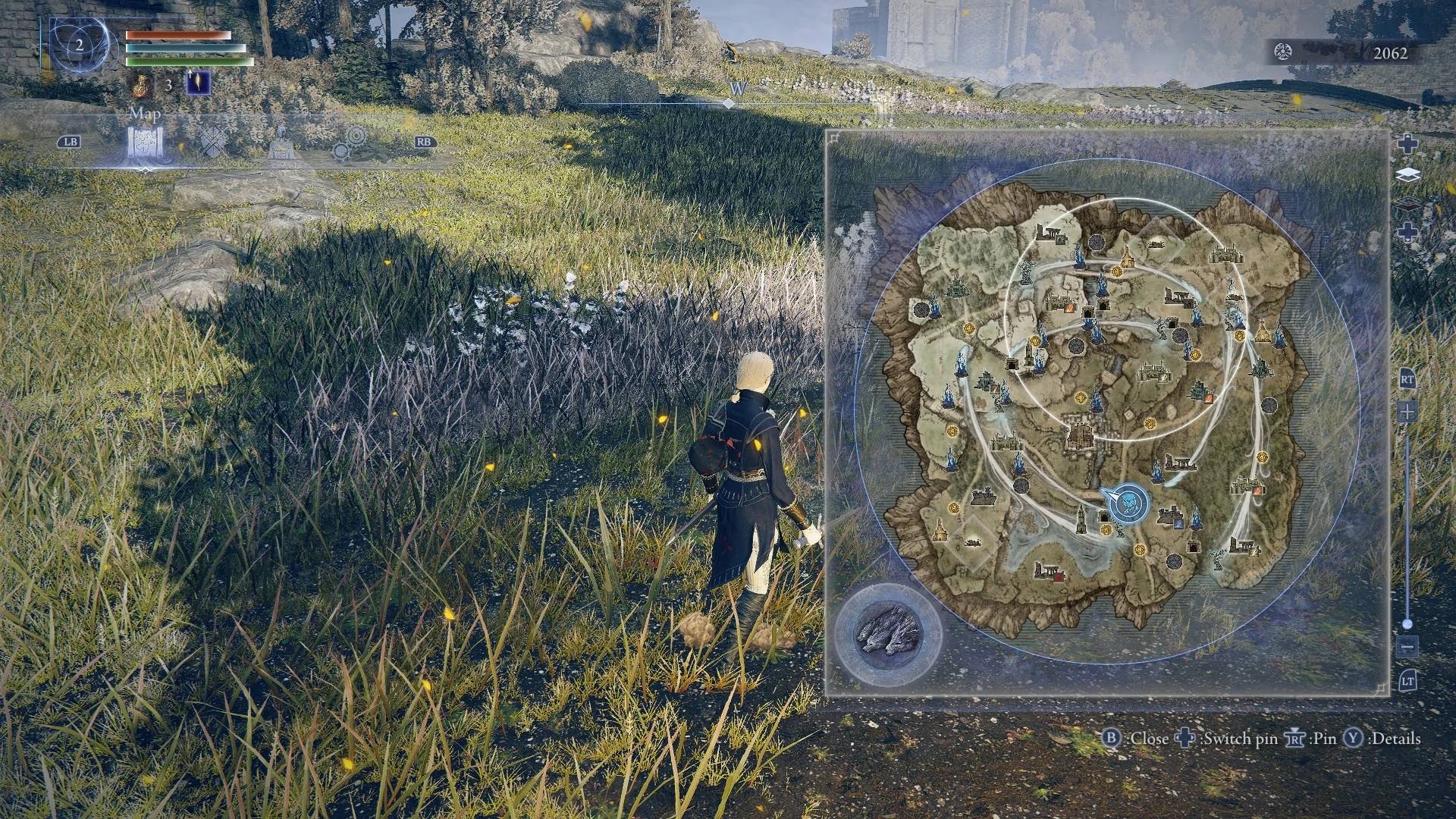
map pattern determines the spawn point and the placement of enemy camps, bosses, special events, and final circles. There are a limited set of map patterns, 40 per Nightlord.
- The expedition seed is a 32-bit integer which determines the selected map pattern for a given Nightlord based on the Shifting Earths and active remembrances of all players in the party. It also determines first circle locations, shops, cataclysms, and scarab locations.
- Item rewards (from bosses, chests, etc) and loot piñatas from online dead players are not determined by the expedition seed.
The map randomizer can replace vanilla map patterns with randomized ones based on the randomizer seed. Each random pattern is generated independent of all other ones. There is still a limited set of patterns per Nightlord. To guarantee you get a different pattern every time, rerun randomizer with a different seed before reattempting a particular Nightlord. The randomizer has three option presets:
- Similar to base game: Exactly what it sounds like. This tries to emulate vanilla patterns as closely as possible, aside from Night Boss selection which can place any Night Boss for any Nightlord.
- Balanced random: Includes some additional randomization like changing the item reward types of enemy camps and slightly randomizing circle timing and size, which applies across all map patterns. There are added features for more interesting runs, like guaranteeing no repeats for enemy camps and guaranteeing an enemy camp with the Nightlord's weakness.
- Extra random: Removes some placement restrictions which are normally helpful for balancing purposes, like permitting any eligible spawn point even if there's no starter camp there or allowing Shifting Earth day 2 circle locations which don't contain the objective.
In addition to these presets, you can also select any custom combination of these options or other options like greatly increasing the frequency of double Night Bosses.
Some parts of map patterns are not yet randomized, like special events and the spawn point (unless "Guarantee starter camp" is unchecked), enemies within maps and encounters, or additional final circle locations. Night 1 and 2 bosses are currently distinct, as otherwise progression will softlock. Also, as a safety measure, encounters (camps and bosses) are only be placed in spots if there is a vanilla map pattern which places them there. The main exception is difficult Sorcerer's Rises, which may appear anywhere a Sorcerer's Rise normally appears. There are enough vanilla map patterns that this is not noticeable in practice.
Utility
This mod includes some miscellaneous settings for added run variety and challenges. These can be used without the randomizer by unchecking the checkbox in the "Map randomizer" header.
Normally, each Shifting Earth has a 2.21% chance of appearing on each expedition without being conjured. "Greatly increase the frequency of one-off Shifting Earth expeditions" bumps this up to 12.5%, which gives each map pattern an overall equal probability. Remember to pass the Shifting Earth in the Waiting Room after if you don't want it to stick around.
Some optional challenge modes include nerfing solo gameplay to match 1.01 behavior (fewer runes, no free revives), increasing rain damage after night 2 to prevent gathering resources indefinitely, and hiding in-game map icons for camps and bosses. Some of these may be useful in competitive play and others may be interesting challenges to try on your own.
Derandomizer
Derandomizer is an optional feature added by , a dll which is distributed with the mod and can be used standalone. It allows setting the expedition seed directly, which determines the map pattern and other expedition behaviors which are seeded in advance.
Use the seed reroller in the mod to generate a random seed. This includes an attempted simulation of the game's pattern selection logic so that you can filter seeds to try to force specific patterns. Logic for remembrances and personal objectives is not simulated, so make sure remembrances are not active when using these seeds.
Item drops are not seeded, but a mode to support that could be added with significantly more changes to game params and maps.
NightreignRandomizerHelper.dll also overrides the save file location because me3 doesn't do that yet, so using it is strongly recommended. me3 profiles generated by randomizer always include it. It also includes a logo skip. Never use randomizer or derandomizer with your main save file, and always revert or delete your save file afterwards if you accidentally do.
Installation
me3 (Mod Engine 3) is the only supported way to use randomizer, which generates game files and a mod profile to launch the modded game. Pirated game version are not supported. You must legitimately acquire Nightreign to use this mod.
1. Install me3
Go to https://me3.help/en/latest/ and follow instructions to install the latest release. This adds a file association for .me3 files, called mod profiles, which let you launch the game with the given mod configuration.
2. Download and extract randomizer
Download the mod's zip file and extract the entire zip contents to somewhere on your local disk, such as your me3 profile directory. Make sure to:
- Explicitly click "Extract here" using a program like 7-Zip and launch NightreignRandomizer.exe from a real directory on your disk, not from within the zip file.
- Don't download the mod to a synced filesystem like OneDrive, as required files can appear missing from the mod's perspective.
3. Install other mods first, including Seamless Coop (optional)
For context, there are mainly two types of mods: dll mods and file mods. dll mods hook into the game's memory while it's running, similar to what Cheat Engine scripts do. File mods provide an altered version of the data files used by the game, such as regulation.bin (containing game params) or files packed inside game archives like data0.bdt.
The randomizer can automatically merge itself with other Nightreign file mods, after you install those other mods in a separate directory. Then, when you launch randomizer from its directory, it will launch those other mods with randomizer's changes on top. It is not necessary to merge them manually yourself. Currently this is limited to one other mod directory, which can be selected using the "Merge other mod" button in randomizer. When me3 adds a profile API, more advanced merging will be possible.
You can configure dll mods to launch with randomizer using the "Add dll mods" button in randomizer. To use Seamless Co-op, add nrsc.dll from your SeamlessCoop directory. Note that NightreignRandomizerHelper.dll is always included because it provides alt saves if none are configured by other mods.
4. Run the randomizer
After configuring settings and merged mods in NightreignRandomizer.exe, click the "Randomize" or "Run" button to generate mod files. You can specify an alphanumeric seed, or else a random one will be generated if "Reroll seed" is checked. Any time you change settings, seed, merged mods, or dll mods, you must close the game and click "Randomize" or "Run" again for the changes to take effect. The only exception is the Derandomizer which can be reloaded while the game is running.
If you're using Seamless Co-op with other people, your seed and all settings must match exactly in advance, or game-breaking desync will occur. From the Settings menu, copy the full string from "Set options from string" to sync with other people.
5. Launch the game with randomizer
First, if you want, you can set up your alternate save file based on your main save file. The "Copy main save file" button does exactly what it says, by default creating or updating NR0000.co2 from NR0000.sl2. Do not copy it back in the other direction as this may flag your save file for a later ban wave.
After running the randomizer, click the "Launch Nightreign" button. This just launches nightreign-randomizer.me3 with Windows Explorer which requires me3 to be installed (see step 1).
When you load into the game, please check that the Expedition menu title has changed to something like "Expeditions (13654-5l8n43z)". The first five digits are the config hash, which changes when any settings changes, followed by the seed when randomizer is active. This must match other players' Expeditions title exactly. If you don't see it, the mod is not active. Check me3 logs in to debug further.
Uninstall
Because randomizer uses its own launcher with an alternate save file, you can return to the normal game just by launching through Steam.
If you touched your main save file at all, make sure to revert it back to a version before running any mods before going back online.
Bugs and installation issues
If you encounter bugs with randomized runs, you can report them, ideally on the mod's discord server. I might eventually see them on Nexus Mods but many bug reports here don't have enough information to be usable. Send your spoiler log or full options string, not just the seed, and where on the map the issue was encountered.
If you see a "How do you want to open this file?" popup when launching the game through randomizer, it means me3 is not installed. Make sure to complete step 1 above.
me3 is not completely reliable, such that sometimes the game does not launch correctly with modded files. If it fails to start for this reason, try launching it again. If not all mod files are active (e.g. if the "Expeditions" menu text is not changed when using randomizer), try closing the game and launching again. Check me3 logs in C:\Users\\AppData\Local\garyttierney\me3\data\logs\nightreign-randomizer\ to debug further.
Acknowledgements
Thanks to TKGP for creating SoulsFormats and helping to test this mod, HotPocketRemix for initial work on emedf, Vawser and others for initial work on Nightreign paramdefs, and others who have contributed to modding tools and documented their findings on the ?ServerName? modding discord server (https://discord.gg/mT2JJjx) and elsewhere.
The mod uses Avalonia and MessageBox.Avalonia which are provided under the MIT License, and Nightreign paramdefs under the Apache license.
At a base level, the only difference you might notice using the randomizer is that Night Bosses are more varied for a given Nightlord. Under the hood, it's creating map patterns nearly from scratch and has a tremendous amount of freedom in its placements. In the future this can be extended to randomizing enemies and bosses within maps and in-depth placement customization.
If you would like to provide feedback or report bugs or see detailed changelogs, you can join the discord server at https://discord.gg/QArcYud (also for Elden Ring Randomizer and other mods). This mod is under development, so please check this mod page and the server for updates.
If you'd like to support my work you can use my Ko-fi page.
Randomizer overview
Map randomizer
Refer to https://thefifthmatt.github.io/nightreign/ for a summary of how Nightreign maps work. As a summary:
map pattern determines the spawn point and the placement of enemy camps, bosses, special events, and final circles. There are a limited set of map patterns, 40 per Nightlord.
- The expedition seed is a 32-bit integer which determines the selected map pattern for a given Nightlord based on the Shifting Earths and active remembrances of all players in the party. It also determines first circle locations, shops, cataclysms, and scarab locations.
- Item rewards (from bosses, chests, etc) and loot piñatas from online dead players are not determined by the expedition seed.
The map randomizer can replace vanilla map patterns with randomized ones based on the randomizer seed. Each random pattern is generated independent of all other ones. There is still a limited set of patterns per Nightlord. To guarantee you get a different pattern every time, rerun randomizer with a different seed before reattempting a particular Nightlord. The randomizer has three option presets:
- Similar to base game: Exactly what it sounds like. This tries to emulate vanilla patterns as closely as possible, aside from Night Boss selection which can place any Night Boss for any Nightlord.
- Balanced random: Includes some additional randomization like changing the item reward types of enemy camps and slightly randomizing circle timing and size, which applies across all map patterns. There are added features for more interesting runs, like guaranteeing no repeats for enemy camps and guaranteeing an enemy camp with the Nightlord's weakness.
- Extra random: Removes some placement restrictions which are normally helpful for balancing purposes, like permitting any eligible spawn point even if there's no starter camp there or allowing Shifting Earth day 2 circle locations which don't contain the objective.
In addition to these presets, you can also select any custom combination of these options or other options like greatly increasing the frequency of double Night Bosses.
Some parts of map patterns are not yet randomized, like special events and the spawn point (unless "Guarantee starter camp" is unchecked), enemies within maps and encounters, or additional final circle locations. Night 1 and 2 bosses are currently distinct, as otherwise progression will softlock. Also, as a safety measure, encounters (camps and bosses) are only be placed in spots if there is a vanilla map pattern which places them there. The main exception is difficult Sorcerer's Rises, which may appear anywhere a Sorcerer's Rise normally appears. There are enough vanilla map patterns that this is not noticeable in practice.
Utility
This mod includes some miscellaneous settings for added run variety and challenges. These can be used without the randomizer by unchecking the checkbox in the "Map randomizer" header.
Normally, each Shifting Earth has a 2.21% chance of appearing on each expedition without being conjured. "Greatly increase the frequency of one-off Shifting Earth expeditions" bumps this up to 12.5%, which gives each map pattern an overall equal probability. Remember to pass the Shifting Earth in the Waiting Room after if you don't want it to stick around.
Some optional challenge modes include nerfing solo gameplay to match 1.01 behavior (fewer runes, no free revives), increasing rain damage after night 2 to prevent gathering resources indefinitely, and hiding in-game map icons for camps and bosses. Some of these may be useful in competitive play and others may be interesting challenges to try on your own.
Derandomizer
Derandomizer is an optional feature added by , a dll which is distributed with the mod and can be used standalone. It allows setting the expedition seed directly, which determines the map pattern and other expedition behaviors which are seeded in advance.
Use the seed reroller in the mod to generate a random seed. This includes an attempted simulation of the game's pattern selection logic so that you can filter seeds to try to force specific patterns. Logic for remembrances and personal objectives is not simulated, so make sure remembrances are not active when using these seeds.
Item drops are not seeded, but a mode to support that could be added with significantly more changes to game params and maps.
NightreignRandomizerHelper.dll also overrides the save file location because me3 doesn't do that yet, so using it is strongly recommended. me3 profiles generated by randomizer always include it. It also includes a logo skip. Never use randomizer or derandomizer with your main save file, and always revert or delete your save file afterwards if you accidentally do.
Installation
me3 (Mod Engine 3) is the only supported way to use randomizer, which generates game files and a mod profile to launch the modded game. Pirated game version are not supported. You must legitimately acquire Nightreign to use this mod.
1. Install me3
Go to https://me3.help/en/latest/ and follow instructions to install the latest release. This adds a file association for .me3 files, called mod profiles, which let you launch the game with the given mod configuration.
2. Download and extract randomizer
Download the mod's zip file and extract the entire zip contents to somewhere on your local disk, such as your me3 profile directory. Make sure to:
- Explicitly click "Extract here" using a program like 7-Zip and launch NightreignRandomizer.exe from a real directory on your disk, not from within the zip file.
- Don't download the mod to a synced filesystem like OneDrive, as required files can appear missing from the mod's perspective.
3. Install other mods first, including Seamless Coop (optional)
For context, there are mainly two types of mods: dll mods and file mods. dll mods hook into the game's memory while it's running, similar to what Cheat Engine scripts do. File mods provide an altered version of the data files used by the game, such as regulation.bin (containing game params) or files packed inside game archives like data0.bdt.
The randomizer can automatically merge itself with other Nightreign file mods, after you install those other mods in a separate directory. Then, when you launch randomizer from its directory, it will launch those other mods with randomizer's changes on top. It is not necessary to merge them manually yourself. Currently this is limited to one other mod directory, which can be selected using the "Merge other mod" button in randomizer. When me3 adds a profile API, more advanced merging will be possible.
You can configure dll mods to launch with randomizer using the "Add dll mods" button in randomizer. To use Seamless Co-op, add nrsc.dll from your SeamlessCoop directory. Note that NightreignRandomizerHelper.dll is always included because it provides alt saves if none are configured by other mods.
4. Run the randomizer
After configuring settings and merged mods in NightreignRandomizer.exe, click the "Randomize" or "Run" button to generate mod files. You can specify an alphanumeric seed, or else a random one will be generated if "Reroll seed" is checked. Any time you change settings, seed, merged mods, or dll mods, you must close the game and click "Randomize" or "Run" again for the changes to take effect. The only exception is the Derandomizer which can be reloaded while the game is running.
If you're using Seamless Co-op with other people, your seed and all settings must match exactly in advance, or game-breaking desync will occur. From the Settings menu, copy the full string from "Set options from string" to sync with other people.
5. Launch the game with randomizer
First, if you want, you can set up your alternate save file based on your main save file. The "Copy main save file" button does exactly what it says, by default creating or updating NR0000.co2 from NR0000.sl2. Do not copy it back in the other direction as this may flag your save file for a later ban wave.
After running the randomizer, click the "Launch Nightreign" button. This just launches nightreign-randomizer.me3 with Windows Explorer which requires me3 to be installed (see step 1).
When you load into the game, please check that the Expedition menu title has changed to something like "Expeditions (13654-5l8n43z)". The first five digits are the config hash, which changes when any settings changes, followed by the seed when randomizer is active. This must match other players' Expeditions title exactly. If you don't see it, the mod is not active. Check me3 logs in to debug further.
Uninstall
Because randomizer uses its own launcher with an alternate save file, you can return to the normal game just by launching through Steam.
If you touched your main save file at all, make sure to revert it back to a version before running any mods before going back online.
Bugs and installation issues
If you encounter bugs with randomized runs, you can report them, ideally on the mod's discord server. I might eventually see them on Nexus Mods but many bug reports here don't have enough information to be usable. Send your spoiler log or full options string, not just the seed, and where on the map the issue was encountered.
If you see a "How do you want to open this file?" popup when launching the game through randomizer, it means me3 is not installed. Make sure to complete step 1 above.
me3 is not completely reliable, such that sometimes the game does not launch correctly with modded files. If it fails to start for this reason, try launching it again. If not all mod files are active (e.g. if the "Expeditions" menu text is not changed when using randomizer), try closing the game and launching again. Check me3 logs in C:\Users\
Acknowledgements
Thanks to TKGP for creating SoulsFormats and helping to test this mod, HotPocketRemix for initial work on emedf, Vawser and others for initial work on Nightreign paramdefs, and others who have contributed to modding tools and documented their findings on the ?ServerName? modding discord server (https://discord.gg/mT2JJjx) and elsewhere.
The mod uses Avalonia and MessageBox.Avalonia which are provided under the MIT License, and Nightreign paramdefs under the Apache license.
Top Mods for ELDEN RING NIGHTREIGN
Explore the best mods for ELDEN RING NIGHTREIGN that bring new features, upgraded visuals, and exciting ways to transform your gameplay experience.
DLC version Honest Merchant
小小渡鸦酱05/12/2025 17:50:35
Instructions for use: Only third-level relics will appear when relics are extracted
Single/Duo Mode Balance Adjustments
03/06/2025 10:23:59
A mod that makes the game more fun without breaking core gameplay. Players gain increased resistance, deal more damage, recover FP on kills, and regenerate health after taking damage.
Crash Fix Tool
30/05/2025 17:24:35
Duo Online Mode (No simultaneous modding)
31/05/2025 17:03:18
Click image for tutorial
God Mode Tour (Requires Duo Connection)
31/05/2025 17:06:24
God mode activated upon use, must be used with Duo Mod; Modification features are disabled during effect
Nightreign Randomizer and Derandomizer
thefifthmatt10/10/2025 06:05:04
Create new random combinations of map placements, run set seeds, and face interesting challenges
Nightreign auto-timer
neolud09/06/2025 16:09:44
An overlay that automatically triggers a timer for Nightreign. Configurable, draggable, always-on-top, and controllable via keyboard shortcuts.
Disable Chromatic Aberration
Giorma104/06/2025 20:34:50
This Mod Disables the Chromatic Aberration effect from the game, which makes the game more blurry and adds a glitch effect to the game's visuals, for better understanding. Check the images.
Unlock the full potential of ELDEN RING NIGHTREIGN with XMODhub—explore these top mods today!
Trusted by 200,000,000+ Users
Need help with download or installation? Join our Discord community for support.

'%3e%3crect%20x='0.5'%20width='24'%20height='18'%20rx='3'%20fill='white'/%3e%3cg%20id='flag'%3e%3cg%20id='contents'%3e%3cpath%20id='bottom'%20fill-rule='evenodd'%20clip-rule='evenodd'%20d='M0.5%2012H24.5V18H0.5V12Z'%20fill='%23FFD018'/%3e%3cpath%20id='middle'%20fill-rule='evenodd'%20clip-rule='evenodd'%20d='M0.5%206H24.5V12H0.5V6Z'%20fill='%23E31D1C'/%3e%3cpath%20id='middle_2'%20fill-rule='evenodd'%20clip-rule='evenodd'%20d='M0.5%200H24.5V6H0.5V0Z'%20fill='%23272727'/%3e%3c/g%3e%3c/g%3e%3c/g%3e%3c/g%3e%3cdefs%3e%3cclipPath%20id='clip0_992_70053'%3e%3crect%20x='0.5'%20width='24'%20height='18'%20rx='3'%20fill='white'/%3e%3c/clipPath%3e%3c/defs%3e%3c/svg%3e)
'%3e%3cg%20clip-path='url(%23b)'%3e%3cpath%20fill='%23fff'%20d='M.5%200h24v18H.5z'/%3e%3cpath%20fill='%23F7FCFF'%20fill-rule='evenodd'%20d='M.5%200v18h24V0z'%20clip-rule='evenodd'/%3e%3cmask%20id='c'%20width='25'%20height='18'%20x='0'%20y='0'%20maskUnits='userSpaceOnUse'%20style='mask-type:luminance'%3e%3cpath%20fill='%23fff'%20fill-rule='evenodd'%20d='M.5%200v18h24V0z'%20clip-rule='evenodd'/%3e%3c/mask%3e%3cg%20mask='url(%23c)'%3e%3cpath%20fill='%233D58DB'%20fill-rule='evenodd'%20d='M12.5%2013.666c2.402%200%204.349-2.068%204.349-4.62%200-2.55-1.947-4.618-4.35-4.618-2.401%200-4.349%202.068-4.349%204.619s1.948%204.618%204.35%204.618'%20clip-rule='evenodd'/%3e%3cmask%20id='d'%20width='9'%20height='10'%20x='8'%20y='4'%20maskUnits='userSpaceOnUse'%20style='mask-type:luminance'%3e%3cpath%20fill='%23fff'%20fill-rule='evenodd'%20d='M12.5%2013.666c2.402%200%204.349-2.068%204.349-4.62%200-2.55-1.947-4.618-4.35-4.618-2.401%200-4.349%202.068-4.349%204.619s1.948%204.618%204.35%204.618'%20clip-rule='evenodd'/%3e%3c/mask%3e%3cg%20mask='url(%23d)'%3e%3cpath%20fill='%23E31D1C'%20fill-rule='evenodd'%20d='M17.001%209.4s-.244-2.178-2.052-2.296-2.295%201.597-2.4%202.052c-.104.454-.368%201.666-2.271%201.666S8.202%207.74%208.202%207.74V4.104h8.8z'%20clip-rule='evenodd'/%3e%3c/g%3e%3cpath%20fill='%23272727'%20fill-rule='evenodd'%20d='m5.974%201.54.686.62-3.18%203.715-.686-.621zm1.132%201.005.686.62-3.066%203.66-.687-.62zm1.812%201.637-.686-.62-3.074%203.687.686.62zM19.522%201.28l-.686.618%201.19%201.397.687-.619zm2.117%202.57-.687.618%201.19%201.397.687-.619zm-5.068.06.686-.618%201.19%201.397-.686.618zm2.802%201.952-.686.618%201.19%201.397.687-.618zm-1.627-2.988.687-.618%203.314%204.035-.687.619zM20.04%2010.683l-.692-.62-1.2%201.402.692.62zm-2.018%202.469-.692-.621-1.201%201.402.692.621zm3.512-1.127.692.621-1.2%201.403-.693-.621zm-1.228%203.147-.692-.62-1.2%201.402.692.62zm-1.832-1.688.692.621-1.253%201.498-.692-.62zm2.748-1.874-.692-.621-1.253%201.498.692.62zM5.305%2011.168l.686-.62%203.064%203.511-.687.62zm.714%203.07.687-.619L8%2015.041l-.687.619zm-2.287-1.72-.686.62%203.079%203.557.686-.619zm.488-.404.687-.619%201.122%201.316-.687.619z'%20clip-rule='evenodd'/%3e%3c/g%3e%3c/g%3e%3c/g%3e%3cdefs%3e%3cclipPath%20id='a'%3e%3crect%20width='24'%20height='18'%20x='.5'%20fill='%23fff'%20rx='3'/%3e%3c/clipPath%3e%3cclipPath%20id='b'%3e%3cpath%20fill='%23fff'%20d='M.5%200h24v18H.5z'/%3e%3c/clipPath%3e%3c/defs%3e%3c/svg%3e)

'%3e%3cmask%20id='b'%20width='25'%20height='18'%20x='0'%20y='0'%20maskUnits='userSpaceOnUse'%20style='mask-type:luminance'%3e%3cpath%20fill='%23fff'%20d='M.5%200h24v18H.5z'/%3e%3c/mask%3e%3cg%20mask='url(%23b)'%3e%3cpath%20fill='%23fff'%20fill-rule='evenodd'%20d='M-1%200h27v18H-1z'%20clip-rule='evenodd'/%3e%3cpath%20fill='%23BC002D'%20d='M12.502%2014.596a5.595%205.595%200%201%200%200-11.19%205.595%205.595%200%200%200%200%2011.19'/%3e%3c/g%3e%3cg%20clip-path='url(%23c)'%3e%3cpath%20fill='%23fff'%20d='M.5-.5h24v18H.5z'/%3e%3cpath%20fill='%23F7FCFF'%20fill-rule='evenodd'%20d='M.5-1.1v18h24v-18z'%20clip-rule='evenodd'/%3e%3cmask%20id='d'%20width='25'%20height='19'%20x='0'%20y='-2'%20maskUnits='userSpaceOnUse'%20style='mask-type:luminance'%3e%3cpath%20fill='%23fff'%20fill-rule='evenodd'%20d='M.5-1.1v18h24v-18z'%20clip-rule='evenodd'/%3e%3c/mask%3e%3cg%20mask='url(%23d)'%3e%3cpath%20fill='%23E31D1C'%20fill-rule='evenodd'%20d='M.5-1.1v9h24v-9z'%20clip-rule='evenodd'/%3e%3c/g%3e%3c/g%3e%3c/g%3e%3cdefs%3e%3cclipPath%20id='a'%3e%3crect%20width='24'%20height='18'%20x='.5'%20fill='%23fff'%20rx='3'/%3e%3c/clipPath%3e%3cclipPath%20id='c'%3e%3cpath%20fill='%23fff'%20d='M.5-.5h24v18H.5z'/%3e%3c/clipPath%3e%3c/defs%3e%3c/svg%3e)
'%3e%3cmask%20id='b'%20width='25'%20height='18'%20x='0'%20y='0'%20maskUnits='userSpaceOnUse'%20style='mask-type:luminance'%3e%3cpath%20fill='%23fff'%20d='M.5%200h24v18H.5z'/%3e%3c/mask%3e%3cg%20mask='url(%23b)'%3e%3cpath%20fill='%23fff'%20fill-rule='evenodd'%20d='M-1%200h27v18H-1z'%20clip-rule='evenodd'/%3e%3cpath%20fill='%23BC002D'%20d='M12.502%2014.596a5.595%205.595%200%201%200%200-11.19%205.595%205.595%200%200%200%200%2011.19'/%3e%3c/g%3e%3cg%20clip-path='url(%23c)'%3e%3cpath%20fill='%23fff'%20d='M-.834-.5h26.667v20H-.834z'/%3e%3cpath%20fill='%23F7FCFF'%20fill-rule='evenodd'%20d='M-1.167-1.167H25.5v20H-1.167z'%20clip-rule='evenodd'/%3e%3cpath%20fill='%23E31D1C'%20fill-rule='evenodd'%20d='M-1.167-1.167v20H25.5v-20z'%20clip-rule='evenodd'/%3e%3cmask%20id='d'%20width='28'%20height='21'%20x='-2'%20y='-2'%20maskUnits='userSpaceOnUse'%20style='mask-type:luminance'%3e%3cpath%20fill='%23fff'%20fill-rule='evenodd'%20d='M-1.167-1.167v20H25.5v-20z'%20clip-rule='evenodd'/%3e%3c/mask%3e%3cg%20mask='url(%23d)'%3e%3cpath%20fill='%23FFD221'%20fill-rule='evenodd'%20d='m12.217%2012.15-4.292%202.729%201.44-4.778L6.303%206.98l4.22-.092%201.868-4.717%201.702%204.779%204.211.074-3.164%203.178%201.477%204.545z'%20clip-rule='evenodd'/%3e%3c/g%3e%3c/g%3e%3c/g%3e%3cdefs%3e%3cclipPath%20id='a'%3e%3crect%20width='24'%20height='18'%20x='.5'%20fill='%23fff'%20rx='3'/%3e%3c/clipPath%3e%3cclipPath%20id='c'%3e%3cpath%20fill='%23fff'%20d='M-.834-.5h26.667v20H-.834z'/%3e%3c/clipPath%3e%3c/defs%3e%3c/svg%3e)

'%3e%3cmask%20id='b'%20width='25'%20height='18'%20x='0'%20y='0'%20maskUnits='userSpaceOnUse'%20style='mask-type:luminance'%3e%3cpath%20fill='%23fff'%20d='M.5%200h24v18H.5z'/%3e%3c/mask%3e%3cg%20mask='url(%23b)'%3e%3cpath%20fill='%23fff'%20fill-rule='evenodd'%20d='M-1%200h27v18H-1z'%20clip-rule='evenodd'/%3e%3cpath%20fill='%23BC002D'%20d='M12.502%2014.596a5.595%205.595%200%201%200%200-11.19%205.595%205.595%200%200%200%200%2011.19'/%3e%3c/g%3e%3cg%20clip-path='url(%23c)'%3e%3cpath%20fill='%23fff'%20d='M-.834-.5h26.667v20H-.834z'/%3e%3cpath%20fill='%23093'%20fill-rule='evenodd'%20d='M-1.167-1.167v20H25.5v-20z'%20clip-rule='evenodd'/%3e%3cmask%20id='d'%20width='28'%20height='21'%20x='-2'%20y='-2'%20maskUnits='userSpaceOnUse'%20style='mask-type:luminance'%3e%3cpath%20fill='%23fff'%20fill-rule='evenodd'%20d='M-1.167-1.167v20H25.5v-20z'%20clip-rule='evenodd'/%3e%3c/mask%3e%3cg%20mask='url(%23d)'%3e%3cg%20fill-rule='evenodd'%20clip-rule='evenodd'%20filter='url(%23e)'%3e%3cpath%20fill='%23FFD221'%20d='m12.105%201.92%2010.168%207.086-10.306%206.636-9.96-6.773z'/%3e%3cpath%20fill='url(%23f)'%20d='m12.105%201.92%2010.168%207.086-10.306%206.636-9.96-6.773z'/%3e%3c/g%3e%3cpath%20fill='%232E42A5'%20fill-rule='evenodd'%20d='M12.167%2013.166a4.167%204.167%200%201%200%200-8.333%204.167%204.167%200%200%200%200%208.333'%20clip-rule='evenodd'/%3e%3cmask%20id='g'%20width='9'%20height='10'%20x='8'%20y='4'%20maskUnits='userSpaceOnUse'%20style='mask-type:luminance'%3e%3cpath%20fill='%23fff'%20fill-rule='evenodd'%20d='M12.167%2013.166a4.167%204.167%200%201%200%200-8.333%204.167%204.167%200%200%200%200%208.333'%20clip-rule='evenodd'/%3e%3c/mask%3e%3cg%20fill='%23F7FCFF'%20mask='url(%23g)'%3e%3cpath%20fill-rule='evenodd'%20d='m10.817%2010.975-.187.098.036-.207-.15-.147.208-.03.093-.189.093.189.208.03-.15.147.035.207zM12.483%2010.975l-.186.098.035-.207-.15-.147.208-.03.093-.189.093.189.208.03-.15.147.035.207zM12.483%2011.975l-.186.098.035-.207-.15-.147.208-.03.093-.189.093.189.208.03-.15.147.035.207zM11.65%208.475l-.187.098.036-.207-.15-.147.208-.03L11.65%208l.093.189.208.03-.15.147.035.207zM11.65%2010.141l-.187.098.036-.207-.15-.147.208-.03.093-.189.093.189.208.03-.15.147.035.207zM10.483%209.308l-.186.098.035-.207-.15-.147.208-.03.093-.189.093.189.208.03-.15.147.035.207zM9.317%209.975l-.186.098.035-.207-.15-.147.208-.03.093-.189.093.189.208.03-.15.147.035.207zM13.15%207.141l-.187.098.036-.207-.15-.147.208-.03.093-.189.093.189.208.03-.15.147.035.207z'%20clip-rule='evenodd'/%3e%3cpath%20d='m7.104%207.998.125-1.662c3.998.301%207.154%201.616%209.427%203.955l-1.195%201.161c-1.97-2.026-4.743-3.182-8.357-3.454'/%3e%3c/g%3e%3c/g%3e%3c/g%3e%3c/g%3e%3cdefs%3e%3cclipPath%20id='a'%3e%3crect%20width='24'%20height='18'%20x='.5'%20fill='%23fff'%20rx='3'/%3e%3c/clipPath%3e%3cclipPath%20id='c'%3e%3cpath%20fill='%23fff'%20d='M-.834-.5h26.667v20H-.834z'/%3e%3c/clipPath%3e%3clinearGradient%20id='f'%20x1='25.5'%20x2='25.5'%20y1='18.833'%20y2='-1.167'%20gradientUnits='userSpaceOnUse'%3e%3cstop%20stop-color='%23FFC600'/%3e%3cstop%20offset='1'%20stop-color='%23FFDE42'/%3e%3c/linearGradient%3e%3cfilter%20id='e'%20width='20.267'%20height='13.723'%20x='2.007'%20y='1.92'%20color-interpolation-filters='sRGB'%20filterUnits='userSpaceOnUse'%3e%3cfeFlood%20flood-opacity='0'%20result='BackgroundImageFix'/%3e%3cfeColorMatrix%20in='SourceAlpha'%20result='hardAlpha'%20values='0%200%200%200%200%200%200%200%200%200%200%200%200%200%200%200%200%200%20127%200'/%3e%3cfeOffset/%3e%3cfeColorMatrix%20values='0%200%200%200%200.0313726%200%200%200%200%200.368627%200%200%200%200%200%200%200%200%200.28%200'/%3e%3cfeBlend%20in2='BackgroundImageFix'%20result='effect1_dropShadow_414_2340'/%3e%3cfeBlend%20in='SourceGraphic'%20in2='effect1_dropShadow_414_2340'%20result='shape'/%3e%3c/filter%3e%3c/defs%3e%3c/svg%3e)
'%3e%3cmask%20id='b'%20width='25'%20height='18'%20x='0'%20y='0'%20maskUnits='userSpaceOnUse'%20style='mask-type:luminance'%3e%3cpath%20fill='%23fff'%20d='M.5%200h24v18H.5z'/%3e%3c/mask%3e%3cg%20mask='url(%23b)'%3e%3cpath%20fill='%23fff'%20fill-rule='evenodd'%20d='M-1%200h27v18H-1z'%20clip-rule='evenodd'/%3e%3cpath%20fill='%23BC002D'%20d='M12.502%2014.596a5.595%205.595%200%201%200%200-11.19%205.595%205.595%200%200%200%200%2011.19'/%3e%3c/g%3e%3c/g%3e%3cdefs%3e%3cclipPath%20id='a'%3e%3crect%20width='24'%20height='18'%20x='.5'%20fill='%23fff'%20rx='3'/%3e%3c/clipPath%3e%3c/defs%3e%3c/svg%3e)


'%3e%3cpath%20d='M0%200.0529785H8.00035V18.9467H0V0.0529785Z'%20fill='%23008D46'/%3e%3cpath%20d='M8.00049%200.0529785H16.0008V18.9467H8.00049V0.0529785Z'%20fill='white'/%3e%3cpath%20d='M16.0005%200.0529785H24.0019V18.9467H16.0005V0.0529785Z'%20fill='%23D2232C'/%3e%3c/g%3e%3cdefs%3e%3cclipPath%20id='clip0_1698_2581'%3e%3crect%20width='24'%20height='19'%20rx='3'%20fill='white'/%3e%3c/clipPath%3e%3c/defs%3e%3c/svg%3e)
Gaming solutions
Resources
Partners
Follow us on

'/%3e%3cpath%20id='f'%20d='M21.2137%2020.2816L21.8356%2016.3301H17.9452V13.767C17.9452%2012.6857%2018.4877%2011.6311%2020.2302%2011.6311H22V8.26699C22%208.26699%2020.3945%208%2018.8603%208C15.6548%208%2013.5617%209.89294%2013.5617%2013.3184V16.3301H10V20.2816H13.5617V29.8345C14.2767%2029.944%2015.0082%2030%2015.7534%2030C16.4986%2030%2017.2302%2029.944%2017.9452%2029.8345V20.2816H21.2137Z'%20fill='white'/%3e%3c/g%3e%3cdefs%3e%3clinearGradient%20id='paint0_linear_1709_56585'%20x1='16'%20y1='2'%20x2='16'%20y2='29.917'%20gradientUnits='userSpaceOnUse'%3e%3cstop%20stop-color='%2318ACFE'/%3e%3cstop%20offset='1'%20stop-color='%230163E0'/%3e%3c/linearGradient%3e%3c/defs%3e%3c/svg%3e)


Contact Support:
support@xmodhub.com
Xmod_Lily
Business Inquiries:
dc@xmodhub.com or cathy@business.xmodhub.com
catherine_79237
Larvas Limited
Room 1201, 12/F Tai Sang Bank Building 130-132 Des Voeux Road Central HK
We use cookies to make interactions with our websites and services easy and meaningful. For more information about the cookies we use or to find out how you can disable cookies, click here