
 Catherine Hu
⚡ Quick Answer
To successfully install a PRAGMATA unlock all suits save without crashing, you must first disable Steam Cloud synchronization.
- [01] Method 1 involves replacing your local userdata save file.
- [02] Method 2 requires launching the game with
-d3d11to bypass RE Engine shader cache crashes caused by uncompiled endgame assets.
Introduction
You have spent over sixty hours exploring the treacherous lunar surface in Sector 6. You have beaten the main campaign, but you realize you missed the hyper-rare Zero-G Scavenger suit for Hugh and the Tactical Hacker outfit for Diana.
Facing another massive grind just to collect resources for cosmetic upgrades is exhausting. Naturally, you head to a modding forum, download a 100% completion save file, and paste it into your directory.
You boot up the game, eagerly anticipating your new armory, but instead, you are greeted by a devastating red error screen: “Save Data Corrupted,” followed by a hard crash to your desktop.
There is nothing more infuriating than a single-player game locking down your local data and punishing you for skipping an agonizing resource grind. This guide will explain exactly why the engine rejects your files and provide the concrete methods to bypass these restrictions safely so you can claim your gear.
Why Downloaded Save Files Crash PRAGMATA
To understand why your game crashes, you must look at how the RE Engine handles asset streaming. When you load into a save file that possesses 100% completion, the game immediately attempts to render endgame weapons—like the fully upgraded Kinetic Plasma Shotgun—and complex cosmetic suit geometry that your local PC has never seen before.
Because your local DirectX 12 shader cache has not yet compiled these visual effects, this sudden demand for uncompiled VRAM assets causes a massive rendering bottleneck. The engine panics and triggers a fatal D3D device hang.
If you are curious about exactly how many hours of grinding you are skipping by downloading these saves, read our comprehensive guide on All Pragmata Rare Crafting Materials Locations & Drop Rates to see the brutal drop mechanics for yourself.
Method 1: Disable Steam Cloud Synchronization
Before you touch any files, you must stop Steam from interfering. If you skip this step, Steam will instantly overwrite your downloaded 100% save with your old, cloud-backed save file the moment you launch the game.
- Open Library: Open your Steam Library and ensure PRAGMATA is completely closed.
- Access Properties: Right-click the game and select Properties.
- Find Cloud Settings: In the General tab, find the Steam Cloud section.
- Disable Sync: Toggle the switch to Off.
Method 2: Replace the Local Userdata Save File
The standard Steam version of the game does not store saves in your Documents folder. You must place the downloaded file in the correct encrypted directory.
- Find Steam Drive: Navigate to your Steam installation drive.
- Follow Path: Follow this exact path:
Steam > userdata > [Your Unique Steam ID Number] > [PRAGMATA App ID] > remote > win64_save. - Delete Old Save: Delete the existing
data00-1.bin(or similarly named save file). - Paste New Save: Paste your downloaded Pragmata unlock all suits save file into this folder. Ensure the file name exactly matches the one you just deleted so the engine recognizes it.
Method 3: Force DirectX 11 to Bypass Shader Crashes
To prevent the black screen crash caused by uncompiled endgame assets loading all at once, you must simplify the rendering pipeline.
- Open Properties: Go back to the game’s Properties menu in Steam.
- Find Launch Options: Under the General tab, scroll down to Launch Options.
- Enter Command: Type
-d3d11exactly as written. - Launch Game: Launch the game. The DirectX 11 API will safely render the new suits without triggering a VRAM overflow.
The Reality of Hex Editing Steam IDs
Because of the Steam ID encryption mentioned earlier, simply pasting the file often isn’t enough. Hardcore modders will tell you to download a hexadecimal editor, open the save file, locate the specific byte string containing the original owner’s Steam ID, and manually type in your own ID to “re-sign” the save.
PRAGMATA has no native command console, and Capcom has heavily fortified the PC release with anti-tamper protections.
If you accidentally overwrite the wrong hex byte or shift the file size by a single kilobyte, the DRM will flag your game execution as malicious. This will result in an immediate desktop crash and potentially flag your account for tampering.
The Ultimate Shortcut: Unlock Everything with XMODhub
Let us be completely honest: hunting down reliable save files, disabling cloud syncs, and risking save corruption is a massive technical headache. You bought PRAGMATA to experience high-octane zero-gravity combat and wear the coolest sci-fi armor available, not to spend your weekend performing digital surgery on system files.
If you are tired of dealing with corrupted data and just want your rewards instantly, the XMODhub PC Client is your ultimate solution.
Instead of replacing your hard-earned save file with a stranger’s data, XMODhub uses a professional, secure kernel-level memory injector. It allows you to safely unlock all items directly within your own save file, preserving your personal story progression while giving you access to the entire arsenal.
How to Master Your Save File Instantly:
- Download XMODhub: Navigate to our official website and securely download the optimized PC desktop application.

- Auto-Detect Game Path: Launch the software. XMODhub will intelligently scan your drives, safely locate your PRAGMATA installation, and seamlessly hook into the engine.
- Toggle trainers/cheats: Click Play to launch the game smoothly. Open the sleek in-game overlay to instantly activate Unlock All Suits, Get All Weapons, or Infinite Lunar Credits.
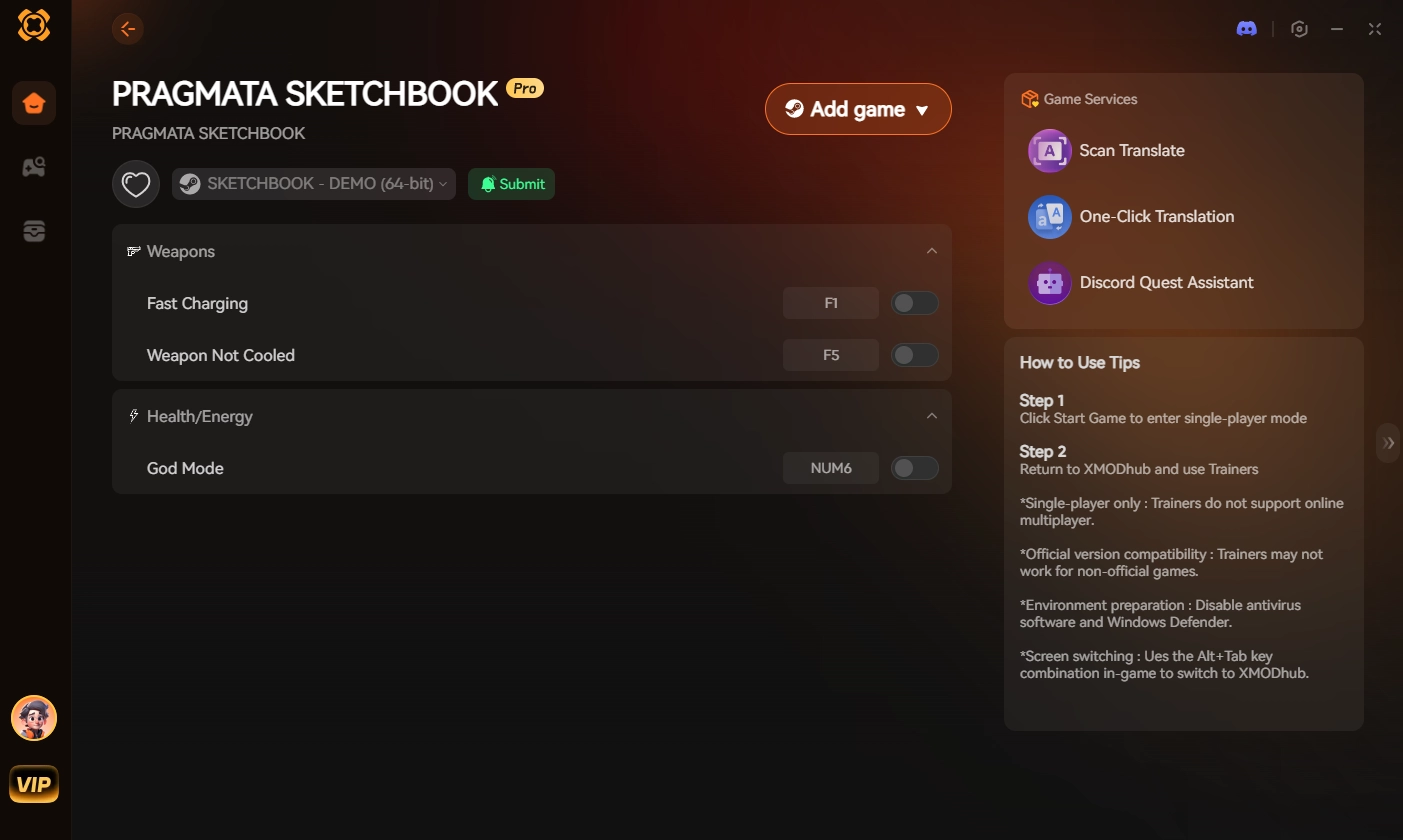
Stop risking your save data and wasting time with complicated file transfers. Give yourself the exact gear you want instantly and dominate the lunar colony entirely on your own terms.
Frequently Asked Questions (FAQ)
Q: Does using a downloaded 100% save file disable Steam achievements in PRAGMATA?
A: Loading a 100% save file will often instantly trigger all progression-based achievements to unlock at the exact same time when you load into the safe room. If you prefer to earn achievements naturally at your own pace, you should avoid replacing your save file.
Q: Why is my screen black after loading a downloaded PRAGMATA save?
A: A black screen with background audio playing indicates a DirectX 12 shader compilation failure. The engine is struggling to render the endgame assets loaded by the new save. You must close the game and execute Method 3 (inputting -d3d11 into your Steam Launch Options) to force a stable rendering pipeline.
Q: Can I merge my existing save file with the downloaded 100% save file?
A: No. RE Engine save files are monolithic blocks of encrypted data. There is no official or safe way to extract specific suits from one save file and inject them into another without completely breaking the file’s hex structure.
Conclusion
Getting a PRAGMATA unlock all suits save to function requires you to carefully navigate around the RE Engine’s strict security measures. By understanding why the shader cache crashes your game, and strictly following the methods to disable Steam Cloud, replace the userdata file, and force DirectX 11, you can bypass the grueling resource grind and look incredible during your next playthrough.
However, if technical troubleshooting and the risk of corrupted data are ruining your immersion, XMODhub is the definitive answer.
As the premier PC gaming enhancement platform supporting over 5,000 titles, XMODhub provides the reliable tools you need to bypass artificial friction. Whether you want to unlock all suits in PRAGMATA, or master similar games like Crimson Desert, and Road to Vostok, XMODhub ensures you always play your game, your way.

I am a passionate gamer and writer at XMODhub, dedicated to bringing you the latest gaming news, tips, and insights.
Connect with me:
LinkedIn Profile ↗
 Nancy Miller