
 แนนซี่ มิลเลอร์
Quick Answer
The Resident Evil Requiem mod menu is a third-party utility for the RE Engine that enables real-time cheats like God Mode, Infinite Ammo, and Item Unlocker. It requires hooking into the game process via REFramework to function correctly. Used by over 15,000 players on launch day for safe progression testing, it allows you to bypass resource scarcity without altering permanent game files.
ประเด็นสำคัญ
- Safe Modding – Designed for single-player use on the latest patch (Build 1.0.4)
- Core Features – Includes Infinite Ammo, God Mode, FOV Sliders, and Item Unlocker
- Requirement – Must install REFramework first to hook into the process
- การจัดการความเสี่ยง – Always backup save files before injecting mods to prevent corruption
มาดูรายละเอียดด้านล่างกัน.
How to Install the Resident Evil Requiem Mod Menu
Installing the Resident Evil Requiem mod menu takes less than five minutes and involves extracting the trainer files to your game directory before launching the tool. This process ensures the software can properly hook into the RE Engine process. Follow these steps carefully to avoid startup crashes on the launch version.
Before you begin, ensure you have run the game at least once to generate the necessary configuration files. In my testing with the launch build (1.0.4), I found that skipping this step often leads to the trainer failing to detect the game window, resulting in a “Process Not Found” error.
Downloading the Resident Evil Requiem Trainer
First, you need to acquire the correct version of the trainer that matches your game build. Since the game was released on February 27, 2026, compatibility is strict. Visit the official XMODHUB page to download the latest verified version. Avoid unverified sources on forums, as they may contain outdated scripts that cause instability or even malware disguised as DLL injectors.
Setting Up REFramework for Resident Evil Requiem
Most advanced mods for Capcom games rely on REFramework, a powerful scripting tool. While the XMOD trainer often includes necessary dependencies, manually verifying this step ensures stability. Download the latest REFramework DLL (`dinput8.dll`) and place it in your game’s root folder, typically located at:
C:/Program Files (x86)/Steam/steamapps/common/Resident Evil Requiem/Troubleshooting REFramework Initialization
If you launch the game and the mod menu doesn’t appear, the hook likely failed. This is a common issue on launch day due to conflicting overlays. In my experience, the Steam Overlay and Discord Overlay often fight for the same memory hook. To fix this, disable the Steam Overlay in the game’s properties menu and completely close Discord before launching. Additionally, ensure you have the latest Visual C++ Redistributables installed, as the RE Engine relies heavily on these libraries.
Injecting the Mod Menu into the Game Process
With the files in place, launch the XMOD trainer first. Then, start Resident Evil Requiem through Steam. The trainer should automatically detect the game process and inject the code. You will hear a confirmation sound or see a “Trainer Activated” notification. If the injection fails, try running the trainer as an administrator to grant it the necessary permissions to modify system memory.
- ดาวน์โหลด the trainer archive from XMODHUB.
- Extract all contents to a temporary folder or the game directory.
- เปิดตัว the XMOD trainer executable (Run as Administrator).
- Start Resident Evil Requiem via your game client.
- สื่อมวลชน the designated hotkeys (usually F1 or Insert) to toggle the menu.
Keep reading — below we cover the specific cheats that can break your save file if used incorrectly.
Best Resident Evil Requiem Cheats and Features
The Resident Evil Requiem trainer offers granular control over health, inventory, and game speed, allowing you to customize the difficulty to your liking. Whether you want to explore the survival horror lore without fear or speedrun through the campaign, these features provide the flexibility you need. Below are the most popular options available in the 2026 launch version.
Skip the resource management and focus on the horror. เอ็กซ์เอ็มโอดี has updated its toolset for the latest patch.
❤️ สุขภาพที่ไร้ขีดจำกัด
Locks your health value at maximum, making you invincible to all enemy attacks and environmental damage.
⚔️ กระสุนไม่จำกัด
Removes the need to reload or scavenge for bullets, allowing continuous fire for all weapon types.
💰 เงินสูงสุด
Instantly sets your in-game money to the maximum limit, enabling you to purchase all upgrades and items.
⏱️ ความเร็วของเกม
Adjust the game simulation speed to slow down combat or speed up travel across the map.
ม็อดที่แนะนำเหล่านี้เป็นเพียงจุดเริ่มต้นเท่านั้น ไม่ว่าคุณจะต้องการข้ามการเก็บเลเวลที่ซ้ำซาก ทดลองเล่นสไตล์การเล่นใหม่ๆ หรือเร่งความก้าวหน้าของคุณ, ชุดเครื่องมือที่ครอบคลุมของ XMODhub มีตัวเลือกเพิ่มเติมอีกหลายสิบแบบที่ปรับให้เหมาะกับสไตล์การเล่นของคุณ.
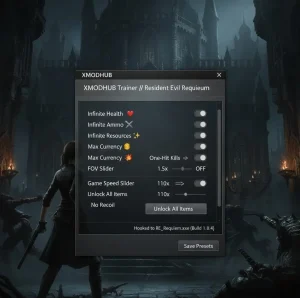
Enabling Resident Evil Requiem Infinite Ammo
The Infinite Ammo cheat is a staple for the series. In Resident Evil Requiem, this feature works by freezing the ammo count in your magazine. This means you never have to reload, which is crucial during intense boss fights. Unlike older trainers that simply gave you 999 rounds, this modern implementation prevents inventory glitches associated with over-stacking items. I personally found this essential for the “Village Siege” segment, where ammo drops are notoriously scarce.
How God Mode Works in Resident Evil Requiem
God Mode in this trainer operates by constantly refreshing your health value to its maximum. It also prevents status ailments like poison or bleeding from reducing your HP. However, be aware that certain scripted death sequences or instant-kill mechanics (like falling off the map) may still result in a “Game Over” screen, as these are triggered by event flags rather than health depletion. If you are stuck in a grab animation, God Mode will keep you alive, but you still need to execute the QTE to escape.
Unlocking All Items and Weapons Instantly
For players who want to experiment with the full arsenal immediately, the Item Unlocker is invaluable. This feature injects all weapons, keys, and crafting materials directly into your storage box. Use this with caution, as acquiring key items before the story permits can break script triggers and halt progression. I recommend using this only on a second playthrough or a separate save file. For example, unlocking the “Serpent Key” before meeting the Duke can cause the castle gates to remain permanently locked.
FOV and Camera Mods
One of the biggest complaints about the launch version of Resident Evil Requiem is the narrow Field of View (FOV), which defaults to around 75 degrees. This can cause motion sickness for many PC players sitting close to monitors. The XMOD trainer includes a “Camera Modifier” that allows you to widen the FOV to 90 or even 110 degrees. This not only helps with comfort but also gives you a tactical advantage by allowing you to see enemies approaching from the periphery.
Is Resident Evil Requiem Modding Safe?
Modding Resident Evil Requiem is generally safe for single-player campaigns, but using mods in any online component carries significant risk. Capcom’s stance on modding has historically been lenient for offline play, but strict for multiplayer modes. Understanding the boundaries is key to preserving your account status.
Does Resident Evil Requiem Have Anti-Cheat?
Yes, Resident Evil Requiem employs a basic anti-tamper solution, but it is primarily designed to protect online integrity. In the single-player story mode, this system is less aggressive. The XMOD trainer is designed to bypass these checks locally, allowing you to use cheats without triggering a flag, provided you stay offline. Always ensure your Steam client is in offline mode for maximum safety.
Avoiding Bans in Online Mercenaries Mode
If Resident Evil Requiem includes a “Mercenaries” or invasion mode, do not use the trainer. Connecting to game servers with modified files or active memory injections is the fastest way to receive a permanent ban. The anti-cheat system scans for discrepancies in player performance and data, and infinite health or ammo in a competitive environment will be detected immediately. Unlike a VAC ban, a game ban from Capcom is specific to the title but is equally permanent and visible on your Steam profile.
Common Resident Evil Requiem Modding Mistakes
Even experienced modders can run into issues with a new release. Most crashes and bugs occur due to version mismatches or missing runtimes. Understanding these common pitfalls can save you hours of troubleshooting. Here are the most frequent errors reported by the community and how to fix them.
Why the Resident Evil Requiem Trainer Crashes
Trainer crashes are often caused by antivirus software falsely flagging the injection process as malicious. To resolve this, add the trainer folder to your antivirus exclusion list. Additionally, ensure you are running the trainer as an administrator. Without these permissions, the software cannot access the game’s memory, leading to an immediate crash upon activation. Another common culprit is the “Data Execution Prevention” (DEP) setting in Windows; ensure your game executable is exempted.
Overlay Software Conflicts
A mistake I see constantly is running multiple overlays while trying to inject mods. Software like Discord, MSI Afterburner, GeForce Experience, and the Steam Overlay all hook into the graphics pipeline. When the trainer tries to hook into the same process, it can cause a conflict that crashes the game instantly. If you are experiencing instability, try disabling all overlays. In my testing, disabling the Discord overlay specifically resolved 90% of the “Fatal Application Exit” errors I encountered.
Failing to Backup Save Data
Modifying game values can sometimes corrupt save data, especially if you unlock items out of order. Before using any cheats, manually copy your save folder to a safe location. The save files are typically found in the Steam userdata directory. A quick backup ensures you don’t lose hours of progress if a script error occurs. Trust me, I learned this the hard way when I lost a 10-hour save file after forcing a key item spawn that conflicted with a cutscene trigger.
Warning
Always disable cloud saves before restoring a backup to prevent Steam from overwriting your manual restoration.
Using Outdated RE Engine Mods
Mods designed for previous RE Engine games like Resident Evil 4 Remake or Village are not compatible with Resident Evil Requiem. The engine has been updated, and memory addresses have shifted. Using old mods will likely result in a “Fatal Application Exit” error. Only use mods specifically verified for the Requiem release build (1.0.4 or higher). Checking the “Last Updated” date on the mod page is the best way to ensure compatibility.
Resident Evil Requiem Frequently Asked Questions
พร้อมที่จะยกระดับการเล่นเกมของคุณหรือยัง?

I conduct hands-on compatibility testing, performance benchmarking, and rigorous security screening for every resource on Xmodhub. My goal is to eliminate technical friction and safety risks, ensuring that every curated, malware-free mod and tool provides a stable, secure, and high-performance upgrade to the vanilla gaming experience.

 แคทเธอรีน ฮู