Кэтрин Ху
⚡ Quick Answer
What are the best WILL: Follow The Light mods right now?
Based on community downloads, stability, and our own 2026 testing of the Unreal Engine 5 framework, the top 5 must-have WILL: Follow The Light mods are:
- ▸Faster Yacht Sailing: Best for overall traversal optimization, significantly reducing the real-world time it takes to sail Molly across the Northern Seas.
- ▸Clear Weather Toggle: Completely overhauls the vanilla weather system, allowing you to instantly clear blinding blizzards for better visibility.
- ▸Infinite Sled Dog Stamina: Removes the harsh stamina limit for your huskies, making land exploration much easier.
- ▸Cinematic Aurora ReShade: Enhances environmental textures, lighting, and UE5 Lumen ray-tracing for a breathtaking night sky.
- ▸Skip Puzzle Animations: Adds instant transitions for the tedious weather station repair sequences.
Introduction
Playing WILL: Follow The Light in its vanilla state is an incredible, atmospheric experience, but the modding community has taken TomorrowHead Studio’s vision to a completely different level. Whether you are annoyed by the incredibly slow sailing mechanics, want to push your graphics card to its absolute limits with better ray-tracing, or simply want to skip the tedious environmental puzzles, there is a mod for exactly that.
However, diving into Unreal Engine 5 modding can be overwhelming. With hundreds of files available, figuring out which ones actually work—and which ones will crash your game during a cinematic transition—is a massive headache.
After spending dozens of hours tweaking UE5 load orders and testing compatibility, we have compiled the definitive list of the best WILL: Follow The Light mods you need to install right now.
Вам также может понравиться: WILL: Follow The Light Item IDs List & Console Spawn Codes (Complete Guide 2026)
How to Install Mods for WILL: Follow The Light Safely
Before downloading anything, you need to set up your game directory to accept modified Unreal Engine files. For WILL: Follow The Light, the community highly recommends the standard UE5 ~mods folder method.
Step-by-Step Installation:
- Locate the Paks Folder: Navigate to your game installation directory and find
WILLFollowTheLight\Content\Paks. - Create the Mods Folder: Inside the Paks folder, create a new folder and name it exactly
~mods(the tilde is required). - Download a Mod: Register on a popular modding hub like Nexus Mods to download your desired
.pakfiles. - Install and Deploy: Drop the downloaded
.pak,.sig, и.ucasfiles directly into your new~modsfolder. Launch the game, and the engine will automatically load them.
Top Quality of Life (QoL) Mods
These mods do not drastically change the core narrative game; they just remove the annoyances that waste your time.
- ▸Faster Walking Speed: Will’s default walking speed is painfully slow. This mod increases his base movement speed by 30%, making lighthouse exploration far less tedious.
- ▸Auto-Interact: Skips the need to hold down a button for 3 seconds every time you want to pick up a clue or turn a valve.
- ▸Brighten Flashlight: Increases the radius and battery life of your vanilla flashlight, so you never get lost in the dark caves.
Best Visual and Graphics Mods
If you have a high-end PC, these mods will make WILL: Follow The Light look like a true next-gen technical marvel.
- ▸True Aurora Borealis: Completely revamps the game’s global illumination and night skybox, making the northern lights significantly more vibrant.
- ▸Disable Depth of Field: Removes the game’s default blurry anti-aliasing (TAA) and depth of field, giving the ocean waves a crisp, realistic look.
- ▸Ultra-Wide UI Fix: Upscales and repositions the compass and inventory UI to properly fit 21:9 and 32:9 monitors without stretching.
Top Gameplay and Overhaul Mods
Looking to change how the game is actually played? These mods adjust the survival and traversal mechanics.
- ▸Arcade Sailing Physics: Rebalances Molly’s handling, making the yacht turn faster and ignore realistic headwind penalties.
- ▸Skip Mini-games: Bypasses the complex electrical wiring sequences at the weather stations, allowing you to focus purely on the story.
- ▸Invincible Sled Dogs: Adjusts the cold survival mechanics, ensuring your huskies never get tired or need to stop for rest during a blizzard.
Nexus Mods Alternatives for WILL: Follow The Light
While Nexus Mods is the undisputed king of PC modding, it is not the only place to find content for WILL: Follow The Light. Depending on the type of content you are looking for, you can also check:
- ✦ModDB: Great for larger, bundled quality-of-life patches.
- ✦GitHub: Many advanced Unreal Engine mod authors host their script extensions (like UE4SS plugins) and open-source files directly on GitHub.
- ✦Patreon/Discord: Hardcore modding communities often host their experimental lighting overhauls on private Discord servers before public release.
Is There a Mod Limit in WILL: Follow The Light?
Yes, depending on your hard drive speed, there is a soft cap on how many .pak files you can install. For WILL: Follow The Light, pushing past 200 individual mod files will cause the Unreal Engine to experience severe stuttering when streaming new oceanic environments. To bypass this, advanced users have to learn how to pack and merge their mods—a highly technical and frustrating process.
The Danger of Mod Conflicts and Corrupted Saves
While lighting mods are usually safe, gameplay mods that alter Will’s movement speed, inventory, or puzzle states can be incredibly dangerous to your save file.
The biggest issue in UE5 modding is load order conflicts. If Mod A and Mod B try to change the same yacht sailing physics, your game will crash to the desktop immediately. Furthermore, every time TomorrowHead Studio releases an official developer update, script-heavy mods break. If you load a save file attached to a broken mod, your narrative progress can become permanently soft-locked.
The Easier Alternative to Gameplay Mods: XMODhub
If your main goal for modding is just to make the game more enjoyable—like giving yourself infinite sled dog stamina, super sailing speed, or ghost mode to bypass a frustrating puzzle—you do not need to risk breaking your game with messy .pak files.
This is where XMODhub shines as the ultimate gameplay enhancer. Instead of downloading outdated mods that conflict with each other, the XMODhub app runs safely alongside WILL: Follow The Light.
- ✦Zero Installation Conflicts: Because it alters memory dynamically, there are no files to drag and drop into your
~modsfolder, and absolutely no load order nightmares. - ✦Update Proof: XMODhub updates its features automatically when WILL: Follow The Light patches on Steam, so you never lose access to your cheats.
- ✦Save File & Achievement Safe: Unlike traditional mods that permanently brand your save file or disable Steam achievements, XMODhub leaves zero trace when you close it.
How to Use XMODhub for WILL: Follow The Light
- Download and Launch the free XMODhub desktop app.

- Search for WILL: Follow The Light.
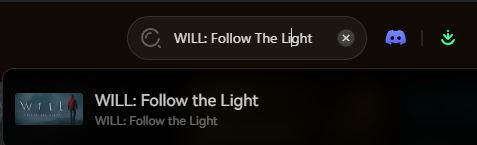
- Click “Play”.
- Toggle your desired enhancements (Ghost Mode, Infinite Stamina, Fast Sailing) directly from the clean UI or via hotkeys.
Troubleshooting: Mods Crashing on Startup
If your game is crashing to a black screen after installing mods, check these common culprits:
- ▸Missing Master Files: You installed a mod but forgot to download the required UE4SS script injector it depends on.
- ▸Outdated Mods: Check if the
.pakfile has been updated for the latest WILL: Follow The Light patch. If it has not been updated in months, delete it from your~modsfolder immediately. - ▸Verify Game Files: Go to Steam, right-click WILL: Follow The Light > Properties > Installed Files > Verify integrity of game files.
Frequently Asked Questions (FAQ)
Will installing mods ban me from WILL: Follow The Light?
No. Because WILL: Follow The Light is a strictly single-player narrative experience, developers do not ban players for modifying their own game files.
Do mods disable Steam achievements?
In many cases, yes. The Unreal Engine detects modified files and will lock achievement progression. You often have to download a separate “Achievement Enabler” plugin just to fix this, or use a secure memory tool like XMODhub which bypasses the detection entirely.
Заключение
Modding WILL: Follow The Light is a fantastic way to breathe new life into a game you already love. While visual enhancements and UI tweaks require traditional .pak file management, altering your gameplay stats does not have to be a complicated, crash-prone process.
For a seamless, risk-free way to customize your traversal speed, bypass the environmental grind, and truly experience the story on your own terms, XMODhub is the superior choice. With dedicated support for WILL: Follow The Light and over 5,000+ other single-player PC games—including massive narrative hits like Alan Wake 2, Firewatch, и SOMA—XMODhub ensures you spend your time actually playing, rather than troubleshooting broken files.

Я страстный геймер и писатель XMODhub, который стремится предоставить вам самые свежие игровые новости, советы и мнения.
Свяжитесь со мной:
Профиль LinkedIn

 Нэнси Миллер