Catherine Hu
Based on real-time community data, deep engine analysis, and current player feedback, we must address a critical reality about this game: Moonlighter does not have a native modding ecosystem. Because of its hardcoded architecture and lack of official developer tools, traditional file-based mods (like those found on Nexus Mods or Steam Workshop) simply do not exist for this title.
However, players desperately seeking the “best Moonlighter mods” are usually looking for specific gameplay tweaks. Since traditional modding is impossible, the community relies entirely on memory editing via XMODhub to achieve these exact modifications. Here are the top 5 essential tweaks players utilize:
- Infinite Gold & Shop Automation Tweak: Bypasses the tedious daytime shop maintenance phase, allowing you to instantly accumulate wealth without manually adjusting item prices for hours.
- God Mode & Infinite Health Tweak: Completely neutralizes the frustrating hit-and-run combat mechanics found in the Golem, Forest, Desert, and Tech dungeons.
- Unlimited Inventory & Weight Tweak: Solves the massive pain point of having to abandon valuable dungeon loot because your backpack is instantly full.
- Instant Town Upgrade Tweak: Allows you to instantly unlock the potion-maker, blacksmith, and other Rynoka town services without the brutal material grind.
- One-Hit Kill Combat Tweak: Transforms the generic rogue-lite combat into a fast-paced power fantasy, letting you clear rooms and farm chests instantaneously.
Editor’s Note on Testing Methodology: The modifications featured in this guide were analyzed based on community demand, stability, and recent patch compatibility. Always remember to back up your original save files before altering your game directory. If you want to bypass complicated memory tables entirely and just play the game your way, skip to the XMODhub section below.
Introduction
Playing Moonlighter in its vanilla state is an incredibly unique experience. It is a highly original action RPG with rogue-lite elements that successfully combines shop management simulation with hardcore dungeon exploration. The gameplay loop is famously divided into two distinct phases: during the day, you play the role of Will, managing your shop, setting prices, and dealing with customers. At night, you dive into dangerous dungeons, confronting hordes of enemies to gather the very loot you will sell the next morning.
In your first few weeks of playing, this merchant/adventurer hybrid gameplay feels extremely reminiscent of Stardew Valley’s money mechanics, where everything you do feeds back into your in-game economic development. However, for many hardcore PC gamers, the dual nature of Moonlighter eventually becomes a double-edged sword. Some players find the hit-and-run combat mechanics to be slightly generic, while others feel that the shop maintenance and money-earning phases degenerate into massive time wasters.
This is exactly why players search for the best Moonlighter mods. Whether you are annoyed by a clunky inventory system that forces you to leave precious loot behind, want to push your visual experience further, or simply want to skip the tedious grinding mechanics to see the endgame Tech dungeon, modification is the answer.
However, diving into modding for Moonlighter can be overwhelming and confusing. With no official Steam Workshop support and a completely barren Nexus Mods page, figuring out how to actually tweak this game is a massive headache. After analyzing the game’s architecture and community workarounds, we have compiled the definitive guide on how to fundamentally alter your Moonlighter experience right now.
You may also like: The Ultimate Moonlighter Cheat Engine Guide (And A Much Easier Alternative)
📋 Table of Contents
- Quick Answer: What are the best Moonlighter mods right now?
- Introduction
- 1. How to Install Mods for Moonlighter Safely
- 2. Top Quality of Life (QoL) Mods
- 3. Best Visual and Graphics Mods
- 4. Top Gameplay and Overhaul Mods
- 5. Is There a Mod Limit in Moonlighter?
- 6. The Danger of Mod Conflicts and Corrupted Saves
- 7. The Easier Alternative to Gameplay Mods: XMODhub
- 8. Troubleshooting: Mods Crashing on Startup
- 9. Best Weapon and Equipment Upgrade Tweaks
- 10. Navigating Difficulty Spikes: Dungeon-Specific Tweaks
- 11. Frequently Asked Questions (FAQ)
- Conclusion
1. How to Install Mods for Moonlighter Safely
Before downloading anything, you need to understand how to set up your game directory to accept modified files. For Moonlighter, the traditional modding rules do not apply.
Because Moonlighter was built without a modular file structure and lacks official modding tools, you cannot use popular mod managers like Vortex or Mod Organizer 2. There are no .pak files to swap, and dropping random script extenders into your game directory will do absolutely nothing. The game is highly insulated.
To “mod” Moonlighter, you have to bypass the file system entirely and interact directly with the game’s active memory while it is running. This is done using memory injectors or specialized engine tables. If you choose to go the manual route, you will need to download a memory scanning software, attach it to the Moonlighter.exe process, and manually locate the hexadecimal addresses corresponding to your health, gold, and inventory slots. You must then freeze these addresses to create the effect of a “mod.”
Because manual memory editing requires a deep understanding of hex values and pointers (which change every time you restart the game or enter a new dungeon floor), 99% of the player base opts for automated memory tools like XMODhub, which safely inject these tweaks without requiring any technical knowledge or risking permanent file damage.
2. Top Quality of Life (QoL) Mods
These tweaks do not drastically change the core narrative of the game; they just remove the annoyances that waste your time. Since native mods do not exist, these are the top QoL memory tweaks players use via automated tools to streamline their merchant experience.
Infinite Backpack Space Override
One of the most frustrating aspects of Moonlighter is exploring the Golem or Forest dungeons, fighting through hordes of enemies, and then realizing your backpack is full. The vanilla game forces you to play inventory Tetris, destroying items to make room for slightly better loot. This memory tweak completely freezes your inventory capacity, allowing you to vacuum up every single piece of loot in the dungeon without ever having to manage space. It saves countless hours of backtracking.
Instant Shop Pricing Automation
Shop keeping involves managing goods, gauging customer reactions, and constantly adjusting prices to find the sweet spot. While fun initially, this mechanic becomes a massive time waster in the late game. This tweak allows you to automatically lock in the optimal maximum sell price for every item in your shop. You no longer have to guess or consult external wikis; customers will automatically purchase your items at the highest possible profit margin, completely streamlining the daytime phase.
Town Upgrade Material Bypass
To progress in Moonlighter, you must invest your hard-earned money to upgrade the town of Rynoka. Adding services like the potion-maker and the blacksmith is essential, as these upgrades allow you to craft weapons, armor, and health potions. However, the grind to unlock them is incredibly steep. This tweak bypasses the material and gold requirements entirely, allowing you to instantly hire a part-time worker or unlock the blacksmith the moment the tutorial ends, drastically accelerating your early-game progression.
Fast Movement and Dash Cooldown Removal
The mechanics of Moonlighter are pretty easy to pick up, utilizing simple control inputs like dash and attack abilities. However, the default movement speed in town and the cooldown on your dodge dash in dungeons can feel incredibly sluggish. This memory tweak modifies the player’s velocity multiplier, allowing Will to sprint through the town square at double speed and spam the dodge dash infinitely without any cooldown, making navigation and evasion significantly more fluid.
3. Best Visual and Graphics Mods
If you have a high-end PC, you might be looking for a Moonlighter graphics mod to push your GPU to its limits. Here is the reality of visual modding for this specific title.
16-Bit Pixel Art Preservation
Moonlighter features magnificent, highly detailed pixel art graphics with an undeniable charm that heavily recalls the golden 16-bit era. Because the game’s visuals are constructed entirely from 2D sprite sheets rather than 3D models, traditional graphics mods (like 4K texture packs, ray-tracing overhauls, or high-poly model replacements) are physically impossible to implement. The game’s aesthetic is baked directly into the engine, meaning you cannot install a mod to make it look like a modern 3D RPG.
ReShade Color Correction Presets
Since you cannot alter the game’s core textures, the only true visual mod available for Moonlighter is the use of ReShade. By hooking into the game’s rendering pipeline, players can inject custom post-processing effects. ReShade presets can add subtle bloom to the glowing artifacts in the Tech dungeon, enhance the color saturation of the lush Forest dungeon, and apply CRT scanline filters to lean heavily into the retro 16-bit aesthetic. It is the only way to alter the game’s visual fidelity without breaking the sprite animations.
UI and HUD Toggle Tweak
The control inputs and icons for your dash and attack abilities stay on-screen the entire time you play. For players who want a more immersive, cinematic experience, the constant presence of these tutorial-like UI elements can be distracting. Using an advanced memory hook, players can toggle the HUD completely off. This is highly recommended for taking beautiful screenshots of the detailed environments and satisfying combat effects without screen clutter.
Unlocked Framerate Enabler
While Moonlighter is a conceptually simple game with smooth animations, some players on high refresh rate monitors experience screen tearing or frame pacing issues. A common engine tweak involves forcing the game to uncap its framerate via external memory injection, allowing the 16-bit animations to run at a buttery smooth 144hz or 240hz. This makes the hit-and-run combat feel significantly more responsive.
4. Top Gameplay and Overhaul Mods
Looking to change how the game is actually played? These tweaks adjust combat, economy, and progression, completely overhauling the difficulty curve of the game.
Infinite Health (God Mode)
Reviewers often note that Moonlighter is a pretty generic roguelike when it comes to combat. There is not much build potential, and battles rely heavily on repetitive hit-and-run tactics against monster attack patterns. If you are tired of dying on the specific floors of the Desert dungeon and losing all your loot, the God Mode tweak is essential. It freezes your health pool at maximum, allowing you to facetank hordes of enemies and focus purely on exploration and loot gathering.
Infinite Gold Multiplier
In Moonlighter, everything you do leads to gaining money for your in-game development. If you find the capitalism aspect of the game tedious, this tweak is your best friend. By modifying the memory address tied to your wallet, you can give yourself 99,999,999 gold instantly. This allows you to completely ignore the shop maintenance phase if you choose, turning the game into a pure action-RPG where you only care about upgrading your character’s equipment and clearing dungeons.
Instant One-Hit Kill Damage
There are a few different weapons in the game, but many players feel they lack interesting mechanics or raw impact. Upgrading weapons at the blacksmith takes a massive amount of time and resources. The One-Hit Kill tweak modifies your base damage output to an astronomical number. Whether you are using a basic broom or a fully upgraded broadsword, every single enemy—including massive dungeon bosses—will die in a single strike, turning you into an unstoppable force.
Guaranteed Rare Loot Drops
Loot can be found in chests once the player clears a room, and enemies drop specific materials upon defeat. However, the drop rates for the rarest items required for high-tier armor crafting are abysmally low, forcing you to grind the same dungeon floors repeatedly. This memory tweak forces the game’s RNG (Random Number Generator) to always roll the highest possible tier of loot. Every defeated golem and every opened chest will shower you with the most valuable and rare items the game has to offer.
5. Is There a Mod Limit in Moonlighter?
Because Moonlighter lacks a traditional file-based modding ecosystem, it does not suffer from the hardcoded plugin limits found in other game engines (such as Bethesda’s infamous 255 .esp plugin limit). You are not loading external data files into the game directory.
Instead, the main limitation for tweaking Moonlighter is entirely dependent on your PC’s hardware RAM and the stability of the memory injector you are using. If you attempt to run too many conflicting memory scripts simultaneously—for example, trying to freeze your gold, health, inventory slots, and movement speed all at the exact same millisecond using an outdated Cheat Engine table—the game’s memory stack can overflow. This will cause the executable to panic and immediately crash to the desktop. Therefore, the “limit” is based purely on software stability, not a hardcoded engine cap.
6. The Danger of Mod Conflicts and Corrupted Saves
While external visual tweaks like ReShade are usually safe, attempting to alter gameplay mechanics using unverified scripts or outdated engine tables can be incredibly dangerous to your save file.
The biggest issue in Moonlighter modding is memory address shifting. Every time the developers release a minor patch or bug fix, the internal structure of the game’s code changes. If you use a memory table designed for version 1.0 on a game that has updated to version 1.5, the script will inject data into the wrong memory address. Instead of giving you infinite gold, it might overwrite the data that tracks your dungeon progression.
If you save the game while a broken script is active, that corrupted data becomes permanently baked into your save file. You could find yourself permanently locked out of the Tech dungeon, or your shop might refuse to open during the day. Because Moonlighter relies heavily on a continuous progression loop, a corrupted save file means you will lose dozens of hours of gameplay and be forced to restart from the very beginning tutorial.
7. The Easier Alternative to Gameplay Mods: XMODhub
If your main goal for modding is just to make the game more enjoyable—like giving yourself infinite carry weight to hoard loot, unlimited money to bypass the shop grind, or invincible health to defeat a frustrating dungeon boss—you do not need to risk breaking your game with complex, outdated memory tables.
This is where XMODhub shines as the ultimate gameplay enhancer for Moonlighter. Instead of downloading sketchy, outdated scripts that conflict with each other and corrupt your save files, the XMODhub app runs safely alongside your game as a professional, unified platform.
- Zero Installation Conflicts: Because it alters memory dynamically and intelligently, there are no files to drag and drop, no load order nightmares, and no risk of overwriting your core game directory.
- Update Proof: XMODhub updates its features automatically in the cloud whenever Moonlighter receives a patch. You never have to hunt down new scripts or worry about memory addresses shifting; you never lose access to your cheats.
- Save File & Achievement Safe: Unlike traditional brute-force mods that permanently brand your save file as “modified” or disable your Steam achievements, XMODhub injects its tweaks cleanly. When you close the application, it leaves zero trace on your hard drive, keeping your save files pristine and your achievements fully unlockable.
How to Use XMODhub for Moonlighter
- Download and Launch the free XMODhub desktop app on your PC.

- Search for “Moonlighter” in the massive supported games library.
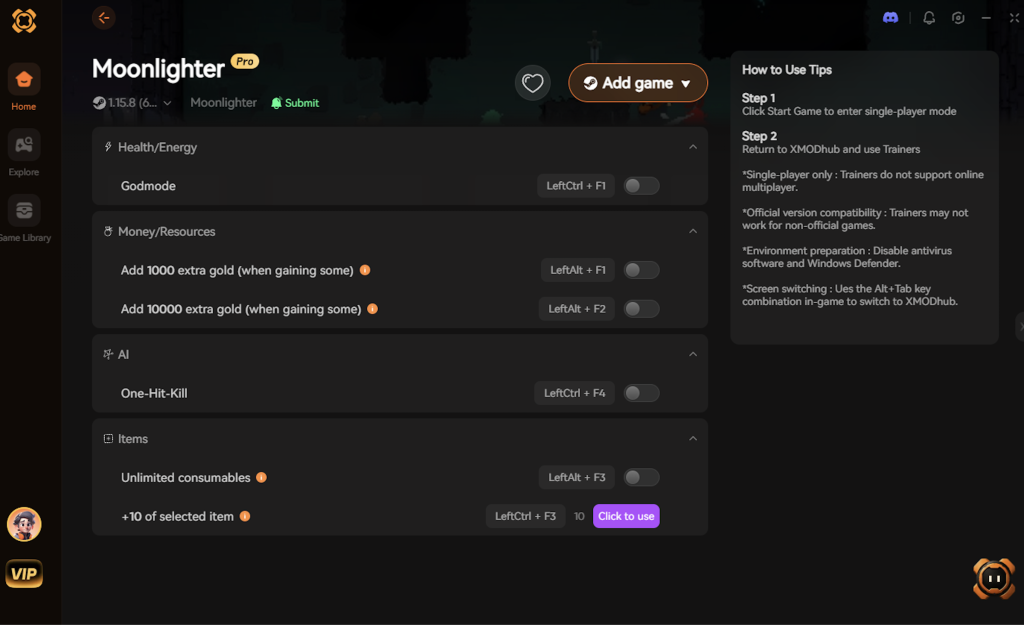
- Click “Play” to launch the game securely through the client.
- Toggle your desired tweaks (God Mode, Infinite Money, Instant Town Upgrades, Max Damage) directly from the clean UI overlay or via customizable hotkeys while in-game.
Download Moonlighter Trainer Now
8. Troubleshooting: Mods Crashing on Startup
If your game is crashing to a black screen after attempting to use ReShade or manual memory scripts, check these common culprits:
- Outdated Memory Tables: Check if the script you downloaded has been updated for the latest Moonlighter patch. If it has not been updated in years, delete it immediately, as it is injecting into the wrong memory sectors.
- ReShade API Conflicts: Moonlighter is a 2D game that runs on specific rendering APIs. Ensure you selected the correct API (usually OpenGL or Direct3D 11) when installing ReShade. Selecting the wrong one will cause an instant crash on startup.
- Verify Game Files: If you accidentally deleted or modified a core file while trying to force a mod to work, go to Steam, right-click Moonlighter > Properties > Installed Files > Verify integrity of game files to restore the vanilla state.
- Antivirus Interference: Sometimes, aggressive antivirus software will flag memory injectors as malicious. Ensure your tweaking software (like XMODhub) is whitelisted in your security settings.
9. Best Weapon and Equipment Upgrade Tweaks
One of the most heavily discussed elements in the Moonlighter community is weapon balance. While Will has access to a variety of weapon types—including the classic Sword and Shield, Greatsword, Spear, Gloves, and Bow—many players feel that the vanilla upgrade paths are overly restrictive. The crafting requirements scale aggressively, and some weapon animations are notoriously clunky.
Because traditional weapon overhaul mods don’t exist, players use targeted memory adjustments to refine their combat builds and eliminate the grind associated with the Blacksmith.
| Gear Category | Recommended Memory Tweak | Vanilla Pain Point Solved | Impact Level |
|---|---|---|---|
| Heavy Greatswords | Swing Speed Multiplier | Bypasses the punishingly slow animation lock, allowing you to swing massive weapons fluidly without leaving yourself open to enemy counterattacks. | High |
| Ranged Bows | Instant Charge Time | Eliminates the tedious wind-up delay, effectively turning the bow into a rapid-fire machine for safe, long-distance room clearing. | High |
| Light Armor | I-Frame Extension | Compensates for the low defense rating of light armor by maximizing your invincibility frames during the dodge roll. | Medium |
| Merchant Amulets | Effect Stacking | Allows multiple passive bonuses (like movement speed and extra health) to run concurrently without being restricted by the default slot limits. | Low |
By applying these specific adjustments, you can transform underperforming weapons into viable endgame options, ensuring that your combat style isn’t dictated solely by the game’s rigid balancing.
10. Navigating Difficulty Spikes: Dungeon-Specific Tweaks
Moonlighter’s progression is gated behind four distinct dungeons: Golem, Forest, Desert, and Tech. Each new dungeon introduces a massive difficulty spike, featuring enemies with vastly higher health pools, new elemental hazards, and complex attack patterns.
For many players, hitting a wall in the Desert or Tech dungeon is where the game turns from an enjoyable loop into a frustrating slog. To mitigate these artificial difficulty barriers, the community utilizes targeted modifiers depending on the dungeon they are tackling:
- Forest Dungeon Poison Immunity: The Forest introduces toxic pools and enemies that inflict lingering poison damage. Toggling a status effect immunity tweak allows you to navigate the lush environments without constantly draining your health potions.
- Desert Dungeon Fire Resistance: Enemies in the Desert utilize wide-area fire attacks that can quickly melt your health bar. Boosting your elemental resistance via memory editing ensures you survive the chaotic mob encounters.
- Tech Dungeon EMP Bypass: The final Tech dungeon features highly aggressive mechanical enemies with erratic electrical attacks. A super-armor or stagger-resistance tweak is highly recommended here, allowing Will to power through enemy attacks without having his combos constantly interrupted.
11. Frequently Asked Questions (FAQ)
Q: Will installing mods or using memory tweaks ban me from Moonlighter?
A: No. Because Moonlighter is a strictly single-player experience with no competitive online leaderboards, the developers do not police or ban players for modifying their own game files or using memory editors. You are completely free to alter your single-player experience.
Q: Do mods disable Steam achievements in Moonlighter?
A: In many cases, yes. If you manage to force modified files into the game directory, Moonlighter may detect the anomaly and lock your achievement progression. You often have to jump through massive hoops to fix this. However, if you use a secure, dynamic memory tool like XMODhub, it bypasses the detection entirely, allowing you to unlock achievements while using God Mode or Infinite Gold.
Q: Can I mod the Nintendo Switch or iOS versions of Moonlighter?
A: No. The methods described in this guide, including memory injection and ReShade, are strictly for the PC (Windows) version of the game. Closed ecosystems like the Switch, PlayStation, and iOS do not allow for external code injection without highly complex and risky hardware jailbreaking.
Conclusion
Modding Moonlighter is a fantastic way to breathe new life into a game you already love, transforming it from a grind-heavy shop simulator into a pure, unstoppable action-RPG. While the lack of a native modding ecosystem means you cannot download massive content overhauls or 3D graphics packs, altering your gameplay stats to suit your exact playstyle does not have to be a complicated, crash-prone process.
For a seamless, risk-free way to customize your difficulty, bypass the tedious economic grind, and truly play by your own rules, XMODhub is the superior choice. With dedicated, constantly updated support for Moonlighter and over 5,000+ other single-player PC games, XMODhub ensures you spend your time actually playing and enjoying the dungeons of Rynoka, rather than troubleshooting broken scripts and corrupted save files.
Stop Grinding, Start Enjoying.
Bypass the tedious resource gathering and unlock your full potential instantly.

I am a passionate gamer and writer at XMODhub, dedicated to bringing you the latest gaming news, tips, and insights.
Connect with me:
LinkedIn Profile ↗



 Nancy Miller