
 Catherine Hu
No, ZeroSpace does not have a built-in developer console or native text-based cheat codes. Because the game is a highly ambitious hybrid RTS/RPG that heavily integrates an MMO Galaxy map, seasonal co-op, and competitive multiplayer modes alongside its story-rich campaign, the developers have strictly locked down the engine. This was a necessary step to prevent exploits that could easily ruin the server-side economy, corrupt player progression, and destroy the competitive balance of the Orion Sector.
However, if you are strictly playing the single-player RPG campaign or setting up private offline skirmishes, the only reliable way to cheat is by using a secure third-party trainer like XMODhub. This dedicated software safely bypasses the locked game engine and offers 1-click alternatives like God Mode, Infinite Faction Resources, Instant Unit Recruitment, and Unlimited Mothership Energy without ever requiring you to type out complex command lines or risk a ban.
Editor’s Note: This guide was last verified against the newest ZeroSpace patch. Whether you are attempting to use native engine tools, memory editors, or a dedicated trainer, please back up your save files before modifying game memory to prevent unexpected bugs or progression blockers.
We have all been there. You have just spent hours dying to the same massive Grell boss in ZeroSpace, or maybe you simply do not have the time to grind for rare Hexium resources and faction reputation after a grueling day at work. Single-player games are meant to be enjoyed on your own terms, at your own pace. Let us get your commander powered up and your armies fully upgraded.
You may also like: The Ultimate ZeroSpace Cheat Engine Guide (And A Much Easier Alternative)
📋 Table of Contents
- Quick Answer: Does ZeroSpace Have Console Commands?
- 1. How to Enable Cheats in ZeroSpace
- 2. The Complete List of ZeroSpace Cheats
- 3. Item IDs and Spawning Guide
- 4. Do Cheats Disable Achievements?
- 5. Why Native Cheats Can Break Your Save Files
- 6. The Safer Alternative: 1-Click Cheats with XMODhub
- 7. Troubleshooting: Cheats Not Working
- 8. Best Tech Tree Upgrades to Unlock Instantly
- 9. The Hexium Grind: Manual Farming vs. Using a Trainer
- 10. Frequently Asked Questions (FAQ)
- Conclusion
1. How to Enable Cheats in ZeroSpace
Because ZeroSpace functions as a unique hybrid experience blending a cinematic single-player narrative with persistent MMO elements, the traditional method of pressing the Tilde (~) key to open a developer console has been completely disabled in both the retail and Early Access builds. The developers intentionally removed the command-line interface to ensure that community feedback regarding faction balance, tech trees, and unit strength remains authentic and untainted by artificial manipulation.
Since there is no developer console, players cannot type in traditional cheat codes. Modifying configuration files (.ini or .xml) in the game directory will also not work, as the game utilizes server-side checks for its galaxy map and encrypted memory addresses for its offline campaign data.
Instead, the most reliable and safest method to enable cheats in the single-player modes of ZeroSpace is by utilizing a dynamic memory injector. Here is the simple 3-step process to download and attach XMODhub to the game to enable your desired cheats:
Step 1: Install the Client
Navigate to the official XMODhub website and download the desktop application. The software is remarkably lightweight and designed to run silently in the background without consuming the valuable CPU and RAM resources you need for large-scale galactic warfare. Install the application and create a free account to access the core single-player cheat database.
Step 2: Link the Game Process
Launch XMODhub before you open ZeroSpace. In the search bar of the XMODhub library, type “ZeroSpace” and select the game profile. The software will automatically detect your installation path, whether you downloaded the game via Steam, Epic Games Store, or another storefront. Click the “Play” button directly from the XMODhub interface. This allows the trainer to seamlessly hook into the game’s executable file (ZeroSpace.exe) as it boots up, bypassing the internal anti-tamper checks designed for the multiplayer modes.
Step 3: Activate Cheats via Hotkeys
Once you are fully loaded into your single-player campaign save or a private offline skirmish against AI opponents, you can bring up the XMODhub overlay (usually Shift + Tab or your custom bound key) or simply use your Numpad to toggle features. You will hear a distinct audio cue confirming that the cheat has been successfully injected into the game’s active memory. Please ensure you are entirely disconnected from the MMO Galaxy map before activating these features to avoid any desync issues.
2. The Complete List of ZeroSpace Cheats
Because ZeroSpace does not feature a developer console, there are no text-based cheat codes to input. You will not find any commands like add_resources 10000 or god_mode 1 hidden in the game files. However, you can achieve the exact same effects—and often much more stable ones—using the XMODhub app.
The trainer isolates the exact memory addresses responsible for your resources, unit health, and RPG mechanics, allowing you to manipulate the Orion Sector exactly how you see fit. Below is the comprehensive list of trainer features available in XMODhub for ZeroSpace, what they do, and how to activate them during your campaign.
| Trainer Feature | Effect / Gameplay Impact | How to Activate |
|---|---|---|
| Infinite Faction Resources | Instantly maxes out your primary building materials and rare currencies like Hexium. Essential for rapidly upgrading your mothership and expanding your Protectorate forces without grinding gathering nodes. | Numpad 1 or Toggle via UI |
| God Mode (Invincible Units) | Locks the health pool of all currently selected friendly units and structures to their maximum value. Enemy attacks, orbital strikes, and environmental hazards will deal zero damage. | Numpad 2 or Toggle via UI |
| Instant Unit Recruitment | Bypasses the standard production timer. When you queue a unit at a production facility, it will spawn instantaneously, allowing you to field a formidable army in seconds. | Numpad 3 or Toggle via UI |
| Unlimited Mothership Energy | Prevents your tactical energy bar from depleting. This allows you to spam powerful orbital abilities, cinematic ultimate attacks, and defensive shields continuously during large-scale galactic warfare. | Numpad 4 or Toggle via UI |
| Max Crew Affinity / Relationship | Automatically maximizes the relationship meters with all your party members. This unlocks all interactive dialogue options, loyalty missions, and alternate story outcomes without having to navigate the hard choices manually. | Numpad 5 or Toggle via UI |
| Instant Tech Tree Unlock | Immediately researches all available upgrades in the current faction’s tech tree, skipping the resource cost and the research time entirely. | Numpad 6 or Toggle via UI |
| Remove Fog of War (Map Reveal) | Clears the entire minimap and main screen of the fog of war. You can see all 10 species of alien civilizations, enemy base layouts, and hidden resource caches across the map. | Numpad 7 or Toggle via UI |
| One-Hit Kills (Super Damage) | Multiplies the damage output of your units by 100x. Even the most basic infantry will instantly obliterate heavily armored enemy mechs and boss units in the PvE scenarios. | Numpad 8 or Toggle via UI |
| Set Game Speed | Allows you to manipulate the internal clock of the game engine. You can slow down time to micro-manage intense battles perfectly, or speed up time to skip tedious traversal across the map. | Ctrl + Numpad +/- |
3. Item IDs and Spawning Guide
In many traditional RPGs or older RTS games, players rely on a massive index of hexadecimal Item IDs and a spawning command format (such as player.additem [ID] [Amount]) to force specific weapons, armor, or quest items into their inventory.
Because ZeroSpace completely lacks native engine tools and a developer console, manually spawning items via text is impossible. The game engine dynamically allocates memory for inventory items, faction upgrades, and crew equipment, meaning there are no static hex codes that a player could simply type into a text box even if one existed. Attempting to force variables into the game using outdated memory editors (like Cheat Engine) often results in immediate crashes, as the game’s hybrid architecture constantly verifies the integrity of your inventory against the current campaign state.
XMODhub elegantly bypasses this frustrating limitation. Instead of requiring you to scour wikis for complex, 8-digit hex codes for every specific tier of Mothership plating or alien artifact, the trainer utilizes highly optimized scripts that interact directly with the game’s loot generation system. By simply clicking the “Maximize Inventory” or “Inject Rare Materials” button within the XMODhub interface, the software automatically identifies the memory arrays associated with your current save file and populates them. This eliminates the need to look up complex hex codes, drastically reducing the risk of corrupting your campaign progress while instantly providing you with the resources you need to shape humanity’s future.
4. Do Cheats Disable Achievements?
For achievement hunters playing ZeroSpace on Steam, the implementation of cheats is always a major concern. In games that actually feature native console commands, the moment you press the Tilde key and input a code, the engine instantly flags your save file as “modified.” This internal flag communicates with the Steamworks API, permanently locking you out of earning achievements for that specific playthrough. If you wanted to earn the achievement for completing the campaign on the hardest difficulty, a native cheat would ruin that effort entirely.
However, because XMODhub operates differently, it safely bypasses these achievement locks. XMODhub does not alter the game’s core executable files or permanently inject flags into your save data. Instead, it temporarily modifies the values in your system’s RAM (Random Access Memory) while the game is running.
Because the game engine still believes you are playing the game normally—it simply registers that your units happen to be taking zero damage or that your resource count naturally increased—the Steamworks API is never alerted to any foul play. You can freely use God Mode, Infinite Resources, and Instant Build times to breeze through the story-rich campaign, and every single achievement will unlock precisely as intended when you reach the necessary cinematic cutscenes or mission victory screens.
5. Why Native Cheats Can Break Your Save Files
Beyond the achievement lock, native developer tools and memory editors are notoriously unstable. These commands were originally built for developers to test bugs during production, not for everyday gameplay.
Forcing a quest to complete or bypassing intended story triggers can cause crucial NPCs to completely disappear from your map. Memory leaks, corrupted assets, and sudden crashes to the desktop are incredibly common when you spawn too many items at once. In a game like ZeroSpace, where the narrative branches based on your faction alliances and crew loyalty, breaking a single script with a forced command can render a 40-hour save file completely unplayable.
6. The Safer Alternative: 1-Click Cheats with XMODhub
If you want the benefits of cheats—like infinite health or skipping the heavy grind—without risking your save files or locking your achievements, you need a dedicated game modification tool.
Instead of typing risky code that might corrupt your game world, the XMODhub app hooks into ZeroSpace safely and cleanly.
- Achievement Safe: It bypasses the game’s internal cheat-flagging system.
- Save File Protection: It alters values temporarily. Your save file remains uncorrupted.
- One-Click Toggles: No more memorizing long item IDs. Just hit a hotkey to turn God Mode on instantly.
How to Use XMODhub for ZeroSpace
- Download and Launch the free XMODhub desktop app.

- Search for “ZeroSpace” in the library.
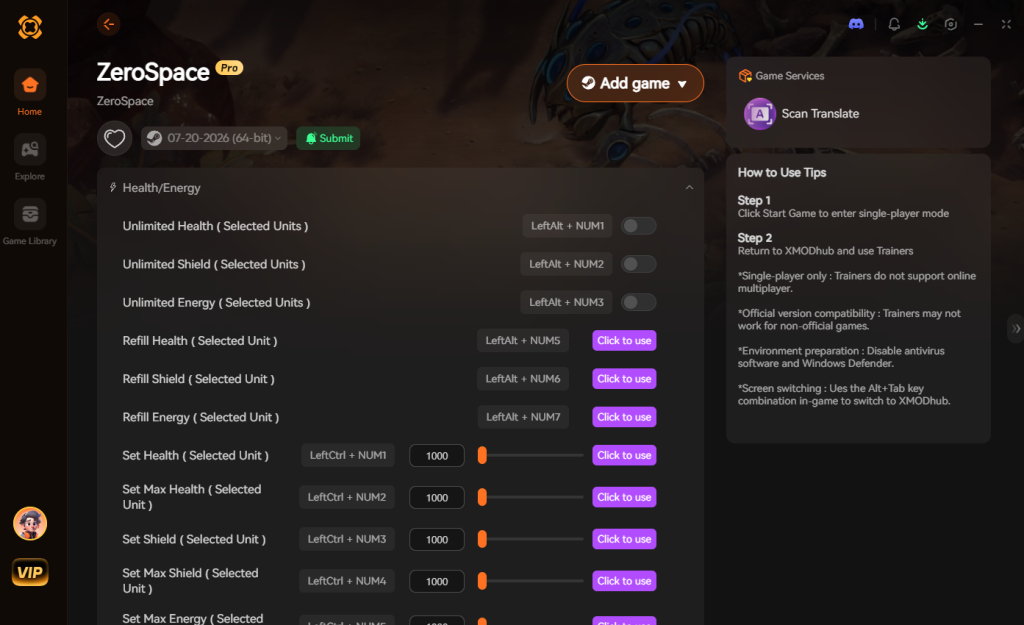
- Click “Play”.
- Toggle your desired cheats directly from the clean UI or via hotkeys.
7. Troubleshooting: Cheats Not Working
Even with a sophisticated tool like XMODhub, PC gaming environments can sometimes cause interference. If you find that your ZeroSpace cheats are not activating or the hotkeys are unresponsive, check the following common issues:
- Game Updates Breaking Memory Addresses: ZeroSpace is currently in Early Access, meaning the developers are frequently pushing patches influenced by community feedback. When a game updates, the internal memory structures shift. If your cheats stop working after a Steam update, simply wait a few hours. The XMODhub team automatically detects patch changes and pushes silent updates to the trainer to realign the memory pointers. Always ensure your XMODhub app is connected to the internet to receive these dynamic updates.
- Lack of Administrator Rights: Because XMODhub needs to read and write to the active memory of
ZeroSpace.exe, Windows security protocols might block the injection process. If you hear an error chime when pressing a Numpad key, close the game and the trainer. Right-click the XMODhub shortcut and select “Run as Administrator.” This grants the software the necessary elevated permissions to bypass standard Windows user account controls. - Antivirus False Positives: Heuristic antivirus scanners (like Windows Defender, Norton, or Bitdefender) often mistake memory injectors for malicious software because they exhibit similar behavior (modifying another program’s memory). If XMODhub fails to launch or cannot find the game process, you will need to add the XMODhub installation folder to your antivirus exclusion/whitelist settings.
- Multiplayer Mode Restrictions: As a strict rule, XMODhub is designed exclusively for single-player environments. If you attempt to use these cheats while connected to the MMO Galaxy map, Co-op, or competitive 1v1/2v2 matchmaking, the server-side architecture will immediately reject the modified values. The cheats will simply fail to toggle, or the game may force a desynchronization error and kick you back to the main menu. Always ensure you are playing the offline campaign or a local PvE skirmish before activating the trainer.
8. Best Tech Tree Upgrades to Unlock Instantly
One of the most satisfying aspects of ZeroSpace is its deep, branching tech tree that allows you to customize your faction’s playstyle. However, researching top-tier nodes requires an immense amount of time and resources. If you are using the Instant Tech Tree Unlock or Infinite Faction Resources cheats via XMODhub, prioritizing the right upgrades can turn your army into an unstoppable force within the first five minutes of a match.
Here is a strategic breakdown of the highest-value upgrades you should instantly unlock to dominate the Orion Sector:
| Upgrade Category | Specific Tech / Node | Strategic Advantage | Trainer Priority |
|---|---|---|---|
| Mothership Core | Orbital Strike T3 | Decimates heavy mech waves and enemy bases instantly with a massive AoE blast. | High |
| Economy | Hexium Extraction Boost | Maximizes passive resource income if you prefer to play without the Infinite Resources toggle active. | Medium |
| Infantry (Vanguard) | Vanguard Plasma Shields | Prevents early-game squishy units from being wiped out by environmental hazards or ambushes. | High |
| Vehicles (Siege) | Heavy Siege Plating | Allows your tanks to soak up massive boss damage without requiring intense micro-management. | Low (if using God Mode) |
| Crew / Hero | Ultimate Ability Cooldown | Lets your hero units spam their ultimate abilities, making cinematic fights incredibly chaotic and fun. | High |
By utilizing the trainer to bypass the research timers on these specific nodes, you can immediately experiment with endgame builds and strategies without having to survive the grueling early-game economy phase.
9. The Hexium Grind: Manual Farming vs. Using a Trainer
In the ZeroSpace campaign, Hexium is the ultimate bottleneck. This rare crystalline resource is required for everything from upgrading your Mothership’s hyperdrive to recruiting elite mercenary factions.
For purists, farming Hexium involves a repetitive gameplay loop: dropping your forces onto a procedurally generated planet, securing resource nodes, defending against waves of native alien wildlife, and extracting before the timer runs out. While this loop is engaging the first few times, doing it for the fiftieth time just to afford a single story-gated upgrade can cause major burnout.
Using a trainer fundamentally respects your time. By toggling on Infinite Faction Resources, you completely bypass the artificial padding of the Hexium grind. Instead of spending 45 minutes defending a mining drill, you can immediately purchase your upgrades and progress to the next major cinematic story mission. For players who are in it for the rich RPG narrative, the deep lore, and the character interactions, skipping the resource grind is the best way to maintain the pacing of the game’s excellent story.
10. Frequently Asked Questions (FAQ)
Q: Can I use these cheats on PlayStation or Xbox?
A: No. Modifying game memory, utilizing trainers, or accessing developer consoles for ZeroSpace is strictly limited to the PC version of the game. Console architecture is heavily encrypted and does not support third-party memory injection tools.
Q: Is there a penalty for using cheats in single-player?
A: There is no account ban or official penalty for cheating in a single-player environment. The only downsides are the potential for corrupted save files and disabled achievements, both of which can be completely avoided by using a secure trainer like XMODhub instead of outdated memory editors.
Q: Can I use Cheat Engine (CE) tables for ZeroSpace?
A: While some community members create Cheat Engine tables, they are notoriously unreliable for ZeroSpace. Because the game receives frequent patches in Early Access, CE pointers break almost weekly, leading to fatal game crashes. XMODhub is recommended because it automatically updates its pointers over the cloud.
Q: Will these cheats work in the Co-op or Multiplayer modes?
A: Absolutely not. ZeroSpace uses dedicated servers for all of its multiplayer components (including Co-op and the MMO Galaxy map). Attempting to inject altered memory values into a server-side match will result in an immediate desync error and could potentially flag your account for a multiplayer ban. Keep the cheats strictly in offline single-player.
Conclusion
Whether ZeroSpace provides a built-in console or not, taking control of your single-player experience is easier than ever. While tweaking raw engine code or hunting down obscure hex IDs can be a fun technical experiment for some, it comes with significant risks to your hard-earned save files and Steam achievements. For a flawless, risk-free experience, using a dedicated modification tool is always the smarter choice.
With secure support for over 5,000+ single-player PC games, you can easily customize your gameplay, skip the tedious grind, and play exactly the way you want. Embrace the power to shape the Orion Sector on your own terms.

Stop Grinding, Start Enjoying.
Bypass the tedious resource gathering and unlock your full potential instantly.

I am a passionate gamer and writer at XMODhub, dedicated to bringing you the latest gaming news, tips, and insights.
Connect with me:
LinkedIn Profile ↗
 Nancy Miller