
 Catherine Hu
How do you cheat in ZeroSpace? To cheat in ZeroSpace, you can manually attach Cheat Engine to the game’s executable and scan for changing numeric values like your raw galactic resources for army recruitment or your Protectorate mothership upgrade points. However, because game updates frequently break Cheat Engine tables (.CT files), the safest and easiest alternative is using an auto-updating mod manager like XMODhub, which provides 1-click cheats without requiring any memory scanning.
[Editor’s Note] Look, I get it. We all start ZeroSpace thinking we’re going to play it completely legit. But after dying to a massive alien swarm in the Orion Sector PvE scenarios for the 15th time, or spending hours grinding for high-tier tech tree nodes and crew relationship reputation points, the fun stops. I’ve been messing with Cheat Engine for years, and trying to isolate the exact memory values for this game’s current patch almost drove me insane. Today, I’m going to show you how to manually hack the values if you want the technical challenge—but I’ll also share the 1-click shortcut I actually use to save my sanity.
You may also like: The Ultimate ZeroSpace Console Commands and Cheats Guide
📋 Table of Contents
- Quick Answer
- 1. How to Use Cheat Engine for ZeroSpace (The Manual Way)
- 2. Common CE Errors: Pointers Breaking & Not Attaching
- 3. The Better Alternative: 1-Click Cheats with XMODhub
- 4. Where to Find Safe ZeroSpace Cheat Tables (.CT)?
- 5. Advanced Cheat Engine Techniques: Hero Stats & Faction Rep
- 6. Top Requested ZeroSpace Cheat Table (.CT) Features
- 7. Frequently Asked Questions (FAQ)
- Conclusion: Work Smarter, Not Harder
1. How to Use Cheat Engine for ZeroSpace (The Manual Way)
If you want to go the old-school route and find the memory addresses yourself, here is the basic “First Scan/Next Scan” method tailored for this game.
Because ZeroSpace is a unique hybrid sci-fi RTS and RPG, you are managing two very different types of economies. On one hand, you have the macro-level RTS resources required to build your army and expand your faction’s influence. On the other hand, you have the RPG elements—specifically, the skill points for your commander, mothership upgrade currencies, and the invisible affinity stats that govern your relationships with your crew. For this tutorial, we are going to focus on isolating the primary RTS base-building resources, as running out of these mid-battle is the fastest way to lose a skirmish against the AI or the environment.
Here is the exact step-by-step process to manipulate your primary harvestable resources during a ZeroSpace campaign mission or PvE skirmish:
Step 1: Launch ZeroSpace and Attach the Process
Boot up ZeroSpace and load into a single-player skirmish or a campaign mission. Do not attempt this in the MMO Galaxy Map multiplayer modes, as server-side checks will immediately flag your account. Once you are loaded into the map and your command center is visible, pause the game. Open Cheat Engine, click the glowing PC icon in the top left corner, and select the ZeroSpace.exe process from the application list.
Step 2: Perform the Initial Memory Scan (First Scan)
Take a look at your current primary resource count at the top of the UI. Let’s say you start with exactly 500 minerals/credits. In Cheat Engine, set the “Value Type” to 4 Bytes (the standard for most integer-based resources in RTS games). Type 500 into the “Value” text box and click “First Scan.” Cheat Engine will likely return thousands, if not millions, of memory addresses holding the value of 500. Do not panic; this is normal because the game engine uses the number 500 for countless background processes.
Step 3: Alter the In-Game Value
Alt-tab back into ZeroSpace and unpause the game. You need to change that resource number. The easiest way to do this in an RTS is to command a worker unit to build a basic structure or queue up a cheap infantry unit at your barracks. Let’s say building a scout costs 50 resources. Queue the unit, watch your resource pool drop to 450, and immediately pause the game again to prevent background harvesting from changing the number further.
Step 4: Filter the Results (Next Scan)
Alt-tab back to Cheat Engine. Change the “Value” box from 500 to 450. Click the “Next Scan” button (do NOT click New Scan). The list of addresses on the left panel should dramatically shrink from thousands down to just a handful—usually between 1 and 3 addresses. If you still have dozens of addresses, repeat Step 3 and Step 4 by spending more resources until only a few addresses remain.
Step 5: Isolate, Modify, and Freeze
Double-click the remaining addresses in the left panel to drop them into the active cheat list at the bottom of the Cheat Engine window. Double-click the number under the “Value” column and change it to 999999. Finally, click the small checkbox next to the address to “Freeze” it. This locks the memory address, meaning no matter how many units you recruit or mothership upgrades you purchase, your resources will never deplete. You now have an infinite economy to steamroll the Orion Sector.
| In-Game Stat / Mechanic | Recommended CE Value Type | Difficulty to Isolate | Common Use Case in ZeroSpace |
|---|---|---|---|
| Primary RTS Resources | 4 Bytes | Easy | Infinite base building and massive army recruitment during skirmishes. |
| Unit Health / Shields | Float | Hard | Creating a God Mode for specific hero units or your main commander. |
| Mothership Tech Points | 4 Bytes | Medium | Instantly unlocking the entire technology tree without grinding. |
| Ability Cooldowns | Float | Very Hard | Spamming devastating orbital strikes or hero abilities instantly. |
| Crew Affinity / Rep | Double / Float | Hard | Maxing out interactive dialogue relationships to unlock specific story outcomes. |
2. Common CE Errors: Pointers Breaking & Not Attaching
If you are pulling your hair out because CE isn’t working for ZeroSpace, you aren’t alone. Here is what’s probably happening:
Error: “Cannot attach to process” / Game Crashes:
ZeroSpace might be using specific engine protections or anti-tamper mechanisms, especially since it features a persistent MMO Galaxy map and seasonal co-op elements. Modern game engines often deploy memory obfuscation or active anti-debugging layers that detect when software like Cheat Engine attempts to hook into the executable. When the game detects this intrusion, it intentionally crashes to the desktop to protect its memory space. To bypass this, you need to configure Cheat Engine to use the VEH Debugger. Go to Cheat Engine’s Settings -> Debugger Options, and switch the debugger method to “Use VEH Debugger.” This tells Cheat Engine to use Windows’ Vectored Exception Handling to intercept memory calls, which is far stealthier and often bypasses basic anti-tamper triggers. Additionally, ensure you are running Cheat Engine as an Administrator, or Windows User Account Control (UAC) will silently block the memory read/write permissions.
The Pointer Problem:
Have you ever successfully hacked your resources, felt like a genius, but then the moment you load into a new cinematic cutscene or start a new mission, your cheats completely break? Welcome to the nightmare of dynamic memory allocation. ZeroSpace does not store your mothership’s health or your resource counts in a static, permanent location on your RAM. Every time you traverse the Orion Sector or load a new map, the game’s engine dynamically reallocates memory. The address that held your resources five minutes ago might now hold the texture data for an alien rock.
To fix this manually, you have to find “Pointers”—the master addresses that tell the game where the dynamic addresses are currently hiding. Finding multi-level pointers requires performing complex pointer scans, rebooting the game multiple times, and writing custom Assembly (AOB) injection scripts to intercept the game’s code execution. It is incredibly tedious. One small typo in your AOB script, and ZeroSpace will instantly fatal-error crash. This is exactly why relying on manual memory editing for modern, constantly updating early access titles is an exercise in pure frustration.
3. The Better Alternative: 1-Click Cheats with XMODhub
Here is the dirty little secret of the modding community: Nobody actually wants to spend two hours updating Cheat Engine tables every time a patch drops. The moment ZeroSpace updates on Steam—which happens frequently during its Early Access phase based on community feedback—your hard-earned memory addresses shift, your custom pointers break, and your game crashes to the desktop.
| Feature / Metric | Manual Cheat Engine (.CT) | XMODhub Auto-Trainer |
|---|---|---|
| Setup Time | 15 – 45 minutes per session | < 10 seconds (1-click) |
| Update Reliability | Breaks on every minor game patch | Auto-updates via cloud instantly |
| Crash Risk | High (Requires exact AOB scripts) | Extremely Low (Safe injection) |
| Ease of Use | Requires deep technical knowledge | User-friendly modern UI |
| Feature Access | Limited by your scanning skills | 15+ premium cheats pre-built |
Why XMODhub beats manual CE for ZeroSpace:
- Zero Hex Codes Needed: Just toggle a beautiful switch on our UI. You don’t need a computer science degree to get infinite health.
- Auto-Updating Cloud Tech: When the developers release a new patch to balance the 10 alien civilizations, XMODhub updates its trainer automatically. No more broken scripts, no more waiting for forum users to upload a new table.
- Premium Features Instant Access:
- Undetected God Mode / Infinite Health for your armies.
- Unlimited Protectorate Tech Points and Instant Unit Recruitment.
- Super Speed & Custom Jump Height (great for exploring maps fast).
- One-Hit Kills for annoying bosses or overwhelming enemy swarms.
How to Use XMODhub for ZeroSpace?
- Download and Launch the free XMODhub desktop app.

- Search for “ZeroSpace” in the library.
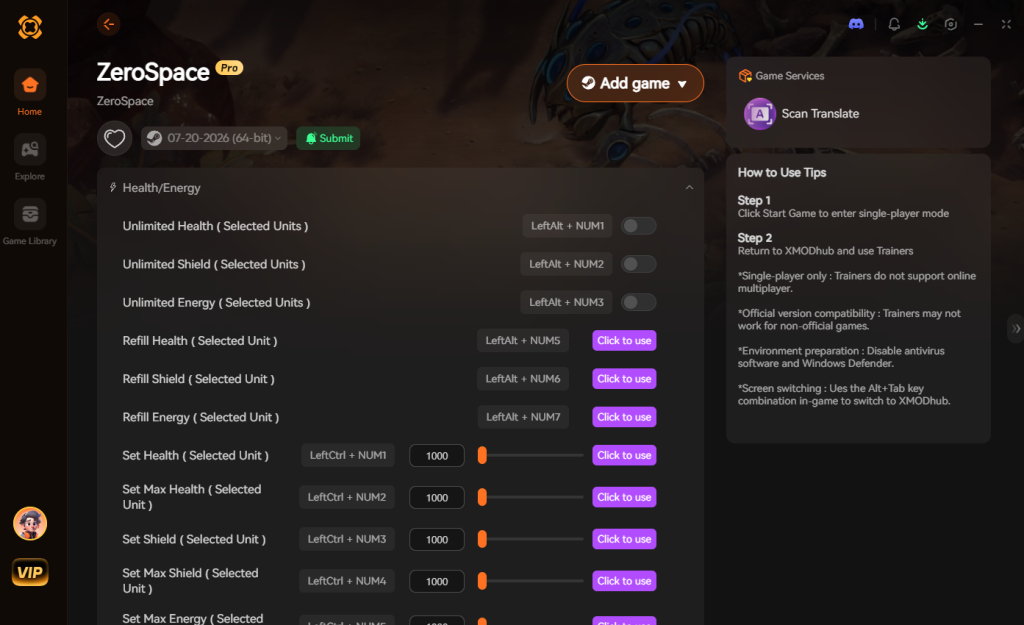
- Click “Play” to auto-hook the game safely.
- Toggle your desired cheats directly from the clean UI or via hotkeys.
4. Where to Find Safe ZeroSpace Cheat Tables (.CT)?
If you absolutely insist on using CE, you’ll want a pre-made Cheat Table (.CT file). However, you must navigate this space with extreme caution. The internet is flooded with unverified forums and sketchy Discord servers offering “Free ZeroSpace Mega Cheat Tables.”
Downloading random .CT files from anonymous users is a massive cybersecurity risk. Cheat Engine tables are not just simple text files; they can contain complex, embedded Lua scripts. Malicious actors frequently exploit this feature to write scripts that execute shell commands on your PC the moment you check a box in the table. While you think you are just activating “Infinite Mothership Energy,” the hidden script could be silently downloading a Trojan horse, installing a crypto-miner that throttles your GPU, or deploying ransomware to steal your personal data.
Even if a file isn’t outright malicious, outdated tables from previous game versions will corrupt your save files or cause continuous hard crashes, ruining your campaign progress. If you are going to download a .CT file, only use heavily moderated, reputable communities like the FearLess Cheat Engine forums, and only download files from users with high reputation scores and pages of positive feedback.
This inherent risk is exactly why a verified, professionally developed application like XMODhub is the vastly superior choice. With XMODhub, the injection methods are rigorously tested, closed-source, and guaranteed to be free of malware. You get all the power of memory editing without opening your PC’s backdoor to random internet strangers.
5. Advanced Cheat Engine Techniques: Hero Stats & Faction Rep
While adjusting basic resources like minerals or credits is a great introduction to memory editing, ZeroSpace’s deep RPG layers demand a more advanced approach. Players often want to modify their Commander’s combat stats or manipulate faction reputation to force specific narrative outcomes.
Modifying Commander Health (God Mode):
Unlike base-building resources, health pools in modern RTS engines are rarely stored as simple 4-byte integers. They are almost always stored as Float values to account for fractional damage mitigation (e.g., taking 12.5 damage from a laser blast). To find your hero’s health, you cannot use an exact value scan because the UI often rounds the number up. Instead, you must set your scan type to Float and perform an “Unknown Initial Value” scan. Then, let your commander take a hit from an enemy, pause the game, and scan for “Decreased Value.” You will have to repeat this process of taking damage and scanning for decreased values dozens of times before isolating the correct address. Once found, you can freeze it to achieve a rudimentary God Mode.
Manipulating Faction Affinity and Crew Rep:
ZeroSpace features a complex dialogue and reputation system that dictates which mercenary factions will ally with you. These values are highly obfuscated. They are often stored as Double data types and are heavily tied to dynamic pointers that shift every time a dialogue cinematic loads. Attempting to manually scan for these invisible affinity stats is incredibly difficult because you rarely know the exact numerical value of your reputation; you only see a visual progress bar. To hack this, advanced users have to write custom AOB (Array of Bytes) injection scripts that intercept the game’s logic right as a dialogue choice awards reputation points, multiplying the awarded value by 100.
6. Top Requested ZeroSpace Cheat Table (.CT) Features
When players venture into modding forums searching for a ZeroSpace cheat engine table, they are usually trying to bypass very specific intentional bottlenecks designed by the developers. A meticulously crafted, community-updated .CT file will typically include custom scripts rather than just raw memory addresses.
Here is a breakdown of the most sought-after cheat scripts that advanced table creators implement, and why they are so valuable during a ZeroSpace campaign playthrough:
| Cheat Table Feature | Memory Data Type | In-Game Impact | Complexity to Script |
|---|---|---|---|
| Infinite Faction Resources | 4 Bytes (Dynamic) | Instantly build massive fleets and upgrade bases without waiting for harvesters. | Low |
| Commander God Mode | Float / Pointer | Hero units absorb infinite damage, allowing you to solo entire enemy outposts. | High |
| Instant Tech Tree Unlock | Byte / Boolean | Skips the entire Protectorate RPG grind, granting access to endgame units early. | Medium |
| Zero Ability Cooldowns | Float (AOB) | Spam orbital strikes, tactical nukes, and hero abilities endlessly without delay. | Very High |
| Max Crew Affinity | Double | Instantly maxes out relationships, unlocking all hidden dialogue and story branches. | High |
If you are intimidated by the prospect of hunting down a functional .CT file that contains all of these features—and hoping it doesn’t crash your game—this is exactly where XMODhub shines. Every single feature listed in the table above is natively pre-built into the XMODhub ZeroSpace trainer, requiring zero scripting knowledge to activate.
7. Frequently Asked Questions (FAQ)
| Platform / Game Mode | Cheat Engine Compatibility | XMODhub Compatibility | Ban Risk Level |
|---|---|---|---|
| Steam (Single-player Campaign) | Yes (Manual Scans Required) | Yes (Fully Supported) | Zero (Safe) |
| Steam (PvE Skirmish vs AI) | Yes (Requires AOB Scripts) | Yes (Fully Supported) | Zero (Safe) |
| Xbox Game Pass (PC) | No (Blocked by UWP Encryption) | Yes (Bypasses UWP) | Zero (Safe) |
| Multiplayer / Co-op Galaxy Map | No (Server-side checks) | Disabled for safety | Extremely High |
Q: Can I use Cheat Engine on the Xbox Game Pass version of ZeroSpace?
A: Usually, no. Game Pass uses strict UWP (Universal Windows Platform) file encryption and restricted folder permissions that actively block Cheat Engine from attaching to the executable. Even if you manage to hook it, the memory addresses are heavily obfuscated. However, XMODhub is specifically engineered to bypass these restrictions seamlessly, allowing you to cheat on the Game Pass version just as easily as the Steam version.
Q: Is it illegal to use Cheat Engine?
A: Modifying data on your own PC for a single-player experience like ZeroSpace’s story-rich campaign is completely legal. You own your hardware and you can modify the local RAM values as you see fit. Just never bring memory editors into a multiplayer server or the seasonal co-op galaxy map, as violating the game’s Terms of Service will result in a swift account ban.
Q: Will using Cheat Engine drop my FPS or slow down my PC?
A: Yes, it absolutely can, depending on how you use it. When you perform a “First Scan” on an unknown value in a modern, resource-heavy game like ZeroSpace, Cheat Engine has to parse through gigabytes of active RAM. This causes massive CPU spikes and can temporarily freeze your game. Furthermore, if you lock (freeze) too many addresses simultaneously, Cheat Engine has to aggressively poll and rewrite those memory addresses dozens of times per second. This constant CPU polling cycle can lead to micro-stutters, frame rate drops, and overall system instability, especially during large-scale galactic warfare scenes with hundreds of units on screen.
Conclusion: Work Smarter, Not Harder
Learning how memory manipulation works in Cheat Engine is a cool flex. Understanding hex codes, pointers, and assembly logic gives you a great peek under the hood of game development. But let’s be real—when you come home from a long day at work, you just want to spawn in that legendary Tier-3 Protectorate Dreadnought and wreck some alien enemy factions without taking a computer science class.
Why spend 45 minutes digging through hex codes, writing custom scripts, and praying your game doesn’t crash when you can click one button and instantly get God Mode? And the best part? XMODhub supports over 5,000+ PC games. Once you install the app, you can ditch the complicated cheat tables for good and focus entirely on dictating the outcome of humanity’s 7th phase of expansion.

Stop Grinding, Start Enjoying.
Bypass the tedious resource gathering and unlock your full potential instantly.

I am a passionate gamer and writer at XMODhub, dedicated to bringing you the latest gaming news, tips, and insights.
Connect with me:
LinkedIn Profile ↗
 Nancy Miller