Catherine Hu
How do you cheat in PRELUDE Dark Pain? To cheat in PRELUDE Dark Pain, you can manually attach Cheat Engine to the game’s executable and scan for changing numeric values like your heroes’ current health points (HP) during grid combat or the unspent talent points available for your roster. However, because game updates frequently break Cheat Engine tables (.CT files), the safest and easiest alternative is using an auto-updating mod manager like XMODhub, which provides 1-click cheats without requiring any memory scanning.
[Editor’s Note] Look, I get it. We all start PRELUDE Dark Pain thinking we’re going to play it completely legit. But after dying to the High Inquisitor of the Order of the Ashen Crusade for the 15th time, or spending hours grinding for rare blacksmithing ores for Soren’s forge, the fun stops. I’ve been messing with Cheat Engine for years, and trying to isolate the exact memory values for this game’s current patch almost drove me insane. Today, I’m going to show you how to manually hack the values if you want the technical challenge—but I’ll also share the 1-click shortcut I actually use to save my sanity.
You may also like: The Ultimate PRELUDE Dark Pain Console Commands and Cheats Guide
📋 Table of Contents
- Quick Answer
- 1. How to Use Cheat Engine for PRELUDE Dark Pain (The Manual Way)
- 2. Common CE Errors: Pointers Breaking & Not Attaching
- 3. The Better Alternative: 1-Click Cheats with XMODhub
- 4. Where to Find Safe PRELUDE Dark Pain Cheat Tables (.CT)?
- 5. Advanced CE Tactics: Skill Cooldowns & Base Addresses
- 6. Frequently Asked Questions (FAQ)
- Conclusion: Work Smarter, Not Harder
1. How to Use Cheat Engine for PRELUDE Dark Pain (The Manual Way)
If you want to go the old-school route and find the memory addresses yourself, here is the basic “First Scan/Next Scan” method tailored for this game.
Because PRELUDE Dark Pain is a deeply tactical RPG with a massive roster of 20+ playable heroes, each possessing two talent branches and a pool of 25 skills, managing your progression can become an absolute slog. One of the most highly sought-after cheats is modifying your available Talent Points. This allows you to instantly max out your Ranged DPS, Magic Support, and Assassin classes without having to grind repetitive side missions against the Order of the Ashen Crusade. Here is the exact, step-by-step technical process to manually isolate and freeze your Talent Points using Cheat Engine.
Step 1: Attach Cheat Engine to the Game Process
First, launch PRELUDE Dark Pain and load into your current campaign save file. Once you are safely in the camp menu where Soren manages the 5-hero roster, open Cheat Engine. Click the glowing “PC/Magnifying Glass” icon in the top-left corner of the Cheat Engine interface. Scroll through your active processes, locate the executable for PRELUDE Dark Pain (usually named PreludeDarkPain.exe or Prelude-Win64-Shipping.exe), and click “Open”. You are now actively monitoring the game’s RAM allocation.
Step 2: Perform the Initial Memory Scan
Navigate to the character progression screen and select a hero who currently has unspent Talent Points. Let’s say your Assassin currently has exactly 5 unspent points. In Cheat Engine, ensure the “Value Type” is set to “4 Bytes” (which is the standard integer format for skill points in most modern Unity/Unreal Engine tactical RPGs). Type “5” into the “Value” box and hit “First Scan”. The address list on the left will populate with thousands, sometimes millions, of memory addresses that currently share the value of 5. Do not touch any of them yet.
Step 3: Modify the In-Game Value
Alt-tab back into PRELUDE Dark Pain. You need to force the game to update that specific memory address to filter out the garbage data. Spend exactly one Talent Point on any skill in the hero’s talent branch (for example, upgrading a critical hit passive or a grid-movement ability). Your Assassin now has 4 unspent Talent Points remaining.
Step 4: Execute the Next Scan to Isolate the Address
Alt-tab back to Cheat Engine. Change the number in the “Value” box from 5 to 4. Click “Next Scan” (Crucial: Do not click First Scan again, or you will reset your progress). The massive list of thousands of addresses should now shrink dramatically to just a handful—usually between 1 and 3 addresses. If you still have dozens of addresses, repeat Step 3 and Step 4 by spending another point until only one static address remains.
Step 5: Freeze and Edit the Memory Value
Double-click the remaining address to drop it into the active cheat table at the bottom of the Cheat Engine window. Double-click the number under the “Value” column and change it to 99 (or whatever amount of points you desire to unlock all 25 skills). Finally, click the empty checkbox on the far left of that row to place a red “X” in it. This “freezes” the value, meaning that even when you spend points in PRELUDE Dark Pain, the game engine cannot subtract from your total. You now have infinite progression for that specific hero.
| In-Game Stat / Mechanic | Common Memory Value Type | Scan Difficulty | Notes for PRELUDE Dark Pain |
|---|---|---|---|
| Hero Health Points (HP) | 4 Bytes or Float | Medium | HP often displays as an integer but is calculated as a float behind the scenes during grid-based damage calculations. |
| Available Talent Points | 4 Bytes | Easy | Highly stable during the camp menu. Best modified before entering a tactical mission. |
| Grid Movement Range | Float | Hard | Tied to complex physics and grid-coordinate logic. Modifying this manually often causes the game to crash. |
| Blacksmithing Materials | 4 Bytes | Easy | Standard inventory quantity scan. Ensure you have at least 3 of an item to successfully filter the Next Scans. |
| Action Points (AP) | 4 Bytes | Medium | Resets every turn. You must freeze this value during your active turn before the enemy faction moves. |
2. Common CE Errors: Pointers Breaking & Not Attaching
If you are pulling your hair out because CE isn’t working for PRELUDE Dark Pain, you aren’t alone. Here is what’s probably happening:
Error: “Cannot attach to process” / Game Crashes:
PRELUDE Dark Pain might be using specific engine protections. Modern PC games, especially those released in 2026, often feature built-in anti-tamper mechanisms or memory obfuscation layers that detect standard Windows API debugging hooks. When you try to attach standard Cheat Engine to PRELUDE Dark Pain, the game’s memory manager detects the intrusion and immediately terminates the process to prevent memory injection, resulting in a sudden crash to the desktop. To bypass this, you need to configure Cheat Engine to use the VEH (Vectored Exception Handler) Debugger. Go to Cheat Engine’s settings, navigate to “Debugger Options,” and change the debugger method from “Windows Debugger” to “Use VEH Debugger.” VEH debugging catches memory exceptions at a deeper architectural level, allowing you to read and write to the game’s RAM without triggering the basic anti-cheat trips wires that protect the Order of the Ashen Crusade’s enemy AI logic.
The Pointer Problem:
You finally found the exact memory address for Soren’s health, froze it, and felt like a god. But the moment you finish the mission, load a new grid-based battlefield, or restart PRELUDE Dark Pain, your cheat stops working. Why? Because of Dynamic Memory Allocation (DMA). Every time the game loads a new environment—whether it’s moving from lower ground to higher ground or navigating moving environments—the engine recalculates and shuffles where data is stored in your physical RAM. The address 0x1A2B3C4D that held your HP yesterday now holds texture data for a rock. To fix this in Cheat Engine, you must use “Pointer Scanning” to find the static Base Address and calculate the multi-level offsets that point to your hero’s stats. Writing assembly scripts to map these pointers for an entire 5-hero roster across 8 class types requires hours of tedious trial and error, making manual memory hacking an incredibly frustrating experience for the average gamer.
3. The Better Alternative: 1-Click Cheats with XMODhub
Here is the dirty little secret of the modding community: Nobody actually wants to spend two hours updating Cheat Engine tables every time a patch drops. The moment PRELUDE Dark Pain updates on Steam, your hard-earned memory addresses shift, and your game crashes to the desktop.
| Feature / Metric | Manual Cheat Engine | XMODhub Auto-Trainer |
|---|---|---|
| Setup Time | 30 to 60+ minutes per session | Under 5 seconds |
| Update Reliability | Breaks instantly on every game patch | Cloud-synced, auto-updates dynamically |
| Crash Risk | High (Incorrect hex edits crash the game) | Zero (Sandboxed memory injection) |
| Ease of Use | Requires technical knowledge and hex logic | 1-Click toggle UI / Hotkey support |
| Feature Access | Limited to what you can manually find | Pre-loaded with God Mode, Infinite Items |
Why XMODhub beats manual CE for PRELUDE Dark Pain:
- Zero Hex Codes Needed: Just toggle a beautiful switch on our UI.
- Auto-Updating Cloud Tech: When the game patches, XMODhub updates its trainer automatically. No more broken scripts.
- Premium Features Instant Access:
- Undetected God Mode / Infinite Health
- Unlimited infinite talent points for all 20+ playable heroes
- Unlimited grid movement actions per turn
- Super Speed & Custom Jump Height
- One-Hit Kills for annoying bosses.
How to Use XMODhub for PRELUDE Dark Pain?
- Download and Launch the free XMODhub desktop app.

- Search for “PRELUDE Dark Pain” in the library.
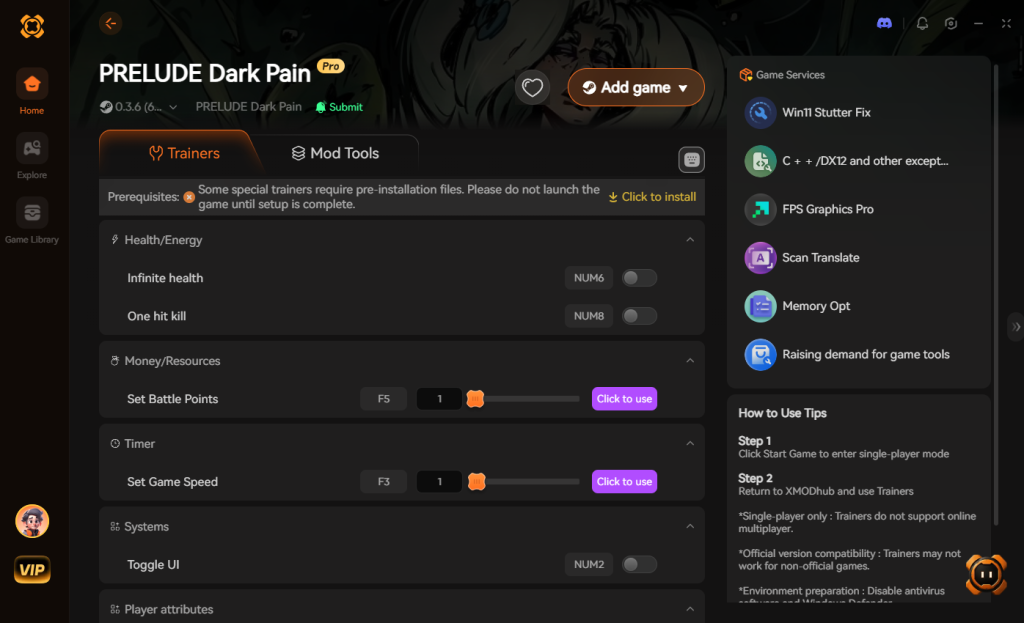
- Click “Play” to auto-hook the game safely.
- Toggle your desired cheats directly from the clean UI or via hotkeys.
Download PRELUDE Dark Pain Trainer Now
4. Where to Find Safe PRELUDE Dark Pain Cheat Tables (.CT)?
If you absolutely insist on using CE, you’ll want a pre-made Cheat Table (.CT file).
However, you must exercise extreme caution. The internet is flooded with unverified forums and sketchy Discord servers offering “free” Cheat Tables for PRELUDE Dark Pain. Downloading a random .CT file is one of the most dangerous things you can do to your gaming rig. Cheat Engine is incredibly powerful; it features a built-in Lua scripting engine that allows table creators to execute complex background commands. While legitimate modders use this to bypass game protections, malicious actors use it to silently execute shell commands on your PC.
When you load a compromised .CT file, the script can immediately download and install Remote Access Trojans (RATs), keyloggers, or hidden crypto-miners that hijack your GPU. You might think you are just downloading a simple cheat to give your Magic Support class infinite mana, but in reality, you are giving a hacker full administrative access to your system. Furthermore, many of these shady files are hidden behind ad-fly links or aggressive pop-ups that attempt to install malware before you even get the file.
This severe cybersecurity risk is exactly why a verified, sandboxed application like XMODhub is the vastly superior and safer choice. XMODhub’s development team professionally reverse-engineers the game and delivers the cheats through a secure, closed-loop client. You never have to download strange files, run risky Lua scripts, or worry about your PC’s security while trying to enjoy your dark fantasy tactical RPG.
5. Advanced CE Tactics: Skill Cooldowns & Base Addresses
For the hardcore data miners who genuinely want to build their own PRELUDE Dark Pain cheat engine table from scratch, simply modifying your inventory values won’t be enough. The real challenge—and where most players get stuck—is manipulating battle mechanics like Skill Cooldowns and establishing permanent Base Addresses so your table survives a game restart.
Manipulating Skill Cooldowns (Turn-Based Logic)
In PRELUDE Dark Pain, ultimate abilities (like the Assassin’s “Shadow Strike” or the Support’s “Aura of the Ancients”) operate on a turn-based cooldown system. Finding these values requires a slightly different approach than scanning for static inventory items.
- Unknown Initial Value Scan: Cast your ultimate ability. The moment it goes on cooldown, pause the game and do an “Unknown Initial Value” scan in Cheat Engine. Set the Value Type to “4 Bytes” (as turns are usually whole integers).
- Decreased Value Scan: End your turn so the cooldown drops by 1. Alt-tab back to Cheat Engine, change the scan type to “Decreased Value”, and hit Next Scan.
- Unchanged Value Scan: If you take an action that does not decrease the cooldown (like moving without ending the turn), do an “Unchanged Value” scan to filter out background noise.
- Freeze at Zero: Once you isolate the address, freeze it at
0. Your hero can now spam their ultimate ability every single turn, completely breaking the tactical difficulty of the Ashen Crusade encounters.
Creating Your Own Cheat Table (.CT) with Pointers
As mentioned earlier, DMA (Dynamic Memory Allocation) will ruin your hard work the second you load a new save file. To make a permanent table, you must find the Base Address.
Right-click your isolated memory address (e.g., your hero’s HP) and select “Find out what accesses this address”. Return to the game and take damage. Cheat Engine will populate a small window with Assembly (ASM) opcodes. Look for an instruction like mov [rax+40], ecx. The 40 is your offset. You then perform a Pointer Scan for that base address (rax). This process generates a pointer map. By saving this pointer map into a .CT file, you ensure that Cheat Engine can mathematically navigate the game’s RAM architecture to find your HP address every single time you boot up the game.
| Target Modification | Memory Value Type | Optimal Scan Strategy | Crash Risk Level |
|---|---|---|---|
| Skill Cooldowns (Turns) | 4 Bytes | Unknown Initial -> Decreased Value | High |
| Rare Forge Materials | 4 Bytes | Exact Value -> Next Scan | Low |
| Hero Experience (XP) | 4 Bytes or Float | Increased Value (Post-Combat) | Low |
| Grid Movement Range | Float | Unknown Initial -> Changed Value | Medium |
Note: Building these pointer maps for all 20+ heroes is a massive undertaking. If you want to skip this tedious assembly mapping, XMODhub handles all these pointer calculations dynamically in the background.
6. Frequently Asked Questions (FAQ)
| Platform / Storefront | Risk Level | Cheat Engine Compatibility | XMODhub Compatibility |
|---|---|---|---|
| Steam (PC) | Safe (Singleplayer only) | Yes (Requires frequent .CT updates) | 100% Supported |
| Epic Games Store | Safe (Singleplayer only) | Yes (Different pointers than Steam) | 100% Supported |
| Xbox Game Pass (PC) | High (UWP File Encryption) | Extremely Difficult / Blocked | 100% Supported |
Q: Can I use Cheat Engine on the Xbox Game Pass version of PRELUDE Dark Pain?
A: Usually, no. Game Pass uses strict UWP file encryption that actively blocks Cheat Engine. However, XMODhub is specifically engineered to bypass these restrictions seamlessly.
Q: Is it illegal to use Cheat Engine?
A: Modifying data on your own PC for a single-player experience like PRELUDE Dark Pain is completely legal. Just never bring memory editors into a multiplayer server.
Q: Will using Cheat Engine drop my FPS or slow down my PC?
A: Yes, it absolutely can, depending on how you use it. When you perform an “Unknown Initial Value” scan in Cheat Engine, the software allocates a massive amount of RAM and CPU cycles to track millions of changing memory addresses simultaneously. This heavy computational load can cause severe frame drops and stuttering in PRELUDE Dark Pain, especially when the game is already rendering complex moving environments and calculating grid-based tactical logic. Furthermore, if you “freeze” a value (like locking your HP at 999), Cheat Engine operates by continuously writing that value to your RAM on a microsecond loop. If the active freezing interval is set too aggressively, it bottlenecks your CPU’s memory bus, leading to micro-stutters during intense combat animations. Using a modern trainer mitigates this by injecting cleaner, optimized assembly code directly into the game’s execution flow.
Conclusion: Work Smarter, Not Harder
Learning how memory manipulation works in Cheat Engine is a cool flex. But let’s be real—when you come home from a long day at work, you just want to spawn in that legendary mastercrafted greatsword forged by Soren to instantly crush the Ashen Crusade and wreck some enemies without taking a computer science class.
Why spend 45 minutes digging through hex codes when you can click one button and instantly get God Mode? And the best part? XMODhub supports over 5,000+ PC games. Once you install the app, you can ditch the complicated cheat tables for good.
Stop Grinding, Start Enjoying.
Bypass the tedious resource gathering and unlock your full potential instantly.

I am a passionate gamer and writer at XMODhub, dedicated to bringing you the latest gaming news, tips, and insights.
Connect with me:
LinkedIn Profile ↗



 Nancy Miller