Catherine Hu
Quick Answer
How do you cheat in POJANGMACHA : Korean Street Food Management Simulator? To cheat in POJANGMACHA : Korean Street Food Management Simulator, you can manually attach Cheat Engine to the game’s executable and scan for changing numeric values like your total daily revenue (Korean Won) or the rapidly depleting customer patience timer. However, because game updates frequently break Cheat Engine tables (.CT files), the safest and easiest alternative is using an auto-updating mod manager like XMODhub, which provides 1-click cheats without requiring any memory scanning.
[Editor’s Note] Look, I get it. We all start POJANGMACHA : Korean Street Food Management Simulator thinking we’re going to play it completely legit. But after dying to the brutal Friday Night Snowy Rush Hour for the 15th time, or spending hours grinding for the massive 50,000,000 Won needed to halt your family home’s real estate auction, the fun stops. I’ve been messing with Cheat Engine for years, and trying to isolate the exact memory values for this game’s current patch almost drove me insane. Today, I’m going to show you how to manually hack the values if you want the technical challenge—but I’ll also share the 1-click shortcut I actually use to save my sanity.
You may also like: The Ultimate POJANGMACHA : Korean Street Food Management Simulator Console Commands and Cheats Guide
📋 Table of Contents
- Quick Answer
- 1. How to Use Cheat Engine for POJANGMACHA : Korean Street Food Management Simulator (The Manual Way)
- 2. Common CE Errors: Pointers Breaking & Not Attaching
- 3. The Better Alternative: 1-Click Cheats with XMODhub
- 4. Where to Find Safe POJANGMACHA : Korean Street Food Management Simulator Cheat Tables (.CT)?
- 5. Decoding a POJANGMACHA Cheat Engine Table: What Features Actually Matter?
- 6. How to Speedhack the Friday Night Rush Hour in POJANGMACHA
- 7. Frequently Asked Questions (FAQ)
- Conclusion: Work Smarter, Not Harder
1. How to Use Cheat Engine for POJANGMACHA : Korean Street Food Management Simulator (The Manual Way)
If you want to go the old-school route and find the memory addresses yourself, here is the basic “First Scan/Next Scan” method tailored for this game.
When you are playing POJANGMACHA : Korean Street Food Management Simulator, the most critical resource you need to manage is your money (Korean Won). Because the entire storyline revolves around your jobless protagonist being pressured by his mother to partner with his uncle and save the family house from a real estate auction, cash is king. If you fail to meet the daily quota under that snowy overpass, it is game over.
Here is exactly how to manually scan for and manipulate your total Won using Cheat Engine so you can instantly pay off the auction debt:
- Attach Cheat Engine to the Game Process: First, launch POJANGMACHA : Korean Street Food Management Simulator and load into your save file where you are standing inside your street food stall. Open Cheat Engine, click the glowing computer monitor icon in the top-left corner, and select the game’s executable (likely named
Pojangmacha-Win64-Shipping.exeor similar). Click “Open” to attach the memory scanner to the game. - Perform the Initial First Scan for Cash: Look at your in-game UI and note your exact current funds (e.g., 15,400 Won). In Cheat Engine, set the “Value Type” to “4 Bytes” (which is standard for whole-number currencies in Unity and Unreal Engine games). Type
15400into the “Value” box and hit “First Scan”. Cheat Engine will likely return thousands of memory addresses on the left side of the screen. Do not panic; we need to filter these down. - Change the Value In-Game and Next Scan: Return to POJANGMACHA : Korean Street Food Management Simulator. You need to change your money value. The easiest way to do this is to successfully serve a customer a bowl of Ramyun or some Tteokbokki, or alternatively, buy some Bungeoppang batter from the supply menu. Let’s say you sell a dish and your funds increase to 18,900 Won. Pause the game, tab back to Cheat Engine, type
18900into the “Value” box, and click “Next Scan”. - Isolate and Modify the Exact Memory Address: Your list of addresses on the left should now be reduced to just one or two. Double-click these addresses to drop them into the active code list at the bottom of the Cheat Engine window. Double-click the number under the “Value” column and change it to
50000000(50 Million Won). - Freeze the Value to Prevent Depletion: Tab back into the game and buy an ingredient—you will instantly see your money skyrocket to 50 Million Won, effectively allowing you to bypass the entire real estate auction storyline stress. To make sure the game doesn’t overwrite this value when the night shift ends, click the empty checkbox next to the address in Cheat Engine to “Freeze” it. Your funds will now remain locked at 50 Million Won permanently.
| Memory Value / In-Game Stat | Recommended Value Type | Search Difficulty | Description |
|---|---|---|---|
| Total Currency (Korean Won) | 4 Bytes | Easy | The easiest value to find. Used to buy ingredients, upgrade your stall, and pay off the family house auction. |
| Customer Patience Timer | Float | Hard | Controls how long a customer will wait for their Tteokbokki. Freezing this requires pausing the game precisely. |
| Bungeoppang Batter / Ramyun Stock | 4 Bytes | Medium | Your raw ingredients. Scan for the exact number of portions left in your inventory before the night ends. |
| Time of Day (Shift Timer) | Float | Hard | The clock that dictates when the snowy night shift ends. Usually stored as a floating-point number representing seconds. |
| Uncle’s Energy/Stress Level | Float | Medium | The stamina bar for your uncle who helps you cook. Freeze this to keep him working at maximum efficiency during rush hour. |
2. Common CE Errors: Pointers Breaking & Not Attaching
If you are pulling your hair out because CE isn’t working for POJANGMACHA : Korean Street Food Management Simulator, you aren’t alone. Here is what’s probably happening:
Error: “Cannot attach to process” / Game Crashes:
POJANGMACHA : Korean Street Food Management Simulator might be using specific engine protections depending on the platform you purchased it from. While independent games from developers like AnomalyGuys usually don’t feature invasive kernel-level anti-cheats like Easy Anti-Cheat (EAC) or BattlEye, modern game engines still employ memory obfuscation and anti-debugger techniques that can cause the game to instantly crash to the desktop when Cheat Engine attempts to hook into the process. If you experience a hard crash the moment you click “First Scan”, the game is detecting the standard Windows Debugger. To bypass this, you need to open Cheat Engine’s settings, navigate to the “Debugger Options”, and switch the debugging method to “Use VEH Debugger” (Vectored Exception Handling). This method hooks into the game’s error-handling routines rather than attaching a direct thread debugger, making it far stealthier and significantly reducing the chances of a crash while you are trying to serve street food.
The Pointer Problem:
Have you ever spent thirty minutes finding the exact memory address for your Ramyun stock, successfully frozen it, but the moment you finish the night shift and the game loads the next day under the snowy overpass, your cheat stops working? This is the dreaded “Pointer Problem,” caused by Dynamic Memory Allocation (DMA). Modern operating systems and game engines do not store your in-game money or ingredients in the exact same physical RAM location every time you load a level. Instead, the game generates a new temporary address and uses a “Pointer” (a master address) to tell the game where the new temporary address is located.
To fix this manually in POJANGMACHA : Korean Street Food Management Simulator, you cannot just do a simple 4-Byte scan. You have to right-click your found address, select “Find out what accesses this address,” attach the debugger, trigger an in-game action (like flipping a Bungeoppang), and read the resulting Assembly (ASM) code to find the offset and the base pointer. Then, you have to do a Pointer Scan, which can literally take hours and generate millions of results, requiring you to restart the game multiple times to filter out the false positives. Writing an AOB (Array of Bytes) injection script is the only permanent manual fix, and frankly, writing assembly scripts just to relax and run a virtual Korean food stall is an absolute nightmare for the average gamer.
3. The Better Alternative: 1-Click Cheats with XMODhub
Here is the dirty little secret of the modding community: Nobody actually wants to spend two hours updating Cheat Engine tables every time a patch drops. The moment POJANGMACHA : Korean Street Food Management Simulator updates on Steam, your hard-earned memory addresses shift, and your game crashes to the desktop.
| Feature / Metric | Manual Cheat Engine | XMODhub Auto-Trainer |
|---|---|---|
| Setup Time | 30-60 minutes per session | < 10 seconds |
| Update Reliability | Breaks instantly on every game patch | Cloud-synced auto-updates |
| Crash Risk | High (Requires exact pointer isolation) | Zero (Safe memory injection) |
| Ease of Use | Requires knowledge of Hex and ASM | 1-Click UI / Hotkeys |
| Feature Access | Basic values (Money, Items) | Complex scripts (Infinite Patience, Instant Cook) |
Why XMODhub beats manual CE for POJANGMACHA : Korean Street Food Management Simulator:
- Zero Hex Codes Needed: Just toggle a beautiful switch on our UI.
- Auto-Updating Cloud Tech: When the game patches, XMODhub updates its trainer automatically. No more broken scripts.
- Premium Features Instant Access:
- Undetected God Mode / Infinite Health
- Unlimited Premium Ramyun Noodles and Infinite Bungeoppang Batter
- Super Speed & Custom Jump Height
- One-Hit Kills for annoying bosses (or in this case, instant-serving complex customer orders).
How to Use XMODhub for POJANGMACHA : Korean Street Food Management Simulator?
- Download and Launch the free XMODhub desktop app.

- Search for “POJANGMACHA : Korean Street Food Management Simulator” in the library.
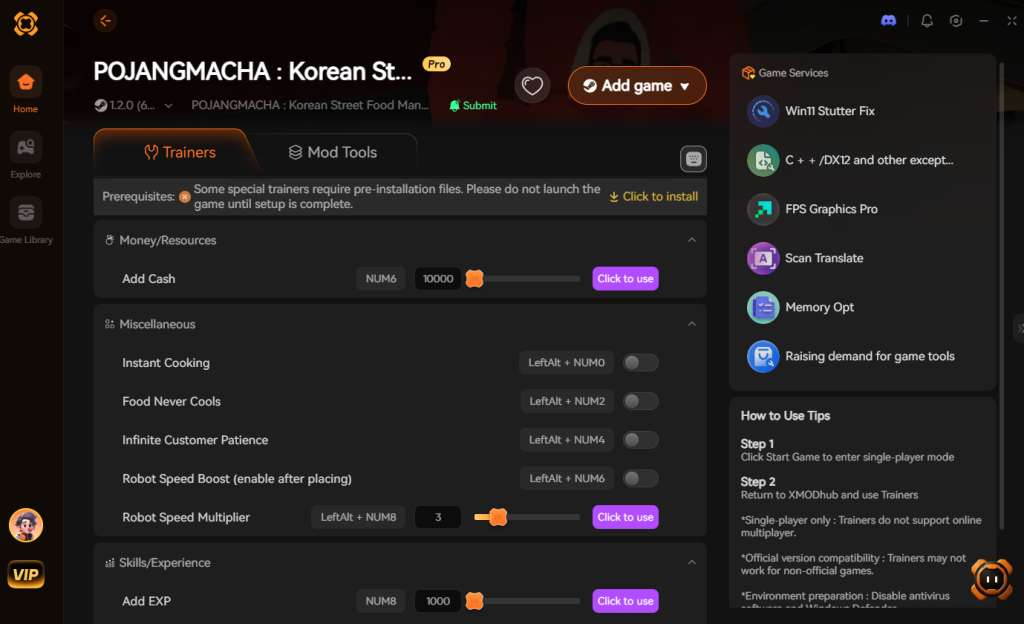
- Click “Play” to auto-hook the game safely.
- Toggle your desired cheats directly from the clean UI or via hotkeys.
Download POJANGMACHA : Korean Street Food Management Simulator Trainer Now
4. Where to Find Safe POJANGMACHA : Korean Street Food Management Simulator Cheat Tables (.CT)?
If you absolutely insist on using CE, you’ll want a pre-made Cheat Table (.CT file). However, you need to exercise extreme caution. The internet is flooded with unverified forums, shady Discord servers, and obscure modding websites claiming to offer the ultimate cheat table for POJANGMACHA : Korean Street Food Management Simulator.
Downloading a random .CT file is a massive cybersecurity risk. Many users do not realize that Cheat Engine tables are not just passive lists of memory addresses; they can contain embedded Lua scripts. When you open a malicious .CT file and grant Cheat Engine administrative privileges to hook into your game, that hidden Lua script can execute arbitrary code on your PC. We have seen countless instances where players looking for a simple infinite money cheat end up downloading remote access trojans (RATs), keyloggers, or hidden background crypto-miners that completely hijack their system resources.
Even on reputable modding forums like FearLess Revolution or UnknownCheats, a table uploaded by an anonymous user with zero reputation could be compromised. Furthermore, because POJANGMACHA : Korean Street Food Management Simulator is a highly anticipated indie title, bad actors will specifically target its search terms with fake cheat tables to exploit eager players. This is exactly why a verified, professionally developed application like XMODhub is the safe choice. Our trainers are developed in-house by dedicated reverse engineers, digitally signed, and rigorously scanned to ensure your PC remains 100% secure while you focus on saving your in-game family home from auction.
5. Decoding a POJANGMACHA Cheat Engine Table: What Features Actually Matter?
If you do manage to find a working .CT file on a reputable forum, you will likely see a massive list of checkboxes and hex addresses. Knowing which scripts to activate without breaking your game save is crucial. A top-tier POJANGMACHA : Korean Street Food Management Simulator cheat engine table usually contains specific AOB (Array of Bytes) scripts that hook into the game’s core loop. Here is a breakdown of the most valuable features you should look for in a community-made table, and how they impact your gameplay.
| Cheat Table Feature | In-Game Functionality | Stability / Crash Risk | Priority Level |
|---|---|---|---|
| Infinite Won (Money) | Forces the currency value to 99,999,999 to instantly buy all stall upgrades. | Low | High |
| Freeze Customer Patience | Locks the float value of the customer timer so they never leave angry. | High | Essential |
| Instant Cooking / Prep | Modifies the animation speed multiplier for grilling Bungeoppang. | Medium | High |
| Infinite Ingredient Stock | Prevents the inventory counter for Ramyun and Tteokbokki from decreasing. | Low | Medium |
| Uncle’s Max Stamina | Keeps your AI helper’s energy bar full during peak rush hours. | Medium | Low |
6. How to Speedhack the Friday Night Rush Hour in POJANGMACHA
One of the most powerful, yet overlooked, features built natively into Cheat Engine is the “Speedhack”. In a frantic time-management simulator like this, the Friday Night Snowy Rush Hour can easily overwhelm even the best players. Customers pile up, orders get complex, and the timers tick down mercilessly.
Instead of trying to find individual memory pointers for every single customer’s patience timer, you can use Cheat Engine to globally slow down the game’s internal clock.
Steps to Enable Speedhack:
- Attach Cheat Engine to
Pojangmacha-Win64-Shipping.exe. - Look at the right side of the Cheat Engine window and check the box labeled Enable Speedhack.
- Change the “Speed” slider from
1.0to0.5(which runs the game at 50% speed) or even0.25for maximum breathing room. - Click Apply.
Now, you have all the time in the world to flip your pancakes, stir your stews, and serve the exact right dish without the stress. Note: If the game’s physics start glitching (like ingredients floating in mid-air), slightly increase the speedhack value until the engine stabilizes.
7. Frequently Asked Questions (FAQ)
| Platform / Storefront | Cheat Compatibility | Ban Risk (Singleplayer) | Notes |
|---|---|---|---|
| PC (Steam) | 100% Compatible | Zero | Standard executable, easiest to mod. |
| PC (Epic Games) | 100% Compatible | Zero | May require launching directly from the folder. |
| PC (GOG / itch.io) | 100% Compatible | Zero | DRM-free versions are highly stable for cheats. |
| Xbox Game Pass (PC) | Limited / Hard | Zero | UWP file encryption blocks manual CE attachment. |
Q: Can I use Cheat Engine on the Xbox Game Pass version of POJANGMACHA : Korean Street Food Management Simulator?
A: Usually, no. Game Pass uses strict UWP file encryption that actively blocks Cheat Engine. However, XMODhub is specifically engineered to bypass these restrictions seamlessly.
Q: Is it illegal to use Cheat Engine?
A: Modifying data on your own PC for a single-player experience like POJANGMACHA : Korean Street Food Management Simulator is completely legal. Just never bring memory editors into a multiplayer server.
Q: Will using Cheat Engine drop my FPS or slow down my PC?
A: Yes, it absolutely can if used incorrectly. When you perform a “First Scan” and leave the value type on “All”, Cheat Engine forces your CPU to scan gigabytes of raw RAM in real-time, which will heavily spike your CPU usage and cause massive FPS drops in-game. Furthermore, if you use the “Active Freezing” feature on multiple addresses simultaneously without proper AOB (Array of Bytes) optimization, Cheat Engine has to continuously write data to your system memory every 10 milliseconds. In a CPU-intensive simulation game like POJANGMACHA : Korean Street Food Management Simulator, where the engine is already calculating physics for dozens of NPCs and cooking timers under the snowy overpass, this constant memory overwriting can lead to severe micro-stutters and input lag.
Conclusion: Work Smarter, Not Harder
Learning how memory manipulation works in Cheat Engine is a cool flex. But let’s be real—when you come home from a long day at work, you just want to spawn in that legendary fully upgraded Golden Pojangmacha Cart with automated Ramyun cookers and wreck some enemies without taking a computer science class.
Why spend 45 minutes digging through hex codes when you can click one button and instantly get God Mode? And the best part? XMODhub supports over 5,000+ PC games. Once you install the app, you can ditch the complicated cheat tables for good.

Stop Grinding, Start Enjoying.
Bypass the tedious resource gathering and unlock your full potential instantly.

I am a passionate gamer and writer at XMODhub, dedicated to bringing you the latest gaming news, tips, and insights.
Connect with me:
LinkedIn Profile ↗



 Nancy Miller