
 Catherine Hu
We have all been there: you leave your desktop running overnight to farm the “Endangered Species” achievement in My Party Is Grinding, expecting to wake up to 100,000 defeated monsters. Instead, you wake up to a server disconnect screen, or worse, you realize you misread a core mechanic because the game’s user interface is incredibly confusing [1]. When a free-to-play RPG blends the relaxed nature of idle gaming with the complex depth of a classic hack-and-slash, the result is a massive grind that practically begs for community optimization [2]. If you are tired of hitting the infamous Act 4 progression wall, finding the My Party Is Grinding best mods is your absolute top priority.
TL;DR: The Short Answer
If you are looking for the My Party Is Grinding best mods to streamline your desktop idle experience, here are the core categories you need to focus on based on community reports:
- UI Overhaul Mods: Essential for fixing the notoriously confusing menus and clarifying the three mechanics new players constantly misread [1][4].
- Offline Mode Enablers: Bypasses the spotty server connections to ensure your overnight idle grinds are never interrupted [1].
- Efficiency Trackers: Calculates your exact monster kill rate to help you reach the 1,000 (“Pest Control”) and 100,000 (“Endangered Species”) kill milestones efficiently [5].
- Inventory & Pet Managers: Helps organize drops, though note that official Supporter Pack pets do not require equipping to grant their Gold and EXP bonuses [3].
You may also like: My Party Is Grinding Cheat Engine Table: How to Bypass The Grind
Table of Contents
- TL;DR: The Short Answer
- The State of My Party Is Grinding Modding
- Mechanics Deep Dive: Why You Need Mods
- Common Mistakes When Modding My Party Is Grinding
- Alternative Methods to Modding
- Advanced Tips for Vanilla Players
- The Ultimate QoL Solution: XMODhub
- Essential Mod Categories and Their Impact
- Frequently Asked Questions
- Final Verdict
The State of My Party Is Grinding Modding
My Party Is Grinding is a unique beast. It borrows heavily from other titles—community veterans often note that the core mechanics are almost identical to TBH [1]. However, because the developers did not copy the UI from those inspirations, the resulting interface in My Party Is Grinding is super confusing [1]. Because this is a desktop-focused idle game with hack-and-slash elements [2], players spend hours staring at menus, making UI improvements the most highly sought-after modifications.
Before diving into complex community patches and third-party files, it is worth noting that some players prefer to take matters into their own hands via memory editing. If you want to bypass the hassle of conflicting mod files and confusing installations, utilizing a [My Party Is Grinding cheat engine table] can be a much faster way to manipulate your Gold, EXP, and monster kill counts directly. However, if you prefer structural changes to the game’s interface and offline capabilities, read on for the deep dive into the modding scene.
Mechanics Deep Dive: Why You Need Mods
To understand why players are desperately searching for the My Party Is Grinding best mods, we have to deeply analyze the game’s core mechanics and where the developer’s design falls short.
The UI Crisis and Visual Clarity
The biggest complaint regarding My Party Is Grinding is the user interface. Because the game features deep hack-and-slash RPG mechanics, you are constantly juggling stats, loot drops, and party configurations. The vanilla UI obfuscates vital information. Based on community reports, UI Overhaul mods are the most downloaded files. These community-created patches aim to reorganize stat sheets, add proper tooltips, and declutter the screen. Without a UI mod, trying to optimize your idle party feels like trying to read a spreadsheet in another language.
The Great Act 4 Progression Wall
The statistics for My Party Is Grinding are brutal and revealing. According to global achievement data, the Act 2 clear rate sits at a respectable 45.0% [4]. However, the Act 4 clear rate plummets to a mere 11.6% [4]. Why is there such a massive drop-off?
Data suggests that there are three specific mechanics that new players consistently misread due to the poor UI [4]. While the exact mechanics vary depending on your build, they generally revolve around damage scaling, idle resource generation, and defensive layering. The My Party Is Grinding best mods often include “Mechanic Clarification” tweaks. These mods rewrite in-game descriptions based on community wiki data to explicitly tell you how your stats interact, preventing you from hitting the Act 4 wall with a fundamentally broken build.
Server Instability and Offline Solutions
My Party Is Grinding is a free-to-play game, and unfortunately, the servers are clearly struggling to keep up with the player base [1]. For an idle game, server instability is a death sentence. If you are trying to grind out the “Endangered Species” achievement (which requires you to defeat 100,000 monsters in total) [5], a server disconnect at 2:00 AM ruins your entire night of progress.
Based on community reports, offline server bypass mods are incredibly popular. These mods trick the game client into saving progress locally when the server connection drops, syncing your monster kills and loot once the connection is re-established. (Note: Reports vary on the safety of these mods, as syncing massive amounts of offline data can sometimes flag anti-cheat systems in free-to-play games).
Common Mistakes When Modding My Party Is Grinding
When players go hunting for the My Party Is Grinding best mods, they often make critical errors that corrupt their save files or ruin the idle experience.
- Installing Outdated UI Mods: Because the game receives updates (especially regarding the Supporter Packs), old UI mods will break the main menu. Always ensure your UI overhaul matches the current game version.
- Misunderstanding Pet Mechanics: Players often look for mods to auto-equip pets. However, if you own the “Four Gold & EXP Bonus Pets” from the official Supporter Pack, their bonuses apply whenever you own them—equipping is not required [3]. Installing a mod to manage these specific pets is redundant and can cause game crashes.
- Over-modding the Idle Timers: Some players attempt to use mods to speed up the internal game clock to reach 100,000 monster kills faster. This often desyncs the game from the server, resulting in a rollback that wipes out your progress toward the “Pest Control” (1,000 monsters) and “Endangered Species” achievements [5].
Alternative Methods to Modding
If you are hesitant to install third-party files to fix the UI or server issues, there are alternative methods to improve your experience in My Party Is Grinding.
The Official Supporter Pack Route:
Instead of modding in EXP multipliers, you can support the developers by purchasing the My Party Is Grinding Supporter Pack [3]. This adds four specific pets to your account that grant permanent Gold and EXP bonuses. Because these bonuses apply passively without needing to be equipped [3], it acts as a massive quality-of-life improvement that mimics the benefits of an efficiency mod, while remaining 100% safe and official.
Wiki-Based Manual Optimization:
If the UI is hiding the truth about the three commonly misread mechanics, you don’t necessarily need a mod to fix the text. You can keep the My Party Is Grinding Wiki open on a second monitor [4]. By manually cross-referencing your build with the wiki’s stage completion rates and mechanic breakdowns, you can overcome the 11.6% Act 4 clear rate through sheer knowledge rather than game modification.
Advanced Tips for Vanilla Players
If you refuse to use mods and want to conquer My Party Is Grinding in its pure, vanilla state, you must master desktop idle management.
- Targeted Farming: Do not just leave your game running in random zones. To get the 100,000 monster kills for “Endangered Species”, find the highest density zone in Act 1 or Act 2 where your hack-and-slash clear speed is instantaneous.
- Mitigating Server Drops: Restart your game client every 4-6 hours to clear the cache. Community reports suggest that memory leaks exacerbate the server disconnection issues, so fresh client sessions are less likely to disconnect overnight.
The Ultimate QoL Solution: XMODhub
Let’s be completely honest: dealing with outdated UI patches, risking server bans with offline bypasses, and leaving your PC on for 300 hours just to get the “Endangered Species” achievement is exhausting. The servers are frustrating [1], the UI is super confusing [1], and the Act 4 wall is mathematically punishing [4].
If you want to skip the headache of managing the My Party Is Grinding best mods and just enjoy the hack-and-slash power fantasy, XMODhub is your ultimate solution. XMODhub is a professional, secure platform that injects quality-of-life features directly into the game without the need to juggle conflicting mod files.
For My Party Is Grinding, XMODhub offers features like Instant Kill Count Multipliers (turn 1 kill into 100 to easily secure the Pest Control and Endangered Species achievements) and Resource Freezing (bypass the need for Gold & EXP pets entirely).
Here is how to take control of your grind in three simple steps:
- Download XMODhub: Install the lightweight client from the official website.

- Auto-Detect My Party Is Grinding: Launch the app; XMODhub will automatically detect your game installation and game version.
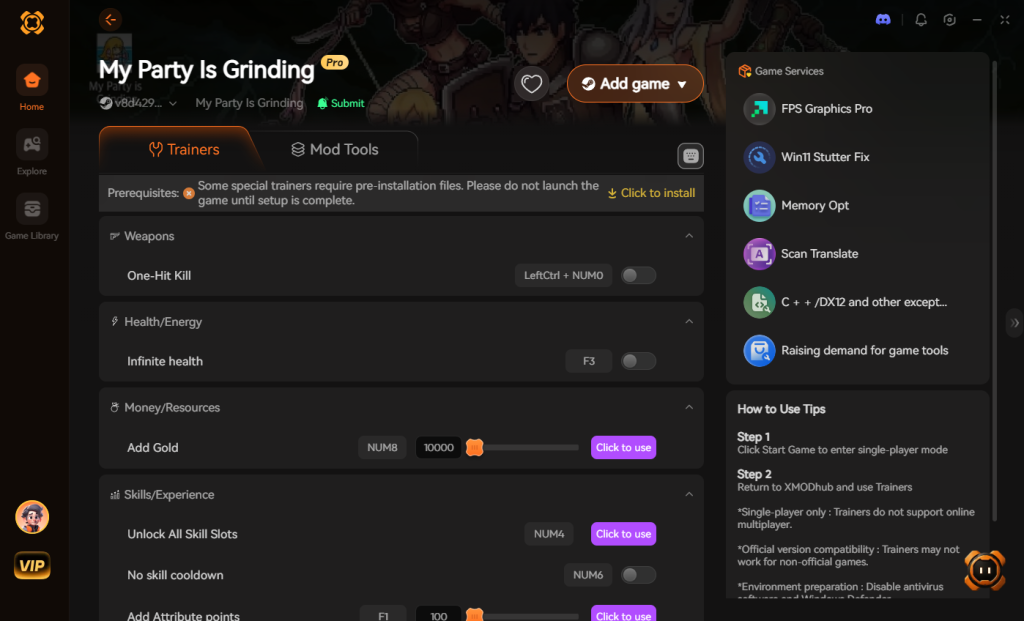
- Toggle Cheats: Use the seamless overlay to activate UI fixes, EXP multipliers, and instant monster kill tracking. Say goodbye to the Act 4 wall!
Download My Party Is Grinding Trainer Now
Essential Mod Categories and Their Impact
When evaluating the My Party Is Grinding best mods, it is critical to understand how different community files interact with the game’s engine. Because this title constantly communicates with live servers to track your idle progression, installing the wrong type of modification can lead to severe performance degradation or account penalties. Below is a detailed breakdown of the most common mod categories to help you optimize your setup safely.
| Mod Category | Primary Function | Performance Impact | Account Ban Risk |
|---|---|---|---|
| UI Overhauls | Reorganizes confusing menus and adds detailed mechanic tooltips | Low | Very Low |
| Offline Enablers | Forces local cache saving during spotty server disconnects | Medium | High (If improperly synced) |
| Auto-Loot Managers | Automatically sorts inventory and deletes low-tier trash items | High (During mass mob clears) | Medium |
| Efficiency Trackers | Calculates real-time EXP and idle monster kill rates | Low | Low |
Mod Installation Safety Checklist
Before injecting any third-party files to achieve your My Party Is Grinding idle optimization, you must protect your hard-earned progress. The journey to overcoming the Act 4 wall is incredibly time-consuming, and a corrupted save file is every player’s worst nightmare.
- Backup Your Local Save: Always navigate to your local AppData directory and create a backup of your
save.datfile before installing or updating any mods. - Cross-Reference Game Versions: The developers frequently push minor updates, especially regarding the My Party Is Grinding Supporter Pack. Ensure your chosen UI mod perfectly matches the current live patch to avoid main menu crashes.
- Avoid Overlapping Scripts: Never run multiple efficiency trackers or inventory managers simultaneously. Conflicting scripts will cause memory leaks, accelerating the very server disconnects you are trying to prevent.
Frequently Asked Questions
Q: Do I need to equip the Supporter Pack pets for them to work?
A: No. According to official store details, the four Gold & EXP Bonus Pets apply their bonuses whenever you own them; equipping is not required [3]. This frees up your active pet slots for other utility companions.
Q: Why am I stuck in Act 4 of My Party Is Grinding?
A: You are not alone. Only 11.6% of players clear Act 4 [4]. This is usually due to the confusing UI causing players to misread three core scaling mechanics. You must optimize your hack-and-slash build synergies, or use mods/XMODhub to bridge the stat gap.
Q: Are there mods to fix the server disconnects?
A: Based on community reports, there are offline-mode workarounds that force the game to save locally. However, because the servers are clearly unstable [1], syncing back up can sometimes cause progression rollbacks.
Q: How many monsters do I need to kill to 100% the achievements?
A: The two major milestones are “Pest Control” (defeat 1,000 monsters) and the massive “Endangered Species” (defeat 100,000 monsters in total) [5]. Automating this grind is why idle efficiency mods are so popular.
Final Verdict
Navigating the world of My Party Is Grinding requires immense patience. The combination of desktop idle mechanics with deep hack-and-slash RPG elements is brilliant on paper, but severely hampered by a confusing UI and spotty servers. While tracking down the My Party Is Grinding best mods can help clarify misread mechanics and push you past the brutal 11.6% Act 4 clear rate, the modding scene requires constant upkeep to avoid save corruption.
Instead of fighting the game’s flawed technical foundation, utilizing a unified tool like XMODhub is the smartest play for modern gamers. With support for over 5,000+ titles—ranging from massive ARPGs like Path of Exile to idle giants like Cookie Clicker or Clicker Heroes,—XMODhub ensures that your time spent grinding is always respected. Stop letting server drops ruin your 100,000 monster kill streaks, and start playing the game on your own terms today.
Stop Grinding, Start Enjoying.
Bypass the tedious resource gathering and unlock your full potential instantly.

I am a passionate gamer and writer at XMODhub, dedicated to bringing you the latest gaming news, tips, and insights.
Connect with me:
LinkedIn Profile ↗

 Nancy Miller