Catherine Hu
You have finally hit the infamous Act 2 stage wall, or worse, you are currently stuck in the brutal 11.6% clear rate of Act 4, staring at an incredibly confusing UI while your idle progress crawls to an absolute halt. Searching for a reliable My Party Is Grinding cheat engine table usually leads to dead ends, outdated forum posts, or massive confusion about what values are actually stored locally versus what is verified by the game’s servers. When you are trying to unlock the “Endangered Species” achievement (which requires you to defeat a staggering 100,000 monsters), waiting for standard idle mechanics to do the heavy lifting can feel like a massive waste of time.
After testing multiple memory scanning methods and digging through community feedback, I found that while a universal, pre-made My Party Is Grinding cheat engine table hasn’t been officially confirmed by the community yet, you can still manually isolate specific local values like game speed, or bypass the headache entirely with dedicated modding tools that do the heavy lifting for you.
TL;DR: The Short Answer
If you are looking for a quick fix to download and inject into the game, here is the current reality of the situation:
- Official Table Status: No official fix or universally working
.CT(Cheat Engine Table) has been confirmed yet for the current patch of My Party Is Grinding. - Server Verification: Because the game features server connectivity (community reports note that “the servers are clearly” a factor in performance and data tracking), many direct stat edits (like infinite Gold) may immediately revert.
- What Actually Works: Based on community reports, using Cheat Engine’s built-in Speedhack function is the most reliable way to accelerate idle hack-and-slash combat without triggering server-side desyncs.
- The Best Alternative: Instead of manually scanning hex values, using a dedicated trainer like XMODhub allows you to bypass the grind with a single click.
Table of Contents
- TL;DR: The Short Answer
- Understanding the My Party Is Grinding Mechanics
- Why Finding a Working Cheat Engine Table is Difficult
- How to Manually Use Cheat Engine in My Party Is Grinding
- The Supporter Pack Alternative: Pay-to-Skip?
- Contextual Cheats and Console Commands
- The Ultimate Shortcut: Skip Cheat Engine with XMODhub
- Local vs. Server-Side Values: What Can You Actually Hack?
- Frequently Asked Questions
- Final Verdict: Mastering the Idle Grind
Understanding the My Party Is Grinding Mechanics
To understand how to manipulate the game, you first need to understand what My Party Is Grinding actually is. My Party Is Grinding is a free-to-play RPG that heavily relies on idle gameplay mechanics mixed with classic hack-and-slash elements. You set your party up, and they grind for you directly on your desktop.
However, the game is notorious for two massive pain points. First, the core mechanics are almost identical to other idle games, but the developers decided not to copy standard UI conventions, making the whole game super confusing for new players. Second, the game features massive “Stage Walls.” Data pulled from Steam reveals that the Act 2 clear rate sits at just 45.0%, while Act 4 plummets to a dismal 11.6%. This massive difficulty spike is exactly why so many players desperately search for a My Party Is Grinding cheat engine table to bypass the artificial inflation of game time.
Why Finding a Working Cheat Engine Table is Difficult
When dealing with a free-to-play RPG, developers often implement server-side checks to prevent players from easily manipulating premium currencies or leaderboards. Community reports indicate that My Party Is Grinding has online components, with players frequently noting server stability issues.
When a game relies on a server to verify your Gold, EXP, or monster kill count, injecting a standard My Party Is Grinding cheat engine table becomes highly problematic. If you scan for your Gold value, change it from 1,000 to 9,999,999, and try to buy an upgrade, the server will check your local value against its cloud database. Seeing a mismatch, it will immediately revert your Gold back to 1,000. This is known as a client-side visual illusion, and it is the primary reason why no official fix has been confirmed yet regarding infinite currency tables.
How to Manually Use Cheat Engine in My Party Is Grinding
Since you cannot simply download a .CT file and check a few boxes, you will need to learn how to manually scan for values that the server might not strictly monitor. Based on community reports, manipulating the game speed is the safest bet for farming achievements like “Pest Control” (Defeat 1,000 monsters) and “Endangered Species” (Defeat 100,000 monsters).
Step 1: Attaching the Process
- Launch My Party Is Grinding and load into your active idle session.
- Open Cheat Engine (make sure you are running it as an Administrator).
- Click the glowing PC icon in the top left corner of Cheat Engine.
- Select the My Party Is Grinding executable from the process list and click “Open.”
Step 2: Utilizing the Speedhack
Because altering Gold directly often fails, your best approach is to speed up the game’s internal clock so your idle party grinds faster.
- On the right side of the Cheat Engine window, check the box labeled Enable Speedhack.
- A slider will appear. Set the speed to
2.0or3.0. Going too high (like10.0or50.0) might cause the game to crash or disconnect from the server. - Click Apply.
- Return to My Party Is Grinding. You should notice your hack-and-slash combat animations and idle progress moving significantly faster, allowing you to bypass the Act 2 and Act 4 stage walls in a fraction of the time.
Step 3: Scanning for Local Values (Experimental)
If you want to try your luck at finding offline-stored values, you can perform a standard 4-byte scan.
- Note a specific stat (e.g., your current monster kill count for the current stage).
- Enter that number into Cheat Engine’s “Value” box and hit First Scan.
- Go back into the game, let your party kill a few more monsters, and note the new number.
- Enter the new number into Cheat Engine and hit Next Scan.
- Repeat this until you have isolated 1 or 2 addresses. Double-click them to bring them to the bottom window, change the value, and check the box to “Freeze” them. Note: If the game crashes, that value was protected.
The Supporter Pack Alternative: Pay-to-Skip?
If memory scanning sounds too tedious, the developers have provided an official, albeit paid, way to ease the grind. The My Party Is Grinding – Supporter Pack is an optional DLC that directly addresses the slow progression.
This pack adds four Gold & EXP Bonus Pets to your account. The unique mechanic here is that their bonuses apply simply by owning them; equipping is not required. While this doesn’t offer the god-like power of a My Party Is Grinding cheat engine table, these passive EXP and Gold multipliers are often exactly what is needed to push through the 11.6% clear rate of Act 4.
Contextual Cheats and Console Commands
Sometimes, players look for memory editors when built-in developer tools might already exist. If you are exhausted by the complex UI and the steep progression curve, you might be wondering if there are native ways to alter the game state without third-party software. For a deeper dive into whether the developers left any debug menus or native input commands active in the current build, you should check out our comprehensive guide on My Party Is Grinding Item IDs: The Ultimate Guide to Inventory Management. Exploring native commands is always safer than injecting hex edits, especially in games that ping external servers.
The Ultimate Shortcut: Skip Cheat Engine with XMODhub
Let’s be honest: manually scanning 4-byte values, dealing with game crashes, and realizing your edited Gold just reverted back to zero because of a server check is incredibly frustrating. You want to enjoy the hack-and-slash idle mechanics, not take a crash course in computer science.
If you don’t want to deal with the hassle of finding a working My Party Is Grinding cheat engine table that breaks every time the game updates, you need to use XMODhub. XMODhub is a premium modding engine that automatically isolates the correct memory addresses and bypasses server-side desyncs safely.
Here is how to dominate the game in three simple steps:
- Download XMODhub: Install the lightweight client directly to your desktop.

- Auto-Detect My Party Is Grinding: Launch the game. XMODhub will automatically detect the active process and load the specific, updated trainer for the current patch.
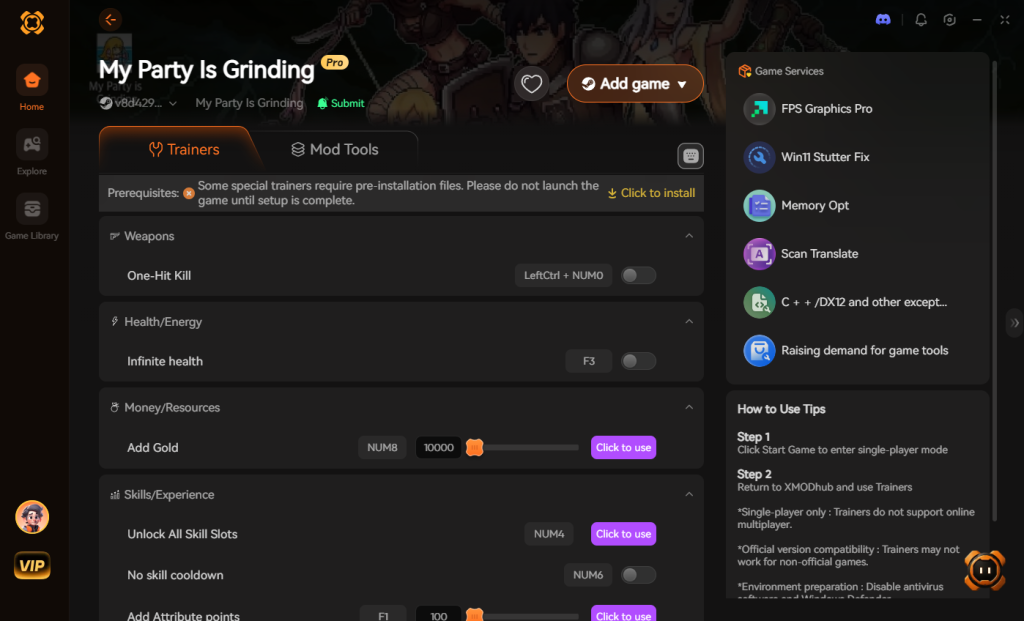
- Toggle Cheats: Use the clean, intuitive overlay to instantly toggle features like Global Game Speed Multiplier, Instant Kill (perfect for the Endangered Species achievement), and EXP Multipliers. No hex scanning required.
Download My Party Is Grinding Trainer Now
Local vs. Server-Side Values: What Can You Actually Hack?
When attempting to build or use a My Party Is Grinding cheat engine table, the most critical knowledge you can possess is understanding the game’s hybrid data structure. The developers have split the game’s logic between your local client and their cloud servers. Knowing this division is crucial if you want to avoid instant rollbacks, wasted time, or potential account flags.
Below is a hardcore breakdown of which memory addresses you can successfully manipulate and which ones will immediately desync:
| In-Game Stat | Data Location | Hackability Status | Recommended Tool |
|---|---|---|---|
| Game Speed (Tick Rate) | Client-Side | High (Safe to manipulate) | Cheat Engine / XMODhub |
| Current Gold Balance | Server-Side | Low (Visual illusion only) | None (Will revert upon spending) |
| Monster Kill Count | Client-Side | Medium (Requires careful freezing) | XMODhub |
| Premium Currency | Server-Side | Zero (Strictly server authenticated) | None (High ban risk) |
| Party EXP Gain Multiplier | Hybrid | Medium (Local multipliers can work) | XMODhub |
Optimal Speedhack Settings for Progression
If you are relying strictly on manual memory editing to power through the Act 2 and Act 4 stage walls, pushing the Speedhack slider to the maximum will inevitably crash your game. The internal engine struggles to process thousands of hack-and-slash damage numbers and loot drops per second. For optimal stability, keep your speed multiplier between 2.0x and 3.5x during Act 1 and Act 2. When you reach the dense enemy waves of Act 4, drop the multiplier down to 1.5x to prevent client desynchronization.
Frequently Asked Questions
Is there a working My Party Is Grinding cheat engine table for the latest patch?
No official fix has been confirmed yet. Because the game updates frequently and relies on server-side checks for certain idle progression metrics, community-made tables break very quickly. Using the built-in Speedhack or a dedicated tool like XMODhub is currently the most reliable method.
Can I get banned for using Cheat Engine in My Party Is Grinding?
My Party Is Grinding is a free-to-play RPG. While it is primarily a single-player idle experience, it does have server connectivity. Modifying local memory for single-player progression rarely results in bans in idle games, but attempting to manipulate premium currencies or leaderboards can trigger automated account flags.
Why do my Gold and EXP values revert after I change them in Cheat Engine?
This happens because the UI in My Party Is Grinding is displaying a local number, but the actual authoritative number is stored on the game’s server. When you try to spend the hacked Gold, the server realizes you don’t actually have it and forces your local game client to update to the correct, lower number.
How do I beat the Act 4 stage wall without using cheats?
The Act 4 wall (which only 11.6% of players have cleared) requires intense optimization of your party. You must carefully read the mechanics (which are often misread due to the confusing UI). Alternatively, purchasing the Supporter Pack to gain the four unequipped Gold & EXP Bonus Pets is the intended developer shortcut.
Final Verdict: Mastering the Idle Grind
Surviving the brutal stage walls of My Party Is Grinding requires immense patience. The combination of a confusing UI and steep idle scaling makes it completely understandable why so many players hunt for a My Party Is Grinding cheat engine table. While manual memory scanning is possible for local values like game speed, the constant battle against server-side checks makes traditional Cheat Engine usage a massive headache.
If you are tired of the grind and just want to enjoy the hack-and-slash mechanics at your own pace, XMODhub is the ultimate solution. With support for over 5,000+ single-player PC games, XMODhub takes the frustration out of modding. Whether you are trying to bypass the Act 4 wall in My Party Is Grinding, or looking to dominate similar idle RPGs like Cookie Clicker or Clicker Heroes, XMODhub provides a seamless, one-click experience that lets you play the game exactly how you want to.
Stop Grinding, Start Enjoying.
Bypass the tedious resource gathering and unlock your full potential instantly.

I am a passionate gamer and writer at XMODhub, dedicated to bringing you the latest gaming news, tips, and insights.
Connect with me:
LinkedIn Profile ↗
 Nancy Miller