
 Catherine Hu
⚡ Quick Answer
Does Alaska Gold Fever have console commands?
No, the retail version of Alaska Gold Fever does not have an active built-in developer console on PC. Because it is built on the Unity Engine, the developers at Baked Games locked the native command inputs before release.
However, you can still easily achieve these exact cheat effects (like infinite gold and god mode) using a dedicated mod manager.
The 3 most popular Alaska Gold Fever cheat features players search for are:
- ✓ Modo Dios: Enables infinite health and perfect body temperature to survive blizzards and bear attacks.
- ✓ Infinite Durability: Prevents your pickaxes and gold panning tools from ever breaking.
- ✓ Add Gold: Instantly grants maximum in-game currency to buy advanced mining machinery.
We have all been there.
You have just spent three hours freezing to death in the Alaskan wilderness, or maybe you simply do not have the time to grind for tiny gold nuggets in a freezing river after a long day at work. Single-player simulation games are meant to be enjoyed on your own terms, and there is absolutely no shame in bending the rules to maximize your fun and focus on building your mining empire.
After rigorously analyzing the game’s engine on the latest patch, this guide provides the ultimate, organized breakdown of how cheating works in Alaska Gold Fever. Let us get your prospector powered up.
How to Enable Console Commands in Alaska Gold Fever
Before you can start typing in god codes, you need to understand how the game’s backend operates. Many players try to press the Tilde key expecting a text box to appear. Unfortunately, because Alaska Gold Fever is compiled on the Unity Engine without a debug wrapper in the retail version, the console is permanently hidden.
The Reality of the Setup:
- Open the Game: If you launch your save file and make sure your character is fully loaded into the world.
- Press the Activation Key: Hitting the
Tilde (~)tecla oF3key on your keyboard will do absolutely nothing in the vanilla game. - Configuration Tweak: Unlike older games, navigating to your local AppData game folder and changing a settings file will not work here. There is no hidden
EnableConsole=1line to edit. - The Solution: To get the effects of console commands, you must inject a third-party trainer or mod engine into the game’s process.
The Complete List of Alaska Gold Fever Cheats
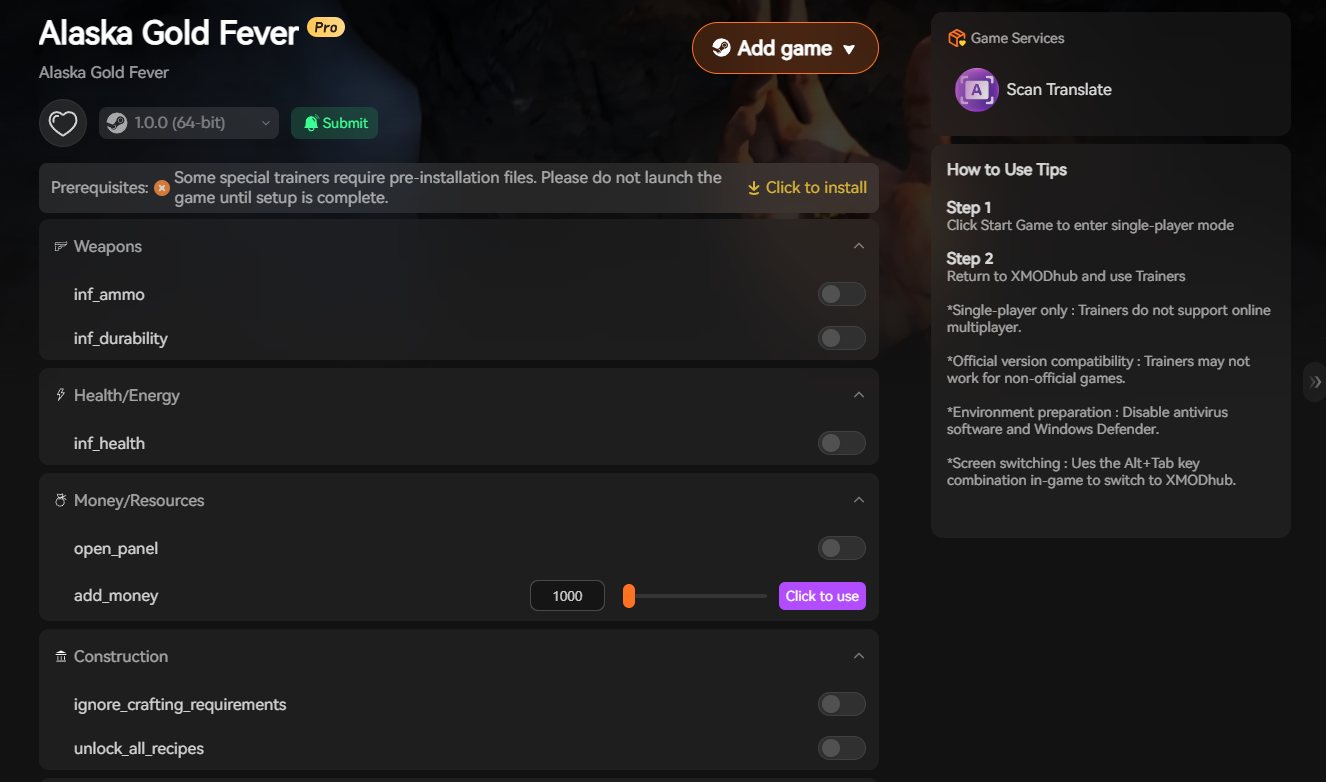
Since you cannot manually type commands like “god” or “noclip” into a text box, you will use a trainer interface. Here are all the verified cheat functions available via XMODhub that replace the need for traditional typed commands.
God Mode & Combat Commands
- ✦ Infinite Health: Prevents you from dying to wildlife attacks or falling damage.
- ✦ Perfect Body Temperature: Stops the freezing mechanic completely, letting you mine through the night.
- ✦ Resistencia infinita: Allows you to sprint and swing your pickaxe indefinitely without needing to rest.
Exploration & Utility
- ✦ Unbreakable Tools: Your shovels, pans, and advanced mining equipment will never lose durability.
- ✦ Super Speed: Increases your movement speed multiplier to cross the massive map quickly.
- ✦ Infinite Fuel: Keeps your generators and vehicles running without needing to constantly buy gas.
Progression & Stats
- ✦ Add 10,000 Gold: Instantly grants a massive injection of cash to your inventory.
- ✦ Infinite Resources: Wood, metal, and other crafting components never deplete when building your camp.
Item IDs and Spawning Guide
Spawning items in Unity games usually requires complex internal Instance IDs that look like long strings of random numbers. Because there is no native command prompt format like player.additem ItemID Amount available to the player, trying to manually spawn specific tools is incredibly difficult.
Instead of hunting down the exact Unity asset path for a “Steel Pickaxe” or “Large Gold Nugget”, modern trainers bypass this by simply making the items you already have infinite, or allowing you to add raw cash so you can legally buy any item from the in-game general store.
Do Cheats Disable Achievements?
Yes, they absolutely can if done incorrectly. This is the biggest catch when using memory editors or attempting to force-unlock developer consoles in Unity games.
In Alaska Gold Fever, if the game’s internal error log detects an illegal memory shift, it can flag your save file. From that point forward, you might not be able to unlock any Steam achievements on that specific playthrough.
If you are an achievement hunter or completionist, messing with raw game files is a fast way to ruin your 100% completion run.
Why Native Cheats Can Break Your Save Files
Beyond the achievement lock, forcing a developer console open via unverified mods is notoriously unstable. These backend tools were originally built for developers to test bugs during production, not for everyday gameplay.
Forcing a quest trigger or spawning 500 gold nuggets at once can cause the Unity physics engine to overload. Memory leaks, corrupted terrain assets, and sudden crashes to the desktop are incredibly common when you bypass intended story triggers or mess with the dynamic memory allocation of the game’s chunk-loading system.
The Safer Alternative: Using XMODhub
If you want the benefits of cheats—like infinite health, unbreakable tools, or skipping the heavy gold grind—without risking your save files or locking your achievements, you need a dedicated game modification tool instead of raw, unstable workarounds.
This is exactly what XMODhub is built for.
Instead of typing risky code that might corrupt your game world, the XMODhub app hooks into Alaska Gold Fever safely and cleanly.
- ✓ Achievement Safe: It bypasses the game’s internal cheat-flagging system, meaning your Steam achievements keep popping normally.
- ✓ Save File Protection: It alters values temporarily in your RAM. Once you close the game, your save file remains completely pure and uncorrupted.
- ✓ One-Click Toggles: No more memorizing long item IDs or struggling with typos. Just hit a hotkey or click a toggle to turn God Mode on or off instantly.
How to Use XMODhub for Alaska Gold Fever

- Download and Launch the free XMODhub desktop app.
- Buscar en for Alaska Gold Fever in the library.
- Click “Play”.
- Toggle your desired cheats (God Mode, Infinite Money, Infinite Durability) directly from the clean UI or via hotkeys while you play. Done.
Troubleshooting: Console Not Opening
If you are mashing the Tilde key and nothing is happening, here is the final reality check:
- ✕ The Console is Locked: As stated above, the developers removed player access to the console. No amount of keyboard pressing will open it.
- ✕ Fake Guides: If you read another guide claiming you can just press a button to open the console in this game, that guide is providing hallucinated, fake information.
- ✓ La solución: Stop trying to open a non-existent text box and download a proper trainer to get the cheats you want.
Frequently Asked Questions (FAQ)
Q: Can I use these cheats on PlayStation or Xbox?
A: No. Modding and trainers for Alaska Gold Fever are strictly limited to the PC version. Console players cannot access the memory injection required to activate these cheats.
Q: Is there a penalty for using cheats in single-player?
A: There is no Steam account ban or official penalty for cheating in a single-player environment. The only downsides are the potential for corrupted save files if you use bad mods, which can be avoided by using a premium trainer like XMODhub.
Q: How do I turn a cheat off?
A: Using our app, most toggle cheats, such as God Mode, can be deactivated by simply clicking the switch on the UI a second time or pressing your assigned hotkey.
Conclusión
While typing built-in console commands can be a fun way to experiment with a game’s engine, the reality is that Alaska Gold Fever simply does not support it natively. Attempting to force it open comes with significant risks to your save files and achievements. For a flawless, risk-free experience, using a dedicated modification tool is always the smarter choice.
Whether you are trying to survive the brutal winter of Alaska Gold Fever, or exploring other massive survival and simulation titles like Gold Rush: The Game, Survival: Fountain of Youth, and The Long Dark, XMODhub has you covered. With secure support for over 5,000+ single-player PC games, you can easily customize your gameplay, skip the tedious grind, and play exactly the way you want.
“`

Soy un jugador apasionado y escritor en XMODhub, dedicado a traerte las últimas noticias de juegos, consejos y puntos de vista.
Conecta conmigo:
Perfil en LinkedIn

 Nancy Miller