Catherine Hu
🔦 [Quick Answer]:
Are there cheat codes for Pratfall on PC?
Modern PC versions of Pratfall do not feature traditional cheat codes. Instead, players often try to modify game files to unlock the Developer Console. However, because the game is built on the Godot 4.6 Engine with online co-op, the native console is permanently locked. The safest and fastest method is using an automated mod manager like XMODhub, which gives you a clean menu for God Mode (no fall damage), Infinite Flares, and item spawning with a single click.
📋 [Editor’s Note]
> Hey guys, Catherine Hu here. Remember the golden days of gaming when you could just pause, type in a secret code, and instantly get infinite bombs? Sadly, modern indie games don’t really do that anymore. When I hit the deep procedural caves in Pratfall and kept dying to gravity or running out of ziplines, I spent hours trying to figure out how to enable the developer console just to spawn some basic food or magic beans. It was a massive headache trying to force Godot debug commands, risking my multiplayer sync. Today, I’m going to show you the reality of built-in cheats for this game, and share the modern, 1-click shortcut I actually use to get God Mode instantly and finally rescue my dog.
Das könnte Ihnen auch gefallen: The 15 Best Pratfall Mods in 2026: Essential Enhancements & Tweaks
⛏️ Introduction: Why Bend the Rules?
Gaming is supposed to be an escape, not a second job. Pratfall is an incredible chaotic co-op experience, but let’s face it: the procedural generation can be brutally unforgiving. Whether you are stuck deep in the third biome dying to the same spiked traps for the twentieth time, or you simply do not have the patience to grind for Deep Dish Pizza and flares after falling down a massive crevasse, sometimes you just need to level the playing field.
Using cheats on PC isn’t about ruining the game; it’s about customizing your single-player or private co-op experience to fit your schedule and playstyle. In this guide, we will break down the reality of hacking your gameplay: the truth about manual console commands in the Godot Engine, and the modern, automated trainer approach.
💻 Built-In PC Cheats: How to Enable the Developer Console
For many older PC games, the only way to manually input cheats is by unlocking the hidden developer console. Players often look for a standard method for Pratfall that looks like this:
- 1.Locate the Config File: Navigate to your PC’s documents folder or AppData.
- 2.Edit the .ini File: Open the settings.ini or config file using Notepad.
- 3.Enable the Console: Add or change the line
EnableConsole=0toEnableConsole=1. - 4.In-Game Activation: Launch the game and press the tilde key (~).
⚠️ The Catch: This method does not work for Pratfall. Because developer Quad Head built Pratfall on the Godot 4.6.1 Engine with heavily integrated SteamNetworkingSockets for its 4-player co-op, the native debug console is entirely stripped from the retail build. There are no .ini files you can casually edit to bring up a text box. Any websites claiming you can just press the tilde key to type godmode 1 are sharing fake, hallucinated code.
🔍 How to Find Pratfall Item IDs & Spawn Codes
If you were using a developer console in a typical game, you couldn’t just type “give pickaxe”. You would need the exact internal Item ID recognized by the game engine.
For example, to spawn an item, the command string typically looks like this: player.additem item_magic_beans_01 10
The Reality: Finding these exact Item IDs is useless in Pratfall because the console is locked. You cannot manually type commands to spawn drills, flares, or bombs. If you want to manipulate your inventory, you cannot do it via text commands, making ID lists completely obsolete for standard players.
🚀 The Modern Way: 1-Click Pratfall Cheats with XMODhub
Let’s be honest: you just want to dig through the caves and have fun, not feel like a data entry clerk trying to force a Godot debugger to open. Furthermore, attempting to inject raw scripts into a multiplayer-enabled game can corrupt your save file.
This is why the PC modding community relies on automated trainers. XMODhub replaces the non-existent developer console with a sleek, modern UI.
Why XMODhub is the best cheat method for Pratfall:
- ★No File Editing Required: You don’t have to touch your game folders or search for fake .ini files.
- ★Zero Memorization: No need to alt-tab to look up complicated Item ID codes for ziplines or Squeakers. Everything is clearly labeled with toggle switches.
- ★Auto-Updating Tech: When the game gets a new patch from Quad Head, XMODhub updates its cheats from the cloud automatically, preventing version-mismatch crashes.
⚙️ How to Use XMODhub for Pratfall?
- Download and Launch the free XMODhub desktop app.

- Suche nach Pratfall in your game library.
- Click “Play” to launch the game securely.
- Toggle your desired cheats (God Mode, Infinite Flares, No Fall Damage) directly from the clean UI or via hotkeys.
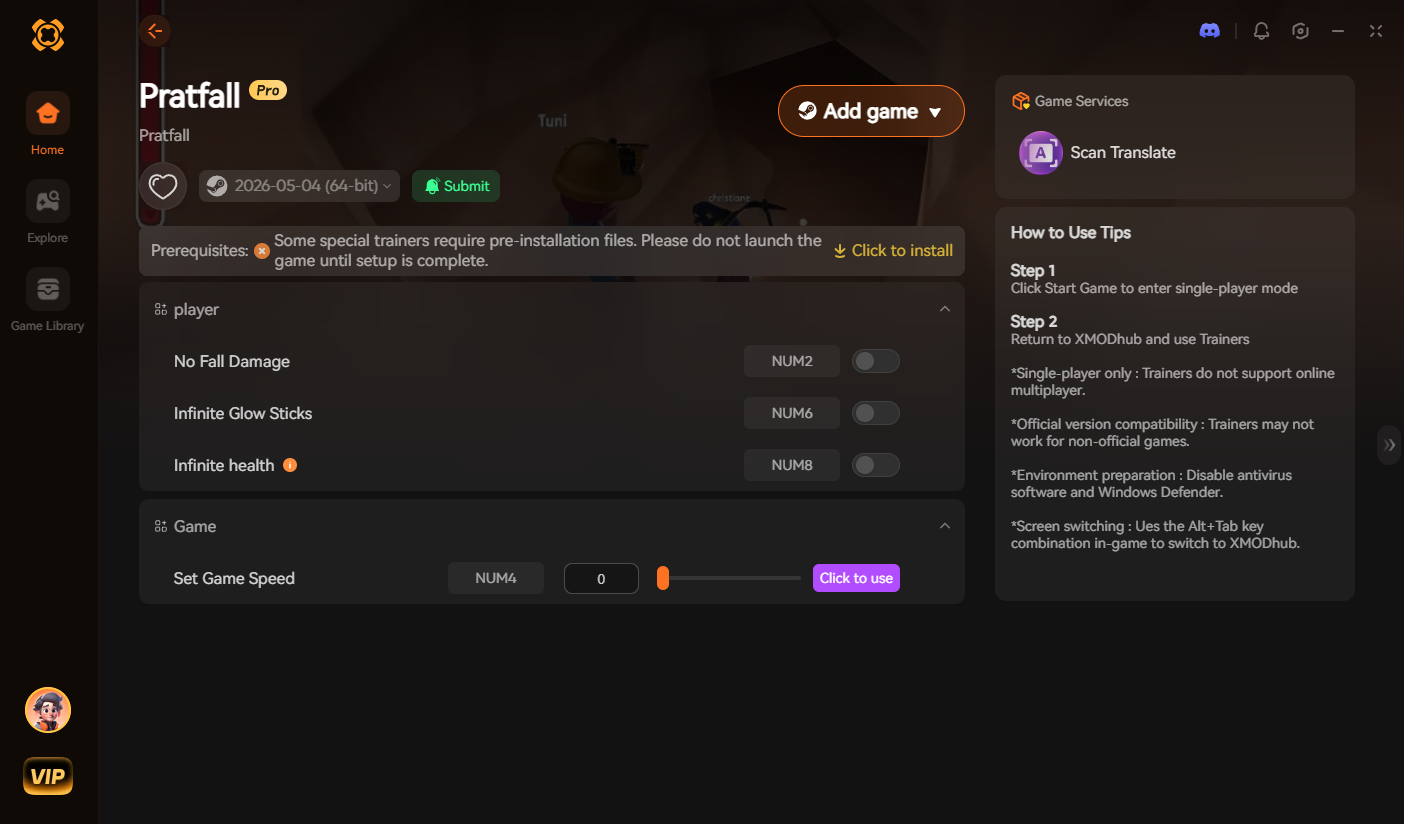
[Download the Pratfall XMODhub Trainer Here]
🧨 Most Popular Cheats You Can Activate Right Now
Since manual console commands are disabled, you can simply toggle these on via XMODhub. Here are the most highly requested cheats for Pratfall that completely change the experience:
- ✦God Mode / No Fall Damage: Stop dying to gravity! Tank every hit from cave-ins, explosives, and massive drops so you can explore the depths without stress.
- ✦Infinite Consumables: Bypass the inventory grind. Give yourself infinite Flares to light up the dark biomes, unlimited Bombs to blow up terrain, and endless Magic Beans.
- ✦Unlimited Stamina / Instant Digging: Swing your pickaxe or use your drill endlessly without running out of energy or fuel.
- ✦Infinite Ziplines: Cross any massive crevasse easily by turning your inventory into a continuous supply of traversal gear.
🎮 Do Cheats Work on the Steam Deck?
With the massive popularity of handheld PC gaming, many players want to know if they can cheat on the go—especially since Pratfall is highly replayable on the Deck.
- •Using Console Commands: As established, the console is locked, so plugging in a Bluetooth keyboard to press the ~ key won’t help you here.
- •Using Trainers: Because the Steam Deck runs on SteamOS (Linux), running standard Windows .exe trainers is complicated and requires forcing compatibility layers like Proton. Fortunately, cloud-based injection platforms like XMODhub are continually optimizing for handhelds, making it easier than ever to activate No Fall Damage from your couch.
🏆 Do Cheats Disable Achievements?
In older games with built-in developer consoles, the moment you press the ~ key and execute a command, the game flags your save file and permanently disables Steam achievements.
The Workaround: Because XMODhub uses stealth memory injection rather than altering the game’s internal command logs or Godot scripts, the game engine usually cannot detect that you are cheating. This means you can run God Mode, safely rescue your dog, and still unlock your 100% completion achievements.
💬 Frequently Asked Questions (FAQ)
Q: Are these PC cheats safe to use?
A: Yes, as long as you use a verified platform. Using a sandboxed tool like XMODhub is completely secure. However, be extremely careful when downloading random standalone .exe cheat programs from YouTube descriptions, as they often contain malware.
Q: Can I use these cheats in online co-op?
A: No. Memory-based cheats are strictly designed for offline single-player or private, strictly controlled local sessions where you are the host. Pratfall uses SteamNetworkingSockets for its 4-player co-op. Using third-party trainers in a public multiplayer lobby will trigger desyncs and ruin the experience for others. Keep the chaos in single-player or private friend lobbies!
Q: Will using cheats corrupt my save file?
A: Memory-injected cheats (like infinite health) will not corrupt your save, as they disable as soon as you close the game. Your procedurally generated biomes remain intact.
Q: Can I spawn the Deep Dish Pizza with a code?
A: No. Because the console is completely locked in the retail build, you cannot use Item IDs. You must use the XMODhub trainer to grant infinite items instead.
⛏️ Conclusion: Play By Your Own Rules
If you are stuck on a brutally difficult cave system, constantly dying to fall damage, or you just want to experience the power fantasy of having infinite bombs to destroy the terrain, you shouldn’t feel bad about bending the rules in a single-player environment.
While digging through config files to unlock developer commands is a myth for Godot Engine games, XMODhub makes tweaking your game effortless. And the greatest benefit? XMODhub supports over 5,000+ PC games. Once you install the app, you have the ultimate cheat engine for almost your entire library. Whether you are blasting enemies with infinite ammo in Resident Evil Requiem, turning on Gott-Modus to survive Spark in the Dark, or surviving the caves in Pratfall, you are always just one click away from total control.

Ich bin ein leidenschaftlicher Gamer und Autor bei XMODhub, der sich der Aufgabe verschrieben hat, euch die neuesten Gaming-News, Tipps und Einblicke zu geben.
Verbinden Sie sich mit mir:
LinkedIn-Profil

 Nancy Miller