Catherine Hu
We have all been there. You boot up Tears of Metal, ready to unleash your formidable Scottish battalion against hordes of enemies to reclaim your island. You are hyped for some intense medieval hack-and-slash co-op roguelike action, but then—disaster strikes. Your internet drops, the servers are undergoing maintenance, or maybe your usual co-op buddies are MIA. You stare at the screen wondering if you can still dive into the trenches by yourself without a stable connection. Playing Tears of Metal offline and solo is completely viable, but navigating the setup and surviving the intense roguelike difficulty without teammates requires a strategic approach.
Editor’s Note: I spent my entire first weekend with Tears of Metal dealing with a spotty internet connection. After repeatedly getting booted mid-run, I dug deep into the game’s offline capabilities and solo mechanics. Switching to offline mode not only saved my sanity but also forced me to master the combat mechanics and battalion commands much faster than I would have in a chaotic co-op lobby.
TL;DR: The Short Answer
If you just want to jump into the action without dealing with connection issues or other players, here is exactly how to play Tears of Metal offline and solo:
- Launch in Offline Mode: Disconnect your PC from the internet or launch Steam in “Offline Mode” before starting Tears of Metal. The game will automatically default to local play.
- Select “Solo Campaign” at the Main Menu: When creating or loading a run, choose the Solo/Local option rather than hosting an online lobby.
- Adjust Battalion Commands: Since you lack human teammates, you must actively rely on the game’s AI command system to position your Scottish troops effectively.
- Manage Aggro: In solo play, all enemy aggro is directed at you and your AI troops. Utilize dodge-rolls and parries constantly, as there is no teammate to revive you if you fall.
Table of Contents
- Understanding the Offline Capabilities of Tears of Metal
- Step-by-Step Guide: Forcing Steam into Offline Mode
- Surviving the Solo Grind: Essential Mechanics
- Mastering the Scottish Battalion AI
- Choosing the Right Weapons for Solo Runs
- Resource Management in the Trenches
- Troubleshooting Network Hangups
- Solo vs. Co-op: Understanding the Scaling Mechanics
- Best Base Upgrades to Prioritize for Solo Runs
- The Ultimate Shortcut: XMODhub
- Frequently Asked Questions
- Final Verdict: Reclaiming the Island on Your Terms
Understanding the Offline Capabilities of Tears of Metal
Tears of Metal was heavily marketed as a co-op medieval hack-and-slash roguelike. Because the core loop emphasizes teamwork to carve through overwhelming enemy hordes and investigate the mysterious Dragon Meteor, many players mistakenly believe an active internet connection is a hard requirement. Fortunately, the developers designed the core engine to support robust local play.
When you play offline, the game scales the enemy health pools down slightly, but the sheer volume of enemies remains roughly the same. This means you are trading the firepower of human allies for a slightly softer target, but you still face a massive crowd control challenge. The rogue-lite progression system (unlocking new gear, permanent base upgrades, and battalion buffs) functions identically in offline mode. Your progress saves locally and will sync with the Steam Cloud the next time you connect to the internet.
Step-by-Step Guide: Forcing Steam into Offline Mode
Sometimes, Tears of Metal will attempt to ping the multiplayer servers if it detects any internet connection, which can cause frustrating delays or error messages at the main menu if your connection is unstable. The cleanest way to play solo is to force your launcher into offline mode.
Step 1: Prepare Steam for Offline Play
Before you lose your internet connection entirely, ensure that your login credentials are saved. Open Steam, click on “Steam” in the top left corner, and select “Settings.” Under the “Security” tab, make sure “Don’t save account credentials on this computer” is unchecked.
Step 2: Enable Offline Mode
Click on “Steam” in the top left corner again and select “Go Offline.” Steam will prompt you to restart the client in Offline Mode. Accept this.
Step 3: Launch Tears of Metal
Once Steam reboots in Offline Mode, navigate to your library and launch Tears of Metal. The game will bypass the initial server check.
Step 4: Start a Local Run
At the main menu, navigate to the campaign or run selection screen. Ensure your lobby is set to “Private” or “Local Only.” You can now carve through the enemy invasion without any network interruptions.
Surviving the Solo Grind: Essential Mechanics
Playing Tears of Metal by yourself completely changes the pacing of the game. In co-op, one player can hold the front line while another flanks or manages the objective. In solo play, you must wear all hats simultaneously.
Mastering the Scottish Battalion AI
Your formidable Scottish battalion is your only lifeline when playing solo. You cannot treat them as fire-and-forget summons.
- Formation Commands: Learn the hotkeys for unit formations immediately. When facing a massive horde, order your troops into a defensive shield wall (if equipped) to create a choke point.
- Flanking Maneuvers: While the AI holds the line, use your superior mobility to dash behind the enemy ranks to eliminate archers and support units.
- Protecting Your Troops: In a roguelike, attrition is your worst enemy. If your battalion gets wiped out early in a biome, the boss fight becomes nearly impossible. Step in to take aggro if you see your troops getting overwhelmed.
Choosing the Right Weapons for Solo Runs
In multiplayer, you might specialize in slow, heavy damage weapons while a friend runs a fast, crowd-control build. Solo play demands versatility.
- Wide Sweeping Attacks: Weapons like the claymore or halberd are exceptional for solo play. They allow you to hit multiple enemies per swing, which is crucial when you are the sole target of a horde.
- Parry Mechanics: Prioritize mastering the parry timing. Successfully parrying an enemy not only prevents damage but often creates a brief AoE stun effect in Tears of Metal, giving you precious seconds to reposition.
- Mobility over Armor: While heavy armor looks great, the ability to dodge-roll out of a bad situation is far more valuable when you are playing alone.
Resource Management in the Trenches
As you advance deeper into the trenches to uncover the truth behind the Dragon Meteor, managing your healing items and upgrade currency becomes critical. In solo mode, all loot drops belong to you. However, you also bear the entire burden of survival. Do not hoard healing items if your health drops below 40%; a single stun-lock combo from an elite enemy can end your run instantly.
Troubleshooting Network Hangups
Even if you prefer to play solo, you might still want to remain connected to the internet to track achievements or chat with friends on Discord. However, if the game’s servers are struggling, trying to play a “private” online game can result in awful rubberbanding or disconnects.
If you are trying to play with friends but keep getting booted, or if you simply cannot get the co-op lobby to initialize, the issue might be related to network configurations rather than the game itself. If you decide you actually want to brave the multiplayer but are running into technical walls, check out this comprehensive guide to fix Tears of Metal coop multiplayer not working. It covers port forwarding, firewall exceptions, and server status checks that are essential for a smooth online experience.
Solo vs. Co-op: Understanding the Scaling Mechanics
If you are transitioning from multiplayer to a strictly offline mode experience, it is vital to understand how the game’s engine dynamically adjusts the difficulty. Tears of Metal employs a hidden scaling system that alters the battlefield based on the number of active players. Knowing these exact differences can make or break your solo runs.
| Gameplay Mechanic | Solo / Offline Mode | Co-op / Online Lobby |
|---|---|---|
| Enemy Health Scaling | Base (100%) | Increases by roughly 35-40% per additional player |
| Aggro Distribution | 100% focused on you and your AI battalion | Split evenly among active human players |
| Revive Mechanics | Permadeath per run (run ends immediately on death) | Teammates have a brief window to revive downed players |
| Loot & Upgrade Currency | All drops belong exclusively to the solo player | Contested or shared depending on lobby configuration |
| Boss Attack Patterns | More predictable, focused entirely on your positioning | Highly erratic as bosses switch targets mid-combo |
As the data shows, playing solo means enemies die faster, but the punishment for mistakes is absolute. Without a teammate to pick you up, defensive play becomes mandatory.
Best Base Upgrades to Prioritize for Solo Runs
Because you cannot rely on a teammate to cover your weaknesses, your permanent base upgrades must compensate. When spending your hard-earned currency between offline runs, prioritize the following:
- Medic Tent Expansions: Increasing your maximum healing flask capacity should be your first objective. In solo play, you will take chip damage simply due to the sheer volume of enemies.
- Battalion Armor Plating: Upgrading your Scottish troops’ survivability is non-negotiable. If your battalion dies, you will be swarmed instantly.
- Stamina Recovery Speed: Since you must constantly dodge-roll and parry to avoid being stun-locked, increasing your stamina regeneration rate ensures you are never caught flat-footed without an escape route.
The Ultimate Shortcut: XMODhub
Let’s be honest. Tears of Metal is a grueling roguelike. When you are playing solo, the difficulty spikes can feel incredibly punishing. Having to constantly manage aggro, protect your Scottish battalion, and carve through endless hordes without a teammate to revive you can turn a fun gaming session into an exercise in frustration. If you are tired of losing 45-minute runs to a single missed parry, there is a better way.
Why grind endlessly when you can tilt the odds in your favor? XMODhub is the ultimate tool for PC gamers who want to experience the full story of Tears of Metal without the agonizing repetition.
With XMODhub, you can access powerful, game-changing features specifically tailored for Tears of Metal, such as:
- God Mode / Infinite Health: Never worry about getting stun-locked by a horde again.
- Infinite Stamina: Dodge, sprint, and swing your claymore without ever tiring out.
- Max Battalion Health: Keep your Scottish troops alive forever so they can hold the front line.
- Instant Kill: Carve through elite enemies and bosses in a single strike.
Getting started takes less than a minute:
- Download and Install XMODhub: Grab the lightweight client from the official website.

- Auto-Detect Tears of Metal: Launch the app, and it will instantly recognize your game installation.
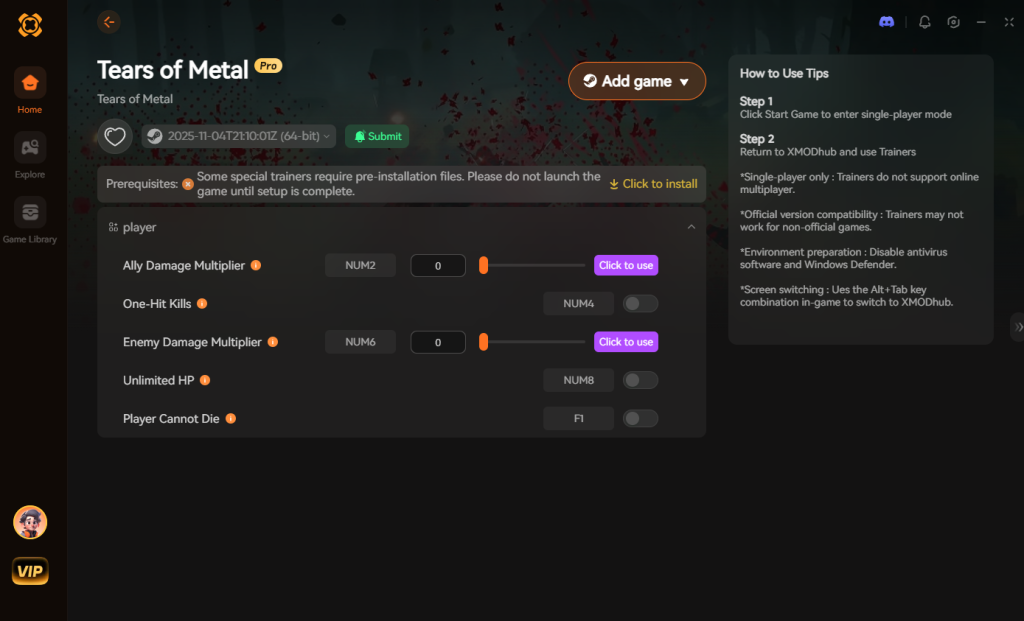
- Toggle Your Cheats: Hit “Play,” open the in-game overlay, and toggle exactly which enhancements you want to use.
Stop letting the roguelike grind dictate your free time. Take back the island on your own terms.
Download Tears of Metal Trainer Now
Frequently Asked Questions
Can I pause Tears of Metal if I am playing offline?
Yes! One of the biggest advantages of playing Tears of Metal offline and solo is the ability to pause the game at any time. If you are playing in an online private lobby, pressing the menu button might not actually stop the background action, leaving you vulnerable to enemies.
Does offline progression carry over to multiplayer?
Absolutely. Your unlocks, base upgrades, and permanent character progression are tied to your save file. If you grind out weapon upgrades in offline solo mode, you will have access to those powerful weapons the next time you host an online co-op lobby.
Is the game too hard for a solo player?
It is challenging, but entirely possible. The game scales enemy health based on the number of active players. However, crowd control is entirely your responsibility. Utilizing your Scottish battalion effectively is the key to surviving the later trenches.
Why does the game lag even when I am playing solo?
If you selected a “Private Lobby” while connected to the internet, you are still hosting a server session. If your connection drops packets, the game will stutter. To fix this, you must force Steam into Offline Mode as detailed earlier in this guide, ensuring the game runs entirely locally on your hardware.
Final Verdict: Reclaiming the Island on Your Terms
Playing Tears of Metal offline and solo is a fantastic way to experience the intense medieval hack-and-slash combat without the stress of coordinating with other players or relying on stable servers. By forcing your launcher into offline mode, you guarantee a smooth, uninterrupted experience. Remember to lean heavily on your AI Scottish battalion and prioritize crowd-control weapons to manage the relentless hordes.
However, if the solo roguelike grind becomes too oppressive, remember that you don’t have to suffer through it. XMODhub is your ultimate backup plan, offering seamless integration with Tears of Metal to give you God Mode, Infinite Stamina, and more. With support for over 5,000+ single-player PC games—including other massive action roguelikes like Mount & Blade 2: Bannerlord and Subnautica 2—XMODhub ensures that you are always in control of your gaming experience. Download it today and show the enemy invasion exactly who owns that island.

Stop Grinding, Start Enjoying.
Bypass the tedious resource gathering and unlock your full potential instantly.
Download XMODhub Trainer

I am a passionate gamer and writer at XMODhub, dedicated to bringing you the latest gaming news, tips, and insights.
Connect with me:
LinkedIn Profile ↗


 Nancy Miller