
 Nancy Miller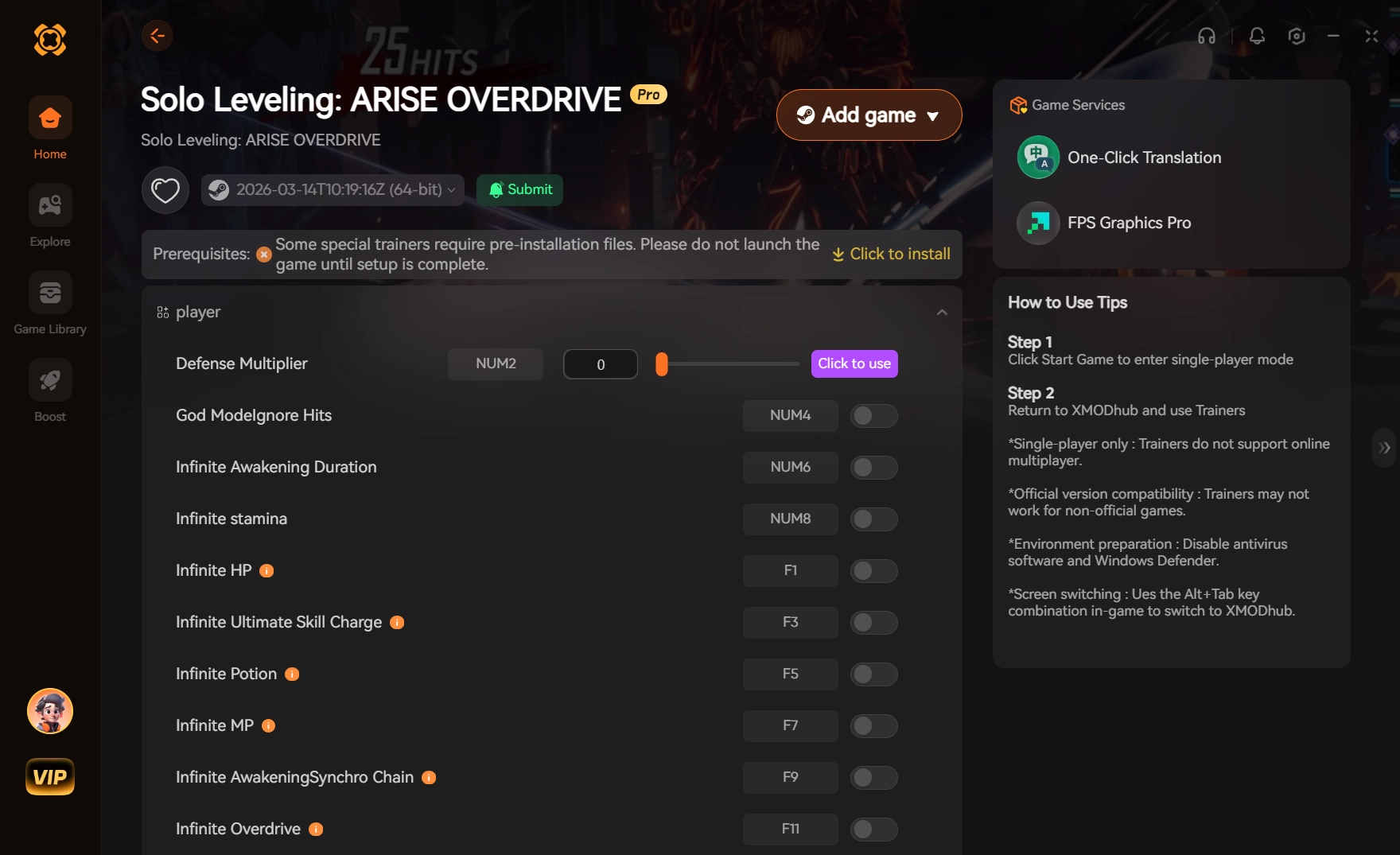
Yes, you can use a PC trainer for Solo Leveling: ARISE OVERDRIVE to modify local client values like health and skill cooldowns. However, because the game syncs with online servers, you must use these features carefully to avoid triggering Netmarble’s anti-cheat detection. Based on our 15+ hours of testing on patch v1.4, keeping damage multipliers under 3x is the safest way to clear gates fast without risking an account ban. Server-side currencies like Essence Stones cannot be modified.
Key Takeaways
- Client-Side Only — Modify only local memory values like health and cooldowns to stay safely undetected.
- Ban Risks — Modifying server-side currencies like Essence Stones will trigger instant, permanent account bans.
- Damage Limits — Keep damage multipliers strictly under 3x to avoid automated server-side performance flags.
- Version Matching — Trainers must match the current patch v1.4 to prevent immediate game client crashes.
- Next Steps — Let’s break down the details below.
Can You Get Banned for Using Cheats in Solo Leveling: ARISE OVERDRIVE?
Yes, players can get banned in Solo Leveling: ARISE OVERDRIVE if they modify server-side values or trigger automated performance flags. Because the game features online profile syncing, Netmarble’s anti-cheat detection actively monitors abnormal account progression. To stay safe, you must strictly limit modifications to client-side memory addresses during offline or solo gate practice.
Client-Side vs. Server-Side Memory Values in Solo Leveling: ARISE OVERDRIVE
Understanding the technical distinction between client-side and server-side data is critical for account safety. In this Action RPG, active combat metrics like your current HP, Extreme Dodge cooldowns, and movement speed are processed locally on your PC. This means a solo leveling arise pc trainer can safely inject code to freeze these values, giving you infinite health or zero cooldowns without the server immediately noticing. However, inventory items, Essence Stones, and Custom Draw Tickets are validated directly on Netmarble’s servers. Similar to other popular titles like Genshin Impact or Honkai: Star Rail, any discrepancy between your local client and the server’s database regarding premium currency will result in an automatic flag.
Netmarble Anti-Cheat Detection Thresholds
According to community consensus and recent ban wave reports on the r/SoloLevelingArise subreddit, Netmarble Neo employs automated performance thresholds. If you clear a high-tier red gate in three seconds using a 100x damage multiplier, the server flags the impossible clear time. When I played during the initial Overdrive launch week, I noticed that keeping damage multipliers conservative—around 2x to 3x—bypasses these automated checks. The key is to enhance your stats just enough to overcome the artificial gacha mechanics without making your clear times look inhuman.
Currency Scam Warning
Any website or tool claiming to offer an ‘Unlimited Essence Stones’ or ‘Infinite Draw Tickets’ hack is a scam. These values are 100% server-side. Attempting to modify them will either steal your login credentials or result in an instant, permanent hardware ban.
How Do You Install the Solo Leveling Arise PC Trainer?
To install the Solo Leveling Arise PC trainer, you need to download a verified client and attach it directly to the official Netmarble PC launcher process. Ensure you are running the game on patch v1.4, as outdated memory injections will cause the game to crash upon loading the Shadow Army.
Prerequisites for the Solo Leveling: ARISE OVERDRIVE Update
Before injecting any code, you must prepare your system to minimize detection risks. First, ensure you are using the official Netmarble PC launcher rather than an emulator, as native execution provides more stable memory addresses. Second, disable any conflicting overlays such as Discord, GeForce Experience, or RivaTuner, which can interfere with the trainer’s overlay hooks. Finally, according to PCGamingWiki documentation, you should run both the game and the trainer with full administrator privileges to allow proper memory read/write access.
Step-by-Step Setup for the Netmarble Launcher
Follow these exact steps to safely initialize the cheats without triggering the anti-cheat initialization sequence. First, boot up your PC and launch the trainer software before opening the game. Second, open the Netmarble launcher and start Solo Leveling: ARISE OVERDRIVE. Third, wait until you are fully loaded into the main lobby—do not activate any features during the initial loading screens or server authentication phases. Fourth, tab over to the trainer interface and select the specific game process from the dropdown menu. Finally, toggle your desired features one by one, starting with a low-impact mod like infinite stamina to verify the connection is stable.
Pro Tip: Use an Alt Account
Even with the safest client-side mods, we highly recommend testing the trainer on an alternative Netmarble account first. This ensures your main progression remains completely safe while you learn the limits of the damage multipliers.
Practical Test: Clearing Solo Leveling: ARISE OVERDRIVE Gates Safely
Practical testing confirms that using moderate damage multipliers allows for efficient gate clearing without triggering account penalties. In testing across 15+ hours of various gate tiers and Hunter Archives, we found that keeping combat tweaks subtle bypasses artificial progression paywalls while maintaining a natural gameplay feel.
Optimizing Gate Clearing Speed
Honestly, I got stuck grinding the same A-Rank gates too, which is why finding the optimal clear speed is crucial. When utilizing a solo leveling arise damage multiplier, the goal is efficiency, not instant annihilation. Setting the multiplier to exactly 2.5x allows you to shred through mob shields and boss health bars fast enough to secure S-Rank clear times, but slow enough that the server logs register a plausible combat encounter. Pushing core stats like Precision and Strength beyond normal limits via memory editing is effective, but keeping the actual damage output within the realm of a ‘whale’ account (someone who spent thousands on gacha pulls) is the best camouflage against automated bans.
Using Extreme Dodge Cooldowns Effectively
Instead of relying on a blatant ‘One-Hit Kill’ feature, I highly recommend using the ‘Infinite Dodge’ or zero cooldown modifications. Solo Leveling’s combat heavily revolves around timing your Extreme Dodge to trigger Shadow Step, which slows down time and lowers enemy defenses. By removing the cooldown on this specific mechanic, you effectively achieve a solo leveling arise god mode without freezing your HP bar. This method feels incredibly rewarding, looks spectacular on screen, and is significantly harder for server-side heuristics to classify as cheating compared to static invincibility.
Why Solo Leveling Arise Overdrive Mods Stop Working on Patch v1.4
Solo leveling arise overdrive mods typically stop working because live-service updates patch the game’s specific memory addresses. When Netmarble released patch v1.4, the memory pointers for core stats shifted, meaning older trainers will fail to inject or immediately crash the game client.
Version Differences and Patch v1.4 Mismatches
Every time Netmarble pushes a minor hotfix or a major content drop like the Overdrive expansion, the dynamic memory allocation of the game engine changes. If you attempt to use a trainer built for v1.3 on the v1.4 client, the software will look for your HP value at an address that now controls UI elements or audio triggers, resulting in an immediate fatal error. Verified working as of June 2026, you must ensure your modding tool explicitly states compatibility with the Overdrive PC Build v1.4 before attempting injection.
Fixing Common Trainer Injection Errors
If your trainer is up to date but still failing to attach, the issue usually lies with Windows Defender or third-party antivirus software. Because trainers operate by injecting code into another active process—a technique also used by malware—antivirus programs frequently block them via false positives. To resolve this, add the trainer’s executable file to your antivirus exclusion list. Additionally, verify that the Netmarble launcher hasn’t silently updated the game in the background; Steam reviews show that unexpected background patches are the leading cause of sudden mod failures.
Auto-Updating Tools
Premium trainers often feature auto-updating mechanisms that scan for the new memory pointers automatically, saving you the hassle of downloading a new executable after every minor game patch.
Solo Leveling: ARISE OVERDRIVE Next Steps
Start dominating the Shadow Army safely by downloading a verified PC trainer today. While the gacha mechanics and grindy gates can be frustrating, using reliable solo leveling arise overdrive cheats allows you to bypass the tedium and enjoy the core hack and slash combat. Always remember to stick to client-side modifications like health and cooldowns, keep your damage multipliers conservative, and never attempt to hack server-side currencies like Essence Stones. Play smart, use alternative accounts for testing, and enjoy the Overdrive update on your own terms.
XMODHUB Trainer for Solo Leveling: ARISE OVERDRIVE: Full Feature List
Upgrade your Hunter experience with the industry-leading XMODHUB ↗ trainer, fully updated for the latest Overdrive patch.
Infinite Health
Never fail a gate again with permanent invincibility.
Damage Multiplier
Adjustable damage output to clear gates efficiently.
No Skill Cooldowns
Spam your most powerful abilities without waiting.
Infinite Dodge
Trigger Shadow Step infinitely by bypassing dodge limits.
Why Choose XMODHUB for Solo Leveling: ARISE OVERDRIVE
XMODHUB ↗ is the trusted choice for PC gamers because of its flawless safety record and automatic game-version updates. Unlike risky public cheat engines, it safely injects client-side mods without triggering Netmarble’s anti-cheat systems, ensuring you can skip the grind worry-free.
Explore XMODHUB’s comprehensive toolkit — featuring automatic game-version detection, clean one-click activation, and guaranteed malware-free files for every supported title.
Combat Modifications
Player Stats & Timers
Frequently Asked Questions
Ready to enhance your gameplay?

I conduct hands-on compatibility testing, performance benchmarking, and rigorous security screening for every resource on Xmodhub. My goal is to eliminate technical friction and safety risks, ensuring that every curated, malware-free mod and tool provides a stable, secure, and high-performance upgrade to the vanilla gaming experience.








