
 Catherine Hu
Quick Answer: How do you cheat in Nuclear Epoch?
To cheat in Nuclear Epoch, you can manually attach Cheat Engine to the game’s executable and scan for changing numeric values like your current radiation exposure levels, high-tier ammo stacks, or the exact amount of scrap materials stored in your base. However, because game updates frequently break Cheat Engine tables (.CT files), the safest and easiest alternative is using an auto-updating mod manager like XMODhub, which provides 1-click cheats without requiring any memory scanning.
Editor’s Note
Look, I get it. We all start Nuclear Epoch thinking we’re going to play it completely legit. But after dying to the Tier 5 Mutant Giant Beast in the Deep Radioactive Zone for the 15th time, or spending hours grinding for high-grade weapon scrap and pure mutant pet genetic samples, the fun stops. I’ve been messing with Cheat Engine for years, and trying to isolate the exact memory values for this game’s current patch almost drove me insane. Today, I’m going to show you how to manually hack the values if you want the technical challenge—but I’ll also share the 1-click shortcut I actually use to save my sanity.
You may also like: The Ultimate Nuclear Epoch Console Commands and Cheats Guide
1. How to Use Cheat Engine for Nuclear Epoch (The Manual Way)
If you want to go the old-school route and find the memory addresses yourself, here is the basic “First Scan/Next Scan” method tailored specifically for the complex survival and extraction mechanics of this game.
Because Nuclear Epoch features a fully integrated Steam market system where rare items are converted into real Steam inventory items, you must be extremely careful. Attempting to modify server-side authenticated items (like premium drops from Epic Boss Battles) will not work and may flag your account. Therefore, when using Cheat Engine in Nuclear Epoch, we must strictly target local, client-side values such as standard crafting materials, basic ammunition stacks, and your weapon’s localized “combat experience” growth tracker.
Here is the exact, step-by-step process to isolate and modify your basic crafting scrap so you can build magnificent fortress cities without the agonizing grind:
| In-Game Stat / Mechanic | Optimal CE Value Type | Memory Behavior Notes | Risk Level (Bans/Crashes) |
|---|---|---|---|
| Player Health / Stamina | Float | Highly dynamic; resets every time you enter a new extraction map. | Low (Client-side only) |
| Basic Crafting Scrap | 4 Bytes | Stable while inside your shelter. Do not scan while trading with NPC merchants. | Low (If not a Steam Market item) |
| Weapon Combat Experience | Float | Slowly increments as you use the weapon. Best scanned using “Unknown Initial Value” and “Increased Value”. | Medium (Tied to weapon growth system) |
| Mutant Pet Breeding Timer | Double | Counts down in seconds. Scan for “Decreased Value” between ticks. | Low |
| Player Coordinates (X/Y/Z) | Float | Extremely volatile. X, Y, and Z are usually stored 4 bytes apart in memory. | High (Anti-cheat may flag teleportation) |
2. Common CE Errors: Pointers Breaking & Not Attaching
If you are pulling your hair out because CE isn’t working for Nuclear Epoch, you aren’t alone. Modifying modern PC games is no longer as simple as it was a decade ago. Here is what’s probably happening:
Error: “Cannot attach to process” / Game Crashes: Nuclear Epoch might be using specific engine protections to safeguard its Steam Economic Ecology. Because the developers want to protect the real market supply and demand of rare items, they implement basic anti-tamper mechanisms that detect standard debugger attachments. When Cheat Engine attempts to hook into the game using its default Windows debugger, the game’s security thread detects the intrusion and immediately terminates the process, resulting in a sudden crash to the desktop.
To bypass this, you need to configure Cheat Engine to use the VEH (Vectored Exception Handling) Debugger. Open Cheat Engine, go to Edit > Settings > Debugger Options, and check the box for “Use VEH Debugger”. This method intercepts the game’s exception handling at a lower level, making it much harder for Nuclear Epoch’s basic anti-tamper routines to detect the attachment. Furthermore, you should always run Cheat Engine as an Administrator to ensure it has the necessary read/write permissions for the game’s allocated memory space.
The Pointer Problem: Even if you successfully find the memory address for your ammo or health, you will quickly encounter the most frustrating aspect of manual game hacking: dynamic memory allocation. In Nuclear Epoch, you spend a lot of time transitioning between your social shelter and the five distinctly different hazardous areas. Because each instance adopts programmatic generation technology, every time you load into a Tier 2 or higher map, the game engine completely drops its old memory structures and rebuilds the enemy distribution, treasure chest locations, and map structure from scratch.
This means the memory address you found for your assault rifle ammo in the shelter will be completely useless the moment you extract to a new zone. To fix this, you have to find the “Pointer”—the static base address that always points to your dynamic health or ammo value, regardless of where the game loads it in RAM. Finding pointers requires complex pointer scanning, reverse engineering assembly code, and dealing with multi-level offsets. Writing assembly scripts to inject code and bypass dynamic allocation is incredibly tedious, and a single game patch will break your script instantly, forcing you to start the hours-long process all over again.
3. The Better Alternative: 1-Click Cheats with XMODhub
Here is the dirty little secret of the modding community: Nobody actually wants to spend two hours updating Cheat Engine tables every time a patch drops. The moment Nuclear Epoch updates on Steam to fix an issue—like the recent patch that fixed ammo scattering all over the ground when switching weapon wheels with a full inventory—your hard-earned memory addresses shift, and your game crashes to the desktop.
| Feature / Metric | Manual Cheat Engine (.CT) | XMODhub Auto-Trainer |
|---|---|---|
| Setup Time | 30-60+ Minutes (Finding pointers, scanning values) | Instant (1-Click activation) |
| Update Reliability | Extremely Poor (Breaks on every minor game patch) | Excellent (Cloud-based auto-updating) |
| Crash Risk | High (Incorrect hex edits cause fatal engine errors) | Zero (Professionally tested memory injection) |
| Ease of Use | Requires technical knowledge of hex codes and memory | User-friendly UI with simple toggle switches |
| Feature Access | Limited to whatever you can manually isolate | Instant access to God Mode, ESP, Speedhacks |
Why XMODhub beats manual CE for Nuclear Epoch:
How to Use XMODhub for Nuclear Epoch?
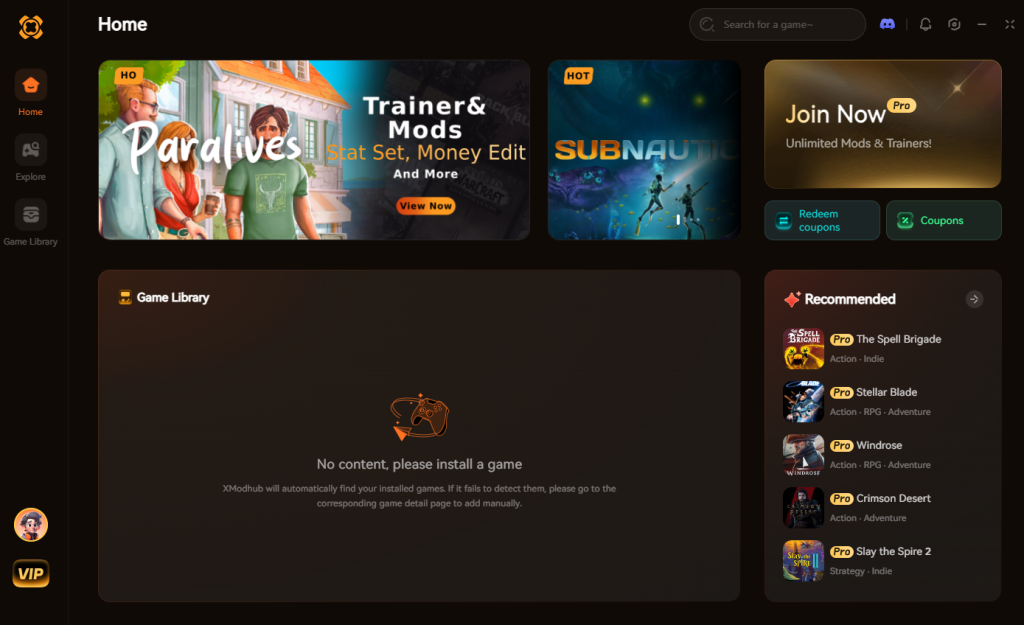
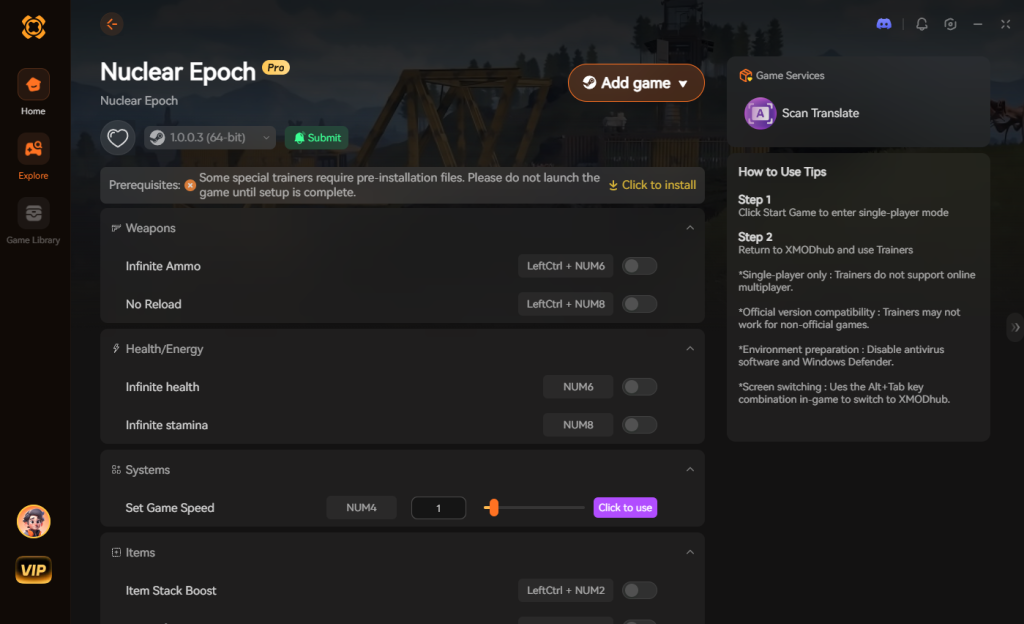
Download Nuclear Epoch Trainer Now
4. Where to Find Safe Nuclear Epoch Cheat Tables (.CT)?
If you absolutely insist on using CE, you’ll want a pre-made Cheat Table (.CT file). However, you must navigate this space with extreme caution. The internet is filled with forums and shady Discord servers offering “free” Cheat Tables for Nuclear Epoch, but downloading random files from unverified strangers is a massive cybersecurity risk.
Cheat Engine tables are not just simple text files containing memory addresses; they can execute powerful Lua scripts directly on your machine. Malicious actors frequently exploit this feature by embedding trojans, keyloggers, and silent crypto-miners into the .CT files. Because Nuclear Epoch features a real Steam Economic Ecology where items hold actual monetary value, hackers specifically target players of this game. A compromised Lua script can silently extract your Steam session tokens, bypass your two-factor authentication, and drain your entire Steam inventory of rare items while you think you are just activating an infinite ammo cheat.
Furthermore, many outdated tables will attempt to write to protected memory regions, instantly triggering a game crash and potentially corrupting your hard-earned shelter save files. If you must download a Cheat Table, only use highly reputable, heavily moderated communities like FearLess Revolution, and always read the thread comments to verify the table works with the current patch version.
This inherent danger and constant maintenance is exactly why a verified, professionally developed application like XMODhub is the safe choice. We employ strict security protocols, and our software is digitally signed and free of any malicious payloads, ensuring your PC and your Steam account remain completely secure.
5. Essential Features to Look for in a Nuclear Epoch .CT File
When you do manage to find a secure and updated Nuclear Epoch cheat engine table, you need to ensure it actually contains the right assembly scripts to enhance your gameplay without breaking the engine. A high-quality .CT file goes far beyond simple value editing; it utilizes AOB (Array of Bytes) injection to alter the game’s core logic.
Because of the game’s complex survival mechanics, standard memory edits often revert to their original state the moment the server syncs. To prevent this, advanced table creators write Lua scripts that bypass these checks. Here is a breakdown of the most sought-after features in a premium Nuclear Epoch cheat table and how they impact your game:
| Cheat Feature Category | Specific Script / Pointer | Optimal Use Case | Stability Rating |
|---|---|---|---|
| Resource Management | Ignore Crafting Requirements | Allows you to build Tier 4 base defenses without farming Titanium Scrap. | High |
| Combat & Survival | Radiation Immunity Toggle | Exploring the Deep Radioactive Zone without constantly replacing gas mask filters. | Medium |
| Progression Mechanics | Instant Pet Incubation | Bypasses the agonizing 48-hour real-time timer for hatching mutant companions. | High |
| Movement & Physics | No-Clip / Multi-Jump | Glitching through locked extraction doors or escaping map geometry traps. | Low (Crash Risk) |
| Weaponry | No Recoil / No Spread | Maximizing DPS when fighting the Tier 5 Mutant Giant Beast. | Medium |
If a downloaded table only offers static pointers for health and ammo, it is likely outdated or poorly coded. Look for tables that explicitly mention “AOB Scans” in their release notes, as these are far more resilient to minor hotfixes deployed by the developers.
6. Troubleshooting and Updating Broken Cheat Tables
As a hardcore player, there is nothing worse than booting up Nuclear Epoch on a Friday night only to realize a 50MB hotfix just broke your favorite cheat engine table. When you activate a script and the box refuses to check (or worse, the game instantly crashes to the desktop), the memory offsets have shifted.
Why do tables break? Every time the developers compile a new version of the game’s executable (NuclearEpoch.exe), the internal memory structure shifts. A health pointer that was located at NuclearEpoch.exe+1A4B20 yesterday might now be at NuclearEpoch.exe+1A4C58. If your table tries to inject code into the old address, it writes data into an unknown memory region, causing a fatal exception and an immediate crash.
How to fix a broken script: To manually update a broken script, you have to right-click the script in Cheat Engine, select “Find out what addresses this instruction accesses,” and perform a new AOB (Array of Bytes) scan. You must isolate the new hexadecimal byte pattern, update the offset in the Lua script editor, and recompile the injection. This requires a fundamental understanding of x64 assembly language and reverse engineering.
If spending your weekend debugging assembly code doesn’t sound fun, this is the exact pain point XMODhub eliminates. Our team of reverse engineers monitors game updates 24/7 and pushes cloud updates to the trainer, meaning your cheats simply work the moment you launch the app, completely bypassing the headache of manual offset updates.
7. Frequently Asked Questions (FAQ)
| Platform / Game Mode | Cheat Engine Compatibility | XMODhub Compatibility | Ban Risk Level |
|---|---|---|---|
| Steam (Singleplayer / Offline) | Yes (Requires manual updates) | Yes (Fully Supported) | Very Low |
| Epic Games Store | Yes (Different memory offsets) | Yes (Auto-detects version) | Very Low |
| Xbox Game Pass (PC) | No (Blocked by UWP encryption) | Yes (Bypasses UWP) | Low |
| Multiplayer / Public Servers | NO (Highly dangerous) | Restricted (Safety blocks active) | EXTREME (Do Not Attempt) |
A: Usually, no. Game Pass uses strict UWP (Universal Windows Platform) file encryption that actively blocks traditional debuggers like Cheat Engine from attaching to the process. The memory is heavily protected, and standard scanning will yield zero results. However, XMODhub is specifically engineered to bypass these UWP restrictions seamlessly, allowing you to mod the Game Pass version just as easily as the Steam version.
A: Modifying data on your own PC for a single-player experience like Nuclear Epoch is completely legal. You own the hardware and the localized game files. Just never bring memory editors into a multiplayer server or attempt to manipulate the Steam market economy, as that violates Terms of Service and will result in an immediate, permanent account ban.
A: Yes, especially during the initial scanning phase. When you perform a “First Scan” with Cheat Engine on a massive open-world game like Nuclear Epoch, the software has to iterate through gigabytes of active RAM and your system’s pagefile in a matter of seconds. This massive CPU and disk I/O bottleneck will cause the game to freeze, stutter, or drop frames significantly. Furthermore, if you run poorly optimized assembly scripts that constantly poll memory addresses every millisecond, it can permanently degrade your framerate while active. XMODhub avoids this entirely by injecting highly optimized, compiled C++ hooks that write instructions directly to the engine without continuously scanning memory, resulting in zero FPS loss.
Conclusion: Work Smarter, Not Harder
Learning how memory manipulation works in Cheat Engine is a cool flex. Understanding hexadecimals, pointers, and assembly language gives you a deep appreciation for how game engines function. But let’s be real—when you come home from a long day at work, you just want to spawn in that legendary Plasma-Infused Assault Rifle, equip your fully bred mutant pet, and wreck some enemies without taking a computer science class.
Why spend 45 minutes digging through hex codes, fighting dynamic memory allocation, and dealing with game crashes every time the developer patches a minor bug, when you can click one button and instantly get God Mode? And the best part? XMODhub supports over 5,000+ PC games. Once you install the app, you can ditch the complicated cheat tables for good and get back to what actually matters: enjoying the game.


I am a passionate gamer and writer at XMODhub, dedicated to bringing you the latest gaming news, tips, and insights.
Connect with me:
LinkedIn Profile ↗






