
 Catherine Hu
⚡ Quick Answer
Are there cheat codes for Graveyard Keeper on PC?
Modern PC versions of Graveyard Keeper do not feature traditional cheat codes, nor do they have an easily accessible developer console. Because the game is built on the Unity engine, the native console is completely locked away from players.
Instead of forcing complex BepInEx mod frameworks into your game files to unlock text commands, the safest and fastest method is using a dedicated PC trainer. An automated tool like XMODhub gives you a clean menu for Infinite Energy, Max Tech Points, and instant money with a single click.
You may also like: How to Fix Graveyard Keeper Crashing on Startup, Black Screen & Stuttering
Introduction: Why Bend the Rules?
Gaming is supposed to be an escape, not a second job. Graveyard Keeper is a delightfully dark management experience, but let’s face it: the progression system can be brutally unforgiving.
Whether you are exhausted by your energy bar depleting after chopping down just three trees, or you simply do not have the real-world weeks required to grind for thousands of Blue Tech Points to unlock advanced theology, sometimes you just need to level the playing field.
Using cheats on PC isn’t about ruining the game; it’s about customizing your single-player experience to fit your schedule and playstyle. In this guide, we will break down the reality of hacking your graveyard simulation: the heavily restricted console command method, and the modern, automated trainer approach.
Built-In PC Cheats: How to Enable the Developer Console
For many PC games, the only way to manually input cheats is by unlocking the hidden developer console. Here is the standard method players attempt to use for Graveyard Keeper, and why it rarely works out of the box:
- ✕ Locate the Config File: Players often navigate to the Unity AppData folder, usually found at
C:\Users\Username\AppData\LocalLow\Lazy Bear Games\Graveyard Keeper. - ✕ Edit the .ini File: They look for a settings file to forcefully enable a command prompt.
- ✕ The Reality (The Catch): Unlike games running on Unreal Engine or proprietary Bethesda engines, Graveyard Keeper’s Unity framework has the developer console hard-locked in the retail build. Pressing the tilde key (~) will do absolutely nothing.
The Modding Workaround:
To actually type commands, you would have to download third-party script injectors (like BepInEx) and outdated console mods from 2019.
Typing out complex strings of code every time you load into the game gets old very quickly.
Even worse, since the game was updated to a 64-bit architecture, forcing these old console mods usually results in an instant crash to the desktop.
How to Find Graveyard Keeper Item IDs & Spawn Codes
If you manage to force a modded developer console open, you cannot just type “give sword”. You need the exact internal string ID recognized by the Unity engine.
For example, to spawn a highly requested item, the background command string typically looks like this:
additem aristocrat_papers 1
Finding these exact Item IDs requires keeping a massive, community-updated Wiki page open on your second monitor. Because Graveyard Keeper features hundreds of unique items—from complex alchemy extracts to specific crop seeds—cross-referencing these lists while trying to manage your zombie workers is incredibly tedious.
The Modern Way: 1-Click Graveyard Keeper Cheats with XMODhub
Let’s be honest: you just want to bury bodies, expand your church, and have fun, not feel like a data entry clerk typing out broken C# scripts. Furthermore, injecting outdated .dll files can permanently corrupt your graveyard layout.
This is why the PC modding community has moved on to automated trainers. XMODhub replaces the clunky, locked developer console with a sleek, modern UI.
Why XMODhub is the best cheat method for Graveyard Keeper:
- ✓ No File Editing Required: You don’t have to touch your AppData folders or install crash-prone Unity injectors.
- ✓ Zero Memorization: No need to alt-tab to look up complicated alchemy Item ID codes. Everything is clearly labeled with toggle switches.
- ✓ Auto-Updating Tech: When the game gets a minor background patch, XMODhub updates its memory addresses from the cloud automatically, preventing version-mismatch crashes.
How to Use XMODhub for Graveyard Keeper?

- Download and Launch the free XMODhub desktop app.
- Search for Graveyard Keeper.
- Click “Play”.
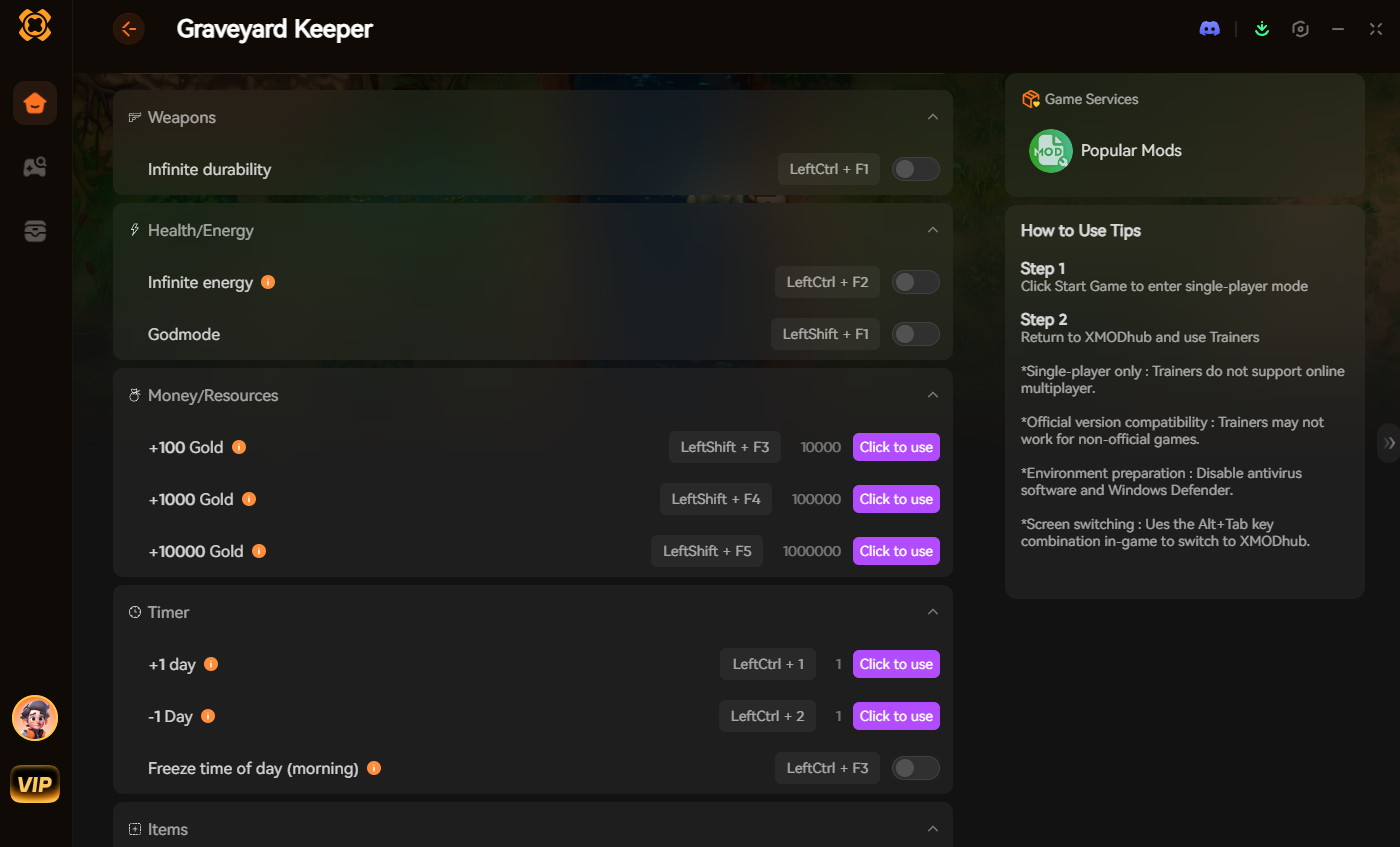
- Toggle your desired cheats (Infinite Energy, Max Tech Points, Fast Walk Speed) directly from the clean UI or via hotkeys.
Most Popular Cheats You Can Activate Right Now
Using XMODhub, here are the most highly requested cheats for Graveyard Keeper that completely remove the frustrating roadblocks:
- ✦ Infinite Energy/Stamina: Stop running back to your bed every five minutes to sleep. Chop wood, mine massive iron veins, and craft endlessly without your stamina bar dropping.
- ✦ Add Blue/Red/Green Tech Points: Instantly grant yourself the exact experience points needed to unlock the entire technology tree, completely bypassing the agonizing study table grind.
- ✦ Infinite Money (Gold/Silver): Bypass the slow early-game trading economy. Instantly grant yourself maximum wealth to buy teleport stones, rare seeds, and late-game quest items from the Merchant.
- ✦ Super Walking Speed: Turn your slow, plodding character into a speedster. Run from the Lighthouse to the Swamp in a fraction of the normal time.
Do Cheats Work on the Steam Deck?
With the massive popularity of handheld PC gaming, many players want to know if they can cheat while farming crops on the go.
- ▹ Using Console Mods: Pulling up the virtual keyboard to type injected mod commands is notoriously buggy on the Steam Deck and often freezes the Unity UI.
- ▹ Using Trainers: Because the Steam Deck runs on SteamOS (Linux), running standard Windows
.exetrainers directly is complicated and requires forcing compatibility layers like Proton. Fortunately, cloud-based injection platforms are continually optimizing for handhelds, making it easier than ever to activate Infinite Energy from your couch.
Do Cheats Disable Achievements?
If you use heavy script injector mods to force the native developer console open, yes. Modifying the core game files will usually flag your save and permanently disable Steam achievements for that playthrough.
The Workaround:
Because XMODhub uses stealth memory alteration rather than permanently altering the game’s internal Unity logs, the engine cannot detect that you are cheating. This means you can run Infinite Energy and still unlock your 100% completion achievements naturally.
Frequently Asked Questions (FAQ)
Q: Are these PC cheats safe to use?
A: Yes, as long as you use a verified platform. Using a secure, sandboxed tool like XMODhub is completely safe for your system. However, be extremely careful when downloading random standalone .exe cheat menus from obscure forums, as they often contain malware.
Q: Can I use these cheats on the Xbox Game Pass PC version?
A: Injecting mods is notoriously difficult on Game Pass due to Microsoft’s locked WindowsApps file system. Fortunately, XMODhub bypasses this entirely by reading memory, working flawlessly with the Game Pass PC version of Graveyard Keeper.
Q: Will using cheats corrupt my save file?
A: Memory-injected cheats (like infinite energy or walk speed) will not corrupt your save, as they deactivate as soon as you close the game. However, using old mods to spawn unreleased alpha items can cause permanent glitches. Always back up your save folder before heavily modifying your inventory.
Q: Can I use these cheats in multiplayer or co-op?
A: Graveyard Keeper is a strictly single-player experience, so you do not have to worry about anti-cheat bans or ruining the game for other people. Keep the chaos to your own cemetery!
Conclusion: Play By Your Own Rules
If you are stuck on a brutally tedious crafting chain, or you just want to experience the power fantasy of having infinite Gold to build the ultimate marble graveyard, you shouldn’t feel bad about bending the rules in a single-player environment.
While digging through Unity framework files to unlock broken developer commands is one way to try it, it’s outdated, risky, and highly frustrating. XMODhub makes it effortless.
And the greatest benefit? XMODhub supports over 5,000+ PC games. Once you install the app, you have the ultimate cheat engine for almost your entire library.
Whether you are building massive automated farms in Stardew Valley, exploring endless caverns in Core Keeper, or turning on infinite resources in My Time at Portia, you are always just one click away from total control.

I am a passionate gamer and writer at XMODhub, dedicated to bringing you the latest gaming news, tips, and insights.
Connect with me:
LinkedIn Profile ↗


 Nancy Miller




Thanks for breaking down the cheat landscape in Graveyard Keeper—your point about the Unity engine locking out traditional consoles really resonated. I’ve been stuck in that mid-game loop for hours too, and the idea of using a trainer to skip the grind instead of wrestling with modded scripts is a game-changer. It’s a solid workaround when the game itself doesn’t offer much in the way of convenience.