
 Catherine Hu
Imagine this: You’ve just spent 50 grueling hours scouting the next prodigy, negotiating brutal player contracts, and leading GamerLegion to a Major victory in Esports Manager 2026. You close the game, go to sleep, and boot it up the next day only to be greeted by a terrifyingly blank “New Game” screen. Your custom rosters, your meticulously edited EMDB.gg database, and your championship legacy—gone in an instant. If you are playing a deep strategy-simulation game, losing your save file is the ultimate nightmare.
Editor’s Note
I lost a 10-season EternalFire dynasty because Steam Cloud decided to overwrite my local data with an empty file during a sudden power outage. Since that catastrophic loss, I’ve manually backed up my management database every single day. Trust me, you do not want to learn this lesson the hard way.
Quick Answer: TL;DR: The Short Answer
If you just want to find your files immediately and secure your hard-earned progress, here is the exact default directory for the Esports Manager 2026 save file location on Windows:
C:\Users\[YOUR USERNAME]\AppData\LocalLow\Neurona Games\Esports Manager 2026\SavesC:\Program Files (x86)\Steam\userdata\[YOUR STEAM ID]\4006000\remoteWhere to Find the Esports Manager 2026 Save File Location
Depending on your operating system and hardware, the save data for Esports Manager 2026 is stored in specific hidden directories. Because this game features real-time match overviews, live round tracking, and a massive database of player ratings (including ADR and HS%), the save files can become quite large and complex.
Windows 10 / Windows 11
By default, Windows hides the AppData folder to prevent users from accidentally deleting vital system configurations. To access your Esports Manager 2026 save files, you must first bypass this hidden restriction.
C:\Users\[YOUR USERNAME]\AppData\LocalLow\Neurona Games\Esports Manager 2026\Saves.Alternatively, you can use the Run command:
Steam Deck & Linux (Proton)
If you are playing the Esports Manager 2026 demo or full release on the go using a Steam Deck, the file structure is completely different due to the Proton compatibility layer, which creates a “fake” Windows environment for the game.
Home/.steam/steam/steamapps/compatdata/4006000/pfx/drive_c/users/steamuser/AppData/LocalLow/Neurona Games/Esports Manager 2026/SavesNote: 4006000 is the Steam App ID for the Esports Manager 2026 Demo. When the full game launches, this folder number will change to the official release ID.
Why You Need to Backup Your Saves Immediately
Esports Manager 2026 is not a casual arcade game; it is a hardcore management sim. Every decision you make—from hiring backend staff and tweaking UI tactics to negotiating multi-year player contracts—is permanently etched into your save file. Here is why backing up is non-negotiable:
Step-by-Step: How to Backup and Restore Your Progress
The Manual Backup Method
The safest way to ensure your esports empire survives is to create a manual backup routine.
How to Restore a Corrupted Save
If the worst happens and your game fails to load your current career:
Steam Cloud Sync: Friend or Foe?
Steam Cloud is a fantastic feature for players who frequently switch between a desktop rig and a Steam Deck. However, for deep simulation games like Esports Manager 2026, it can sometimes be your worst enemy.
When you close the game, Steam immediately begins uploading your save file. If your internet connection drops for even a second during this sync, or if Steam’s servers hiccup, a fragmented, incomplete file is uploaded to the cloud. The next time you launch Esports Manager 2026, Steam forcefully downloads this fragmented file, overwriting your perfectly healthy local save.
Pro Tip: If you only play on one PC, seriously consider disabling Steam Cloud for this specific title and relying entirely on manual backups. The risk of cloud corruption often outweighs the convenience.
The Ultimate Shortcut: XMODhub
Let’s be brutally honest. If you are reading this because your save file is already corrupted and you just lost 40 hours of meticulous team building, the thought of starting from scratch with a tier-3 amateur team is agonizing. Re-grinding your way to the Majors, re-scouting talent, and suffering through early-game budget constraints isn’t fun the second time around.
You don’t have to suffer. If you want to instantly rebuild your lost empire or just bypass the tedious financial grind to focus purely on live match simulation and tactics, XMODhub is your ultimate weapon.
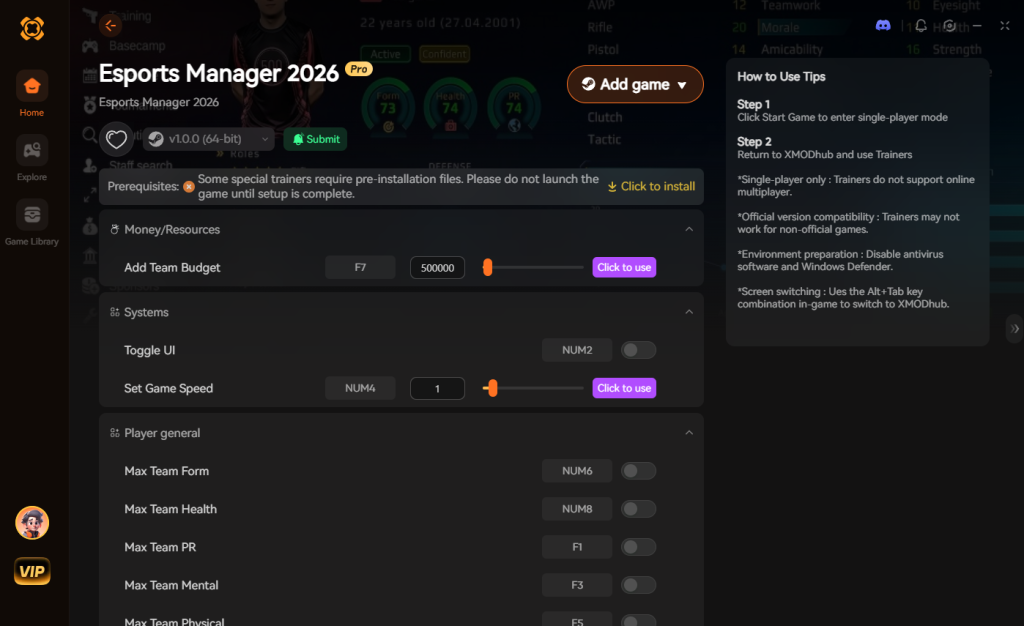
XMODhub is a premium PC game modification tool that injects directly into the game’s engine, allowing you to bypass the grind safely and efficiently. For Esports Manager 2026, XMODhub offers game-changing features:
How to Dominate with XMODhub:

Download Esports Manager 2026 Trainer Now
Decoding the Save Folder Structure
When you finally locate your Esports Manager 2026 save directory, you might be overwhelmed by the sheer number of files inside. Because the game relies heavily on complex data arrays for player statistics and staff generation, understanding what each file does is crucial before you start deleting or modifying anything.
If you are trying to isolate a specific corrupted element or just want to back up a particular custom tactic without copying the entire 500MB folder, refer to this data breakdown:
Diagnosing Save File Errors
If your game crashes immediately upon loading a file, check the file size of your career_[name].sav. A healthy mid-game save usually ranges between 45MB to 80MB. If your .sav file shows up as 0KB, it has been completely wiped by a failed Steam Cloud sync or a power outage during a write cycle. In this scenario, your only option is to delete the 0KB file and rename the most recent file inside the AutoSave_bkp folder to match your main save’s name.
Frequently Asked Questions
A: Yes! The developers at Neurona Games have structured the save data so that your progress in the Steam Sports Fest demo will seamlessly transition to the full version. Just ensure you do not delete your LocalLow AppData folder when uninstalling the demo.
A: While some configuration files (like graphics and UI settings) are stored as simple .json or .ini files in the main directory, the actual career save files are heavily encoded. Attempting to manually edit your budget using Notepad will almost certainly corrupt the save file. If you want to modify your game, use the community EMDB.gg database tools or XMODhub.
A: If you download a custom community roster from EMDB.gg, those files are usually placed in a separate Database folder within the same AppData\LocalLow\Neurona Games\Esports Manager 2026 directory. Always back this folder up alongside your Saves folder.
A: This happens when the developers release a major patch that overhauls core gameplay systems (like tactics, UI, or match simulation depth). Usually, older saves cannot be parsed by the new engine logic. Always read the patch notes before updating; sometimes you must finish your current season on an older branch of the game via Steam Betas.
Final Verdict
Losing your progression in a stat-heavy, deeply immersive simulation like Esports Manager 2026 is a devastating blow to any gamer. By understanding exactly where your Esports Manager 2026 save file location is and implementing a strict manual backup routine, you bulletproof your organization against sudden crashes, corrupted cloud syncs, and bad roster decisions.
However, if tragedy has already struck and your championship team is lost to the digital void, remember that you don’t have to waste weeks grinding back to the top. XMODhub provides the ultimate shortcut to reclaim your glory instantly. With support for over 5,000+ single-player PC games—including other massive management sims like Football Manager 2024 and F1 Manager 2024—XMODhub is the definitive tool for players who value their time and want to experience the best parts of management gaming without the tedious setbacks. Secure your saves, manage your database, and go win that Major.


I am a passionate gamer and writer at XMODhub, dedicated to bringing you the latest gaming news, tips, and insights.
Connect with me:
LinkedIn Profile ↗


 Nancy Miller

