Summary: The Borderlands 4 Game Translation Tool lets you play in your preferred language, with full support for subtitles, UI, and voice acting for a fully localized experience.
Borderlands 4 has made strides in offering official language support for its global player base, covering many popular languages in UI, subtitles, and voice acting.
However, gaps remain for players in regions with less common languages or for those who prefer customized localization.
This is where a dedicated game translation tool becomes invaluable, allowing every gamer to fully enjoy the Borderlands 4 experience in their own language.
In this guide, we’ll explore why such tools are needed, highlight the best options available, and answer common questions to help you get started.
Table of contents
- Borderlands 4 Official Language Support
- Why a Game Translation Tool Is Still Needed
- Best Borderlands 4 Game Translation Tool
- FAQ
- Conclusion
Borderlands 4 Official Language Support
Borderlands 4 offers extensive localization options right from launch. Players can select English, French, Italian, German, Spanish (Spain), Spanish (Latin America), Japanese, Korean, Polish, Brazilian Portuguese, Russian, Thai, Simplified Chinese, or Traditional Chinese for the interface and subtitles. This broad support ensures gamers across Europe, Asia, and the Americas can navigate menus and follow the story comfortably.
Voice Acting Languages
The voiceover options, while more limited, remain impressive. Full voice acting is available in English, French, Italian, German, Spanish (Spain), Japanese, Korean, and Chinese. These localized performances deliver an immersive experience, preserving the humor and style that Borderlands fans love.
Why a Game Translation Tool Is Still Needed
Despite Borderlands 4’s extensive language options, some regions—like the Middle East and Turkey—still lack native support. Languages such as Arabic, Turkish, and several others are missing, which can make it harder for players to follow fast-paced dialogue or understand mission objectives.
Community inclusivity is another factor. Many players stream or share content with local audiences, and translation tools allow them to add subtitles or adapt the game into additional languages, making Borderlands 4 more accessible worldwide.
Additionally, some players simply prefer reading in their native language, even if they understand another. Translation tools help reduce fatigue and make long gaming sessions more comfortable and enjoyable.
Best Borderlands 4 Game Translation Tool
Among available tools, XMOD stands out as a powerful way to enhance your Borderlands 4 experience. Unlike optimization programs, XMOD focuses on gameplay customization, quality-of-life improvements, and modding support, allowing players to tailor the game to their preferred style.
Extensive Gameplay Enhancements
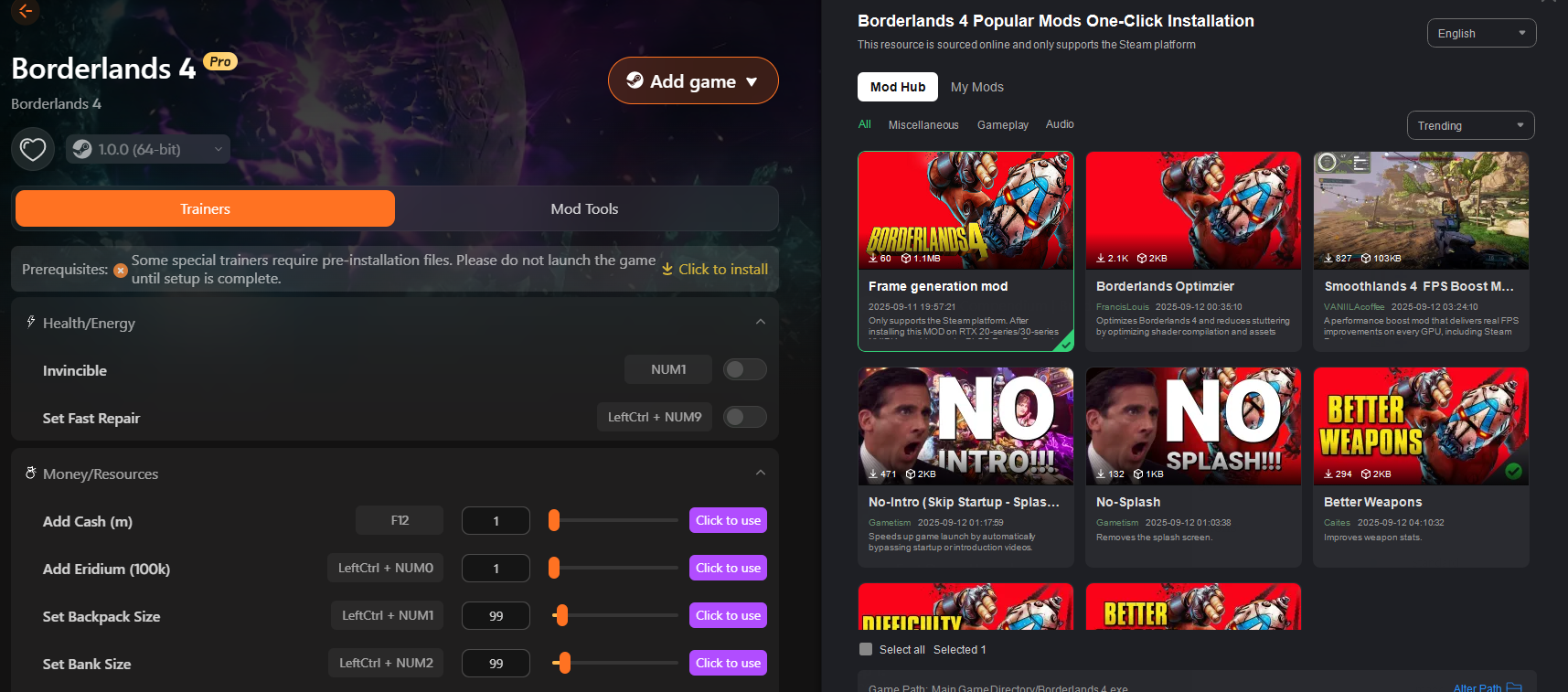
XMOD goes beyond standard game options by offering a variety of tweaks, including HUD adjustments, interface customization, and gameplay mods. It gives players greater control over menus, abilities, and visual elements, making it easier to manage fast-paced action and complex missions.
The tool also allows customization of display elements, such as HUD placement and text size, so important information is clear without obstructing the action.
How to Use the Translation Tool in XMOD
Launch XMOD and link it to Borderlands 4.
Open Translation Tools and select your language.
Adjust text (size, font, placement) for readability.
Enable real-time translation for subtitles and chat.
Apply settings and start the game.
Other services
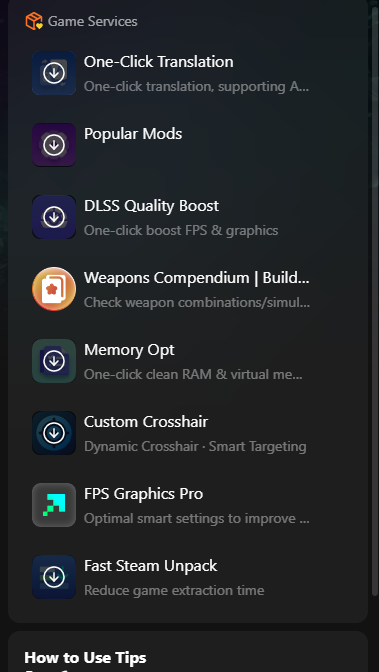
XMOD offers a range of tools and enhancements for Borderlands 4 and other supported games:
- One-Click Translation: Quickly translate menus, subtitles, and in-game text into multiple languages.
- Popular Mods: Access top community mods for gameplay tweaks and quality-of-life improvements.
- DLSS Quality Boost: Automatically enhance FPS and graphics for smoother performance.
- Weapons Compendium / Build Tools: Check weapon combinations and simulate builds for optimal strategy.
- Memory Opt: Clean RAM and optimize virtual memory for better stability.
- Custom Crosshair: Create dynamic, smart-targeting crosshairs for improved aiming.
- FPS Graphics Pro: Apply optimized graphics settings to maximize FPS without sacrificing visuals.
- Fast Steam Unpack: Reduce game extraction and loading times for faster setup.
Additionally, XMOD includes trainer-like features for health, energy, money, resources, backpack, and bank size adjustments, giving players more control over in-game mechanics.
FAQ
Q1: Does Borderlands 4 already include Arabic or Turkish language support?
No, these languages are not officially included. XMOD’s translation and localization features help fill that gap for players in these regions.
Q2: Will using XMOD affect my game performance?
XMOD is designed to be lightweight. Most players won’t notice any drop in FPS or responsiveness while using its translation or gameplay enhancements.
Q3: Can I use XMOD for both subtitles and voice?
Currently, XMOD focuses on text translation—subtitles, menus, and chat. Voice localization may be added in future updates.
Q4: Does it only work for Borderlands 4?
XMOD supports multiple games, but its translation tools are optimized for Borderlands 4 at launch.
Q5: How many languages are supported?
XMOD expands the list to 20+ additional languages, covering many regions not included in the official game localization.
Conclusion
Borderlands 4 comes with extensive language support for UI, subtitles, and voice acting, yet some regions, like the Middle East and Turkey, remain underserved. XMOD helps bridge this gap by offering translation features for menus, subtitles, and in-game chat, supporting over 20 additional languages.
With XMOD, players worldwide can customize and enhance their Borderlands 4 experience, ensuring smooth gameplay and improved accessibility. For fans seeking a more immersive, player-tailored adventure, XMOD’s tools make navigating the game easier and more enjoyable than ever.
I am a passionate gamer and writer at XMODhub, dedicated to bringing you the latest gaming news, tips, and insights.
Connect with me:
LinkedIn Profile ↗

 Catherine Hu


 Nancy Miller