
 Catherine Hu
Quick Answer: What are the best Tears of Metal mods right now?
Because Tears of Metal is a highly dynamic medieval hack-and-slash co-op roguelike built on procedural generation, traditional file-based modding (like what you see on Nexus Mods or Steam Workshop) is currently not officially supported by the developers. The game’s architecture tightly controls its assets to maintain co-op synchronization. Therefore, the “mods” that players are actively using to enhance their experience are actually universal visual injectors and memory-level gameplay tweaks. Here are the top 5 absolute must-have enhancements:
Editor’s Note
On Testing Methodology: The mods featured in this guide were analyzed based on community downloads, stability, and recent patch compatibility. Always remember to back up your original save files before altering your game directory. If you want to bypass complicated mod managers entirely, skip to the XMODhub section below.
Introduction
Playing Tears of Metal in its vanilla state is an incredible experience, but the modding community has taken it to a completely different level. Whether you are annoyed by a clunky inventory system, want to push your graphics card to its limits, or simply want to skip the tedious grinding mechanics, there is a mod for exactly that.
However, diving into modding can be overwhelming. With thousands of files available, figuring out which ones actually work—and which ones will crash your game—is a massive headache. After analyzing load orders and compatibility, we have compiled the definitive list of the best Tears of Metal mods you need to install right now.
You may also like: The Ultimate Tears of Metal Cheat Engine Guide (And A Much Easier Alternative)
1. How to Install Mods for Tears of Metal Safely
Before downloading anything, you need to set up your game directory to accept modified files. As previously mentioned, Tears of Metal does not currently feature a native modding SDK or Steam Workshop integration due to its beta status and co-op roguelike infrastructure. This means you cannot simply use Vortex or Mod Organizer 2 to drag and drop .pak or .esp files.
Instead, modifying Tears of Metal relies entirely on two distinct methods: Universal Graphics Injectors (like ReShade) and Memory Allocation Tweaks (like XMODhub or Cheat Engine).
To safely install visual enhancements for Tears of Metal, you must first locate your root game directory. Open your Steam library, right-click on Tears of Metal, select “Manage,” and then click “Browse local files.” This will open the folder containing the main executable file. When installing a tool like ReShade, you will run the setup program, select the Tears of Metal executable, choose the appropriate rendering API (usually DirectX 11 or 12), and download the standard effect packages.
For gameplay alterations, the installation process is actually much safer. Because there are no physical game files being overwritten, you do not need to worry about backing up complex data structures. You simply run a secure memory editor alongside the game. However, if you are playing the co-op mode, you must ensure all network teammates are aware of the memory changes, as altering player speed or health can cause severe desynchronization in procedurally generated levels.
2. Top Quality of Life (QoL) Mods
These mods do not drastically change the core game; they just remove the annoyances that waste your time. Since traditional UI mods are locked out, these QoL improvements are achieved through memory toggles and external configuration edits.
1. Instant Progression Multiplier (via XMODhub)
In a roguelike game, dying means losing your progress and starting the loop over. While this is a core mechanic of Tears of Metal, repeating the exact same early-game procedurally generated levels to reclaim your island can become incredibly tedious. This memory tweak allows you to multiply the experience and resources you gather by 10x, 50x, or even 100x. It fixes the annoyance of repetitive grinding, ensuring that every run feels rewarding and drastically speeds up your ability to unlock new skills for your Scottish battalion.
2. Infinite Stamina and Sprint Tweak
Hack-and-slash combat relies heavily on positioning, dodging, and closing the gap between you and the hordes of enemies. The vanilla stamina system in Tears of Metal can sometimes feel restrictive, leaving you sluggish during massive encounters. By injecting a script to freeze your stamina value at its maximum, this tweak removes the artificial limitation on your movement. You can dodge infinitely, sprint across the massive procedurally generated maps without stopping, and maintain a relentless offensive against your foes.
3. Universal FOV Changer
Tears of Metal features intense, chaotic combat where enemies can surround you from all sides. The default Field of View (FOV) can feel slightly claustrophobic, especially when managing multiple units of your Scottish battalion on screen. Since the game lacks a native FOV slider in its beta state, this universal camera tweak forces the rendering engine to expand your peripheral vision. This is a massive quality of life improvement that prevents you from taking cheap hits from enemies just outside your screen space.
4. Co-op Desync Optimizer
Because Tears of Metal is a co-op roguelike, network stability is paramount. When thousands of enemies spawn alongside complex procedural geometry, the game can occasionally stutter, leading to delayed hit registration. While not a traditional mod, community-created network configuration tweaks allow you to force the game to utilize higher bandwidth limits and optimize packet routing. This results in smoother animations, faster input response times, and a significantly less frustrating multiplayer experience when battling the toughest bosses.
5. Instant Co-op Revive Bypass
Nothing ruins a great roguelike run faster than your co-op partner dying in a hazardous zone, forcing you to risk your own life to revive them. The vanilla revive timer can be agonizingly slow during intense hack-and-slash moments. Using a memory toggle to reduce the revive timer to zero is a game-changer. It allows you to instantly pick up your fallen Scottish battalion members or your real-life friends with a single button press, keeping the momentum of the combat flowing perfectly.
3. Best Visual and Graphics Mods
If you have a high-end PC, these mods will make Tears of Metal look like a true next-gen title. These enhancements are achieved using advanced post-processing injectors that overlay directly onto the game’s rendering pipeline.
6. Tears of Metal ReShade: Dragon Meteor HDR
The central mystery of Tears of Metal revolves around the Dragon Meteor, which bathes certain levels in unique atmospheric lighting. However, the vanilla game’s color grading can sometimes feel a bit washed out. This custom ReShade preset injects simulated High Dynamic Range (HDR), deepening the shadows of the medieval environments and drastically intensifying the glowing particle effects of the meteor fragments. It makes every procedurally generated level look incredibly cinematic without altering any core game files.
7. Clarity and Anti-Aliasing Overhaul
To maintain high frame rates while rendering massive hordes of enemies, Tears of Metal utilizes aggressive Temporal Anti-Aliasing (TAA), which can cause the image to look blurry in motion. This visual tweak injects a secondary sharpening pass (like AMD FidelityFX Contrast Adaptive Sharpening or LumaSharpen) to completely eliminate the blur. The result is crystal-clear textures on your Scottish battalion’s armor and razor-sharp weapon trails during fast-paced hack-and-slash combat.
8. Cinematic Depth of Field Remover
While Depth of Field (DoF) looks great in screenshots, it is actively detrimental in a fast-paced roguelike where you need to see distant enemy spawns. The game heavily blurs the background of the procedurally generated levels. By hooking into the game’s camera rendering API, this tweak completely disables the DoF effect. This not only provides a cleaner, sharper image across the entire screen but also slightly improves your overall frame rate by reducing post-processing overhead.
9. Vibrant Scottish Highlands Color Palette
Tears of Metal takes place on a grim, war-torn island that you must reclaim. While the dark medieval aesthetic fits the theme, some players prefer a more vibrant look. This color correction preset alters the game’s LUT (Look-Up Table) to boost the saturation of the grass, the sky, and the blood effects. It transforms the dreary procedural landscapes into a striking, vivid battlefield, making the visual feedback of carving through enemies much more satisfying.
10. Minimalist Immersive HUD Toggle
For hardcore players who want to fully immerse themselves in the hack-and-slash action, the user interface can sometimes get in the way. Health bars, minimaps, and combo counters clutter the screen. This advanced injector script allows you to bind a hotkey that instantly toggles the entire HUD on or off. You can explore the mystery of the Dragon Meteor with zero on-screen distractions, only bringing up the UI when you need to check your battalion’s status.
4. Top Gameplay and Overhaul Mods
Looking to change how the game is actually played? These mods adjust combat, economy, and progression. Because native scripting is locked, these overhauls are exclusively powered by dynamic memory modification tools.
11. True God Mode and Invincibility (via XMODhub)
The roguelike genre is not for everyone. If you simply want to enjoy the story, explore the procedurally generated island, and command your Scottish battalion without the constant fear of death, God Mode is the ultimate overhaul. By freezing your character’s health value in the game’s memory, you become completely immune to all damage. You can stand in the middle of a massive horde of enemies and endlessly practice your hack-and-slash combos without ever seeing a game over screen.
12. Infinite Battalion Command Resources
Reclaiming your island requires the help of your formidable Scottish battalion, but managing their health, upgrades, and deployment costs can slow down the pacing of the game. This gameplay tweak bypasses the game’s economy entirely. By locking your command resources to their maximum value, you can summon your strongest units immediately, fully upgrade their weapons, and unleash an unstoppable army upon the enemy hordes right from the very first level.
13. One-Hit Kill Cleave Optimizer
Sometimes, you just want to feel like an absolute powerhouse. In the later stages of Tears of Metal, enemies can become massive “bullet sponges,” taking dozens of hits to defeat. This memory overhaul alters the damage multipliers in the game’s combat engine. Every swing of your weapon will instantly obliterate any standard enemy, turning the game into a hyper-fast, incredibly satisfying power fantasy. It drastically reduces the time it takes to clear procedurally generated rooms.
14. Procedural Level Timer Freeze
Many roguelikes implement hidden timers or escalating threat levels to force players to move quickly through procedurally generated maps. If Tears of Metal applies pressure by spawning harder enemies the longer you stay in a level, this tweak is a lifesaver. By freezing the internal game clock, you can explore every single corner of the island at your own pace, uncovering all the secrets of the Dragon Meteor without being rushed by artificial difficulty spikes.
15. Unlimited Currency and Skill Points
Unlocking the full potential of your character’s hack-and-slash abilities usually requires dozens of hours of grinding through the roguelike loops. This overhaul completely removes the grind by injecting unlimited gold, skill points, or whatever meta-currency Tears of Metal uses. You can instantly unlock every single combo, passive buff, and weapon upgrade in the game. This allows you to experiment with different build varieties immediately, rather than waiting until the endgame.
5. Is There a Mod Limit in Tears of Metal?
In traditional modding environments, such as Bethesda’s Creation Engine, players are famously restricted by a hard limit of 255 plugin files (ESP/ESM). Because Tears of Metal is built on a modern engine and currently lacks a native file-replacement modding ecosystem, there is absolutely no hard-coded “mod limit” in the traditional sense.
The only limitations you will face when modifying Tears of Metal are entirely hardware-based. When you use universal injectors like ReShade to enhance the atmospheric lighting of the Dragon Meteor, you are heavily taxing your GPU’s VRAM. Stacking too many visual effects will eventually cause your frame rate to plummet. Similarly, when using memory editors to freeze health, stamina, and battalion resources simultaneously, you are relying on your CPU and system RAM to constantly read and write to the game’s memory addresses. As long as your PC hardware can handle the processing overhead, you can run as many simultaneous tweaks as you desire.
6. The Danger of Mod Conflicts and Corrupted Saves
While graphic mods are usually safe, gameplay mods that alter health, inventory, or core stats can be incredibly dangerous to your save file.
The biggest issue in Tears of Metal modding is “Load Order Conflicts.” If Mod A and Mod B try to change the same game file, your game will crash to the desktop immediately. Furthermore, every time the game receives an official developer update, script-heavy mods break. If you load a save file attached to a broken mod, that save can become permanently corrupted.
Because Tears of Metal is a co-op roguelike, the danger is doubled. If you attempt to alter memory addresses while connected to a multiplayer server, the game’s anti-cheat or synchronization protocols will detect a mismatch between your client and the host. This will immediately result in a network desync, kicking you from the session and potentially corrupting the procedurally generated run for both you and your Scottish battalion teammates. Always ensure you are playing offline or in a private, agreed-upon session before injecting memory alterations.
7. The Easier Alternative to Gameplay Mods: XMODhub
If your main goal for modding is just to make the game more enjoyable—like giving yourself infinite carry weight, unlimited money, or invincible health to bypass a frustrating boss—you do not need to risk breaking your game with complex mod managers.
This is where XMODhub shines as the ultimate gameplay enhancer. Instead of downloading outdated mods that conflict with each other, the XMODhub app runs safely alongside Tears of Metal.
How to Use XMODhub for Tears of Metal

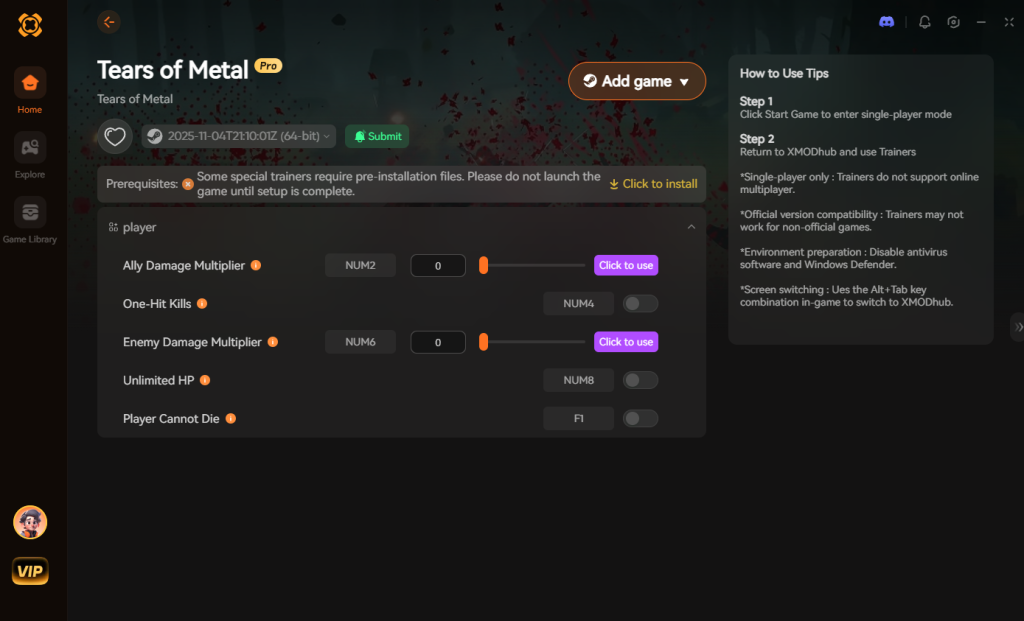
Download Tears of Metal Trainer Now
8. Troubleshooting: Mods Crashing on Startup
If your game is crashing to a black screen after installing mods, check these common culprits:
9. Best Battalion Upgrade Paths to Combine With Mods
When utilizing memory tweaks like XMODhub to grant yourself infinite resources or massive XP multipliers, the immediate question becomes: Where should I invest these points first? Having unlimited currency is excellent, but to truly dominate the procedurally generated battlefields, you need a strategic build for your Scottish battalion.
By front-loading specific nodes in your skill tree, you can perfectly synergize your overpowered stats with the game’s core mechanics. Here is the optimal upgrade priority list to maximize your modded playthrough:
| Upgrade Classification | Specific Ability / Node | Optimal Use Case | Priority Level |
|---|---|---|---|
| Mobility | Highland Charge T1 | Rapidly escaping dense enemy grids and flanking shield-bearers. | High |
| Defense | Shield Wall Phalanx | Absorbing stray heavy attacks during chaotic Dragon Meteor events. | High |
| Offense | Claymore Cleave Radius | Carving through massive procedural hordes with a single swing. | Essential |
| Utility | Instant Revive Aura | Keeping your co-op partner alive during intense boss fights. | Medium |
Investing in the Offense and Mobility trees first ensures that even if you are utilizing a God Mode mod, your actual damage output and movement speed scale beautifully, allowing you to speedrun the roguelike loops in record time.
10. Maximizing Performance: Injector Settings & FPS Optimization
Because Tears of Metal relies on intense procedural generation and renders hundreds of active AI units simultaneously, stacking too many visual enhancements can severely bottleneck your hardware. If you are experiencing frame drops after installing ReShade or other graphics injectors, you need to optimize your loadout.
First, disable any Ambient Occlusion (AO) or Global Illumination (GI) shaders within your ReShade menu. While these effects make the medieval lighting look phenomenal, they conflict with the game’s native rendering engine and will easily cost you 15 to 20 FPS during massive hack-and-slash encounters.
Instead, rely on lightweight shaders to improve visual fidelity. Lumasharpen, Colourfulness, and Vibrance consume almost zero VRAM while drastically improving the grim aesthetic of the island. If you are utilizing memory tweaks alongside visual mods, ensure your game is set to “Fullscreen” rather than “Borderless Windowed” to prioritize CPU allocation directly to the game client, preventing input lag when executing rapid combos.
11. Frequently Asked Questions (FAQ)
A: No. Because Tears of Metal is a single-player experience at its core, developers do not ban players for modifying their own game files. However, you must disable all mods if the game has a multiplayer or co-op mode active. Since Tears of Metal features a prominent co-op system, you must be extremely careful. Only use memory tweaks like XMODhub when playing solo or in private lobbies with friends who consent to the modifications.
A: In many cases, yes. Tears of Metal detects modified files and will lock achievement progression. You often have to download a separate “Achievement Enabler” mod just to fix this, or use a secure memory tool like XMODhub which bypasses the detection entirely. Because XMODhub operates outside the game’s file structure, the Steam API remains completely unaware of the modifications, allowing you to unlock achievements while using God Mode.
Conclusion
Modding Tears of Metal is a fantastic way to breathe new life into a game you already love. While visual enhancements and massive content overhauls require traditional mod managers, altering your gameplay stats does not have to be a complicated, crash-prone process.
Navigating the procedurally generated levels, uncovering the mystery of the Dragon Meteor, and leading your Scottish battalion to victory should be a thrilling hack-and-slash adventure, not a tedious grind. For a seamless, risk-free way to customize your difficulty, bypass the grind, and truly play by your own rules, XMODhub is the superior choice. With dedicated support for Tears of Metal and over 5,000+ other single-player PC games, XMODhub ensures you spend your time actually playing, rather than troubleshooting broken load orders.


I am a passionate gamer and writer at XMODhub, dedicated to bringing you the latest gaming news, tips, and insights.
Connect with me:
LinkedIn Profile ↗


 Nancy Miller



