
 Catherine Hu
Quick Answer: How do you cheat in Tears of Metal?
To cheat in Tears of Metal, you can manually attach Cheat Engine to the game’s executable and scan for changing numeric values like your current health points during intense horde encounters, or your current count of Dragon Meteor fragments. However, because game updates frequently break Cheat Engine tables (.CT files), the safest and easiest alternative is using an auto-updating mod manager like XMODhub, which provides 1-click cheats without requiring any memory scanning.
Editor’s Note
Look, I get it. We all start Tears of Metal thinking we’re going to play it completely legit. But after dying to the final procedural stronghold defending the Dragon Meteor crater for the 15th time, or spending hours grinding for permanent meta-progression resources to upgrade your Scottish battalion, the fun stops. I’ve been messing with Cheat Engine for years, and trying to isolate the exact memory values for this game’s current patch almost drove me insane. Today, I’m going to show you how to manually hack the values if you want the technical challenge—but I’ll also share the 1-click shortcut I actually use to save my sanity.
You may also like: The Ultimate Tears of Metal Console Commands and Cheats Guide
Table of Contents
1. How to Use Cheat Engine for Tears of Metal (The Manual Way)
If you want to go the old-school route and find the memory addresses yourself, here is the basic “First Scan/Next Scan” method tailored specifically for this game.
Because Tears of Metal is a medieval hack-and-slash roguelike, the memory structure is highly volatile. Every time you load into a new procedurally generated level, the game reallocates its memory assets. Therefore, finding a static address is nearly impossible without pointer scanning, but we will start with the fundamental methodology of isolating the exact memory address for your Dragon Meteor fragments—the crucial meta-progression currency you need to upgrade your Scottish battalion between runs.
| In-Game Stat | Data Type | Scan Strategy | Volatility Level |
|---|---|---|---|
| Player Health Bar | Float | Unknown Initial Value -> Decreased Value | Extremely High |
| Dragon Meteor Fragments | 4 Bytes | Exact Value -> Next Scan | Medium |
| Scottish Battalion Morale | 4 Bytes | Exact Value -> Next Scan | Medium |
| Stamina / Dash Meter | Float | Unknown Initial Value -> Changed Value | High |
| Horde Kill Combo | 2 Bytes | Exact Value -> Increased Value | Low |
2. Common CE Errors: Pointers Breaking & Not Attaching
If you are pulling your hair out because CE isn’t working for Tears of Metal, you aren’t alone. Here is what’s probably happening:
Error: “Cannot attach to process” / Game Crashes: Tears of Metal might be using specific engine protections. Modern hack-and-slash co-op roguelikes often implement background monitoring systems, not necessarily as aggressive anti-cheat, but as data integrity checks to prevent desyncs during co-op multiplayer sessions. When standard Cheat Engine attempts to inject its debugger into Tears of Metal, the game engine detects an unauthorized memory read/write operation and immediately terminates the process to protect the game state, resulting in a sudden crash to your desktop.
To bypass this frustrating roadblock, you need to configure Cheat Engine to use a different debugging method. Navigate to Cheat Engine’s settings, find the “Debugger Options” tab, and switch your active debugger from the default Windows debugger to the “VEH Debugger” (Vectored Exception Handling). The VEH Debugger hooks into the game at a much lower level, intercepting error handling rather than directly attacking the memory allocation table. This stealthier approach often prevents Tears of Metal from realizing its memory pool is being monitored, allowing you to scan for your Scottish battalion stats without triggering an automatic crash.
The Pointer Problem: You finally found the exact memory address for your infinite health, you froze it, and you are dominating the enemy hordes. But the moment you complete the level and the game transitions through a loading screen to generate the next procedural island sector, your cheats instantly stop working. Even worse, your game might crash. This is the infamous “Pointer Problem,” and it happens because of dynamic memory allocation.
In Tears of Metal, every time a new procedural level is generated, the game’s engine completely dumps its current memory cache and reassigns all values to entirely new, randomized memory addresses. The address 0x1A4B89C that held your health in level one might hold enemy AI logic in level two. If Cheat Engine is still freezing that old address, it corrupts the game’s logic. To fix this manually, you have to perform complex Pointer Scanning to find the static base address (the master blueprint) and calculate the offset chains that lead to your health value, or write complex Assembly (AOB) injection scripts that rewrite the game’s code dynamically. It is a grueling, highly technical process that requires a deep understanding of computer science, turning a fun gaming session into a frustrating software engineering homework assignment.
3. The Better Alternative: 1-Click Cheats with XMODhub
Here is the dirty little secret of the modding community: Nobody actually wants to spend two hours updating Cheat Engine tables every time a patch drops. The moment Tears of Metal updates on Steam, your hard-earned memory addresses shift, and your game crashes to the desktop.
| Feature / Metric | Manual Cheat Engine | XMODhub Auto-Trainer |
|---|---|---|
| Setup Time | 30 – 60+ Minutes per session | Under 10 Seconds |
| Update Reliability | Breaks on every minor game patch | Auto-updates via Cloud Tech |
| Crash Risk | High (Requires exact pointer offsets) | Extremely Low (Safely injected) |
| Ease of Use | Requires hexadecimal / memory knowledge | 1-Click visual UI toggles |
| Feature Access | Limited to what you can manually find | 15+ pre-coded premium cheats |
Why XMODhub beats manual CE for Tears of Metal:
How to Use XMODhub for Tears of Metal?

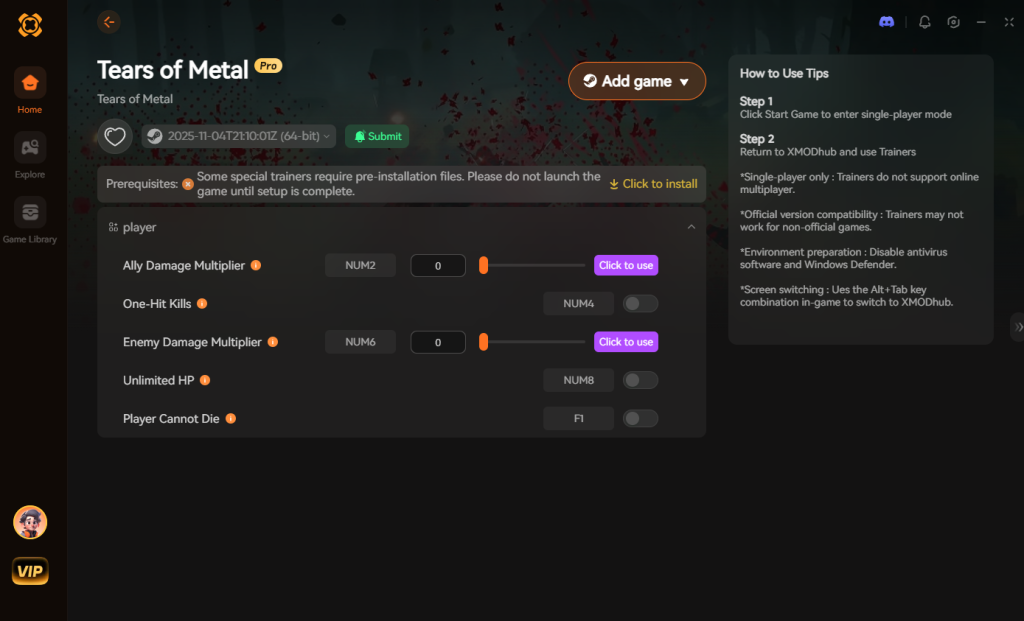
Download Tears of Metal Trainer Now
4. Where to Find Safe Tears of Metal Cheat Tables (.CT)?
If you absolutely insist on using CE, you’ll want a pre-made Cheat Table (.CT file).
However, you must exercise extreme caution. Downloading random Tears of Metal cheat engine table files from unverified forums, obscure subreddits, or anonymous Discord servers exposes your PC to severe cybersecurity risks. A .CT file is not just a harmless text document containing memory addresses; it is a highly capable script container. Cheat Engine tables heavily utilize embedded Lua scripting to automate complex AOB (Array of Bytes) injections and pointer calculations. While this makes the cheats work efficiently, it also means that a malicious actor can easily write a Lua script that executes arbitrary code on your machine the moment you check a box in Cheat Engine.
Hackers frequently disguise malware within highly anticipated game cheat tables. When you activate what you think is an “Infinite Stamina” script for Tears of Metal, the hidden Lua script could silently download and install a Trojan horse, a keylogger designed to steal your Steam and banking credentials, or a silent crypto-miner that hijacks your GPU resources, severely degrading your PC’s performance. Furthermore, because Cheat Engine requires Administrator privileges to hook into Tears of Metal, any malicious script running inside it automatically inherits full administrative control over your entire operating system.
This is exactly why relying on a verified, professionally maintained application like XMODhub is the vastly superior and safer choice. XMODhub completely eliminates the need to download shady, user-generated .CT files. Our dedicated team of in-house reverse engineers securely develops, tests, and digitally signs every single cheat module, ensuring that your PC remains 100% safe from malware while you focus entirely on conquering the island with your Scottish battalion.
5. Top Memory Values to Edit in Tears of Metal (Advanced Guide)
If you have successfully bypassed the anti-debugger protections and are ready to map out your own Tears of Metal cheat engine table, you need to know exactly which values are worth your time. Because the game balances massive horde combat with intricate base-building mechanics, isolating the right data types is crucial.
Modifying the wrong values—such as the procedural generation seeds or enemy AI spawn logic—will almost certainly result in a corrupted save file or an immediate hard crash. Below is a curated breakdown of the most sought-after memory values in the game, complete with their expected data types and the recommended modification strategy to keep your game stable.
| Target Value | Cheat Engine Data Type | Recommended Action | Ban Risk Level |
|---|---|---|---|
| Dragon Meteor Fragments | 4 Bytes | Freeze at 99,999 | Low |
| Hero Health / HP | Float | AOB Injection (God Mode) | Low |
| Scottish Battalion Morale | 4 Bytes | Edit manually before horde waves | Medium |
| Weapon Durability | Float | Freeze at maximum value | Low |
| Co-Op Session ID Sync | String | Do NOT modify | Extremely High |
Understanding Battalion Morale vs. Hero Stats: Your Scottish battalion’s morale is usually stored as a simple 4 Byte integer, making it incredibly easy to find using the Exact Value scan method detailed in Section 1. However, your hero’s active combat stats, such as Health, Stamina, and Weapon Durability, are almost always stored as Float values. This is because combat damage is calculated using complex multipliers (e.g., taking 12.5 damage from a stray arrow). When scanning for your health, you must use the “Unknown Initial Value” scan type, take damage, and then filter by “Decreased Value.”
6. How to Update a Broken Tears of Metal Cheat Table (.CT)
Every time the developers push a new patch or hotfix to Steam, your downloaded .CT files will likely break. The checkboxes will refuse to activate, or worse, activating a script will instantly crash Tears of Metal. This happens because the static memory offsets the table relies on have shifted during the compilation of the new game update.
To fix a broken table manually, you need to transition from basic pointer scanning to Array of Bytes (AOB) injection.
mov or sub command).code: section. You will see the original instruction that subtracts your health. If you replace that specific line of code with nop (No Operation), you are effectively telling the game engine to ignore the damage calculation entirely. Save this script to your cheat table. Because AOB injections scan for a unique pattern of bytes rather than a static memory address, this method is far more resilient to game updates and will often survive minor patches without needing adjustments.(Note: If writing assembly code sounds like a nightmare, this is exactly why 99% of players prefer the automated updates provided by XMODhub.)
7. Frequently Asked Questions (FAQ)
| Platform / Mode | Cheat Compatibility | Ban Risk Level | Notes |
|---|---|---|---|
| Steam (Singleplayer) | 100% Compatible | Zero Risk | Safe to use Memory Editors / XMODhub |
| Epic Games (Singleplayer) | 100% Compatible | Zero Risk | Requires correct executable selection |
| Xbox Game Pass (PC) | Requires Bypass | Low Risk | UWP encryption blocks standard CE |
| Online Co-Op Multiplayer | Not Recommended | Extremely High | Modifying shared server data causes bans |
A: Usually, no. Game Pass uses strict UWP file encryption that actively blocks Cheat Engine. However, XMODhub is specifically engineered to bypass these restrictions seamlessly.
A: Modifying data on your own PC for a single-player experience like Tears of Metal is completely legal. Just never bring memory editors into a multiplayer server.
A: Yes, it absolutely can, especially during the initial scanning phases. When you perform a “First Scan” for an unknown value (like your health bar) in a complex game like Tears of Metal, Cheat Engine allocates massive amounts of your system’s RAM and aggressively utilizes your CPU to read millions of memory addresses simultaneously. This can cause severe stuttering, FPS drops, or even temporary freezes in-game. Additionally, if you have multiple addresses “Frozen” (actively locked to a specific value), Cheat Engine runs a continuous background loop that writes to the game’s memory dozens of times per second. If your CPU is already bottlenecked by the game’s physics calculations and rendering the massive enemy hordes, this constant memory injection will noticeably degrade your framerate.
Conclusion: Work Smarter, Not Harder
Learning how memory manipulation works in Cheat Engine is a cool flex. But let’s be real—when you come home from a long day at work, you just want to spawn in that legendary Dragon-Forged Claymore and wreck some enemies without taking a computer science class.
Why spend 45 minutes digging through hex codes when you can click one button and instantly get God Mode? And the best part? XMODhub supports over 5,000+ PC games. Once you install the app, you can ditch the complicated cheat tables for good.


I am a passionate gamer and writer at XMODhub, dedicated to bringing you the latest gaming news, tips, and insights.
Connect with me:
LinkedIn Profile ↗


 Nancy Miller



