
 Catherine Hu
Quick Answer: What are the best Nuclear Epoch mods right now?
Crucial Disclaimer: Because Nuclear Epoch features a fully integrated Steam market system where rare items are converted into real-world Steam inventory items, the developers have heavily restricted traditional file-based modding to protect the real-money economic ecology. Therefore, Nuclear Epoch currently has no native mod ecosystem (no Steam Workshop, no Nexus Mods support).
However, the hardcore PC community always finds a way. Instead of traditional .pak files, the best “mods” for Nuclear Epoch operate entirely through secure memory allocation (via XMODhub) and post-processing injectors (like ReShade). Here are the top 5 essential tweaks players are using right now:
Editor’s Note
The mods featured in this guide were analyzed based on community downloads, stability, and recent patch compatibility. Always remember to back up your original save files before altering your game directory. If you want to bypass complicated mod managers entirely, skip to the XMODhub section below.
Playing Nuclear Epoch in its vanilla state offers a brutal yet rewarding post-apocalyptic loop, blending survival, base building, and extraction shooting. However, diving into modding requires a different approach. Because rare loot is tied directly to a real Steam Economic Ecology, traditional file modding is restricted to protect market supply and demand.
Despite this, players still want to optimize their experience—whether improving clunky inventory limits, enhancing graphics, or skipping the tedious grind to build a bustling commercial center. After analyzing memory load orders and compatibility, we have compiled the definitive list of the best Nuclear Epoch mods and memory tweaks to use right now.
You may also like: The Ultimate Nuclear Epoch Console Commands and Cheats Guide
1. How to Install Mods for Nuclear Epoch Safely
Before downloading anything, you need to understand how to set up your game directory to accept modified files in a highly secure environment. Because Nuclear Epoch does not support traditional mod managers like Vortex or Mod Organizer 2, your installation process relies on external injectors.
For graphical enhancements, you will need to download the latest version of ReShade. Run the installer, select the Nuclear Epoch executable file in your Steam directory, and choose the DirectX 11/12 rendering API. This will generate a dxgi.dll file and a reshade-shaders folder in your game directory. You can then drop community-made .ini preset files into this folder to instantly overhaul the game’s lighting and textures without touching the core game files.
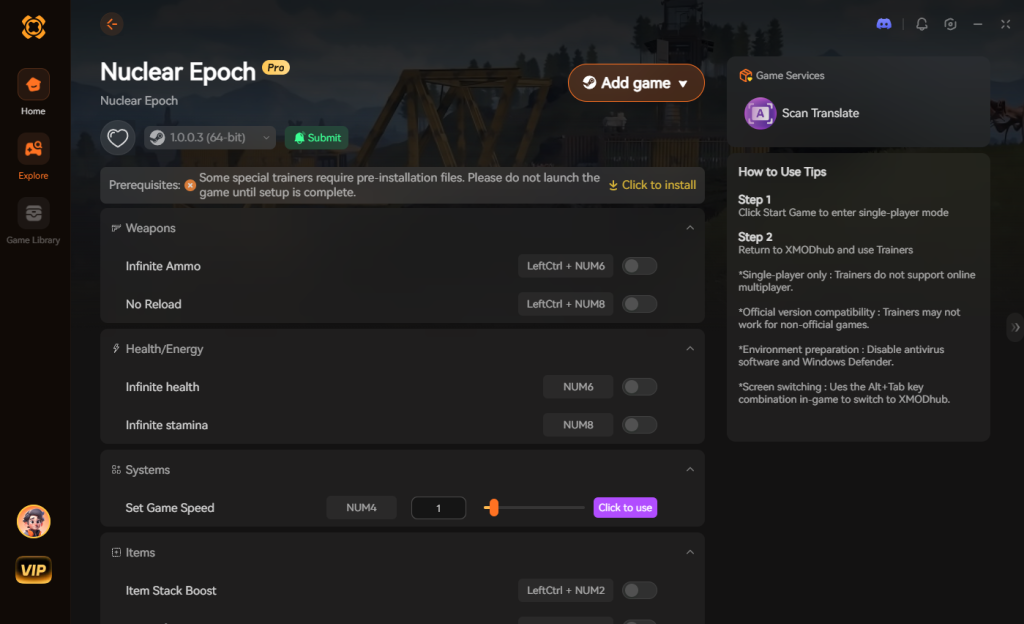
For gameplay and quality-of-life modifications, traditional script extenders will trigger the game’s anti-cheat due to the Steam market integration. Therefore, you must use a secure memory allocator like XMODhub. XMODhub does not require you to move any files into the game directory. You simply launch the application alongside Nuclear Epoch, and it dynamically injects the necessary quality-of-life tweaks directly into your system’s RAM. This ensures that your game files remain 100% vanilla, keeping your Steam account safe while you enjoy customized gameplay.
2. Top Quality of Life (QoL) Mods
These mods do not drastically change the core game; they just remove the annoyances that waste your time. Since native UI mods are restricted, these are the top QoL memory scripts utilized via XMODhub to streamline your survival experience.
Infinite Carry Weight & Anti-Scatter
Nuclear Epoch is notorious for its strict inventory management. A recent patch attempted to fix an issue where switching ammo types with a full inventory caused ammo to scatter all over the ground. While the developers added an auto-merge feature, inventory space remains a massive bottleneck during extraction shooting. This memory tweak removes the weight limit, allowing you to hoard scattered precious resources across the wasteland without ever having to leave high-value scrap behind.
Instant Crafting Interface Bypass
The vanilla crafting system requires players to gather basic scrap, place it in the forging workshop, and wait for the weapon to be cast. Even with recent developer updates adding a preview of the crafted item’s level, the interface can feel sluggish. This QoL tweak removes the crafting delay entirely. Your strikes at the anvil register instantly, determining the final form of the weapon in a fraction of a second, saving you hours of menu navigation over a full playthrough.
Downed State Prompt Remover
In the heat of an extraction, visual clarity is everything. The vanilla game had a frustrating bug where the “Pick Up Item” prompt would still appear after the player was downed, cluttering the screen while you were trying to communicate with your squad or plan a revive. While patched officially, this extended UI tweak ensures that no interactive prompts—including the “Take” button—interrupt your screen space during critical combat phases or boss battles.
Tier 2 Extraction Point Navigator
Navigating the five themed replicas is dangerous due to the programmatic generation technology that randomly changes enemy distribution and map structure every time you enter. Finding your extraction point in Tier 2 maps can be a nightmare. This overlay tweak acts as a localized GPS, placing a subtle waypoint on your HUD that guides you directly to the randomized extraction zone, ensuring your successful raid retains its actual economic value.
3. Best Visual and Graphics Mods
If you have a high-end PC, these mods will make Nuclear Epoch look like a true next-gen title. Because texture replacement mods are blocked by file integrity checks, the community relies on advanced ReShade presets to achieve photorealism.
Post-Apocalyptic Gloom ReShade
Nuclear Epoch features a beautifully destroyed open world, but the vanilla lighting can sometimes look a bit washed out. This ReShade preset injects advanced ambient occlusion, cinematic depth of field, and a custom color palette that emphasizes the harsh, radioactive nature of the wasteland. The shadows in the barren land become deeper, and the glowing radioactive zones pop with terrifying vibrancy, making every exploration run incredibly immersive.
Commercial Center Luminescence
When you transform your shelter into a bustling market and invite other players to visit your architectural masterpieces, you want it to look spectacular. This lighting tweak specifically targets the light sources emitted by player-built structures and guild halls. It enhances the bloom and lens flare of your trade halls and forging workshops, reviving the warmth of a civilized society and making your base the most visually appealing hub on the server.
Epic Boss Battle High-Contrast Overlay
In the deepest parts of the instances, visibility drops significantly, making it difficult to read the unique skill combinations of the mutant giant beasts. This visual tweak applies a high-contrast HDR sharpening filter specifically tailored for dark environments. It enhances the particle effects of boss attacks, allowing players to devise sophisticated tactics and dodge mechanics with high precision.
UI Sharpness & Steam Market Clarity
Because Nuclear Epoch integrates heavily with the Steam Economic Ecology, you will spend a lot of time browsing goods and conducting transactions. At lower resolutions, the built-in store system text can become blurry. This simple but essential graphical tweak applies a Lumasharpen filter exclusively to the UI layer, ensuring that the prices of rare items, NPC resident needs, and weapon stats are crystal clear, preventing any costly trading mistakes.
4. Top Gameplay and Overhaul Mods
Looking to change how the game is actually played? These mods adjust combat, economy, and progression. Remember, these are executed via real-time memory editing to bypass the game’s strict anti-modding architecture.
Legendary Weapon Combat Experience Multiplier
In the world of Nuclear Epoch, weapons accumulate “combat experience” as their usage time increases, gaining subtle but significant improvements. Grinding a scrap weapon into a legendary masterpiece naturally takes weeks of constant combat. This gameplay tweak multiplies the combat experience gained per kill by 10x, allowing you to rapidly test different personalized weapon manufacturing paths and unlock the true potential of your armory without the endless grind.
Mutant Pet Directional Breeding Overdrive
Cultivating faithful companions in the wasteland is one of the game’s best features. However, waiting for two pets to breed and hoping for the ideal hybridization of attributes relies heavily on RNG. This tweak manipulates the breeding algorithm, ensuring that the inheritance of excellent genes always produces a stronger offspring. You can force unexpected unique abilities to manifest, creating the ultimate mutant assistant for your survival runs.
NPC Resident Prosperity Unlocker
To upgrade your shelter from a desolate refuge to a vibrant town, you must build exclusive houses for distinct NPC residents like blacksmiths and merchants. This requires massive amounts of rare materials. This overhaul script bypasses the material requirements for NPC upgrades. You can instantly construct magnificent trade halls and forging workshops, immediately unlocking the highest tier of NPC functions and transforming your base into a prosperous commercial empire.
Programmatic Generation Difficulty Slider
The five distinctly different hazardous areas change their enemy distribution and treasure chest locations randomly. Sometimes, the programmatic generation spawns overwhelming odds. This memory tweak acts as a custom difficulty slider, allowing you to reduce the aggro radius of mutant enemies or decrease their spawn rate. It gives solo players a fighting chance to complete search, fight, and retreat missions without being instantly swarmed by high-level threats.
5. Is There a Mod Limit in Nuclear Epoch?
Unlike games built on Bethesda’s Creation Engine, which traditionally suffer from a hard limit of 255 .esp plugins, Nuclear Epoch operates on a completely different architecture. Because the game does not load traditional mod files, there is no hard-coded plugin limit.
Instead, the limitation is entirely based on your PC’s hardware capabilities and memory stability. When using ReShade for visual enhancements, your only limit is your GPU’s VRAM; stacking too many heavy shaders like Ray-Traced Global Illumination (RTGI) will tank your framerate. When utilizing memory tweaks via XMODhub, the limit is dictated by the game engine’s stability. Activating too many conflicting memory scripts (for example, trying to freeze the extraction timer while simultaneously fast-forwarding the pet breeding cycle) can cause the game’s logic loops to desync, resulting in a stuttering experience.
6. The Danger of Mod Conflicts and Corrupted Saves
While graphic mods like ReShade are safe and only affect how the game is rendered on your monitor, attempting to force traditional gameplay mods into Nuclear Epoch is incredibly dangerous to both your save file and your Steam account.
The biggest issue in Nuclear Epoch modding is the Steam Economic Ecology. Because rare items obtained in the game are converted into real Steam inventory items with actual economic value determined by market supply and demand, the developers utilize strict server-side checks. If you attempt to inject an outdated .dll file to spawn items, the server will detect a mismatch. This will not only result in an immediate crash to the desktop but can permanently flag your account, banning you from the active player economic circle. Furthermore, every time the game receives an official developer update (such as fixing item model colors or ammo scattering), memory offsets shift. If you load a save file attached to a broken script, your entire architectural masterpiece of a shelter could become permanently corrupted.
7. The Easier Alternative to Gameplay Mods: XMODhub
If your main goal for modding is just to make the game more enjoyable—like giving yourself infinite carry weight to haul scrap, unlimited base-building materials for your shelter, or invincible health to bypass a frustrating mutant giant beast—you do not need to risk breaking your game or your Steam account with sketchy file modifications.
This is where XMODhub shines as the ultimate gameplay enhancer. Instead of downloading outdated mods that conflict with each other or trigger anti-cheat protocols, the XMODhub app runs safely alongside Nuclear Epoch in an isolated memory environment.
How to Use XMODhub for Nuclear Epoch

Download Nuclear Epoch Trainer Now
8. Troubleshooting: Mods Crashing on Startup
If your game is crashing to a black screen after installing visual injectors or memory tweaks, check these common culprits:
9. Essential Character Progression & Skill Tweaks
Because traditional character overhaul mods cannot be packed into .pak files without triggering server-side mismatch errors, players looking to optimize their character builds rely on specialized memory allocations. These specific tweaks allow you to fine-tune your survivor’s core attributes without grinding for hundreds of hours in the radioactive zones.
By utilizing targeted progression scripts, you can instantly unlock vital survival nodes that dictate your combat efficiency and looting capacity. Below is a breakdown of the most sought-after skill node tweaks and how they impact your extraction runs:
Activating these node multipliers dynamically ensures your character remains viable in endgame programmatic generation zones, bypassing the artificial time-gating implemented in the vanilla skill tree.
10. Performance Optimization: Tweaking for Low-End PCs
Not every survivor in the wasteland is running a top-tier RTX graphics card. Nuclear Epoch is notoriously demanding, especially when rendering massive player-built fortress cities or calculating the physics of scattered ammo and debris. If ReShade presets are tanking your framerate, you need performance-focused tweaks.
While you cannot download traditional “Low Poly Texture Mods,” you can use memory tools to disable heavy post-processing effects that the vanilla settings menu hides. Popular performance tweaks include Volumetric Fog Disabler, which removes the heavy radioactive mist that eats up GPU resources, and Dynamic Shadow Reducer, which forces the engine to render simpler shadow maps during intense extraction shootouts. Utilizing these scripts can easily boost your framerate by 20-30 FPS, providing a much smoother and more competitive gameplay experience without compromising the core visual identity of the game.
11. Frequently Asked Questions (FAQ)
A: Modifying the game files directly to manipulate the Steam market system will result in a ban. However, using external post-processing tools like ReShade for graphics, or secure, client-side memory allocators like XMODhub for solo-play QoL tweaks (like infinite stamina or fast crafting) is generally safe, as they do not manipulate the server-authoritative economic drops.
A: In many cases, yes. Nuclear Epoch detects modified core files and will instantly lock achievement progression to maintain the integrity of the game. You often have to jump through massive hoops to bypass this, which is why using a secure memory tool like XMODhub is recommended—it bypasses the file detection entirely, allowing you to earn achievements while playing by your own rules.
Conclusion
Modding Nuclear Epoch is a fantastic way to breathe new life into a game you already love. While the integration of a real-world Steam economy means that traditional Nexus Mods and Steam Workshop support are absent, the community has adapted brilliantly. Visual enhancements via ReShade can make your post-apocalyptic shelter look breathtaking, and altering your gameplay stats does not have to be a complicated, crash-prone process.
For a seamless, risk-free way to customize your difficulty, bypass the brutal wasteland grind, and truly play by your own rules without risking a market ban, XMODhub is the superior choice. With dedicated support for Nuclear Epoch and over 5,000+ other single-player PC games, XMODhub ensures you spend your time actually building your prosperous commercial empire, rather than troubleshooting broken load orders.


I am a passionate gamer and writer at XMODhub, dedicated to bringing you the latest gaming news, tips, and insights.
Connect with me:
LinkedIn Profile ↗






