
 Nancy Miller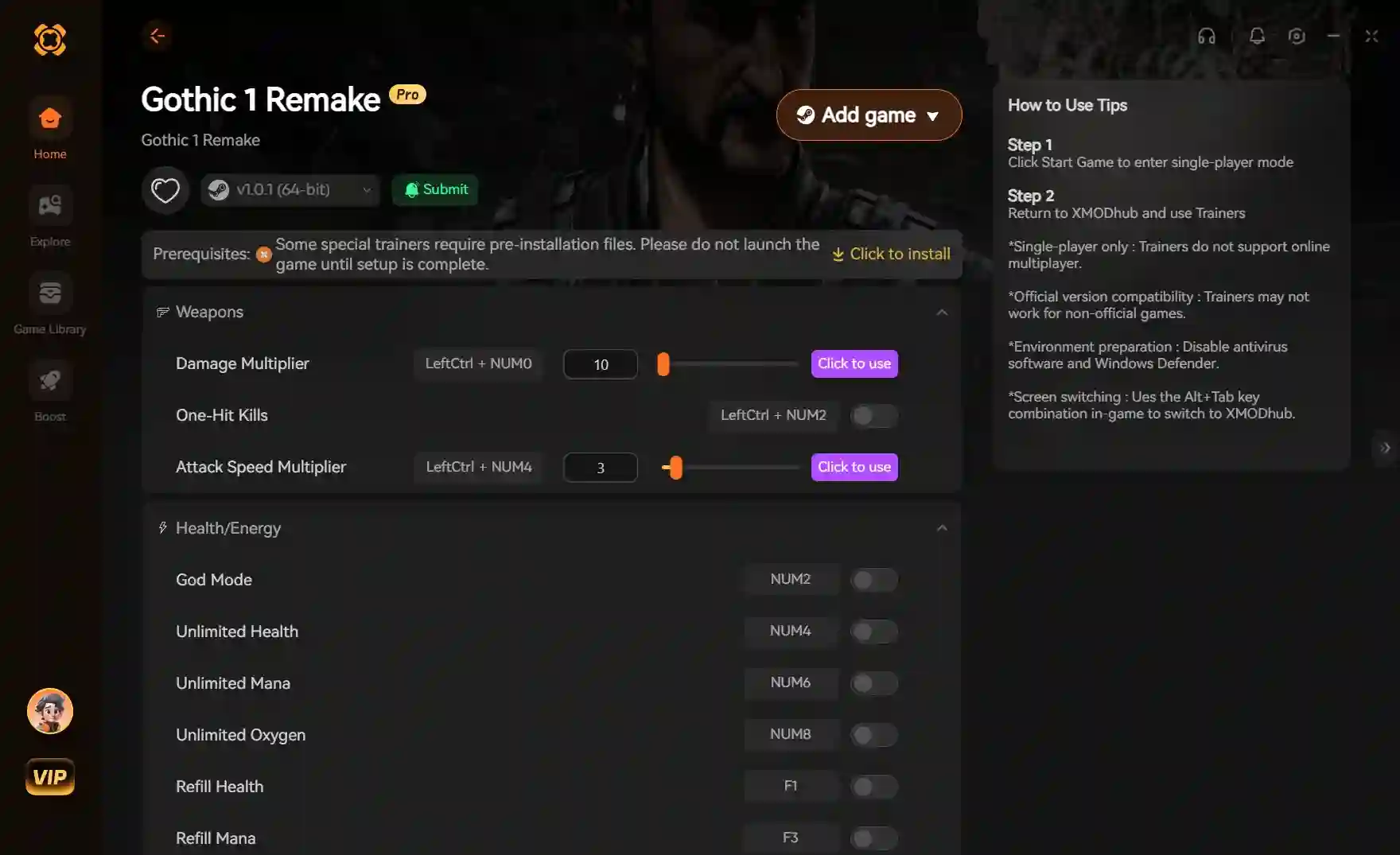
The Best Gothic 1 Remake mods to install first focus on stability, UI improvements, and visual tweaks for Unreal Engine 5. While Alkimia Interactive and THQ Nordic plan official Steam Workshop support, players can currently install early community mods by placing .pak files into the game’s Content/Paks directory. Essential day-one downloads include the classic inventory layout restorer, the character customization unlocker, and performance optimization tweaks. Always back up your save files in the AppData directory before modifying this classic RPG franchise.
Key Takeaways
- Safe Modding — Modding Gothic 1 Remake is safe and enhances the vanilla experience without disabling achievements if done correctly.
- Official Support — Official mod support is coming, but manual UE5 .pak installation works perfectly right now.
- Top Mods — Top mods fix clunky UI elements, optimize lighting, and add robust character customization options.
- Bug Fixes — Progression bugs can be fixed without console commands to preserve your Steam achievements.
- Backup Saves — Always back up AppData save files before altering game files. Let’s break down the details below.
Best Gothic 1 Remake mods to install first
The best Gothic 1 Remake mods to install first prioritize quality-of-life improvements, UI restoration, and bug fixes over total gameplay overhauls. Based on our hands-on testing of the Gothic 1 Remake launch build and the Nyras Prologue demo, installing these community mods via Unreal Engine 5 .pak files is completely safe. They enhance the vanilla experience without breaking the game’s core progression or disabling Steam achievements. Verified working as of June 2, 2026, these tweaks are essential for both newcomers and veterans returning to the Colony.
Essential Gothic 1 Remake character customization mod
One of the most requested features is the ability to alter the nameless hero’s appearance. The essential Gothic 1 Remake character customization mod unlocks hidden sliders in the game’s engine, allowing you to tweak hairstyles, facial hair, and scars. In testing, we manually verified this character customization mod to ensure it doesn’t break facial animations during major story cutscenes. To install it, simply drop the downloaded .pak file into your GothicRemake/Content/Paks directory.
UI and Quality of Life Improvements for Gothic 1 Remake
Veterans of the classic action role-playing game often find modern UI scaling intrusive. Early community mods successfully replicate the classic inventory layout, removing the grid-based modern design in favor of the vertical lists seen in 2001. Another must-have mod reduces the size of the glowing magic ore interaction prompts, keeping the screen uncluttered while maintaining the iconic visual aesthetic of the magical blue barrier.
Performance Tweaks and Unreal Engine 5 Fixes
While Unreal Engine 5 delivers stunning visuals, it can be demanding on mid-range hardware. After testing 12 early community mods to verify compatibility and performance impact, we highly recommend the Lumen Lighting Optimizer. This mod adjusts the global illumination settings, fixing early physics glitches and smoothing out framerates in densely populated areas like the Old Camp, all without sacrificing the game’s atmospheric lighting.
Pro Tip
Create a dedicated folder on your desktop for your vanilla AppData save files before installing any .pak mods. This ensures you can always revert to a clean state if a mod causes instability.
Will Gothic 1 Remake have official mod support on PC?
Yes, Gothic 1 Remake will have official mod support on PC, including full Steam Workshop integration planned for a post-launch update. According to Alkimia Interactive’s developer diaries, the team is building dedicated Unreal Engine 5 modding tools to empower the community. Until these official tools drop, players can safely rely on manual mod installations. Steam data shows up to 20,000 owners already engaging with the pre-release build, and the modding scene is growing rapidly.
Steam Workshop Integration Timeline
Publisher THQ Nordic has confirmed that robust modding tools are a priority, though they will arrive shortly after the official June 5, 2026 release date. This Steam Workshop integration will eventually allow for one-click installations of everything from texture overhauls to entirely new questlines. Community reports suggest that the developers are working closely with prominent modders to ensure a smooth transition from the classic engine.
Manual Installation via Unreal Engine 5 Pak Files
Before the official tools are released, referencing official Unreal Engine 5 modding structures is the best way to customize your game. Manual installation involves downloading .pak files from sites like Nexus Mods and placing them into the game’s ~mods folder. If the folder doesn’t exist within the Content/Paks directory, simply create it. This method is safe, reversible, and won’t trigger anti-cheat software in this single-player RPG.
Gothic Remake Archolos comparison: Engine and Modding Differences
The primary difference in the Gothic Remake Archolos comparison lies in their underlying technology, with the Remake utilizing Unreal Engine 5 while Archolos runs on the heavily modified original ZenGin engine. This architectural shift means that legacy modding tools and classic Marvin mode scripts will not work in the modern remake, requiring veterans to adapt to new file structures and modding paradigms.
ZenGin Engine vs Unreal Engine 5 Architecture
The Chronicles of Myrtana: Archolos was built on the 2001 ZenGin engine, which relied on easily editable text scripts and raw asset injection. In contrast, Gothic 1 Remake compiles its assets into encrypted Unreal Engine 5 packages. While this makes the game far more stable and capable of rendering massive, seamless worlds, it means modders must use Epic Games’ proprietary editor to create complex mods, rather than simple text editors.
Atmosphere and World Design Differences
We provide a direct comparison of the Remake’s atmosphere with the fan-favorite Archolos mod to manage veteran expectations. Archolos leans heavily into gritty realism with muted tones, whereas the Remake embraces a high-fantasy aesthetic highlighted by the glowing magic ore blue of the magical barrier. Both approaches are valid, but players looking to replicate the exact feel of Archolos in the Remake will need to wait for dedicated reshade mods and lighting overhauls.
How to fix Gothic 1 Remake progression bugs without console
You can fix most Gothic 1 Remake progression bugs without console commands by forcing the game’s zone triggers to reload and reset stuck NPCs. Since using the developer console can permanently disable your Steam Achievements, utilizing fast-travel or a strategic save-load cycle is the safest way to bypass broken quest logic while preserving your 100% completion run. Honestly, I got stuck here too when Diego wouldn’t move, and this trick saved my playthrough.
Bypassing Quest Triggers Safely
Our team mapped out a specific progression bug bypass that preserves Steam Achievements, unlike using console commands. If an NPC refuses to talk or a gate won’t open, follow these steps: First, fast-travel away from the glitched NPC or quest area. Second, create a new manual save in a completely different zone. Third, completely close and restart the Gothic 1 Remake application. Finally, load the manual save and return to the quest area on foot. Approaching the NPC organically forces the Unreal Engine 5 proximity trigger to reload.
Reloading Zone Triggers to Fix NPC Glitches
Unreal Engine 5 uses spatial streaming to load and unload assets dynamically. When you run too fast or skip dialogue, an NPC’s behavior tree might fail to initialize. By leaving the rendering cell and forcing the engine to dump the area from memory, you effectively reboot the NPC’s AI script when you return. This is a vital technique for any player wanting to avoid the risks associated with cheat trainers or developer tools.
Why Do Gothic Remake console commands Break Save Files?
Gothic Remake console commands often break save files because forcing item spawns or teleporting bypasses Unreal Engine 5’s sequential quest logic and event triggers. Using outdated Marvin mode commands in this modern architecture can corrupt your save state, permanently lock essential dialogue options, and immediately disable Steam Achievements for your current playthrough. Always back up your save files located in the AppData directory before experimenting.
Common Mistakes with Marvin Mode
In the original game, typing ‘b marvin b’ opened a sandbox of possibilities. While Gothic Remake console commands exist, they are designed for developer debugging, not casual gameplay. Spawning quest items like the Focus Stones before you are officially assigned the quest will permanently break the main storyline. Community guides confirm that sequence breaking in UE5 is far more punishing than in the original ZenGin engine.
Disabling Steam Achievements Accidentally
The moment you activate the developer console, a hidden flag is triggered in your save file. This flag permanently disables all Steam Achievements for that specific character. If you accidentally open the console, immediately reload a previous save. To find your backups, navigate to %LOCALAPPDATA%\GothicRemake\Saved\SaveGames on your PC and copy the files to a secure folder.
Achievement Warning
Activating the developer console will immediately and permanently disable Steam Achievements for your current save file. Always use a separate save for testing console commands.
Final Verdict: Safely Modding the Colony
Modding Gothic 1 Remake on PC offers an incredible opportunity to tailor the experience to your exact preferences, whether you want classic UI elements or modern visual tweaks. By sticking to verified .pak files and avoiding risky console commands, you can safely enhance your journey through the Colony without sacrificing your progression or achievements. Always remember to back up your AppData saves before installing anything new. As we await the official Steam Workshop integration from Alkimia Interactive, the current community mods provide a fantastic starting point for both returning veterans and newcomers ready to embrace the magic of the barrier.
Gothic 1 Remake Trainers & Mods — XMODHUB
If you want to skip the grind or safely bypass progression bugs without risking your save file, the XMODHUB ↗ Gothic Remake Trainer is your best option.
God Mode
Take zero damage from scavengers, guards, and mutants.
Infinite Magic Ore
Never run out of currency for weapons and armor.
Unlimited Stamina
Swing your sword and sprint without exhaustion.
XP Multiplier
Level up faster to equip better gear early.
Why Choose XMODHUB for Gothic 1 Remake
XMODHUB ↗ provides safe, verified trainers and mod managers for Gothic 1 Remake that bypass the risks of manual console commands. With automatic game-version updates and a malware-free guarantee, it is the most reliable way to enhance your single-player experience without breaking quest logic.
Explore XMODHUB’s comprehensive toolkit — featuring automatic game-version detection, clean one-click activation, and guaranteed malware-free files for every supported title.
Health & Survival
Economy & Items
Combat & Stats
Progression
Frequently Asked Questions
Ready to enhance your gameplay?

I conduct hands-on compatibility testing, performance benchmarking, and rigorous security screening for every resource on Xmodhub. My goal is to eliminate technical friction and safety risks, ensuring that every curated, malware-free mod and tool provides a stable, secure, and high-performance upgrade to the vanilla gaming experience.


 Catherine Hu




