
 Catherine Hu
You have carefully positioned your semi-transparent game window in the corner of your monitor, letting your team of five heroes hack and slash while you focus on your coding work [1]. But after hours of idling, you look over only to realize your party wiped on Act 4, Stage 10 on Hell difficulty [1][2]. The boss’s signature skills bypassed your mitigation pipeline, and your gear simply wasn’t up to par [1]. Frustrated by the sudden progression wall, you immediately open your browser and search for My Party Is Grinding cheats and console commands to give your heroes an unfair advantage.
As a hardcore idle RPG veteran, I have been exactly where you are. In this comprehensive guide, we will break down the reality of exploiting this unique desktop RPG, why traditional developer commands might not work as you expect, and how to legitimately (and illegitimately) break past the Inferno difficulty wall [1].
TL;DR: The Short Answer
If you are looking for a quick fix to instantly spawn Legendary or Eternal gear, here is the hard truth about My Party Is Grinding cheats and console commands:
- No Built-in Console Commands: There is no native developer console enabled for players to type in cheat codes for infinite Coins or XP.
- Strict Server-Side Verification: All progress, currencies, items, and crafting outcomes are issued and verified on the server [1]. Client tampering and item duping do not work [1].
- Internet Requirement: Because it is a server-based online game, you cannot disconnect from the internet to manipulate local save files [1].
- The Real “Cheats”: The closest things to cheats are UI automation tools (to auto-click dropped chests) and highly optimized progression strategies that maximize your 8-hour offline catch-up mechanic [1].
Table of Contents
- TL;DR: The Short Answer
- The Reality of My Party Is Grinding Cheats and Console Commands
- Common Mistakes When Trying to Exploit the Game
- Alternative Methods: Legitimate Progression Hacks
- Advanced Tips for Pushing Inferno Difficulty
- Automating the Grind: The XMODhub Solution
- Third-Party Trainers and Cheat Engine: Are They Safe?
- Best Idle Farming Zones for Maximum XP and Loot
- Frequently Asked Questions
- Final Verdict
The Reality of My Party Is Grinding Cheats and Console Commands
When players look for My Party Is Grinding cheats and console commands, they are usually looking for a way to bypass the massive grind required to reach level 100 (the level cap) [2] or to instantly acquire the 400+ pieces of gear across the 8 different grades [1].
However, the developer, SUPERLINK Inc., has built the game with a robust server-based architecture [1]. Every time your Knight swings a sword or your Mage casts a spell, the resulting loot drops, XP gains, and gold accumulation are verified by the game’s servers [1]. If you attempt to use basic memory editors to change your Coin count from 100 to 10,000,000 (which normally earns the “Master of the Vault” achievement [2]), the server will immediately correct the value back to its legitimate state upon the next sync.
For players interested in what client-side data can actually be monitored or tweaked visually without triggering server flags, you might want to explore a My Party Is Grinding Cheat Engine Table: How to Bypass The Grind to track local UI values or live damage meters [1], but be aware that fundamental game economy values are locked down.
Common Mistakes When Trying to Exploit the Game
Because direct My Party Is Grinding cheats and console commands are off the table, players often resort to inefficient strategies that actually hurt their progression. Here are the most common mistakes:
1. Misunderstanding the Offline Catch-Up Limit
Many players think they can simply close the game for a week and come back to a fully leveled party. This is a massive mistake. My Party Is Grinding only allows for up to 8 hours of offline catch-up [1]. If you leave the game closed for 24 hours, you are losing 16 hours of potential loot and XP. To maximize efficiency (and earn the “My Party Never Sleeps” achievement [2]), you must log in at least once every 8 hours to collect your rewards.
2. Reckless Enchanting at the Mage Tower
In a desperate bid for power, players will spam enchantments at the Mage Tower without proper preparation. Because crafting and enhancement outcomes are decided server-side [1], you cannot “save scum” (reload an old save) if an enchantment fails. Failing an enchantment can result in losing the item entirely (triggering the “Ashes to Ashes” achievement) [2]. Never gamble your best gear without backup loadouts.
3. Ignoring the Mitigation Pipeline
Players often focus purely on offensive stats, hoping to kill enemies before they get hit. However, My Party Is Grinding features a layered mitigation pipeline consisting of dodge, block, damage reduction, and armor [1]. If you push into Nightmare or Hell difficulties [1] without balancing these defensive layers, your heroes will constantly go down, ruining your auto-challenge farming efficiency.
Alternative Methods: Legitimate Progression Hacks
Since you cannot type My Party Is Grinding cheats and console commands to win, you must abuse the game’s deep progression systems to create an unstoppable, self-driving party. Here are the best alternative methods to skyrocket your power.
1. Rushing the Orb Circuit and Constellations
Progression in My Party Is Grinding never truly stops [1]. Your primary focus should be the Orb Circuit—a sprawling directional growth tree containing over 200 nodes [1]. Do not spread your points evenly. Focus on unlocking nodes that synergize with your party’s specific elemental damage types (Physical, Fire, Cold, Lightning, or Chaos) [1].
Once you unlock Constellations (the second growth axis), prioritize the powerful keystone bonuses that amplify your entire party’s stats [1]. Fully completing a constellation will also grant you the “Star Chart Perfected” achievement [2].
2. Exploiting Collections and Factions
Costumes in My Party Is Grinding are not just cosmetic. While wearing them is purely for looks, owning them provides massive benefits [1]. Completing costume gear collections grants permanent, party-wide bonuses [1]. Furthermore, owning multiple costumes from the same faction makes every single hero in your party stronger [1]. Spend your resources unlocking costumes early to benefit from these passive multipliers while you idle.
3. Maximizing the Blacksmith and Mage Tower
Your gear is the ultimate bottleneck. With 12 gear slots per hero [1], you need to constantly upgrade.
- The Blacksmith: Level this up to its cap of 70 [2]. Here, you will forge, fuse, and craft gear [1]. Synthesizing nine items into one better item is crucial for pushing toward Legendary and Eternal gear grades [2].
- The Mage Tower: Cap this at level 30 [2]. Use the tower to engrave, enchant, socket gems, and extract materials [1]. Always socket gems into your gear (earning the “Gem Setter” achievement) to min-max your elemental status effects [1][2].
Advanced Tips for Pushing Inferno Difficulty
The ultimate goal in My Party Is Grinding is to clear the 4 acts and 10 stages on Inferno, the fifth and final difficulty [1]. To earn the “Beyond Burnout” achievement [2], you need real strategy.
Master Elemental Status Effects
Every element (Physical, Fire, Cold, Lightning, and Chaos) applies unique status effects [1]. Ensure your party of five (Knight, Warrior, Assassin, Archer, and Mage) [1] has a loadout of up to four active skills [1] that chain these status effects together. For example, using Cold to slow enemies before hitting them with devastating Fire AoE attacks.
Monitor the Live Damage Meter
Do not just let the game run blindly. Use the built-in live damage meter to track each hero’s contribution [1]. If your Assassin is falling behind in DPS, it is time to re-evaluate their stat point distribution or swap their active and passive skills [1].
The “Solo Developer” Challenge
If you want to truly test your mastery, try attempting the “Solo Developer” achievement, which requires you to clear stage 4-10 with only the Knight [2]. This requires absolute perfection in your mitigation pipeline (dodge, block, damage reduction) and top-tier Eternal crafted gear [1][2].
Automating the Grind: The XMODhub Solution
While server-side checks prevent traditional My Party Is Grinding cheats and console commands, the game still requires manual UI management. You have to “glance over between tasks, click a dropped chest, and collect your rewards” [1]. If you are working or coding, this manual clicking interrupts your workflow.
This is where XMODhub becomes the ultimate quality-of-life upgrade. Instead of manually managing your inventory or clicking chests, XMODhub can safely automate the client-side UI interactions without injecting malicious code into the server pipeline.
Here is how to set up XMODhub to truly make the game 100% idle:
Step 1: Download and Install XMODhub
Navigate to the official XMODhub website and install the lightweight client on your PC. It is designed to run silently in the background, just like My Party Is Grinding.

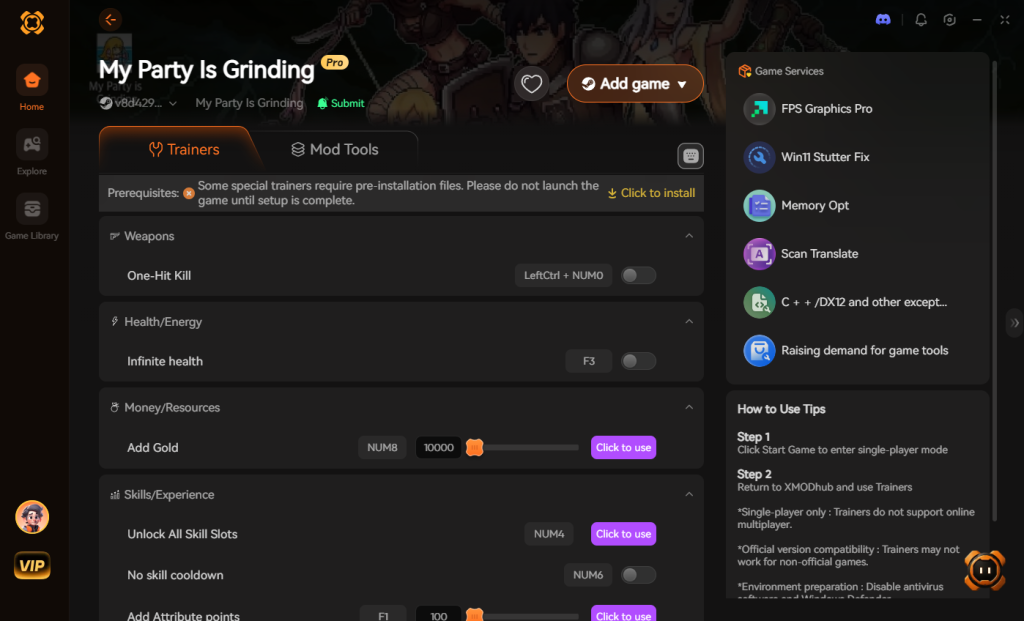
Step 2: Auto-Detect My Party Is Grinding
Launch My Party Is Grinding in its semi-transparent window [1]. Open XMODhub, and the software will instantly recognize the game process. Navigate to the game’s specific module within the XMODhub library.
Step 3: Toggle QoL Automation Scripts
Enable features like “Auto-Click Dropped Chests” and “Auto-Manage UI.” Because these scripts merely simulate human mouse clicks on your local client, they do not violate the server-side item verification checks [1]. You can now leave the game running indefinitely while you work, knowing every single random chest that drops in battle is being stockpiled and opened automatically [1].
Download My Party Is Grinding Trainer Now
Third-Party Trainers and Cheat Engine: Are They Safe?
While native My Party Is Grinding cheats and console commands do not exist, many players turn to third-party trainers or memory scanners like Cheat Engine in search of an edge. Because the game relies heavily on its server-side architecture, attempting to modify core values like your total Gold, premium currency, or hero base stats will result in an immediate desync.
The server will rapidly overwrite your local changes, and repeated offenses might trigger an automated account shadowban. However, you can safely use local memory reading to track hidden metrics—such as exact boss HP values, internal cooldowns, or precise DPS numbers—without modifying the data or risking your account.
Best Idle Farming Zones for Maximum XP and Loot
Instead of risking a ban with sketchy My Party Is Grinding hacks, the most efficient way to break through progression walls is to park your party in mathematically optimal farming zones. When combined with an automation tool, these stages yield the highest return on investment for your offline catch-up window.
| Farming Zone | Difficulty Level | Primary Loot Drops | Ideal Party Level | Recommended Elemental Focus |
|---|---|---|---|---|
| Act 2, Stage 5 | Nightmare | Rare Crafting Materials, T4 Armor | 45 – 55 | Fire (High AoE required) |
| Act 3, Stage 8 | Nightmare | Epic Weapons, Gem Fragments | 60 – 70 | Lightning (Stun mitigation) |
| Act 4, Stage 2 | Hell | Legendary Accessories, T7 Gear | 75 – 85 | Cold (Slows fast-moving mobs) |
| Act 4, Stage 10 | Inferno | Eternal Gear Blueprints, Orbs | 90 – 100 | Chaos (Bypasses high armor) |
Setting up your automated runs in these specific zones ensures your mitigation pipeline holds up overnight while maximizing your hourly XP gains and material drops.
Frequently Asked Questions
Can I play My Party Is Grinding offline to use time-skip cheats?
No. My Party Is Grinding is a strictly server-based online game [1]. An internet connection is required to play, and all progress is verified by the server [1]. You cannot change your PC’s clock to cheat the 8-hour offline catch-up system.
How do I unlock all five classes?
You start the game with a limited roster, but as you grow and progress through the stages, you will unlock new classes to expand your party [1]. Unlocking one additional class grants the “Plus One” achievement, and unlocking all five (Knight, Warrior, Assassin, Archer, Mage) grants the “Party Assembled” achievement [1][2].
How do I get pets in My Party Is Grinding?
Pets provide massive passive bonuses just by owning them [1]. You unlock them simply by slaying monsters out in the world [1]. Collecting your first pet grants “The Sixth Member” achievement, and owning six grants the “Petting Zoo” achievement [2].
Is there a way to trade items with other players?
Yes, a trading system is planned. The developers have stated that trading items with other players on the Steam Community Market will be added as a free post-launch update [1]. You can also deposit items on the Trade Vessel and make sales on the Market to earn achievements like “First Sale!” and “Smart Shopper” [2].
Final Verdict
Searching for My Party Is Grinding cheats and console commands is a natural reaction when hitting the brutal progression walls of Nightmare and Hell difficulties. However, because SUPERLINK Inc. has locked down the game with server-side architecture, traditional memory editing and duping exploits are entirely useless. To conquer the 200 battles across the 4 regions [1], you must rely on deep gear crafting, mastering the Orb Circuit, and optimizing your offline catch-up windows.
If you are tired of the manual UI management and want to turn this semi-idle game into a fully automated loot-farming machine, XMODhub is your best solution. By automating chest collection and UI clicks, you can focus on your real-life tasks while your party continuously scales toward level 100. With support for over 5,000+ games—including massive Cookie Clicker or Clicker Heroes—XMODhub is the ultimate tool for gamers who want to maximize their progression without the tedious grind. Download XMODhub today and let your party do the grinding for you.
Stop Grinding, Start Enjoying.
Bypass the tedious resource gathering and unlock your full potential instantly.

I am a passionate gamer and writer at XMODhub, dedicated to bringing you the latest gaming news, tips, and insights.
Connect with me:
LinkedIn Profile ↗
 Nancy Miller