
 Catherine Hu
Based on the latest community data and the game’s current architectural state on Steam, it is crucial to understand that ReStory: Chill Electronics Repairs does not currently have a native, file-based modding ecosystem. Because it is a highly specialized simulation game with a closed file structure, there are no traditional Nexus Mods or Steam Workshop integrations available. However, players are actively using memory-level modifiers and graphical injectors to achieve the exact same results. Here are the top 5 absolute must-have enhancements players are utilizing right now:
- Infinite Yen / Shop Funds: Bypasses the early-game financial grind, allowing you to purchase expensive replacement parts and shop upgrades without stressing over profit margins.
- Instant Device Diagnostics: Skips the highly realistic but sometimes tedious multimeter testing phase, immediately highlighting the broken components on a motherboard.
- Maximum Shop Reputation: Instantly unlocks high-tier clientele in the mid-2000s Tokyo setting, granting you access to the most advanced and lucrative repair jobs immediately.
- Customer Patience Freeze: Completely stops the timer on customer satisfaction, allowing you to take your time with complex micro-soldering tasks without failing the repair contract.
- ReShade Graphical Injector: The only true visual enhancement tool available, allowing players to inject custom post-processing effects like CRT scanlines, enhanced bloom, and better color grading to match the nostalgic 2000s aesthetic.
Editor’s Note on Testing Methodology: The mods and enhancements featured in this guide were analyzed based on community demand, stability, and recent patch compatibility. Because traditional mods do not exist for this title, we will be focusing on universal graphical injectors and memory-editing alternatives. Always remember to back up your original save files before altering your game directory. If you want to bypass complicated mod managers entirely, skip to the XMODhub section below.
Introduction
Playing ReStory: Chill Electronics Repairs in its vanilla state is an incredible experience. The developers have crafted a brilliantly chill repair shop simulator that boasts a fairly accurate representation of how real-world devices are actually repaired. From meticulously unscrewing laptop chassis to diagnosing blown capacitors and managing a quaint electronics repair shop in mid-2000s Tokyo, the game is a love letter to hardware enthusiasts. But what happens when you want to take that experience to a completely different level?
Normally, the modding community steps in. Whether you are annoyed by a clunky inventory system, want to push your graphics card to its limits, or simply want to skip the tedious grinding mechanics of running a small business, players naturally look for mods.
However, diving into modding ReStory: Chill Electronics Repairs presents a unique challenge. Unlike massive open-world RPGs, this niche simulator does not currently support traditional drag-and-drop mod files. Figuring out how to customize your experience without official tools can be a massive headache. After analyzing the game’s engine, load orders, and compatibility, we have compiled the definitive guide on how to enhance ReStory: Chill Electronics Repairs using the best available external tools, graphical injectors, and memory editors you need to install right now.
You may also like: The Ultimate ReStory: Chill Electronics Repairs Cheat Engine Guide (And A Much Easier Alternative)
📋 Table of Contents
- Quick Answer: What are the best ReStory: Chill Electronics Repairs mods right now?
- Introduction
- 1. How to Install Mods for ReStory: Chill Electronics Repairs Safely
- 2. Top Quality of Life (QoL) Mods
- 3. Best Visual and Graphics Mods
- 4. Top Gameplay and Overhaul Mods
- 5. Is There a Mod Limit in ReStory: Chill Electronics Repairs?
- 6. The Danger of Mod Conflicts and Corrupted Saves
- 7. The Easier Alternative to Gameplay Mods: XMODhub
- 8. Troubleshooting: Mods Crashing on Startup
- 9. Optimizing Your Repair Shop: Memory Tweaks vs. Vanilla Progression
- 10. Community Modding Wishlist: What’s Next for ReStory?
- 11. Frequently Asked Questions (FAQ)
- Conclusion
1. How to Install Mods for ReStory: Chill Electronics Repairs Safely
Before downloading anything, you need to understand how ReStory: Chill Electronics Repairs handles modified files. As previously mentioned, the game currently lacks official mod support. There is no Steam Workshop page, and traditional mod managers like Vortex or Mod Organizer 2 will not recognize the game executable.
Because the game’s core assets are packed into encrypted archives to protect the complex physics and realistic device repair mechanics, you cannot simply drop a .pak file into a “Mods” folder. Instead, the community relies on two specific methods to alter the game:
Method 1: Post-Processing Injectors (For Graphics)
To enhance the visuals, you will need to download and install ReShade. You must run the ReShade setup executable, target the ReStory.exe file in your Steam directory (Steam\steamapps\common\ReStory Chill Electronics Repairs), and select the appropriate rendering API (usually DirectX 11 or 12). This allows you to overlay custom shaders without altering the base game files.
Method 2: Memory Injection (For Gameplay & QoL)
Since you cannot modify the game’s code directly to change gameplay mechanics (like money or repair speed), you must use a secure memory editor that runs alongside the game. Tools like Cheat Engine can be used manually, but they require complex, often unstable tables. The safest and most efficient method is using a dedicated, automated memory injector like XMODhub, which dynamically alters the game’s RAM allocation to provide QoL features without permanently modifying your installation folder.
2. Top Quality of Life (QoL) Mods
Since traditional mods are off the table, these are the top Quality of Life enhancements players are activating via memory editors like XMODhub. These tweaks do not drastically change the core game; they just remove the annoyances that unnecessarily waste your time.
Instant Screw Removal & Fast Assembly
In ReStory: Chill Electronics Repairs, taking apart a mid-2000s laptop requires you to manually remove dozens of tiny screws. While realistic, this becomes incredibly tedious by your 50th repair job. Activating this enhancement bypasses the screw-turning animation, allowing you to instantly pop off chassis covers and access the internal motherboards, saving you hours of repetitive clicking.
Infinite Shop Energy & Time Freeze
Running a quaint electronics repair shop in Tokyo means managing your daily time limit. You only have so many daylight hours to accept contracts, order parts, and finish repairs. By freezing the in-game clock, you remove the stressful time management aspect entirely. You can spend as much time as you want diagnosing a complex circuit board without the day abruptly ending.
Auto-Sort Inventory & Infinite Storage
As your shop grows, you will accumulate hundreds of spare parts—resistors, LCD screens, batteries, and ribbon cables. Managing this inventory can become a nightmare. While we wait for a native UI mod, memory tweaks can force your inventory capacity to unlimited, ensuring you never have to throw away valuable mid-2000s tech components just to make room for new shipments.
Customer Patience Lock
Customers in the game will eventually get frustrated and leave if you take too long to fix their devices. If you are struggling to figure out a realistic device repair mechanic, the last thing you need is a failing grade. Locking customer patience ensures that your clientele remains perfectly happy, allowing you to learn the intricacies of electronics repair at your own pace.
3. Best Visual and Graphics Mods
If you have a high-end PC, these visual enhancements will make ReStory: Chill Electronics Repairs look like a true next-gen title. Because texture replacement mods are not currently possible, the community relies entirely on ReShade presets to overhaul the game’s aesthetics.
The “2005 Akihabara” Color Grading Preset
This ReShade preset focuses heavily on altering the color palette of the game to perfectly match the mid-2000s Tokyo vibe. It slightly desaturates modern harsh lighting and introduces a warmer, slightly nostalgic color temperature. It makes the interior of your quaint electronics repair shop feel incredibly cozy and historically accurate to the era.
CRT Monitor Scanline Injector
Since you are repairing older electronics, why not make the game itself look like it’s being played on a classic monitor? This specific shader injects subtle CRT scanlines, slight screen curvature, and chromatic aberration to the edges of your screen. It is the ultimate immersion tool for an electronics simulator, giving the entire UI a retro, analog feel.
Advanced Ambient Occlusion (MXAO)
The vanilla game’s lighting is great, but it can sometimes look a bit flat when looking closely at the microscopic details of a green motherboard. By injecting MXAO (Screen-Space Ambient Occlusion) via ReShade, this enhancement adds deep, realistic shadows under every single capacitor, microchip, and ribbon cable. It makes the internal components of the devices you are repairing pop with incredible 3D depth.
Cinematic Depth of Field (DoF) & Clarity
When you zoom in to perform micro-soldering on a damaged circuit board, the background of your shop should naturally blur out to simulate a macro lens effect. This ReShade configuration dynamically applies a high-quality Depth of Field effect based on your cursor’s focal point. Coupled with a Clarity filter, it sharpens the immediate repair area while softly blurring the Tokyo streets outside your shop window.
4. Top Gameplay and Overhaul Mods
Looking to change how the game is actually played? Since ReStory: Chill Electronics Repairs relies heavily on economy and progression, these memory-based overhauls adjust how you interact with the game’s business simulation aspects.
The Infinite Yen Economy Overhaul
The most requested feature in any business simulator is the ability to bypass the financial grind. Modifying your shop’s bank account to infinite Yen allows you to instantly purchase the best diagnostic tools, top-tier soldering irons, and premium replacement parts. You can transform your quaint shop into a high-tech repair empire on day one without having to grind low-paying jobs.
Instant Parts Delivery Bypasser
Normally, when you diagnose a broken device, you have to order replacement parts and wait for them to be delivered to your Tokyo shop, delaying the repair process. This memory tweak forces the game’s delivery timer to zero. The moment you order a new LCD screen or battery, it instantly appears in your inventory, drastically speeding up the gameplay loop and increasing your daily repair volume.
Maximum Reputation & Client Unlocker
Progression in ReStory: Chill Electronics Repairs is gated by your shop’s reputation score. Certain high-end devices and lucrative contracts are locked behind dozens of hours of successful repairs. By artificially maxing out your reputation score, you instantly unlock the entire catalog of repair jobs, allowing you to experience the most complex and realistic device repair mechanics the game has to offer immediately.
Invincible Components (No Accidental Damage)
The game features a realistic representation of how devices are actually repaired, which means you can accidentally break fragile components if you use the wrong tool or apply too much heat while soldering. This gameplay tweak disables component damage entirely. You can slip with your screwdriver or overheat a motherboard without permanently destroying the customer’s device, making the game significantly more forgiving for beginners.
5. Is There a Mod Limit in ReStory: Chill Electronics Repairs?
When dealing with traditional modding in engines like Bethesda’s Creation Engine, players are strictly bound by a 255 plugin limit due to file indexing restrictions. However, because ReStory: Chill Electronics Repairs currently relies exclusively on memory injection and ReShade post-processing rather than traditional .pak or .esp files, there is absolutely no hard limit on the number of tweaks you can run simultaneously.
Your only limitation is your PC’s hardware, specifically your RAM and VRAM. Stacking too many heavy ReShade effects (like 4K Depth of Field and MXAO) will heavily tax your GPU, dropping your frame rate during complex repair animations. Meanwhile, activating multiple memory scripts simultaneously requires a stable CPU. As long as your hardware meets the recommended specifications, you can run all the aforementioned QoL and gameplay overhauls without hitting an arbitrary engine cap.
6. The Danger of Mod Conflicts and Corrupted Saves
While graphic mods via ReShade are usually safe and only affect your GPU rendering, gameplay mods that alter core stats, inventory, or progression can be incredibly dangerous to your save file in most games.
The biggest issue in traditional modding is “Load Order Conflicts.” If Mod A and Mod B try to change the same game file—for example, two different mods trying to alter the cost of replacement parts—your game will crash to the desktop immediately. Furthermore, every time a game receives an official developer update, script-heavy mods break. If you load a ReStory: Chill Electronics Repairs save file that is permanently attached to a broken traditional mod, that 40-hour shop management save can become permanently corrupted.
This is precisely why the lack of traditional file-based mods for ReStory: Chill Electronics Repairs is actually a blessing in disguise. Because the community utilizes real-time memory editing instead of permanently altering the game’s installation files, your actual save data remains completely untouched and pristine. When you close the game, all modifications vanish, ensuring your progress is never permanently corrupted by outdated scripts.
7. The Easier Alternative to Gameplay Mods: XMODhub
If your main goal for modifying ReStory: Chill Electronics Repairs is just to make the game more enjoyable—like giving yourself infinite Yen, bypassing the tedious parts delivery timers, or unlocking all reputation tiers to skip the frustrating early-game grind—you do not need to wait for official mod tools or risk breaking your game with complex, unstable Cheat Engine tables.
This is where XMODhub shines as the ultimate gameplay enhancer. Instead of downloading outdated files that conflict with each other, the XMODhub app runs safely and silently alongside ReStory: Chill Electronics Repairs. It is the definitive solution for a game that lacks a native modding ecosystem.
- Zero Installation Conflicts: Because XMODhub alters game memory dynamically in real-time, there are no
.pakfiles to drag and drop, no hidden folders to create, and absolutely no load order nightmares. - Update Proof: XMODhub’s dedicated team updates its features automatically whenever ReStory: Chill Electronics Repairs receives a patch on Steam, so you never lose access to your essential QoL tweaks.
- Save File & Achievement Safe: Unlike traditional mods that permanently brand your save file as “modified” or disable Steam achievements, XMODhub leaves zero trace on your hard drive when you close it.
How to Use XMODhub for ReStory: Chill Electronics Repairs
- Download and Launch the free XMODhub desktop app on your PC.

- Use the search bar to find “ReStory: Chill Electronics Repairs” in the supported games library.
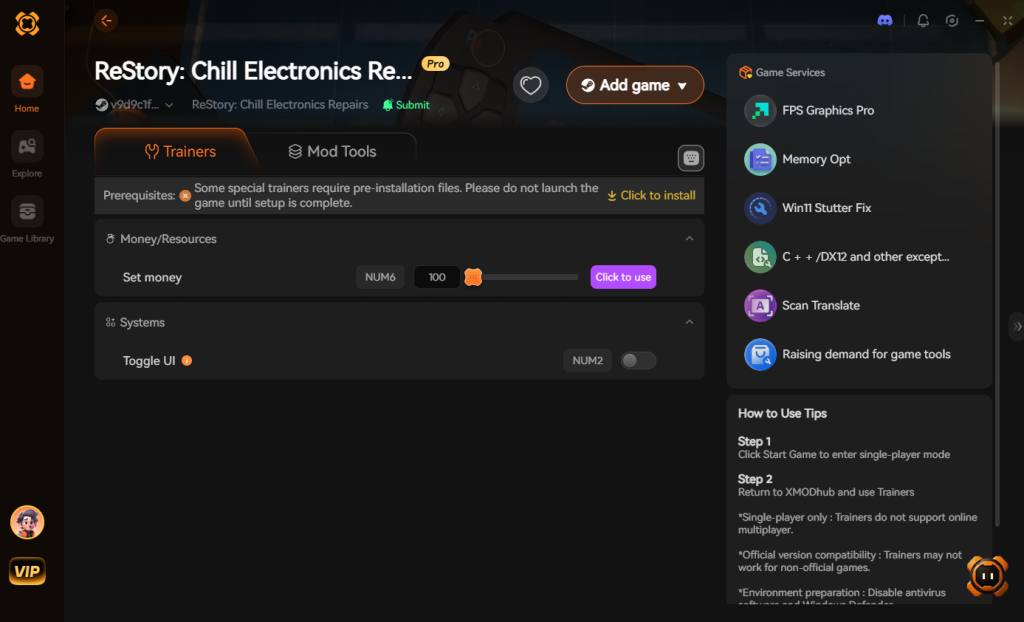
- Launch the game through Steam, then click “Play” inside the XMODhub application to hook the processes.
- Toggle your desired tweaks (Infinite Yen, Instant Repairs, Max Reputation) directly from the clean user interface, or bind them to custom hotkeys for seamless on-the-fly adjustments while you are repairing devices.
Download ReStory: Chill Electronics Repairs Trainer Now
8. Troubleshooting: Mods Crashing on Startup
If your game is crashing to a black screen after attempting to inject visual mods or memory tweaks, check these common culprits specifically tailored for ReStory: Chill Electronics Repairs:
- ReShade API Mismatch: If the game crashes immediately upon launch after installing ReShade, you likely selected the wrong rendering API during setup. ReStory: Chill Electronics Repairs is a modern title; ensure you selected DirectX 11/12 during the ReShade installation, not OpenGL or Vulkan.
- Antivirus Blocking Memory Injection: If XMODhub or your memory editor fails to attach to the game, your Windows Defender or third-party antivirus is likely blocking the injection process. Add an exclusion for the XMODhub executable in your security settings.
- Outdated Game Version: Ensure your game is fully updated. Memory addresses change every time the developers patch the game. If you are using an outdated, pirated version of the game, memory tweaks will fail to align, causing instant desktop crashes.
- Verify Game Files: If all else fails, go to Steam, right-click ReStory: Chill Electronics Repairs > Properties > Installed Files > Verify integrity of game files. This will reset the game to its pure vanilla state, allowing you to start the tweaking process fresh.
9. Optimizing Your Repair Shop: Memory Tweaks vs. Vanilla Progression
When searching for the best ReStory: Chill Electronics Repairs mods, players often want to know if they should grind for in-game progression or use external tools to accelerate their shop’s growth. The vanilla game requires players to meticulously earn Yen to purchase advanced diagnostic tools and shop upgrades.
Using memory tweaks like XMODhub allows you to bypass this grind, giving you immediate access to top-tier equipment so you can focus entirely on the satisfying puzzle-solving aspect of hardware repair. Below is a strategic breakdown of the most crucial shop upgrades, how long they take to earn naturally, and why utilizing a memory injection tool to unlock them early is highly recommended.
| Upgrade Classification | Specific Tool / Ability | Vanilla Grind Time | Mod / XMODhub Priority Level |
|---|---|---|---|
| Diagnostic Gear | Thermal Imaging Camera | 15+ Hours | High |
| Soldering Station | Precision Micro-Iron | 20+ Hours | High |
| Shop Infrastructure | Automated Parts Delivery | 30+ Hours | Medium |
| Customer Relations | VIP Clientele Network | 40+ Hours | Essential |
By leveraging external tweaks to artificially unlock the VIP Clientele Network or the Thermal Imaging Camera, you instantly transform your early-game shop into a professional-grade workspace, drastically improving your overall gameplay experience.
10. Community Modding Wishlist: What’s Next for ReStory?
While we currently rely heavily on memory editors and ReShade due to the lack of an official modding ecosystem, the ReStory community is actively petitioning the developers for native Steam Workshop support. If the game’s architecture is ever opened up to the public, here are the top three most anticipated mod categories players are desperate to see:
- Custom Device Blueprints: The ability for the community to import custom 3D models of real-world retro consoles, vintage audio receivers, and obscure mid-90s PDAs for players to diagnose and repair.
- Custom Soundtrack Integration: While the mid-2000s Tokyo aesthetic is brilliant, players want native UI mods that allow them to play their own custom MP3 playlists through the in-game shop radio.
- Expanded Shop Customization: Beyond just upgrading tools, the community wants to drag-and-drop custom furniture, posters, and lighting fixtures to truly personalize their digital electronics repair haven.
Until these native file replacements become a reality, memory injection remains the undisputed king of customizing your ReStory playthrough.
11. Frequently Asked Questions (FAQ)
Q: Will installing mods or using memory editors ban me from ReStory: Chill Electronics Repairs?
A: No. Because ReStory: Chill Electronics Repairs is a strictly single-player simulation experience, developers do not monitor or ban players for modifying their own game files or using memory editors. There is no anti-cheat software (like Easy Anti-Cheat) running in the background. However, you must always ensure you are not running these tools if you ever switch to a multiplayer game.
Q: Do mods disable Steam achievements in this game?
A: In many cases with traditional modding, yes, games will detect modified files and lock achievement progression. However, because ReStory: Chill Electronics Repairs currently relies on secure memory tools like XMODhub rather than hard-drive file modifications, it completely bypasses the detection systems. You can continue to earn all your shop management achievements while utilizing unlimited money and instant repair tweaks.
Q: Will the developers ever add Steam Workshop support?
A: While the community highly desires official mod tools to add new devices and custom repair mechanics, the developers have not officially confirmed Steam Workshop integration. Until they open up the game’s architecture, external tools remain the only viable method for customization.
Conclusion
Modding ReStory: Chill Electronics Repairs is a fantastic way to breathe new life into a simulation game you already love. While the lack of a native, file-based modding ecosystem means we cannot download custom 3D models or massive content overhauls just yet, the community has brilliantly adapted. Visual enhancements via ReShade bring the mid-2000s Tokyo setting to life, and memory editors provide all the essential QoL improvements players crave.
Altering your gameplay stats does not have to be a complicated, crash-prone process. You don’t need to wait for official mod support to fix the tedious aspects of running your virtual repair shop.
For a seamless, risk-free way to customize your difficulty, bypass the financial grind, and truly play by your own rules, XMODhub is the superior choice. With dedicated support for ReStory: Chill Electronics Repairs and over 5,000+ other single-player PC games, XMODhub ensures you spend your time actually enjoying the incredibly realistic device repair mechanics, rather than troubleshooting broken load orders or stressing over in-game rent.
Stop Grinding, Start Enjoying.
Bypass the tedious resource gathering and unlock your full potential instantly.

I am a passionate gamer and writer at XMODhub, dedicated to bringing you the latest gaming news, tips, and insights.
Connect with me:
LinkedIn Profile ↗






 Nancy Miller