
 Catherine Hu
No, ReStory: Chill Electronics Repairs does not have a built-in developer console or native text-based cheat codes. Because the developers designed this simulation game to focus on the authentic, methodical process of running a mid-2000s Tokyo repair shop, they intentionally removed the developer debugging console from the final retail build on Steam. Pressing the tilde (~) key or modifying configuration files will not grant you access to hidden command prompts.
However, this does not mean you are stuck grinding for spare parts or struggling to pay your shop’s rent. The only way to cheat is by using a secure, third-party trainer like XMODhub. This dedicated modification tool directly interacts with the game’s memory, offering powerful 1-click alternatives like Infinite Yen, Instant Repair/Diagnostics, and Freeze Customer Patience, allowing you to enjoy the relaxing atmosphere of ReStory: Chill Electronics Repairs without the stressful financial management.
Editor’s Note: This guide was last verified against the newest ReStory: Chill Electronics Repairs patch. Whether you are using native engine tools or a dedicated trainer, please back up your save files before modifying game memory to prevent unexpected bugs.
We have all been there. You have just spent hours trying to diagnose a complex motherboard issue in ReStory: Chill Electronics Repairs, or maybe you simply do not have the time to grind for rare vintage capacitors, replacement LCD screens, and enough Yen to keep the lights on in your mid-2000s Tokyo shop after a long day. Single-player games are meant to be enjoyed on your own terms. Let us get your character powered up so you can focus entirely on the relaxing, chill aspects of electronics repair.
You may also like: The Ultimate ReStory: Chill Electronics Repairs Cheat Engine Guide (And A Much Easier Alternative)
📋 Table of Contents
- Quick Answer: Does ReStory: Chill Electronics Repairs Have Console Commands?
- 1. How to Enable Cheats in ReStory: Chill Electronics Repairs
- 2. The Complete List of ReStory: Chill Electronics Repairs Cheats
- 3. Item IDs and Spawning Guide
- 4. Do Cheats Disable Achievements?
- 5. Why Native Cheats Can Break Your Save Files
- 6. The Safer Alternative: 1-Click Cheats with XMODhub
- 7. Troubleshooting: Cheats Not Working
- 8. Optimal Shop Progression: When to Use Modifications
- 9. The Hardest Electronics Repairs (And How Trainer Tools Help)
- 10. Frequently Asked Questions (FAQ)
- Conclusion
1. How to Enable Cheats in ReStory: Chill Electronics Repairs
Because ReStory: Chill Electronics Repairs does not feature a native developer console, players cannot simply press a key to open a text box and type in cheat codes. Many players waste hours searching through the local application data folders, attempting to edit .ini or .json configuration files to force a debug mode to activate. Unfortunately, the game engine compiles these scripts securely, meaning manual text-based manipulation is entirely impossible for the average user.
To enable cheats, bypass the shop’s daily timer, or instantly acquire infinite spare electronic components, you must utilize a memory injection tool. This is where XMODhub comes in. It safely reads the active memory addresses of ReStory: Chill Electronics Repairs and allows you to toggle advantages without altering the core game files.
Here is the simple, three-step process to download and attach XMODhub to the game to enable cheats:
Step 1: Download and Install the Client
Navigate to the official XMODhub website and download the desktop client. Install the application on the same storage drive where your Steam library is located to ensure the fastest memory reading speeds.
Step 2: Locate the Game in the Library
Open the XMODhub application and use the search bar to find ReStory: Chill Electronics Repairs. The software will automatically detect your installation path. If you have installed the game on a custom directory, you can manually point the software to the game’s executable file (.exe).
Step 3: Launch and Inject
Click the “Play” button directly inside the XMODhub interface. This will launch ReStory: Chill Electronics Repairs with the trainer safely attached to the background process. Once you load into your Tokyo repair shop, you can use a secondary monitor to click the cheat toggles, or simply press the designated hotkeys (such as F1, F2, F3) on your keyboard to activate the modifications in real-time.
2. The Complete List of ReStory: Chill Electronics Repairs Cheats
Because ReStory: Chill Electronics Repairs does not feature a developer console, there are no text-based cheat codes to input. You cannot type “add_money 1000” or “spawn_item_capacitor”. However, you can achieve the exact same effects—and often much more stable ones—using the XMODhub app.
The mid-2000s Tokyo setting of the game requires meticulous attention to detail, from soldering tiny wires to managing customer expectations. The XMODhub trainer specifically targets these gameplay loops to remove any frustration. Here are the trainer features available:
| Feature | Effect | How to Activate |
|---|---|---|
| Infinite Yen (Money) | Instantly maximizes your shop’s bank account, allowing you to buy all cosmetic upgrades, premium tools, and pay rent forever without worrying about bankruptcy. | Toggle via UI or press NUMPAD 1 |
| Infinite Spare Parts | Locks the quantity of your inventory items (screws, wires, logic boards, screens) at 99. You will never run out of materials during a crucial repair job. | Toggle via UI or press NUMPAD 2 |
| Instant Diagnostics | Bypasses the manual multimeter testing and circuit tracing minigames. Instantly highlights the broken component on any electronic device brought into the shop. | Toggle via UI or press NUMPAD 3 |
| Perfect Soldering | Removes hand-shake mechanics and instantly completes any soldering or desoldering task with a 100% perfect quality rating, ensuring maximum customer payout. | Toggle via UI or press NUMPAD 4 |
| Freeze Shop Timer | Stops the in-game clock from advancing. Take as much real-world time as you want to chill, listen to the soundtrack, and repair items without the day ending. | Toggle via UI or press NUMPAD 5 |
| Max Customer Patience | Customers waiting in the lobby will never lose their patience meter, meaning you will never fail a job due to taking too long on a complex repair. | Toggle via UI or press NUMPAD 6 |
| Unlock All Tools | Instantly unlocks high-tier repair equipment (advanced microscopes, premium heat guns, elite soldering irons) regardless of your current shop level. | Toggle via UI or press NUMPAD 7 |
3. Item IDs and Spawning Guide
In many simulation games, players rely on a massive database of hexadecimal Item IDs to manually spawn specific objects into their inventory using text commands. Because ReStory: Chill Electronics Repairs lacks the native engine tools required to process these commands, manually spawning items via text is impossible. You will not find a working list of item codes for vintage cell phones, CRT monitor components, 16V 1000uF electrolytic capacitors, or specific motherboard resistors anywhere on the internet, because the game simply cannot read them.
However, XMODhub entirely bypasses this tedious requirement. Instead of forcing you to look up complex hex codes on a second monitor and carefully type them out without making a syntax error, the trainer handles the inventory memory addresses automatically. By activating the “Infinite Spare Parts” feature, the software instantly maximizes every single component currently stored in your shop’s inventory bins.
If you need a specific rare part—like a proprietary T5 Torx screw or a specialized ribbon cable—to fix a late-game device, you do not need to hunt down an ID code. You simply purchase one from the in-game supplier, activate the XMODhub toggle, and watch as that single component instantly duplicates into an endless supply. This eliminates the need for complex command memorization and keeps you immersed in the relaxing atmosphere of ReStory: Chill Electronics Repairs.
4. Do Cheats Disable Achievements?
When playing single-player simulation games on PC, one of the most common concerns is whether modifying the game will permanently lock you out of earning Steam or Epic Games Store achievements. If ReStory: Chill Electronics Repairs had a native developer console, using it would almost certainly trigger the game’s internal cheat-detection flags. In most modern titles, the moment you press the tilde key and execute a command, the engine communicates with the platform’s API to disable all achievement tracking for that specific save file.
This means you would miss out on prestigious milestones like achieving a five-star shop rating or successfully completing a flawless repair streak.
Fortunately, XMODhub operates entirely differently. Because it is an external memory injector rather than an internal engine tool, it completely bypasses the internal cheat-flagging system of ReStory: Chill Electronics Repairs. The game remains completely unaware that your Yen has been artificially inflated or that your soldering precision is being assisted by software. Therefore, the Steam API continues to function normally. You can freely use Infinite Money, Instant Diagnostics, and Max Customer Patience while still unlocking every single achievement the game has to offer. It is the safest way to customize your difficulty without sacrificing your platform progression.
5. Why Native Cheats Can Break Your Save Files
Beyond the achievement lock, native developer tools and memory editors are notoriously unstable. These commands were originally built for developers to test bugs during production, not for everyday gameplay.
Forcing a quest to complete or bypassing intended story triggers can cause crucial NPCs to completely disappear from your map. Memory leaks, corrupted assets, and sudden crashes to the desktop are incredibly common when you spawn too many items at once. In a meticulously detailed game like ReStory: Chill Electronics Repairs, forcing the engine to load assets out of sequence can permanently corrupt your shop’s save data, forcing you to start your entire mid-2000s Tokyo business over from scratch.
6. The Safer Alternative: 1-Click Cheats with XMODhub
If you want the benefits of cheats—like infinite shop funds or skipping the heavy component grind—without risking your save files or locking your achievements, you need a dedicated game modification tool.
Instead of typing risky code that might corrupt your game world, the XMODhub app hooks into ReStory: Chill Electronics Repairs safely and cleanly.
- Achievement Safe: It bypasses the game’s internal cheat-flagging system.
- Save File Protection: It alters values temporarily. Your save file remains uncorrupted.
- One-Click Toggles: No progression blocking and no memorizing long item IDs. Just hit a hotkey to turn your desired modifications on instantly.
How to Use XMODhub for ReStory: Chill Electronics Repairs
- Download and Launch the free XMODhub desktop app.

- Search for “ReStory: Chill Electronics Repairs” in the library.
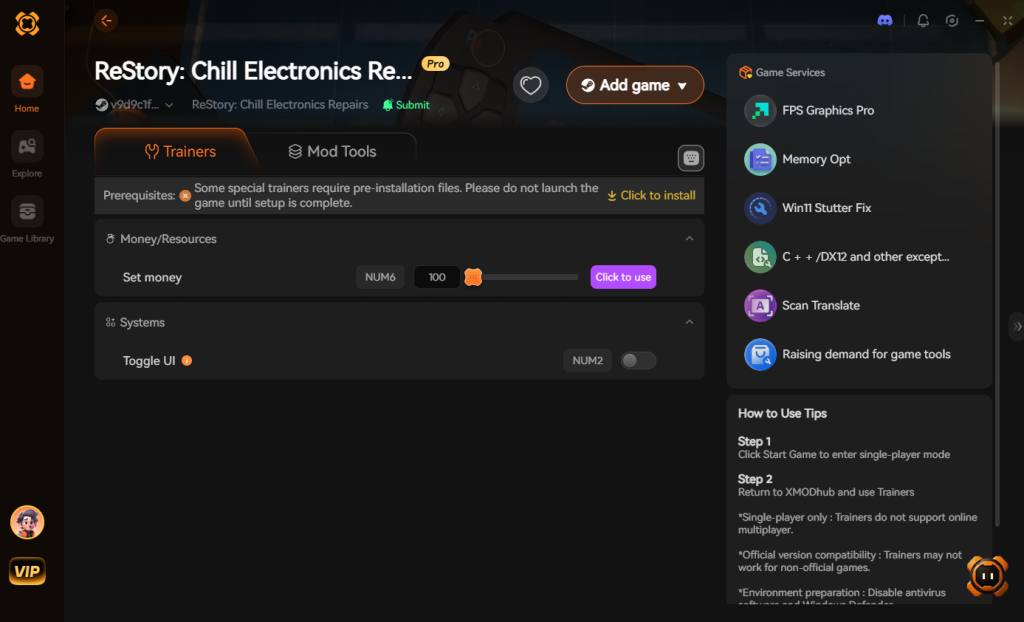
- Click “Play”.
- Toggle your desired cheats directly from the clean UI or via hotkeys.
Download ReStory: Chill Electronics Repairs Trainer Now
7. Troubleshooting: Cheats Not Working
Even with a streamlined tool like XMODhub, PC gaming environments can sometimes present technical hurdles. If you find that your modifications for ReStory: Chill Electronics Repairs are not activating correctly, check the following common issues:
- Administrator Rights and Antivirus Interference: The most common reason cheats fail to inject is that your Windows security settings are blocking the trainer from reading the game’s memory. Always ensure you right-click the XMODhub shortcut and select “Run as Administrator.” Additionally, overly aggressive antivirus software (like Windows Defender or third-party suites) may falsely flag the memory injection process. You must add the XMODhub installation folder to your antivirus exclusion list to ensure seamless operation.
- Game Updates Breaking Memory Hooks: ReStory: Chill Electronics Repairs is actively supported by its developers. Whenever a new patch or hotfix is downloaded via Steam, the specific memory addresses that control your Yen, inventory, and shop timer will shift. If your cheats suddenly stop working after a game update, simply wait a few hours. The XMODhub team automatically detects version changes and pushes silent updates to the trainer to align with the new memory architecture.
- Conflicting Overlay Software: Sometimes, third-party overlays can conflict with the hotkey detection of the trainer. If pressing the Numpad keys does not trigger the cheats, try disabling the Steam Overlay, Discord Overlay, or Nvidia GeForce Experience overlay. Alternatively, you can always use a second monitor or Alt-Tab out of the game to manually click the toggle switches directly within the XMODhub user interface.
8. Optimal Shop Progression: When to Use Modifications
In ReStory: Chill Electronics Repairs, the gameplay loop is meticulously designed to simulate the authentic, slow-burn grind of a tech repair business. Early on, you are tasked with incredibly simple, satisfying jobs—like cleaning dust out of old PC cases, swapping out dead batteries in basic flip phones, or replacing cracked screens on early 2000s PDAs. During these early hours, the game is incredibly relaxing.
However, as your shop’s reputation grows and you transition from a Level 1 amateur to a Level 5 master technician, the difficulty curve spikes dramatically. You will quickly find yourself overwhelmed by complex diagnostics, multi-layered micro-soldering tasks, steep supplier delivery wait times, and increasingly impatient customers. The relaxing atmosphere can quickly turn into a stressful time-management simulator.
This is the exact moment when utilizing ReStory: Chill Electronics Repairs cheats and console commands (via the XMODhub trainer) becomes a game-changer. Instead of burning out on the repetitive grind of sourcing rare capacitors or panicking as the daily timer ticks down before a massive rent payment is due, you can take back control of your experience. By toggling Freeze Shop Timer and Infinite Yen, you completely remove the artificial stress of running a business. You can focus purely on the zen-like puzzle of piecing a retro game console back together, listening to the lo-fi soundtrack, and enjoying the game exactly as the title suggests—chill.
9. The Hardest Electronics Repairs (And How Trainer Tools Help)
To truly understand why so many players seek out ReStory: Chill Electronics Repairs cheats and console commands, we need to look at the notorious late-game repair tickets. Some of these vintage devices feature intricate logic boards and fragile components that demand absolute perfection. If your hand shakes during a delicate soldering minigame, you risk destroying the customer’s device, failing the contract, and losing a massive chunk of your hard-earned Yen.
Here is a breakdown of the most notoriously difficult repair jobs in the game, and the specific XMODhub features that can help you bypass the frustration:
| Device Classification | Common Defect / Issue | Vanilla Grind Difficulty | Optimal XMODhub Solution |
|---|---|---|---|
| Vintage Flip Phones | Micro-soldering incredibly fragile ribbon cables to the mainboard. | High | Perfect Soldering |
| CRT Monitors | Safely diagnosing and discharging high-voltage capacitors without shorting the board. | Extreme | Instant Diagnostics |
| Retro Game Consoles | Repairing heavily corroded motherboard traces and replacing proprietary optical drives. | Medium | Infinite Spare Parts |
| Early MP3 Players | Swollen battery extraction and delicate housing reassembly under a strict time limit. | High | Max Customer Patience |
| Custom PC Builds | Tracing complex power supply faults through multiple intertwined wiring harnesses. | Very High | Instant Diagnostics |
By using the right modifications for the right jobs, you can bypass the mechanics that you find personally tedious while keeping the parts of the game that you genuinely enjoy completely intact.
10. Frequently Asked Questions (FAQ)
Q: Can I use these cheats on PlayStation or Xbox?
A: No. Modifying game memory or accessing developer consoles for ReStory: Chill Electronics Repairs is strictly limited to the PC version. Console ecosystems are heavily encrypted and do not allow third-party memory injection tools like XMODhub to operate.
Q: Is there a penalty for using cheats in single-player?
A: There is no account ban or official penalty for cheating in a single-player environment. The only downsides are the potential for corrupted save files and disabled achievements, which can be avoided by using a secure trainer like XMODhub. ReStory: Chill Electronics Repairs is a purely offline, single-player simulation experience, meaning you are completely safe to modify your game however you see fit without violating any multiplayer terms of service.
Q: Will XMODhub work if I play ReStory: Chill Electronics Repairs on a Steam Deck?
A: XMODhub is primarily designed for Windows desktop environments. While some advanced users have managed to run trainer software through Linux compatibility layers (like Proton) on the Steam Deck, it requires complex technical workarounds and is not officially supported for this specific title at this time.
Conclusion
Whether ReStory: Chill Electronics Repairs provides a built-in console or not, taking control of your single-player experience is easier than ever. While tweaking raw engine code can be a fun technical experiment, it comes with significant risks to your save files and achievements. For a flawless, risk-free experience, using a dedicated modification tool is always the smarter choice.
With secure support for over 5,000+ single-player PC games, you can easily customize your gameplay, skip the tedious grind, and play exactly the way you want.

Stop Grinding, Start Enjoying.
Bypass the tedious resource gathering and unlock your full potential instantly.

I am a passionate gamer and writer at XMODhub, dedicated to bringing you the latest gaming news, tips, and insights.
Connect with me:
LinkedIn Profile ↗






 Nancy Miller