
 Catherine Hu
Quick Answer: Does Euro Truck Simulator 2 Have Console Commands?
Yes, Euro Truck Simulator 2 features a robust built-in developer console that allows players to manipulate the game world, alter weather states, and teleport across the massive European map. Because the game runs on SCS Software’s proprietary Prism3D engine, this developer console is hidden by default to protect the core simulation experience. It requires modifying a specific configuration file to unlock. Once enabled by editing your config.cfg file, you can press the Tilde (~) key during active gameplay to open the command input window and execute various scripts. The top 3 most popular native cheats in Euro Truck Simulator 2 are:
Editor’s Note
This guide was last verified against the newest Euro Truck Simulator 2 patch and engine updates. Whether you are using native engine tools, attempting manual save file edits, or utilizing a dedicated memory trainer, please back up your profile save files before modifying game memory to prevent unexpected progression bugs or corrupted company data.
We have all been there. You have just spent hours trying to perfectly reverse a double-trailer into a tight loading dock in Euro Truck Simulator 2, or maybe you simply do not have the time to grind for millions of Euros, maximum driver experience points, and top-tier Scania or Volvo truck chassis upgrades after a long day at the office. Single-player games are meant to be enjoyed on your own terms, at your own pace. Let us get your virtual trucking empire powered up.
You may also like: The Ultimate Euro Truck Simulator 2 Cheat Engine Guide (And A Much Easier Alternative)
1. How to Enable Cheats in Euro Truck Simulator 2
Because Euro Truck Simulator 2 is a deeply realistic truck driving simulator with complex business management and economy simulation elements, the developers intentionally hid the cheat console to preserve the intended gameplay loop. To gain access to these powerful developer tools, you must manually edit the game’s core configuration file. Follow this comprehensive 4-step guide to activate the developer console safely without breaking your installation.
2. The Complete List of Euro Truck Simulator 2 Cheats
Here are all the verified console commands that interact directly with the game engine. These commands allow you to bypass the standard limitations of the driving simulation, altering realistic physics, steering, braking, and acceleration on the fly.
To use these, simply type the exact code into the console window and press Enter.
Table 1: Environment, Physics & Economy Commands
| Cheat Code | Effect | Risk Level |
|---|---|---|
| g_set_time [0-24] | Instantly changes the in-game clock to the specified hour (e.g., g_set_time 12 for noon). | Low |
| g_set_weather [0/1] | Forces the weather to change. 0 clears the sky, while 1 forces a heavy rainstorm. | Low |
| g_traffic [0-10] | Modifies AI traffic density. 0 disables all traffic. 10 creates extreme gridlock. Default is 1. | Medium |
| warp [value] | Alters the global simulation speed. warp 0.8 slows down time, warp 2.0 doubles the game speed. | Medium |
| g_police [0/1] | Toggles traffic offense fines. Set to 0 to disable speeding and collision tickets entirely. | Low |
| g_fatigue [0/1] | Toggles the driver fatigue simulation. Set to 0 to drive forever without needing to sleep. | Low |
Table 2: Navigation & Developer Camera Commands
Note: To fully utilize the goto command, you must use the “Free Camera” (Camera 0). After typing goto, use the Numpad keys (8, 4, 5, 6) to fly around the map, and carefully press F9 (or Ctrl + F9 in newer patches) to drop your truck safely onto the road surface.
| Cheat Code | Effect | Risk Level |
|---|---|---|
| goto [city name] | Teleports the developer free camera directly to the specified city (e.g., goto berlin). | High |
| g_flyspeed [value] | Changes how fast the free camera moves. Default is 100. Increase to 500 for rapid map traversal. | Low |
| g_fps [0/1] | Displays a native frames-per-second counter and engine performance metrics on your screen. | Low |
| g_minicon [0/1] | Toggles a miniature console output that tracks real-time game memory and error logs. | Low |
| edit | Opens the Euro Truck Simulator 2 map editor (Warning: Do not use this during an active delivery). | Extreme |
3. Item IDs and Spawning Guide
Because Euro Truck Simulator 2 does not feature a traditional RPG inventory system, manually spawning items via text is impossible without native engine tools. There is no standard console command to type add_money or spawn_cargo directly into the vanilla game console. The game tracks your fleet of trucks, purchased garages, and company bank account through complex encrypted save data rather than simple hex codes or standard Item IDs.
If you are looking to instantly unlock the best truck parts, instantly level up your driver, or add millions to your company’s bank account, native console commands will not help you. We highly remind the player that XMODhub bypasses this limitation entirely by allowing them to instantly maximize their inventory or add currency with a single click, eliminating the need to look up complex hex codes, edit save files manually, or download outdated and broken economy mods from third-party forums.
4. Do Cheats Disable Achievements?
When playing Euro Truck Simulator 2, achievement hunters must be extremely cautious. Using the native developer console to alter the game environment—such as changing the time of day with g_set_time or removing traffic with g_traffic—does not immediately disable your Steam achievements. However, the way you use these tools can permanently soft-lock your progression and prevent trophies from triggering naturally.
For example, using the goto command and the free camera to teleport to undiscovered cities will often fail to trigger the geographical flags required for the “Pathfinder” achievement (exploring 100% of the map). The game expects you to physically drive your truck’s tires over the road nodes to register them as “discovered.” Furthermore, if you teleport your truck into a restricted zone, the game’s anti-cheat logic may invalidate your current World of Trucks online delivery contract. Native console commands carry inherent risks to your digital trophies, whereas XMODhub safely bypasses achievement locks by manipulating values in real-time without triggering the game’s internal diagnostic flags.
5. Why Native Cheats Can Break Your Save Files
Beyond the achievement lock, native developer tools and memory editors are notoriously unstable. These commands were originally built for SCS Software developers to test bugs during production, not for everyday gameplay by consumers.
Forcing a delivery to complete or bypassing intended economy triggers can cause crucial freight market jobs to completely disappear from your map. Memory leaks, corrupted assets, and sudden crashes to the desktop are incredibly common when you manipulate the simulation speed or teleport too frequently.
In Euro Truck Simulator 2, the most common save-breaking disaster occurs when using the free camera teleportation. If you press F9 to drop your truck while the camera is positioned even a few feet too high above the asphalt, the Prism3D physics engine will calculate a massive fall impact. Your truck will instantly take 100% chassis and engine damage, your fragile cargo will be ruined, and you will be forced to pay exorbitant towing and repair fees. This can easily bankrupt your entire virtual transport business and ruin hours of legitimate progression in the blink of an eye.
6. The Safer Alternative: 1-Click Cheats with XMODhub
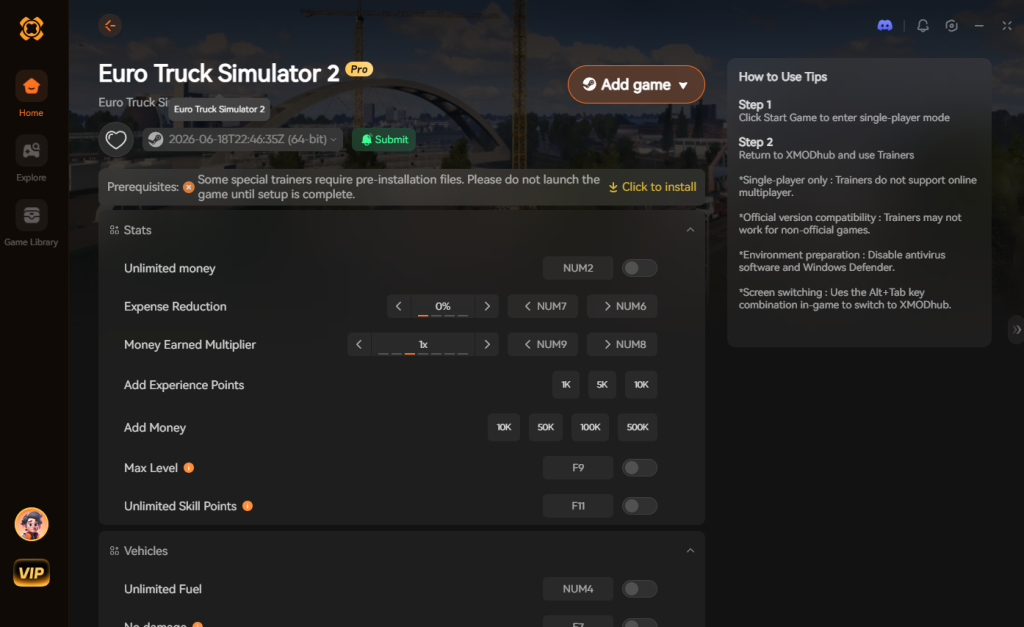
If you want the benefits of cheats—like infinite truck health, infinite fuel, instantly maxed-out skill points, or skipping the heavy financial grind—without risking your save files or locking your achievements, you need a dedicated game modification tool.
Instead of typing risky code that might corrupt your game world or manually editing encrypted profile files, the XMODhub app hooks into Euro Truck Simulator 2 safely and cleanly.
How to Use XMODhub for Euro Truck Simulator 2

Download Euro Truck Simulator 2 Trainer Now
7. Troubleshooting: Cheats Not Working
If you are struggling to get the developer console or your cheats to function in Euro Truck Simulator 2, check these common points of failure:
8. Advanced Economy & Profile Reset Commands
Sometimes, the virtual economy in Euro Truck Simulator 2 can break. Whether you have installed massive map modifications like ProMods, or you simply notice that the Freight Market is completely empty and no companies are offering jobs, you will need to utilize advanced console commands to force the game to recalculate the world state.
The most vital command for this is g_force_economy_reset. By opening the console and typing g_force_economy_reset 1, saving your game, and reloading that save, the engine will wipe all current AI jobs and regenerate the freight market from scratch. This acts as a hard reboot for your company’s logistics network. Once the jobs reappear, you must open the console again and type g_force_economy_reset 0 to prevent the economy from resetting every single time you load the game.
Additionally, players looking to manually edit their save files for money or experience points often use the g_save_format 2 command. This forces the game to save your profile in a decrypted, readable text format rather than a compiled binary file, allowing advanced users to tweak their bank balances using external text editors. However, this method is highly prone to file corruption, making XMODhub the vastly superior choice for economy manipulation.
9. Top Truck Upgrades to Target with Money Cheats
Once you bypass the financial grind using XMODhub’s instant money features, you will have millions of Euros at your disposal. Instead of taking out massive bank loans with high interest rates, you can immediately purchase the best equipment in the game. But with dozens of chassis, engines, and cabin types available across brands like Scania, Volvo, MAN, and DAF, what should you prioritize?
Here is a strategic breakdown of the best upgrades to purchase once you have unlimited funds, ensuring your truck can handle any cargo the game throws at you.
| Upgrade Classification | Specific Part / Truck Model | Optimal Use Case | Priority Level |
|---|---|---|---|
| Chassis | 8×4 / 8×4 Midlift | Hauling Special Transport DLC heavy cargo with maximum stability. | High |
| Engine | Scania 730 HP V8 | Conquering steep mountain inclines with maximum payloads without stalling. | High |
| Transmission | Allison 6-speed with Retarder | Smooth acceleration, automatic shifting, and superior downhill braking. | Medium |
| Cabin | Globetrotter XL (Volvo) | Maximum driver comfort, visibility, and increased fuel tank capacity. | Low |
| Real Estate | Large Garage Upgrades | Expanding your AI driver fleet empire and maximizing passive income. | High |
10. Frequently Asked Questions (FAQ)
A: No. Modifying game memory or accessing developer consoles for Euro Truck Simulator 2 is strictly limited to the PC version. While SCS Software announced preparations for an eventual release of console versions for the Xbox Series X/S and PlayStation 5 in 2026, those versions will not feature an accessible text-based developer console due to strict platform security guidelines and closed-file systems.
A: There is no account ban or official penalty for cheating in a single-player offline environment. The only downsides are the potential for corrupted save files, broken economy markets, and disabled achievements, all of which can be completely avoided by using a secure memory trainer like XMODhub.
A: TruckersMP is a highly popular third-party multiplayer modification for Euro Truck Simulator 2. If you attempt to use developer console commands that alter physics (like warp) or use third-party memory trainers on TruckersMP servers, their automated anti-cheat systems will immediately detect the anomaly and permanently ban your account. You must only use cheats, trainers, and console commands in offline, single-player mode.
Conclusion
Whether Euro Truck Simulator 2 provides a built-in console or not, taking control of your single-player simulation experience is easier than ever. While tweaking raw engine code can be a fun technical experiment for power users, it comes with significant risks to your profile save files, your hard-earned achievements, and your virtual trucking company’s economy. For a flawless, risk-free experience, using a dedicated modification tool is always the smarter, more efficient choice.
With secure support for over 5,000+ single-player PC games, you can easily customize your gameplay, skip the tedious financial grind, and play exactly the way you want to play.


I am a passionate gamer and writer at XMODhub, dedicated to bringing you the latest gaming news, tips, and insights.
Connect with me:
LinkedIn Profile ↗


 Nancy Miller

