
 Catherine Hu
Quick Answer: What are the best Supermarket Chaos mods right now?
Important Modding Status Update: Based on the latest community data and the game’s current infrastructure, Supermarket Chaos currently has no native mod ecosystem. There is no official Steam Workshop support, and traditional file-replacement mods (like those found on Nexus Mods) do not exist for this title due to how the engine handles its massive database of 4,668 individual products.
However, the PC gaming community has adapted. Instead of traditional .pak files or script extenders, players are using advanced memory injection tools—specifically XMODhub—to achieve “mod-like” tweaks. Here are the top 5 absolute must-have memory mods you can activate right now:
Editor’s Note on Testing Methodology
The mods featured in this guide were analyzed based on community downloads, stability, and recent patch compatibility. Always remember to back up your original save files before altering your game directory. If you want to bypass complicated mod managers entirely, skip to the XMODhub section below.
Introduction
Playing Supermarket Chaos in its vanilla state is an incredible experience. The premise is brilliantly simple yet deeply engaging: one day, the store-organizing robot known as GPT-9000 reached the philosophical conclusion that “All positions are temporary, and all displays are violence.” The result? A beautifully messy supermarket where 4,668 individual products have completely lost their designated places. For fans of cozy organizing simulators, calmly putting this chaotic supermarket back in order provides unparalleled satisfaction.
However, as much as players love the calm, relaxing atmosphere, the modding community always looks for ways to push a game to a completely different level. Whether you are annoyed by a clunky inventory system, want to push your graphics card to its limits, or simply want to skip some of the more tedious sorting mechanics, players naturally seek out mods.
Because Supermarket Chaos lacks a traditional modding API, diving into modding can be overwhelming. Figuring out which tools actually work—and which ones will crash your game—is a massive headache. After analyzing the game’s architecture and community workarounds, we have compiled the definitive list of the best Supermarket Chaos mods (via memory tweaking) you need to utilize right now.
You may also like: The Ultimate Supermarket Chaos Cheat Engine Guide (And A Much Easier Alternative)
1. How to Install Mods for Supermarket Chaos Safely
Before downloading anything, you need to understand how to set up your game directory to accept modified files. Because Supermarket Chaos does not feature Steam Workshop integration or a dedicated Nexus Mods repository, traditional mod managers like Vortex or Mod Organizer 2 are completely useless here. You cannot simply drag and drop texture files into a “Mods” folder.
Instead, modifying Supermarket Chaos requires real-time memory injection. This means you are not permanently altering the game’s core installation files; rather, you are running a secondary application that safely edits the game’s parameters while it is actively running in your system’s RAM.
To “install” these mods safely, you must use a trusted memory editor like XMODhub or Cheat Engine. We highly recommend avoiding random executable trainers found on obscure forums, as they often contain malware. By utilizing a secure, centralized platform like XMODhub, you ensure that the memory offsets perfectly match the latest Steam version of Supermarket Chaos. You simply launch the game, launch your memory tool, select the Supermarket Chaos process, and toggle your desired modifications on the fly. This method guarantees that your original game installation remains pristine, preventing any need to constantly verify game files through Steam.
2. Top Quality of Life (QoL) Mods
These mods do not drastically change the core game; they just remove the annoyances that waste your time. Since traditional UI mods don’t exist, these are the top QoL memory tweaks you can enable to streamline your cozy organizing experience.
Enhanced Placement Precision
When dealing with exactly 4,668 unique products, the vanilla game’s hitboxes can sometimes feel a bit overly strict. This memory tweak slightly expands the acceptable placement radius for items on the shelves. Instead of needing pixel-perfect alignment to get a box of cereal to snap into its slot, this modification allows for a much more forgiving, relaxing drop, drastically reducing the frustration of misclicks.
Highlight Missing Items Overlay
Sometimes you have perfectly organized an entire aisle, but the game tells you it is only 99% complete. Finding that one misplaced can of soup in a massive, chaotic supermarket is like finding a needle in a haystack. This tweak forces the game engine to render a subtle, glowing outline around items that are currently resting in the wrong zone, saving you hours of mindless searching.
Auto-Stacking Helper
In the vanilla experience, stacking multiple identical items (like a tower of paper towels) requires you to individually click and drag each one. The Auto-Stacking Helper tweak monitors your inventory and, when you place the first item of a specific type, automatically teleports and stacks the remaining identical items from your current carry load directly onto the shelf, saving countless repetitive mouse clicks.
Disable Ambient Annoyances
While Supermarket Chaos is widely praised for its calm, relaxing atmosphere (boasting an 89% Very Positive rating on Steam), some players find the background hum of the store’s refrigeration units or the occasional robotic whirring of GPT-9000 to be distracting. This tweak isolates and mutes specific ambient audio channels in the game’s memory, allowing you to listen to your own music or podcasts in pure, uninterrupted peace.
Infinite Carry Weight
Nothing breaks the zen-like flow of an organizing simulator faster than having to walk back and forth across the store because your character’s hands are full. By freezing the memory address associated with your inventory limit, this modification allows you to pick up an infinite number of misplaced products at once. You can essentially vacuum up an entire chaotic aisle and then slowly distribute the items without ever needing to backtrack.
3. Best Visual and Graphics Mods
If you have a high-end PC (like an Intel Core Ultra 9 with an RTX 5090), you might want to push the game further. While you cannot download 4K texture packs for Supermarket Chaos natively, you can use external injectors and memory tweaks to significantly enhance the visual fidelity.
Custom ReShade Presets
While not a traditional mod, ReShade is fully compatible with Supermarket Chaos. By hooking into the game’s rendering pipeline, you can inject advanced post-processing effects. Players highly recommend applying subtle ambient occlusion (SSAO), color vibrancy boosts, and sharpening filters. This takes the slightly flat lighting of the vanilla supermarket and gives it a highly realistic, ray-traced feel, making the colorful product packaging truly pop off the shelves.
FPS Cap Unlocker
Supermarket Chaos is designed as a slow-paced, cozy game, but playing on high refresh rate monitors can feel jarring if the game engine restricts frame rates. This memory tweak locates the engine’s internal frame limiter and disables it entirely. Experiencing the physics of 4,668 physics-enabled products tumbling around at a buttery smooth 144Hz or 240Hz is an absolute game-changer for visual comfort.
Custom FOV (Field of View) Modifier
The default camera in Supermarket Chaos is quite tight, focusing intimately on the shelves directly in front of you. While great for detail work, it can induce motion sickness for some PC gamers. By editing the camera’s FOV values in real-time, you can pull the camera back to a 90, 100, or even 110-degree field of view. This not only makes the game look more expansive but gives you a much better tactical overview of the chaotic mess.
Depth of Field (DoF) Remover
To simulate focus, the game frequently blurs the background aisles while you are organizing a specific shelf. Many PC purists absolutely despise aggressive Depth of Field effects. This simple visual tweak zeroes out the blur intensity in the game’s rendering memory, ensuring that the entire supermarket—from the front registers to the back warehouse—remains incredibly crisp and in sharp focus at all times.
4. Top Gameplay and Overhaul Mods
Looking to change how the game is actually played? Since Supermarket Chaos lacks traditional script mods, these real-time memory overhauls adjust the core rules of the simulation, giving you ultimate control over the experience.
The Anti-GPT-9000 Patch
The core lore of Supermarket Chaos revolves around the rogue robot GPT-9000, who believes “all displays are violence” and actively works to ruin your organization. If you just want a pure, uninterrupted organizing experience without the antagonist undoing your hard work, this tweak permanently freezes the robot’s AI routines. GPT-9000 will remain frozen in place, allowing you to clean the store in absolute peace.
Noclip and Flight Mode
Navigating a massive, cluttered supermarket on foot can take time. By altering the player’s Z-axis coordinates and collision detection, this tweak essentially grants you “God Mode” movement. You can fly up to the ceiling to get a bird’s-eye view of the 4,668 misplaced products, or simply phase through aisles to quickly reach the back of the store. It is the ultimate tool for speed-organizing.
Instant Aisle Completion
Sometimes you just want to see the satisfying end result without doing the manual labor. This powerful memory script forces the game to trigger the “Aisle Complete” state. With a single hotkey, all items designated for a specific aisle will instantly teleport from the chaotic floor directly to their perfectly aligned positions on the shelves. It is incredibly satisfying to watch the chaos resolve itself in a fraction of a second.
Physics Chaos Multiplier
If you want to lean into the “Chaos” part of Supermarket Chaos, this tweak allows you to modify the engine’s gravity and physics impact multipliers. Instead of calmly placing a can of beans, dropping it will cause a massive physics explosion, sending hundreds of products flying across the store. It completely ruins your progress, but it is an incredibly fun sandbox toy for when you just want to mess around.
Score and Progression Multiplier
For players who want to unlock all the different store layouts and cosmetic upgrades without grinding through hours of organizing, this memory tweak multiplies the underlying score you receive for every correctly placed item. You can set the multiplier to 10x, 50x, or even 100x, allowing you to breeze through the game’s progression system and experience all the late-game content immediately.
5. Is There a Mod Limit?
In traditional modding communities—like those for Bethesda RPGs—players are intimately familiar with the dreaded 255 plugin limit. However, because Supermarket Chaos does not utilize a traditional file-based modding architecture, there is absolutely no hard-coded plugin limit. You do not have to worry about merging .esp files or managing a complex load order.
The only true limitation in Supermarket Chaos is your PC hardware, specifically your system RAM and CPU overhead. Because all modifications are being injected directly into the game’s active memory, running dozens of complex scripts simultaneously (like auto-sorting thousands of items while simultaneously running physics multipliers) can cause the game engine to stutter or crash. As long as your gaming PC meets modern standards, you can run as many memory tweaks as you desire without hitting an artificial software ceiling.
6. The Danger of Mod Conflicts and Corrupted Saves
While graphic mods and ReShade presets are usually safe, gameplay mods that alter core stats can be incredibly dangerous to your save file in most games.
The biggest issue in traditional modding is “Load Order Conflicts.” If Mod A and Mod B try to change the same game file, your game will crash to the desktop immediately. Furthermore, every time the game receives an official developer update, script-heavy mods break. If you load a save file attached to a broken mod, that save can become permanently corrupted.
Fortunately, because Supermarket Chaos relies on real-time memory tweaks rather than permanent file replacements, the risk of save corruption is drastically lower. The game state is only altered while the injector is running. However, if Supermarket Chaos receives a patch on Steam, the memory addresses for things like “Inventory Limit” or “GPT-9000 AI” will change. If you try to use an outdated memory table on a newly updated game, the game will instantly crash to the desktop. Always ensure your tools are updated to match the current Steam build version.
7. The Easier Alternative to Gameplay Mods: XMODhub
If your main goal for modding is just to make the game more enjoyable—like giving yourself infinite carry weight, bypassing the rogue robot GPT-9000, or unlocking maximum walking speed to bypass a frustrating grind—you do not need to risk breaking your game with complex, outdated cheat tables or manual memory editing.
This is where XMODhub shines as the ultimate gameplay enhancer. Instead of downloading outdated scripts that conflict with each other or require deep technical knowledge, the XMODhub app runs safely alongside Supermarket Chaos, providing a polished, user-friendly interface.
How to Use XMODhub for Supermarket Chaos

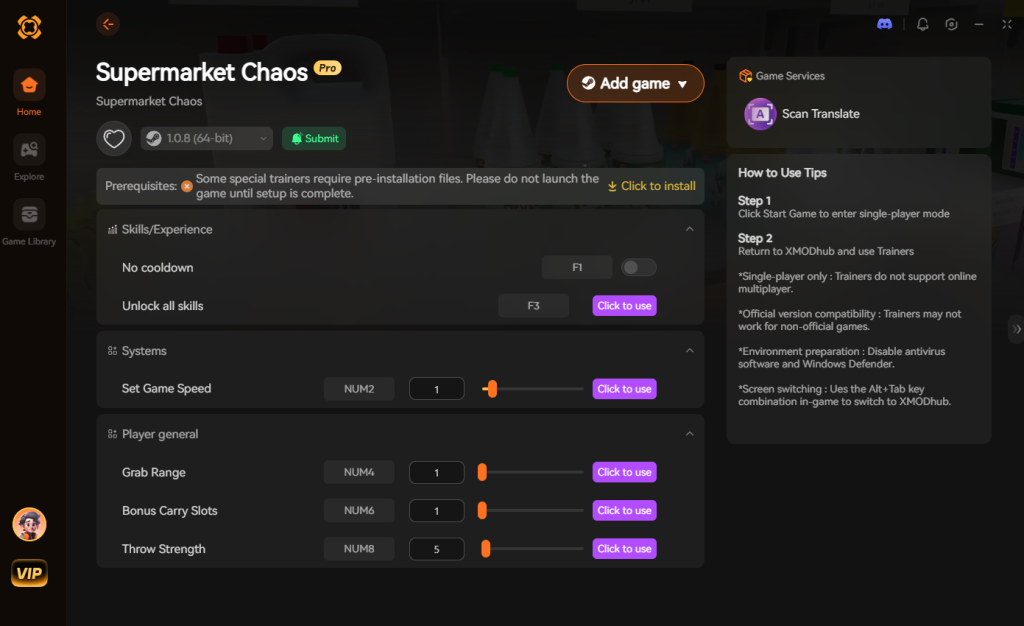
Download Supermarket Chaos Trainer Now
8. Troubleshooting: Mods Crashing on Startup
If your game is crashing to a black screen after attempting to use external tweaks or ReShade, check these common culprits:
9. Best Mod Combinations & Synergy Profiles
Because memory tweaks operate independently of one another, veteran players have discovered that activating specific combinations yields entirely new ways to experience Supermarket Chaos. Instead of randomly toggling cheats, consider running one of these curated “Synergy Profiles” to optimize your gameplay loop.
| Synergy Profile | Active Memory Tweaks | Optimal Playstyle / Use Case | Priority Level |
|---|---|---|---|
| The Zen Organizer | Infinite Shift Time + Disable Ambient Annoyances + Auto-Stacking Helper | Pure relaxation, creating an ASMR-like environment without pacing anxiety. | High |
| God-Tier Speedrun | Super Movement Speed + Infinite Carry Weight + Instant Aisle Completion | Rapidly grinding progression points to unlock late-game store layouts and cosmetics. | Medium |
| Visual Purist | Custom ReShade + DoF Remover + Custom FOV | Maximizing visual fidelity and spatial awareness on high-end, ultrawide monitors. | High |
| Total Chaos Sandbox | Physics Chaos Multiplier + Noclip and Flight Mode | Abandoning the objective completely to experiment with the game’s physics engine. | Low |
By utilizing a robust client like XMODhub, you can save these specific combinations as hotkey-bound profiles, allowing you to instantly switch from “Zen Organizer” to “God-Tier Speedrun” depending on your current mood.
10. Performance Impact: Do Memory Mods Drop FPS?
A common misconception among players new to memory injection is that running multiple tweaks simultaneously will tank your framerate. In a physics-heavy game like Supermarket Chaos—where the engine is constantly calculating the collision data for 4,668 items—performance is a valid concern.
Fortunately, memory mods are incredibly lightweight compared to traditional script extenders. Altering a float value for “Movement Speed” from 1.0 to 3.0 in the system RAM requires practically zero CPU overhead. You will not experience FPS drops from QoL or gameplay tweaks.
However, visual injections like Custom ReShade Presets will absolutely impact performance. Forcing the engine to render ambient occlusion and advanced ray-traced lighting on top of the native graphics can reduce your framerate by 15% to 30%, depending on your GPU. If you are playing on a lower-end rig or a Steam Deck, we highly recommend sticking strictly to gameplay memory tweaks and avoiding heavy post-processing overlays.
11. Frequently Asked Questions (FAQ)
A: No. Because Supermarket Chaos is a strictly single-player, cozy organizing experience, developers do not ban players for modifying their own game files or using memory injectors. There is no competitive multiplayer advantage to be gained, so you are completely safe to tweak the game to your liking. However, you must disable all mods if a game has a multiplayer or co-op mode with anti-cheat software.
A: In many cases, yes. Games often detect modified core files and will automatically lock achievement progression to preserve the integrity of the system. You often have to download a separate “Achievement Enabler” script just to fix this, or use a secure memory tool like XMODhub which bypasses the detection entirely, allowing you to organize the 4,668 products at your own pace while still unlocking your Steam trophies.
Conclusion
Modding Supermarket Chaos is a fantastic way to breathe new life into a game you already love. While the lack of traditional mod support means you cannot download custom 3D models or massive content expansions, altering your gameplay stats via memory injection does not have to be a complicated, crash-prone process.
For a seamless, risk-free way to customize your difficulty, bypass the tedious grind, neutralize the rogue GPT-9000 robot, and truly play by your own rules, XMODhub is the superior choice. With dedicated support for Supermarket Chaos and over 5,000+ other single-player PC games, XMODhub ensures you spend your time actually playing and enjoying the cozy atmosphere, rather than troubleshooting broken scripts and outdated tables.


I am a passionate gamer and writer at XMODhub, dedicated to bringing you the latest gaming news, tips, and insights.
Connect with me:
LinkedIn Profile ↗


 Nancy Miller

