Catherine Hu
Quick Answer: Does Fortune Mill Have Console Commands?
No, Fortune Mill does not have a built-in developer console or native text-based cheat codes. Because the game is built around incremental progression, idle mechanics, and heavily randomized gacha systems, the developers completely removed the debug console before the final release to prevent players from easily breaking the game’s economy. Pressing the tilde (~) key or attempting to modify configuration files will not open any command prompt.
Editor’s Note
This guide was last verified against the newest Fortune Mill patch. Whether you are using native engine tools or a dedicated trainer, please back up your save files before modifying game memory to prevent unexpected bugs.
We have all been there. You have just spent hours trying to perfectly time the Dart Throw minigame in Fortune Mill, or maybe you simply do not have the time to grind for endless Pachinko balls and scratch-off tickets after a long day. When a game heavily relies on a 1-in-6 dice roll mechanic or an unforgiving collectathon just to progress, the fun can quickly turn into a chore. Single-player games are meant to be enjoyed on your own terms. Let us get your character powered up and your gacha pulls maximized.
You may also like: Comprehensive Fortune Mill Modding & Tools Guide
1. How to Enable Cheats in Fortune Mill
In many PC games, accessing cheats is as simple as tweaking an .ini file and pressing the tilde (~) key to bring up a text box. However, Fortune Mill is a tightly compiled indie game that blends incremental clicker mechanics with complex luck-based minigames. Because the entire gameplay loop revolves around wealth accumulation and pulling from gacha machines across its five distinct rooms, the developer completely stripped the debug console from the retail build. There are no hidden developer modes, no secret keystrokes, and no text boxes to input commands.
Since there is no developer console, players cannot type in codes to spawn items or alter their stats. If you want to take control of your progression, you must utilize external memory injection. Instead of struggling with outdated hex editors like Cheat Engine, which require you to manually search for changing integer values every time you buy a scratch-off ticket, the most efficient method is using a dedicated trainer.
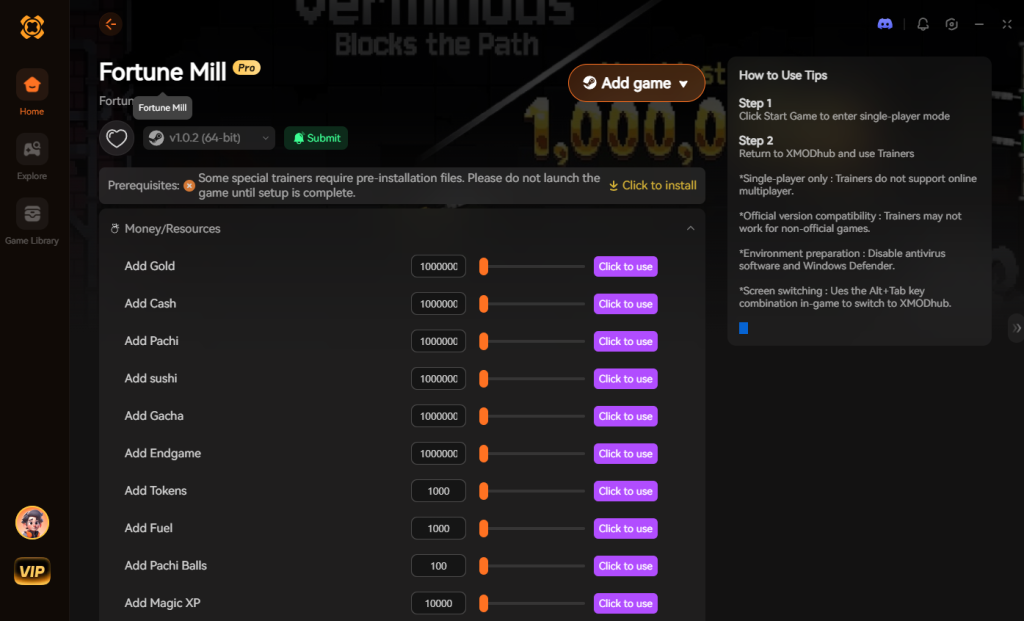
Here is the simple 3-step process to download and attach XMODhub to Fortune Mill to enable cheats:

Download Fortune Mill Trainer Now
2. The Complete List of Fortune Mill Cheats
Because Fortune Mill does not feature a developer console, there are no text-based cheat codes to input. You will not find any add_money 1000 or god_mode strings that work in this game. However, you can achieve the exact same effects—and much more powerful manipulations—using the XMODhub app.
3. Item IDs and Spawning Guide
In games with traditional developer consoles, players can usually type a command like player.additem [ItemID] [Quantity] to instantly spawn items. However, because Fortune Mill lacks a developer console, manually spawning items via text is impossible. XMODhub bypasses this hurdle by intercepting reward functions, allowing you to maximize inventory organically without needing Item IDs.
4. Do Cheats Disable Achievements?
Using native console commands in most games would disable achievements. However, because XMODhub operates externally in system RAM rather than modifying the game’s executable, your achievements remain safe. The game engine simply registers your progress as legitimate, allowing you to unlock milestones without penalty.
5. Why Native Cheats Can Break Your Save Files
Native developer tools and raw memory editors are notoriously unstable. Forcing values beyond intended thresholds often results in corrupted JSON or Base64 save files. When internal arrays misalign, you risk losing your pets, high scores, and entire progress. XMODhub avoids this by injecting safe, temporary values that do not persist after closing the game.
6. The Safer Alternative: 1-Click Cheats with XMODhub
XMODhub is the preferred method for safe game modification, ensuring stability through constant updates matching Steam versions. Benefits include Achievement Safety, Save File Protection, and convenient One-Click Toggles.
7. Troubleshooting: Cheats Not Working
If you encounter issues, ensure you are running XMODhub as Administrator, check for game version mismatches, verify your antivirus hasn’t flagged the injector, and disable conflicting overlays like Discord or Steam.
8. Optimal Progression Strategy: What to Upgrade First
Prioritize Passive Coin Multipliers for idle wealth, then pivot to the Gacha Mechanics tree for legendary pet charms. This path guarantees the fastest return on investment in the early game.
9. Legitimate Farming Methods vs. Console Commands
Legitimate farming requires 40 to 60 hours of repetitive minigame play. Using XMODhub condenses this grind into an afternoon, allowing players with limited time to fully experience the game’s late-game content without the artificial time-gating.
10. Frequently Asked Questions (FAQ)
A: No. Modifying game memory is limited to the PC version; console ecosystems do not permit external memory injection.
A: No. There are no bans for single-player environments, provided you use secure tools like XMODhub instead of risky raw memory editors.
A: No, it actually accelerates idle wealth generation. Just disable it during precision minigames.
Conclusion
Whether Fortune Mill provides a built-in console or not, taking control of your single-player experience is easier than ever. While tweaking raw engine code or attempting to manually edit memory values can be a fun technical experiment, it comes with significant risks to your save files, achievements, and overall game stability—especially in an incremental game where the math scales exponentially.
For a flawless, risk-free experience that lets you bypass the grueling gacha grind and tedious 1-in-6 dice rolls, using a dedicated modification tool is always the smarter choice. With secure support for over 5,000+ single-player PC games, you can easily customize your gameplay and play exactly the way you want.


I am a passionate gamer and writer at XMODhub, dedicated to bringing you the latest gaming news, tips, and insights.
Connect with me:
LinkedIn Profile ↗


 Nancy Miller