胡凱琳
胡凱琳
⚡Quick Answer:
Are there cheat codes for TerraTech Legion on PC?
Modern PC versions of TerraTech Legion do not feature traditional text-based cheat codes. Instead, players must either modify the Unreal Engine 5 client using a third-party script injector to unlock the Developer Console (pressing the ~ key) to type in commands manually, or use a dedicated PC trainer. Because forcing the console is highly unstable, the safest and fastest method is using an automated mod manager like XMODhub, which gives you a clean menu for God Mode, Infinite XP, and instant block spawning with a single click.
Because traditional text-based commands are completely disabled by the engine, the 3 most popular cheat features require an external memory trainer like XMODhub:
📋 [Editor’s Note]
> Hey guys, Catherine Hu here. Remember the golden days of gaming when you could just pause, type in a secret code like “HESOYAM”, and instantly get infinite ammo? Sadly, modern roguelites don’t really do that anymore. When I hit the endgame grind in TerraTech Legion, I spent hours trying to figure out how to enable the developer console just to spawn some legendary Plasma Cannons and Titanium armor. It was a massive headache involving forcing Unreal Engine debuggers and risking my entire run. Today, I’m going to show you the reality of activating built-in cheats if you want to type commands manually, but I’ll also share the modern, 1-click shortcut I actually use to get God Mode instantly and destroy the Planetary Bosses.
您可能也會喜歡: The Ultimate TerraTech Legion Cheat Engine Guide (And A Much Easier Alternative)
🤖 Introduction: Why Bend the Rules?
Gaming is supposed to be an escape, not a second job. TerraTech Legion is an incredible bullet-heaven vehicle builder, but let’s face it: the roguelite progression system can be brutally unforgiving. Whether you are stuck on the final Planetary Boss Mech dying for the twentieth time because you couldn’t find a Repair Bubble, or you simply do not have the 40 real-world hours required to grind for the heaviest weapon blocks, sometimes you just need to level the playing field.
Using cheats on PC isn’t about ruining the game; it’s about customizing your single-player experience to fit your schedule and playstyle. In this guide, we will break down the two primary ways to hack your gameplay: the old-school manual Unreal Engine console command method, and the modern, automated trainer approach.
💻 Built-In PC Cheats: How to Enable the Developer Console
For many older PC games, the only way to manually input cheats is by unlocking the hidden developer console. Players often look for a standard .ini config method:
C:\Users\[Username]\AppData\Local\TerraTechLegion\Saved\Config\Windows\.ConsoleKey=Tilde. Save and close the file.⚠️ The Catch: This simple .ini tweak does not work for TerraTech Legion. Because Payload Studios built the game on Unreal Engine 5, the native debug console is entirely stripped from the retail build to protect the procedural wave progression. Pressing the tilde key (~) natively does nothing.
To enable the console, you must download a third-party Universal Unreal Unlocker (UUU), inject it into the TerraTechLegion.exe memory while the game is running, and force the text box to appear. Even then, typing old engine commands often results in crashes.
🔍 How to Find TerraTech Legion Item IDs & Spawn Codes
If you manage to force the developer console open with a UUU injector, you cannot just type “give orbital laser”. You need the exact Blueprint Class path recognized by the UE5 engine.
For example, to spawn a heavy energy weapon, the command string typically looks like this: Summon BP_Weapon_Plasma_Heavy_C
Finding these exact Item IDs requires keeping a massive, data-mined Wiki spreadsheet open on your second monitor. Because TerraTech Legion features hundreds of unique chassis blocks, wheels, and turrets, cross-referencing these lists while trying to survive a swarm of AI bots is incredibly tedious and often crashes the physics engine if the block spawns inside your vehicle.
🚀 The Modern Way: 1-Click TerraTech Legion Cheats with XMODhub
Let’s be honest: you just want to build a monstrous rolling fortress and blast machines, not feel like a data entry clerk typing out complex UE5 Blueprint paths. Furthermore, injecting raw Universal Unreal Unlocker scripts can permanently corrupt your run or cause fatal physics errors.
This is why the PC modding community has moved on to automated trainers. XMODhub replaces the clunky, locked developer console with a sleek, modern UI.
Why XMODhub is the best cheat method for TerraTech Legion:
⚙️ How to Use XMODhub for TerraTech Legion?

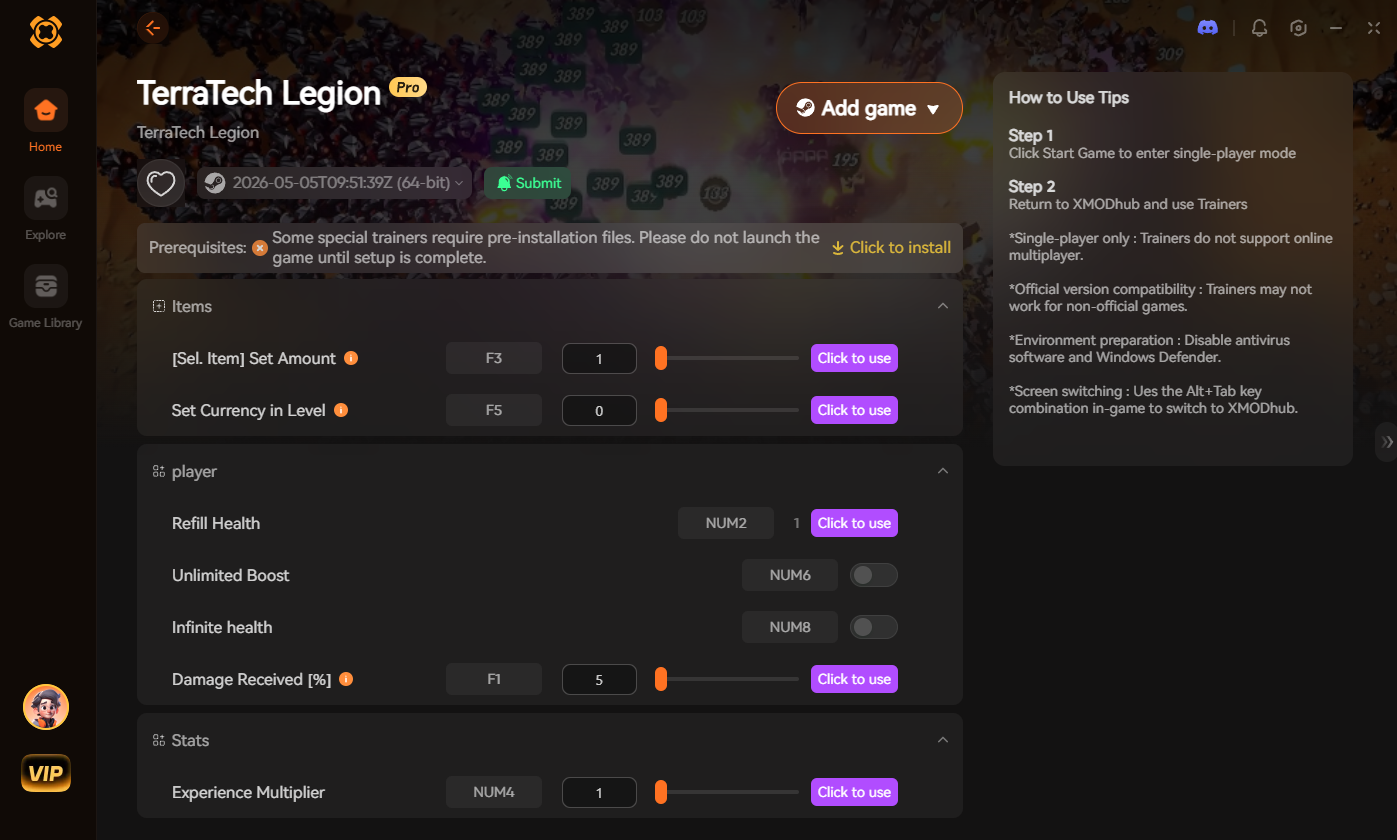
[Download the TerraTech Legion XMODhub Trainer Here]
🧨 Most Popular Cheats You Can Activate Right Now
Whether you attempt to force manual console commands via an unlocker or simply toggle them on via XMODhub, here are the most highly requested cheats for TerraTech Legion that completely change the bullet-heaven experience:
🎮 Do Cheats Work on the Steam Deck?
With the massive popularity of handheld PC gaming, many players want to know if they can cheat on the go—especially since TerraTech Legion is an incredible pick-up-and-play title.
🏆 Do Cheats Disable Achievements?
If you use a forced developer console injector, yes. The moment the game detects a script hook forcefully opening the UE5 debug logs, TerraTech Legion will usually flag your current roguelite run and permanently disable Steam achievements for that session.
The Workaround: Because XMODhub uses stealth memory injection rather than altering the game’s internal command logs, the Unreal Engine usually cannot detect that you are cheating. This means you can run God Mode, destroy the final boss, and still unlock your 100% completion achievements.
💬 Frequently Asked Questions (FAQ)
Q: Are these PC cheats safe to use?
A: Yes, as long as you use a verified platform. Using a sandboxed tool like XMODhub is completely secure. However, be extremely careful when downloading random standalone .exe cheat programs or outdated Universal Unreal Unlockers from YouTube descriptions, as they often contain malware.
Q: Can I use these cheats on the Epic Games Store version?
A: Modifying files to enable the console is notoriously difficult on different storefronts due to DRM. Fortunately, XMODhub reads active memory and bypasses this entirely, working flawlessly with both the Steam and Epic Games PC versions of TerraTech Legion.
Q: Will using cheats corrupt my save file?
A: Memory-injected cheats (like infinite core health) will not corrupt your save, as they disable as soon as you close the game. However, force-spawning unreleased Blueprint blocks via a UUU console can permanently glitch your physics, so always back up your save folder before heavily modifying your build pool.
Q: Can I use these cheats in multiplayer or co-op?
A: Currently, TerraTech Legion is a single-player experience, making cheats perfectly fine to use. If the developers ever introduce online multiplayer, cheats and console commands will be strictly disabled for public lobbies. Keep the chaos in single-player!
🚀 Conclusion: Play By Your Own Rules
If you are stuck on a brutally difficult boss wave, or you just want to experience the power fantasy of having Infinite Block Capacity to build the ultimate rolling dreadnought, you shouldn’t feel bad about bending the rules in a single-player environment.
While digging through Unreal Engine injectors to unlock developer commands is one way to do it, it’s outdated, risky, and frustrating. XMODhub makes it effortless. And the greatest benefit? XMODhub supports over 5,000+ PC games. Once you install the app, you have the ultimate cheat engine for almost your entire library. Whether you are blasting enemies with infinite ammo in Deep Rock Galactic: Survivor, turning on God Mode to survive Soulstone Survivors, or building the ultimate mech in TerraTech Legion, you are always just one click away from total control.


 南希-米勒
南希-米勒