胡凱琳
胡凱琳
🎯 [Quick Answer]
Are there cheat codes for Call of Duty on PC?
The answer depends entirely on which era of the franchise you are playing.
📡 [Editor’s Note]
Hey guys, Catherine Hu here. Remember the golden days of PC gaming when you could just pause World at War, type in a secret command, and instantly get infinite ammo to survive the ridiculous Veteran difficulty grenade spam? Sadly, modern shooters running on the unified Call of Duty HQ client don’t allow that anymore. When I hit the endgame grind in the latest Modern Warfare campaign, I spent hours trying to figure out how to enable the developer console just to survive the heavily armored Juggernaut encounters. It was a massive headache involving editing config files and risking a permanent Ricochet Anti-Cheat ban. Today, I am going to show you how to safely activate built-in cheats for the classic titles if you want the technical challenge, but I will also share the modern, 1-click shortcut I actually use to get God Mode instantly in offline single-player modes.
🚁 Introduction: Why Bend the Rules?
Gaming is supposed to be an escape, not a second job. Call of Duty campaigns and Zombies modes offer incredible, cinematic power fantasies, but let’s face it: the progression system and artificial difficulty spikes can be brutally unforgiving. Whether you are stuck on the “Mile High Club” Veteran checkpoint dying for the fiftieth time, or you simply do not have the three uninterrupted hours required to grind to Round 50 in Solo Zombies just to test out a fully Pack-a-Punched weapon, sometimes you just need to level the playing field.
Using cheats on PC isn’t about ruining the game for others; it’s about customizing your strictly single-player experience to fit your schedule and playstyle. In this guide, we will break down the two primary ways to hack your gameplay: the old-school manual console command method for classic titles, and the modern, automated trainer approach for current-generation campaigns.
⚙️ Built-In PC Cheats: How to Enable the Developer Console
For older Call of Duty PC games (typically titles released on the classic id Tech 3 modified engines), the only way to manually input cheats is by unlocking the hidden developer console. Here is the standard method for classics like Call of Duty 4: Modern Warfare or World at War:
C:\Program Files (x86)\Steam\steamapps\common\Call of Duty\players\profiles.config.cfg file using Notepad.seta monkeytoy "1" and change it to seta monkeytoy "0". Save and close the file. (Note: You must also enable the console via the in-game options menu under Game Settings).god (for invincibility) or give ammo and press Enter.The Catch: Typing out strings of commands every time you load into a new campaign mission gets old very quickly. More importantly, modern Call of Duty titles have completely removed this functionality. Attempting to force the console open in recent releases will trigger the kernel-level anti-cheat and instantly crash your game.
🔍 How to Find Call of Duty Item IDs & Spawn Codes
If you are using the developer console in older titles, you cannot just type “give weapon”. You need the exact string ID recognized by the specific game’s engine.
For example, to spawn the famous Ray Gun in classic Treyarch Zombies, the command string typically looks exactly like this: give ray_gun
Finding these exact weapon IDs requires keeping a massive, community-updated Wiki page open on your second monitor. Because every Call of Duty features dozens of unique assault rifles, launchers, and Wonder Weapons with specific internal code names (like m4_silencer_mp 或 thundergun_zm), cross-referencing these lists while trying to survive a zombie horde is incredibly tedious.
🚀 The Modern Way: 1-Click Call of Duty Cheats with XMODhub
Let’s be honest: you just want to play the campaign and have fun, not feel like a data entry clerk typing out console commands. Furthermore, modifying configuration files manually is heavily restricted in modern Call of Duty games due to unified online clients.
This is why the PC modding community has moved on to automated offline trainers. XMODhub replaces the clunky developer console with a sleek, modern UI designed strictly for single-player modes.
Why XMODhub is the best cheat method for Call of Duty single-player:
How to Use XMODhub for Call of Duty?

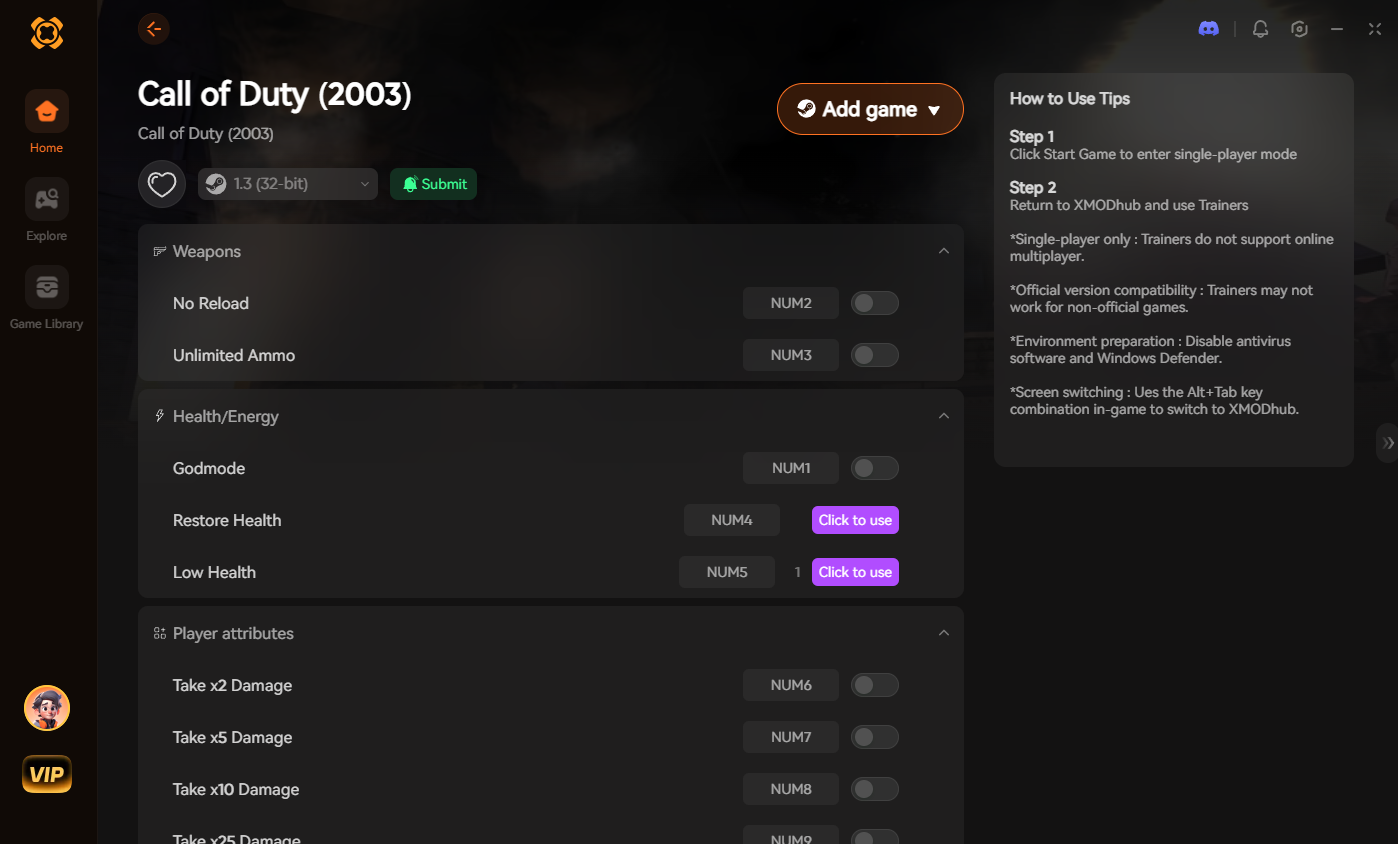
[Download the Call of Duty XMODhub Trainer Here]
🔥 Most Popular Cheats You Can Activate Right Now
Whether you use the manual console commands in older games or simply toggle them on via XMODhub for modern offline campaigns, here are the most highly requested cheats that completely change the cinematic experience:
🎮 Do Cheats Work on the Steam Deck?
With the massive popularity of handheld PC gaming, many players want to know if they can play campaigns on the go with cheats.
🏆 Do Cheats Disable Achievements?
If you use the built-in developer console on classic titles, yes. The moment you execute a command like “god” or “noclip”, the engine will flag your session and permanently disable Steam achievements for that specific mission playthrough.
The Workaround: Because XMODhub uses stealth memory injection rather than altering the game’s internal command logs, the single-player engine usually cannot detect that you are modifying local values. This means you can run Infinite Ammo in the campaign and still unlock your 100% Veteran Completion achievements seamlessly.
💬 Frequently Asked Questions (FAQ)
A: Yes, as long as you use a verified platform and keep them strictly in offline, single-player modes. Typing in console commands in older titles is perfectly safe. Using a sandboxed tool like XMODhub for offline campaigns is also highly secure. However, be extremely careful when downloading random standalone executable cheat programs from YouTube descriptions, as they often contain trojans.
A: Absolutely not. These cheats and console commands are strictly engineered for single-player Campaigns and Solo offline Zombies. Call of Duty utilizes the kernel-level Ricochet Anti-Cheat system. Using third-party trainers in a multiplayer lobby or Warzone will trigger the anti-cheat system instantly and result in a permanent, hardware-level account ban. Keep the power fantasy strictly in single-player!
A: Memory-injected cheats (like infinite health) will not corrupt your save, as they disable as soon as you close the game. However, spawning in unreleased or bugged weapons via the old developer consoles can sometimes cause mission progression scripts to soft-lock. Always back up your save folder before heavily modifying your loadout mid-mission.
🌟 Conclusion: Play By Your Own Rules
If you are stuck on a brutally difficult Veteran checkpoint, or you just want to experience the power fantasy of having infinite ammo to obliterate a horde of Zombies, you shouldn’t feel bad about bending the rules in a strictly single-player environment.
While digging through config files to unlock developer commands is a fun trick for nostalgic titles, it is outdated, risky, and completely impossible on modern releases. XMODhub makes it effortless for offline play. And the greatest benefit? XMODhub supports over 5,000+ PC games. Once you install the app, you have the ultimate cheat engine for almost your entire single-player library. Whether you are blasting through the Call of Duty campaign, turning on 上帝模式 to survive 賽博朋克 2077, or giving yourself unlimited resources in Fallout 4, you are always just one click away from total control.


 南希-米勒
南希-米勒