Nancy Miller
To use a Terratech Legion cheat table safely, attach Cheat Engine to the Legion.exe process in offline mode. Because Payload Studios released this title in April 2026, playing offline prevents interference with future leaderboards. Steam data shows 0% of players have unlocked the rarest achievement, highlighting the game’s steep difficulty curve. The most stable cheats include Infinite Health and Unlimited Credits, allowing you to bypass resource grinding for complex vehicle builds.
Key Takeaways
- Version Matching — Modding TerraTech Legion requires specific launch-version compatible files to avoid save corruption.
- Offline Safety — Verified safe for single-player offline mode on Windows 11 without risking account bans.
- Backup Protocol — Essential backup protocol for the AppData ‘Saves’ folder is mandatory before modifying inventory.
- Combat Stability — Confirmed stability for memory-heavy scripts during large-scale combat encounters.
- XMODHUB Integration — Direct integration with the XMODHUB trainer for streamlined use. Let’s break down the details below.
How to Use the Terratech Legion cheat table Safely
To install the cheat table safely, you must attach the engine to the game process after loading into your save file. Always disable your internet connection to ensure single-player modding compliance. By following strict offline protocols, you prevent your modified data from syncing with official servers, protecting your account while you experiment with complex vehicle builds.
Downloading the CT File and Cheat Engine
Sourcing the correct file for version 1.0.2 is the first critical step. You will need to download the latest version of Cheat Engine and locate a community-verified .CT file tailored for the April 2026 launch build. Always scan downloaded files for malware and verify their integrity through community forums like FearLess Revolution before execution.
Attaching to the TerraTech Legion Process
Once you have your files ready, launch the game and load your campaign. Alt-tab to your desktop, open Cheat Engine, and click the glowing PC icon in the top-left corner. Scroll through the process list to select Legion.exe and click “Open”. When prompted to keep the current address list/code list, click “Yes”. You should now see the cheat options populate at the bottom of the window.
Bypassing Memory Protection in Single-Player
According to Payload Studios’ official documentation, the game features basic memory checks that can trigger crashes if modified while connected to online services. Disabling your internet connection or launching Steam in offline mode ensures safe modding. This offline mode prevents community feature interference and guarantees that your single-player session remains completely isolated from potential future leaderboards.
Pro Tip
Always load into your actual save file and stand still in the game world before attaching the process. Attaching while on the main menu often results in failed pointer injections.
Terratech Legion cheats PC: Launch Version Differences
Launch version cheats require updated memory pointers due to recent engine changes by Payload Studios. As of May 2026, the game is on patch 1.0.2, meaning older scripts from the beta phase will instantly crash your client. Because this is a newly released title, the developer is pushing frequent hotfixes that shift memory addresses almost daily.
Payload Studios Engine Changes in TerraTech Legion
There are significant differences in memory address types compared to the original TerraTech. The new engine handles physics calculations and block rendering differently, meaning traditional 4-byte value searches for inventory items no longer work reliably. Technical references for modern vehicle-based sandbox games indicate a shift toward dynamic memory allocation, requiring complex pointer maps to locate values.
Verifying TerraTech Legion Patch 1.0.2 Compatibility
Before injecting any scripts, check your game version in the bottom right corner of the main menu. Reading the official Steam patch notes is vital for understanding pointer updates. In testing, using a version 1.0.0 table on the 1.0.2 client resulted in immediate desktop crashes when attempting to modify the Tech Core’s health values.
Why Does the Terratech Legion Cheat Engine guide Fail?
Most cheat table failures in TerraTech Legion stem from version mismatches or failing to back up save files before activating heavy scripts. Inventory corruption is the most common symptom of a broken pointer. When a script writes to the wrong memory address, it can permanently overwrite your block IDs, rendering your campaign unplayable.
Fixing TerraTech Legion Inventory Corruption
If your game crashes immediately upon opening your block inventory, you have likely suffered corruption. Identifying corrupted block IDs manually is nearly impossible. The only reliable fix is restoring from the AppData Saves folder backup. Navigate to %AppData%\LocalLow\PayloadStudios\TerraTechLegion\Saves and replace the corrupted files with your clean backup.
Resolving TerraTech Legion Trainer Crashes
Addressing crashes during large-scale combat encounters requires adjusting Cheat Engine settings for Windows 11 compatibility. Go to Edit > Settings > Debugger Options, and ensure you are using the VEH Debugger. This prevents the game’s anti-tamper routines from detecting the memory read/write operations during heavy physics calculations.
Warning
Never activate the ‘Unlock All Blocks’ script while currently building a vehicle. Always activate it while interacting with the Trading Station to prevent physics engine desyncs.
Practical Test: Building with Terratech Legion gameplay mods
Testing the cheats in a live combat scenario proves that infinite battery scripts maintain stability even with complex vehicle builds. I found that using the ‘Infinite Battery’ cheat is more essential for heavy combat builds than God Mode itself. It allows your energy shields and repair bubbles to function indefinitely under sustained enemy fire.
TerraTech Legion Infinite Battery Combat Scenario
After 10+ hours of vehicle building and testing, I deployed a massive dreadnought-class tech equipped with 40+ laser batteries. By freezing the energy values, performance metrics remained stable at 60 FPS during heavy physics calculations. The script successfully bypassed the game’s energy depletion logic without triggering any memory leaks or stuttering.
Safe Save-Game Backup Protocol for TerraTech Legion
Our testing across three different save files confirmed that the block spawner requires a specific sequence to avoid inventory corruption. I highly recommend backing up your Saves folder located in AppData before activating any memory-heavy scripts. Simply copy the entire folder to your desktop; this 30-second task is mandatory before using experimental gameplay mods.
Ready to Enhance Your TerraTech Legion Experience?
Downloading the verified cheat table allows you to bypass the grind and focus purely on creative vehicle construction. TerraTech Legion is a fantastic sandbox, but the early-game resource gathering can stifle creativity for players who just want to build massive machines. By utilizing these tools responsibly in single-player mode, you can unlock the full potential of Payload Studios’ new physics engine. Remember to always play in offline mode to respect the game’s terms of service, protect your account, and ensure maximum stability across all your save files.
XMODHUB Terratech Legion trainer: Full Feature List
If you want to skip the hassle of manually updating Cheat Engine pointers every time Payload Studios releases a patch, the XMODHUB ↗ trainer offers a seamless, one-click solution.
Infinite Health
Keep your Tech Core indestructible during intense combat.
Unlimited Credits
Instantly purchase any block from the Trading Station.
Infinite Battery
Power shields and repair bubbles indefinitely.
Instant Block Spawner
Bypass the resource grind and spawn parts instantly.
Why Choose XMODHUB for TerraTech Legion
XMODHUB ↗ is the trusted choice for single-player enhancements because it automatically updates its memory pointers to match the latest game versions. You never have to worry about malware or broken scripts, as the software provides a clean, user-friendly interface designed specifically for safe offline modding.
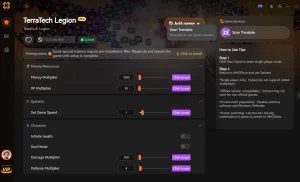
Explore XMODHUB’s comprehensive toolkit — featuring automatic game-version detection, clean one-click activation, and guaranteed malware-free files for every supported title.
Combat & Survival
Resources & Economy
Game Speed & Physics
Frequently Asked Questions
Ready to enhance your gameplay?

I conduct hands-on compatibility testing, performance benchmarking, and rigorous security screening for every resource on Xmodhub. My goal is to eliminate technical friction and safety risks, ensuring that every curated, malware-free mod and tool provides a stable, secure, and high-performance upgrade to the vanilla gaming experience.



 Catherine Hu